
1. Introduction
Thank you for choosing the Soundmaster Highline ICD2023SW Stereo System. This versatile device combines an Internet radio, DAB+ and FM radio, CD player, USB playback, and Bluetooth streaming, all complemented by multi-color LED ambient lighting. This manual provides essential information for safe and efficient use of your new stereo system.

Image 1.1: Front view of the Soundmaster Highline ICD2023SW Stereo System, showcasing the display, controls, and speaker grilles.
2. Setup
2.1 Unpacking and Placement
- Carefully remove all components from the packaging.
- Place the stereo system on a stable, flat surface away from direct sunlight, heat sources, and moisture.
- Ensure adequate ventilation around the unit.
2.2 Connecting Power
- Connect the power cable to the DC IN port on the rear of the unit.
- Plug the other end of the power cable into a suitable wall outlet.
2.3 Antenna Connection
For optimal DAB+ and FM radio reception, connect the supplied antenna to the ANTENNA port on the rear of the unit. Extend the antenna fully for best signal quality.
2.4 Initial Power-On and Wi-Fi Setup
- Press the Power button on the unit or remote control to turn on the system.
- Follow the on-screen prompts to select your preferred language.
- The system will guide you through the Wi-Fi setup process. Select your network (supports 2.4/5 GHz) and enter the password using the navigation buttons and OK button.

Image 2.1: Rear view of the stereo system, showing the DC IN, AUDIO IN, and ANTENNA ports.
3. Operating Instructions
3.1 Basic Controls
The system can be controlled using the buttons on the unit or the included remote control.

Image 3.1: The remote control for the Soundmaster Highline ICD2023SW, showing various function buttons.
- Power (⏸): Turns the unit on or off.
- Volume (+/-): Adjusts the sound level.
- Menu: Accesses the main menu for settings and options.
- Navigation Buttons (Up/Down/Left/Right): Navigates through menus and lists.
- OK: Confirms selections.
- Mode: Switches between different audio sources (Internet Radio, DAB+, FM, CD, USB, Bluetooth, AUX IN).
3.2 Internet Radio
- Press the Radio button on the remote or select 'Internet Radio' from the menu.
- Use the navigation buttons to browse stations by location, genre, or search.
- Press OK to select and play a station.
3.3 DAB+ / FM Radio
- Press the DAB or FM button on the remote or select the respective mode from the menu.
- The system will automatically scan for available stations on first use.
- Use the navigation buttons to select a station from the list.
3.4 Bluetooth Streaming
- Press the BT button on the remote or select 'Bluetooth' from the menu. The display will show 'Pairing'.
- On your smartphone, tablet, or PC, enable Bluetooth and search for 'Soundmaster ICD2023SW'.
- Select the device to pair. Once connected, you can stream audio wirelessly.
3.5 CD Player
- Press the CD button on the remote or select 'CD' from the menu.
- Insert a CD (CD-R/RW, MP3 CD) into the CD slot on the front of the unit.
- Playback will start automatically. Use the playback controls (Play/Pause, Skip, Stop) on the unit or remote.
3.6 USB Playback
- Insert a USB flash drive containing MP3 files into the USB port on the front of the unit.
- Press the USB button on the remote or select 'USB' from the menu.
- The system will read the files, and playback will begin. Navigate through folders and tracks using the controls.
3.7 AUX IN
Connect an external audio device (e.g., MP3 player) to the 3.5 mm AUX IN port on the rear of the unit using an audio cable. Select 'AUX IN' mode to play audio from the connected device.
3.8 LED Ambient Lighting
The multi-color LED ambient lighting can be adjusted via the system's menu or dedicated buttons (if available on remote/unit). Explore different colors and effects to suit your mood.
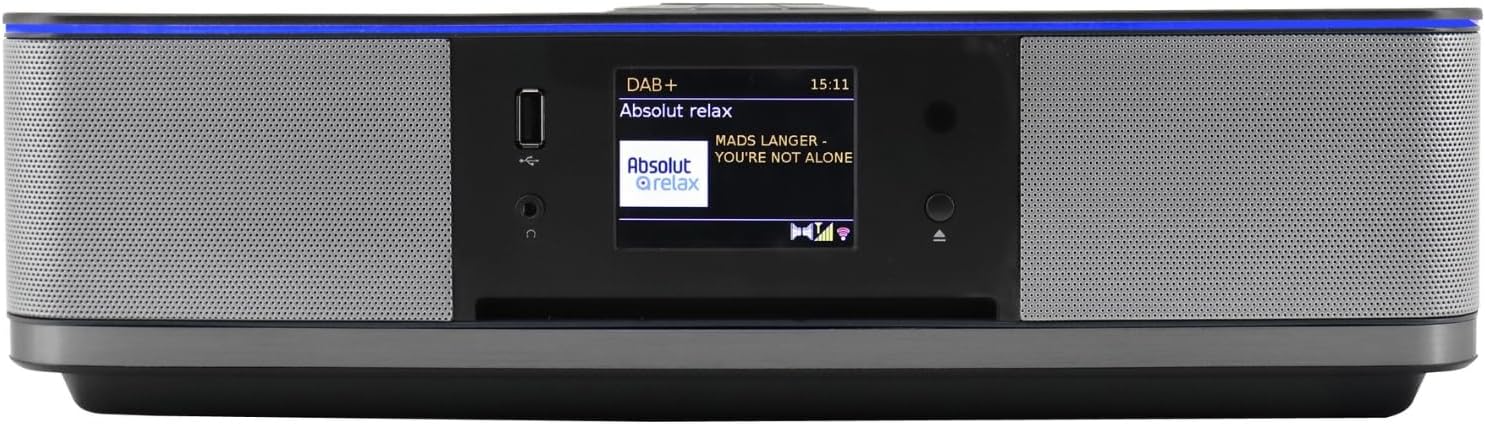
Image 3.2: Close-up of the front panel, highlighting the 7.1 cm color display and main controls.
3.9 Equalizer Settings
Access the equalizer settings via the menu or the EQ button on the remote. Choose from preset modes like Normal, Jazz, Rock, Classic, Pop, or customize your own settings for bass and treble.
3.10 Alarm Function
The system features two independent alarms. Set the alarm time and choose your preferred wake-up source: buzzer, Internet radio, DAB, FM, CD, or USB. Access alarm settings through the system menu.
3.11 App Control (Undok App)
For convenient control, download the Undok app on your smartphone or tablet. Ensure your device is connected to the same Wi-Fi network as the stereo system. The app allows you to control various functions and settings remotely.
4. Maintenance
4.1 Cleaning
- Always unplug the unit from the power outlet before cleaning.
- Use a soft, dry cloth to wipe the exterior surfaces.
- Do not use abrasive cleaners, waxes, or solvents as they may damage the finish.
- For the display, use a soft, lint-free cloth.
4.2 CD/USB Care
- Handle CDs by their edges to avoid fingerprints and scratches.
- Keep USB drives clean and free from dust.
5. Troubleshooting
If you encounter issues with your Soundmaster Highline ICD2023SW, please refer to the following common problems and solutions:
| Problem | Possible Cause | Solution |
|---|---|---|
| No power | Power cable not connected; Power outlet faulty | Ensure power cable is securely connected; Try a different power outlet. |
| No sound | Volume too low; Mute activated; Incorrect source selected | Increase volume; Deactivate mute; Select the correct audio source. |
| Poor radio reception | Antenna not extended; Weak signal | Extend the antenna fully; Reposition the unit for better signal. |
| Bluetooth pairing fails | Device too far; Bluetooth not enabled on external device | Ensure devices are within range; Enable Bluetooth on your external device; Try re-pairing. |
| CD not playing | CD inserted incorrectly; CD is dirty or scratched; Unsupported CD format | Re-insert CD correctly; Clean or replace CD; Ensure CD is CD-R/RW or MP3 CD. |
| USB not recognized | USB drive not formatted correctly; Unsupported file type | Ensure USB is FAT32 formatted; Ensure files are MP3 format. |
6. Specifications
| Feature | Specification |
|---|---|
| Model Number | ICD2023SW |
| Brand | Soundmaster |
| Power Output | 2 x 15W RMS (30 Watts total) |
| Connectivity | Wi-Fi (2.4/5 GHz), Bluetooth, USB |
| Radio Tuner | Internet Radio, DAB+, FM/FM-PLL with RDS |
| CD Player | Supports CD-R/RW, MP3 CD |
| USB Playback | MP3 format |
| Display | 7.1 cm Color Display |
| Inputs/Outputs | 3.5 mm Headphone Jack, 3.5 mm AUX IN |
| Speaker Type | Two-way speakers (2 speakers) |
| Dimensions (L x W x H) | 37 x 20 x 11 cm |
| Weight | 3.58 kg |
| Power Source | Electric Cable |
| Color | Black |
7. Warranty and Support
7.1 Warranty Information
The Soundmaster Highline ICD2023SW Stereo System comes with a 1-year warranty for spare parts. Please retain your proof of purchase for warranty claims.
7.2 Customer Support
For further assistance, technical support, or service inquiries not covered in this manual, please contact your retailer or the Soundmaster customer service department. Refer to the contact information provided with your product packaging or on the official Soundmaster website.


