1. Introduction
This manual provides detailed instructions for the setup, operation, and maintenance of your XIVUE Replacement Remote Control. This remote is specifically designed to work with certain Brondell Bidet Toilet Seat Swash models. Please read this manual carefully before use to ensure proper functionality and longevity of your device.
2. Compatibility
This replacement remote control is pre-programmed and requires no setup. It is designed to work exclusively with the following Brondell Bidet Toilet Seat Swash models:
- Brondell Swash CL825
- Brondell Swash S1400
- Brondell Swash S1200
- Brondell Swash S1000
- Brondell Swash S900
- Brondell Swash S300
Important: This remote control will ONLY work with the models listed above. It is not compatible with any other bidet toilet seat models, even if they are from the Brondell brand.

Figure 2.1: Compatibility overview with various Brondell Swash models.
3. Setup
3.1 Battery Installation
The remote control requires two (2) AAA 1.5V batteries (not included). To install the batteries:
- Locate the battery compartment cover on the back of the remote control.
- Slide the cover downwards to open the compartment.
- Insert two AAA batteries, ensuring the correct polarity (+ and -) as indicated inside the compartment.
- Slide the battery compartment cover back into place until it clicks securely.

Figure 3.1: Rear view of the remote control showing the battery compartment.
4. Operating Instructions
The remote control is designed for intuitive operation of your compatible Brondell bidet toilet seat. Below is a guide to the main functions and buttons.
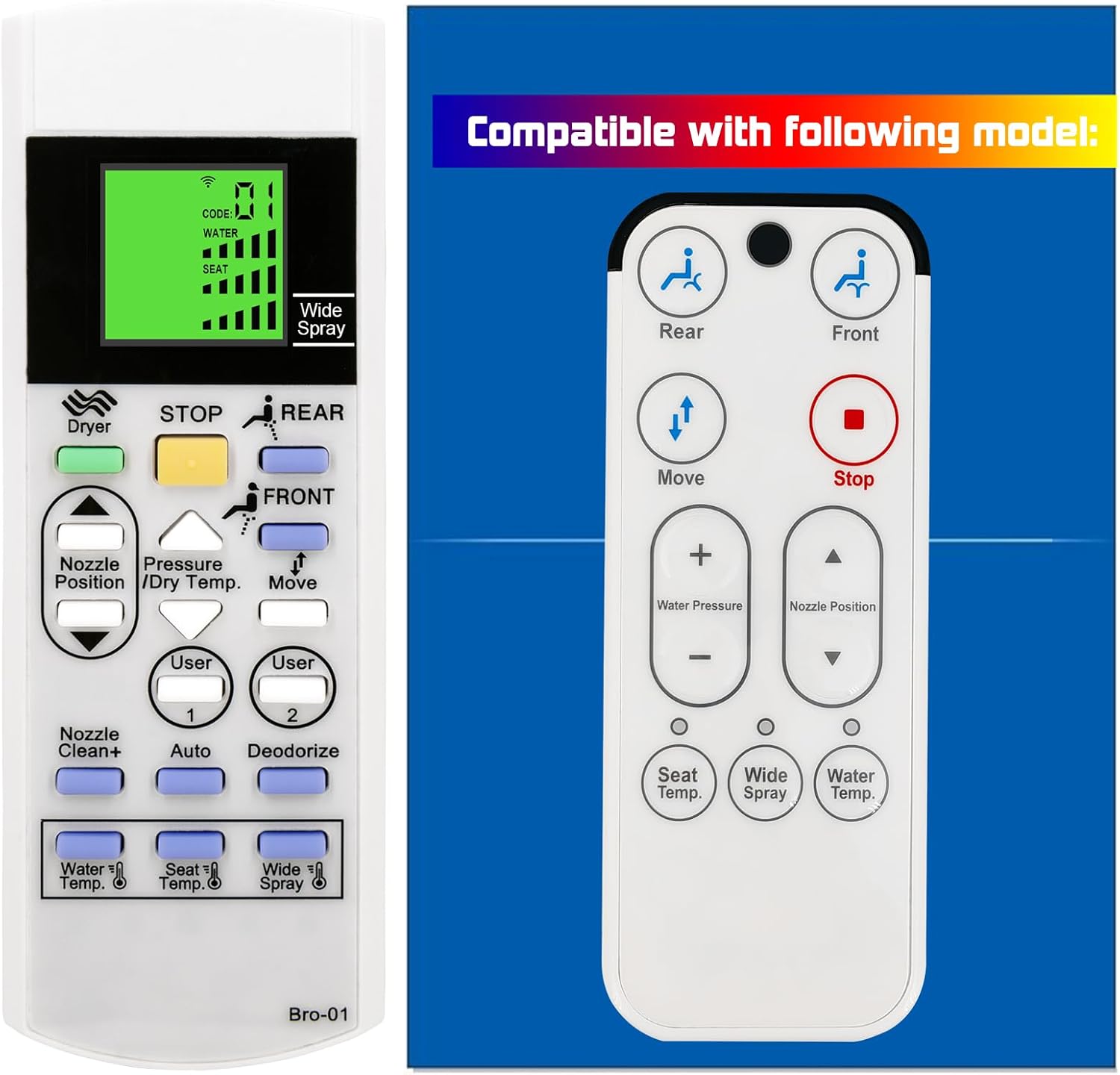
Figure 4.1: Front view of the remote control.
4.1 Button Functions
| Button/Feature | Description |
|---|---|
| Screen Display | Displays current settings for water temperature, seat temperature, nozzle position, and other active functions. Features a green backlight for visibility in low light. |
| Dryer | Activates the warm air dryer function. |
| STOP | Immediately stops all active bidet functions (wash, dry, etc.). |
| REAR | Initiates the rear wash function. |
| FRONT | Initiates the feminine wash function. |
| Nozzle Position / Dry Temp. | Adjusts the nozzle position during wash or the dryer temperature during drying. Use the up/down arrows. |
| Water Temp. | Adjusts the water temperature for washing. |
| Seat Temp. | Adjusts the heated seat temperature. |
| Wide Spray | Activates or deactivates the wide spray function for a broader wash area. |
| User 1 / User 2 | Recalls personalized settings for two different users. Refer to your bidet's main manual for programming these presets. |
| Auto | Activates an automatic wash and dry cycle. |
| Deodorize | Activates the built-in deodorizer function. |
| Nozzle Clean+ | Initiates a self-cleaning cycle for the bidet nozzle. |
5. Mounting the Remote
The remote control comes with a mounting bracket for convenient wall placement. To install the mounting bracket:
- Choose a suitable location near your bidet toilet seat, ensuring easy access and clear signal transmission.
- Use screws (not included) to securely attach the mounting bracket to the wall. Ensure it is level.
- Slide the remote control into the bracket.

Figure 5.1: Remote control with included mounting bracket.
6. Maintenance
To ensure the longevity and proper functioning of your remote control, follow these simple maintenance guidelines:
- Cleaning: Wipe the remote control with a soft, dry cloth. For stubborn dirt, slightly dampen the cloth with water. Do not use abrasive cleaners, solvents, or chemical sprays, as these can damage the surface and internal components.
- Battery Replacement: Replace batteries when the display becomes dim or the remote's response becomes sluggish. Always replace both batteries at the same time with new ones of the same type.
- Storage: If the remote control will not be used for an extended period, remove the batteries to prevent leakage and potential damage. Store in a cool, dry place.
7. Troubleshooting
If you encounter issues with your remote control, please refer to the following common problems and solutions:
| Problem | Possible Cause | Solution |
|---|---|---|
| Remote not responding | Dead or low batteries Incorrect battery polarity Obstruction between remote and bidet Remote not compatible with bidet model | Replace batteries with new ones Check battery orientation Ensure clear line of sight Verify bidet model compatibility (refer to Section 2) |
| Display is dim or blank | Low batteries | Replace batteries |
| Specific functions not working | Bidet unit issue Remote button malfunction | Check bidet's main power and functionality Ensure button is pressed firmly. If issue persists, contact support. |
If the problem persists after trying these solutions, please contact customer support.
8. Specifications
| Feature | Detail |
|---|---|
| Brand | XIVUE |
| Model Number | B620240102B01(Bro-01_zhijia) |
| Compatible Devices | Brondell Bidet Toilet Seat Swash CL825, S1400, S1200, S1000, S900, S300 |
| Power Source | 2 x AAA 1.5V Batteries (not included) |
| Color | White |
| Special Feature | Backlit Display |
| Item Weight | 1.76 ounces |
| Package Dimensions | 3.94 x 1.97 x 0.79 inches |
9. Warranty and Support
For any questions, concerns, or technical assistance regarding your XIVUE Replacement Remote Control, please contact the seller or manufacturer directly through your purchase platform. Please retain your proof of purchase for any warranty claims.