Introduction
The Mastfuyi FY77 Digital Multimeter is a versatile tool designed for precise electrical measurements in various industrial and household applications. It features automatic range selection, True RMS measurement, and a 2000-count display. This manual provides essential information for safe and effective use of your multimeter.
Key features include:
- Non-Contact Voltage (NCV) detection for enhanced safety.
- Battery testing for 1.5V, 6V, 9V, and 12V batteries.
- Measurement of AC/DC voltage, AC/DC current, resistance, continuity, and diode.
- Large backlit display and flashlight for visibility in dark environments.
- Overload protection with dual ceramic fuses and PTC thermistor circuits.
- Automatic sleep mode to conserve battery life.
- Data hold function for stable readings.
Setup
1. Battery Installation
The multimeter requires three AAA batteries for operation. Ensure correct polarity when inserting the batteries into the battery compartment, typically located on the back of the device. A low battery indicator will appear on the screen when replacement is needed.
2. Connecting Test Leads
Before using the test leads, remove the protective caps from the probe tips. Insert the red test lead into the "V/Ω/µA/mA/BAT" input jack and the black test lead into the "COM" (common) input jack for most measurements. For high current measurements (up to 10A), insert the red test lead into the "10A" input jack.

Figure 1: Removing protective caps from test leads. Always remove these caps before making measurements to ensure proper contact.
Operating Instructions
Multimeter Controls and Display

Figure 2: Functional illustration of the multimeter. This diagram highlights the non-contact voltage sensing area, flashlight, liquid crystal display, "HOLD" data hold key, "FUNC" function selection key, function range knob, 10A input, "COM" input, "V/Ω/µA/mA/BAT" input, flashlight illumination button, and backlight button.
Familiarize yourself with the multimeter's layout as shown in Figure 2. The large Liquid Crystal Display (LCD) shows measurement readings. The central function range knob selects the desired measurement mode. Buttons like "HOLD", "FUNC", backlight, and flashlight provide additional functionalities.
1. Battery Testing
To test 1.5V, 6V, 9V, or 12V batteries:
- Turn the function knob to the desired battery voltage position (1.5V, 6V, 9V, or 12V).
- Connect the red test lead to the positive (+) terminal of the battery and the black test lead to the negative (-) terminal.
- Read the battery charge status on the display.
2. AC/DC Voltage Measurement
The multimeter can measure AC/DC voltage up to 600V. Turn the function knob to the "V~" (AC Voltage) or "V-" (DC Voltage) position. The device features auto-ranging, so it will automatically select the appropriate range.
3. AC/DC Current Measurement
Measure AC/DC current up to 200mA or 10A. Select the "mA~" or "A~" position for AC current, or "mA-" or "A-" for DC current. Remember to use the correct input jack (V/Ω/µA/mA/BAT for mA, 10A for A) and connect the multimeter in series with the circuit.

Figure 3: Accurate current measurement. The multimeter can measure current ranges from 1mA to 10A, demonstrated here measuring a small current in a simple circuit.
4. Resistance, Continuity, and Diode Testing
Turn the function knob to the "Ω" position for resistance, continuity, or diode testing. Use the "FUNC" button to cycle between these modes if necessary. For continuity, the multimeter will emit an audible tone if the circuit is continuous.
5. Non-Contact Voltage (NCV) Detection
For non-contact voltage detection, turn the function knob to the "NCV" position. Place the multimeter's head near the area where an AC signal is suspected. If voltage is detected, the multimeter will provide an audible and visual alarm, indicating the presence of live AC voltage without direct contact.
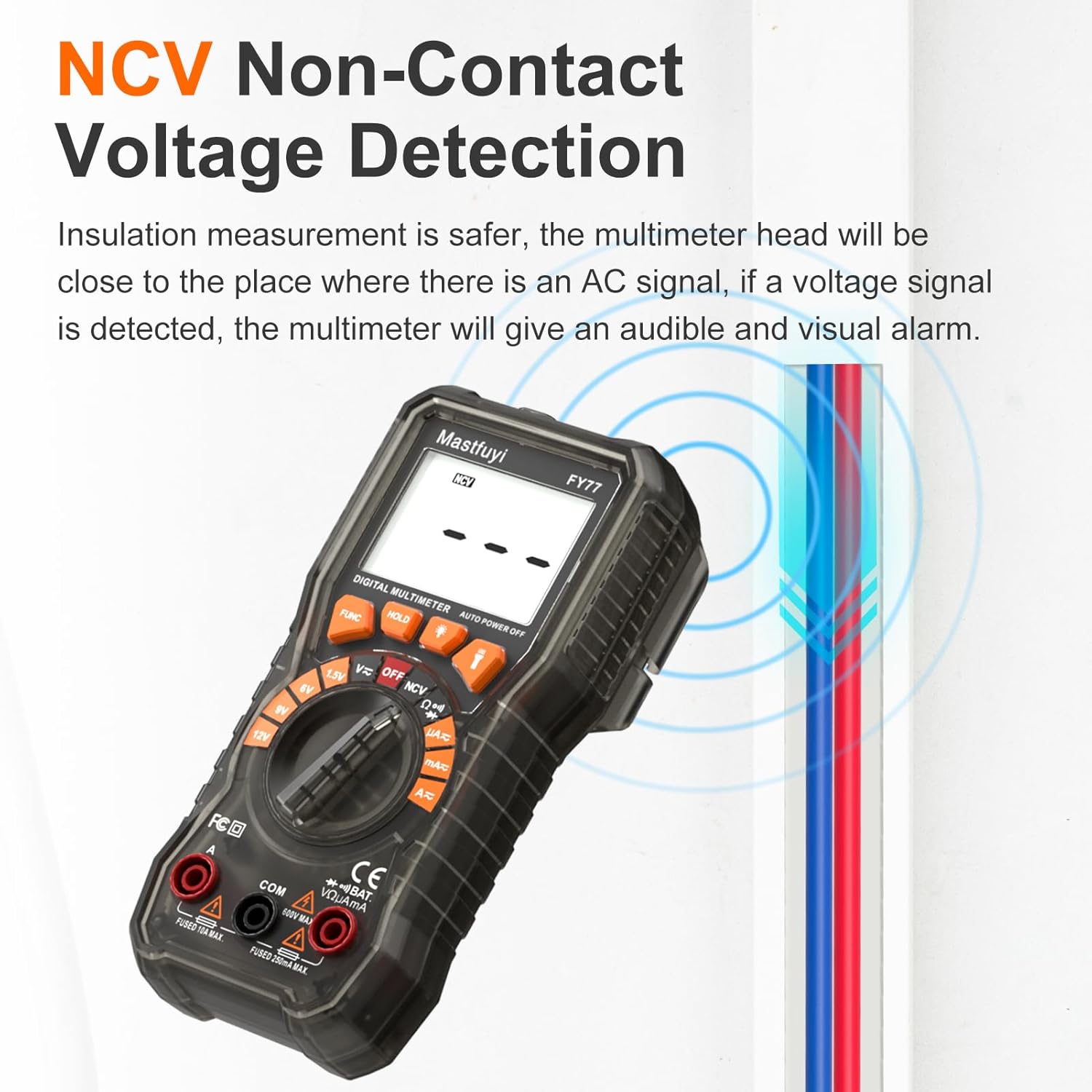
Figure 4: NCV Non-Contact Voltage Detection. This feature allows for safer insulation measurement by detecting AC signals without direct contact, providing an audible and visual alarm.
6. Live Wire Detection
When in an AC voltage test function, the multimeter can help determine live and neutral lines. The higher voltage reading indicates the live wire, while the lower voltage reading corresponds to the neutral line.

Figure 5: Live Wire Detection. Under AC voltage test, the multimeter helps identify live and neutral lines in an electrical outlet.
7. Data Hold Function
If the reading on the display is unstable or you need to record a specific value, press the "HOLD" button. This will freeze the current reading on the screen, making it convenient for observation and recording.
8. Backlight and Flashlight
Press the backlight button to illuminate the display for better visibility in low-light conditions. The backlight automatically turns off after 30 seconds. Press the flashlight button to activate the built-in flashlight, useful for illuminating the test area.
Maintenance
1. Cleaning
Wipe the multimeter with a damp cloth and mild detergent. Do not use abrasive cleaners or solvents. Ensure the device is dry before storage or next use.
2. Fuse Replacement
The multimeter is equipped with dual ceramic fuses and PTC thermistor protection circuits to prevent damage from incorrect measurements. If a fuse blows, it must be replaced with a fuse of the same type and rating to maintain safety and functionality. Refer to the specifications for fuse ratings.

Figure 6: Dual Ceramic Fuse protection. The internal circuit board features two ceramic fuses designed for intelligent anti-burning protection against 250V AC voltage, offering superior protection compared to traditional glass fuses.
3. Storage
Store the multimeter in a cool, dry place away from direct sunlight and extreme temperatures. If storing for extended periods, remove the batteries to prevent leakage.

Figure 7: Translucent Body & Case. Both the multimeter body and its removable rubber cover are made from translucent material, providing durability and protection against drops, wear, static, and slips.
Troubleshooting
- No Display/Faint Display: Check battery installation and replace batteries if the low battery indicator is present or if the display is faint.
- Incorrect Readings: Ensure test leads are properly connected to the correct input jacks and the function knob is set to the appropriate measurement mode. Check for damaged test leads.
- No Continuity Beep: Verify the function knob is set to continuity mode. Ensure the circuit is not open.
- Multimeter Does Not Turn On: Check batteries. The device has an auto-hibernation feature after 15 minutes of inactivity; try pressing a button or rotating the knob to wake it.
- Overload Indication ("OL"): This indicates the measured value exceeds the selected range. For auto-ranging multimeters, it means the value exceeds the maximum measurable range for that function. Disconnect immediately and ensure the measurement is within the device's capabilities.
Specifications
| Feature | Specification |
|---|---|
| Model | FY77 |
| Display | 2000 Counts, Large Backlit LCD |
| AC/DC Voltage | Up to 600V |
| AC/DC Current | Up to 200mA / 10A |
| Resistance | Up to 20MΩ |
| Battery Test | 1.5V, 6V, 9V, 12V |
| Special Features | NCV, True RMS, Auto Range, Data Hold, Flashlight, Backlight, Auto Hibernation |
| Overload Protection | Dual Ceramic Fuses, PTC Thermistor Circuits |
| Power Source | 3 x AAA Batteries (Included) |
| Item Weight | 372 g |
| Dimensions | 17.6 x 11.2 x 5.41 cm |
Warranty
The Mastfuyi FY77 Digital Multimeter comes with a 24-month unconditional warranty. This warranty covers manufacturing defects and ensures lifetime customer service. Please retain your proof of purchase for warranty claims.
Support
For technical assistance, troubleshooting, or warranty inquiries, please contact Mastfuyi customer service. Refer to the product packaging or the official Mastfuyi website for the most current contact information.
Package Contents:
- 1 x Digital Multimeter
- 2 x Test Leads
- 3 x AAA Batteries
- 1 x User Manual


