
DSP KM3051A
DSP Professional KM3051A Multifunctional Dough Mixer User Manual
Model: KM3051A
1. Important Safety Instructions
Please read all instructions carefully before using the appliance. Keep this manual for future reference.
- Always ensure the appliance is unplugged from the power outlet before assembly, disassembly, or cleaning.
- Do not immerse the motor unit in water or any other liquid. Clean with a damp cloth only.
- This appliance is not intended for use by persons (including children) with reduced physical, sensory or mental capabilities, or lack of experience and knowledge, unless they have been given supervision or instruction concerning use of the appliance by a person responsible for their safety.
- Children should be supervised to ensure that they do not play with the appliance.
- Avoid contact with moving parts. Keep hands, hair, clothing, as well as spatulas and other utensils away from beaters during operation to reduce the risk of injury to persons and/or damage to the mixer.
- Do not operate any appliance with a damaged cord or plug, or after the appliance malfunctions, or has been dropped or damaged in any manner.
- The use of attachments not recommended or sold by the manufacturer may cause fire, electric shock, or injury.
- Do not use outdoors.
- Do not let cord hang over edge of table or counter.
- Do not let cord contact hot surfaces, including the stove.
- Always operate the mixer on a flat, stable surface.
- Ensure the head is locked down before operating.
2. Product Overview
The DSP Professional KM3051A Multifunctional Dough Mixer is designed to simplify your baking and cooking tasks. It features a powerful motor and a large capacity bowl, along with various attachments for different mixing needs.
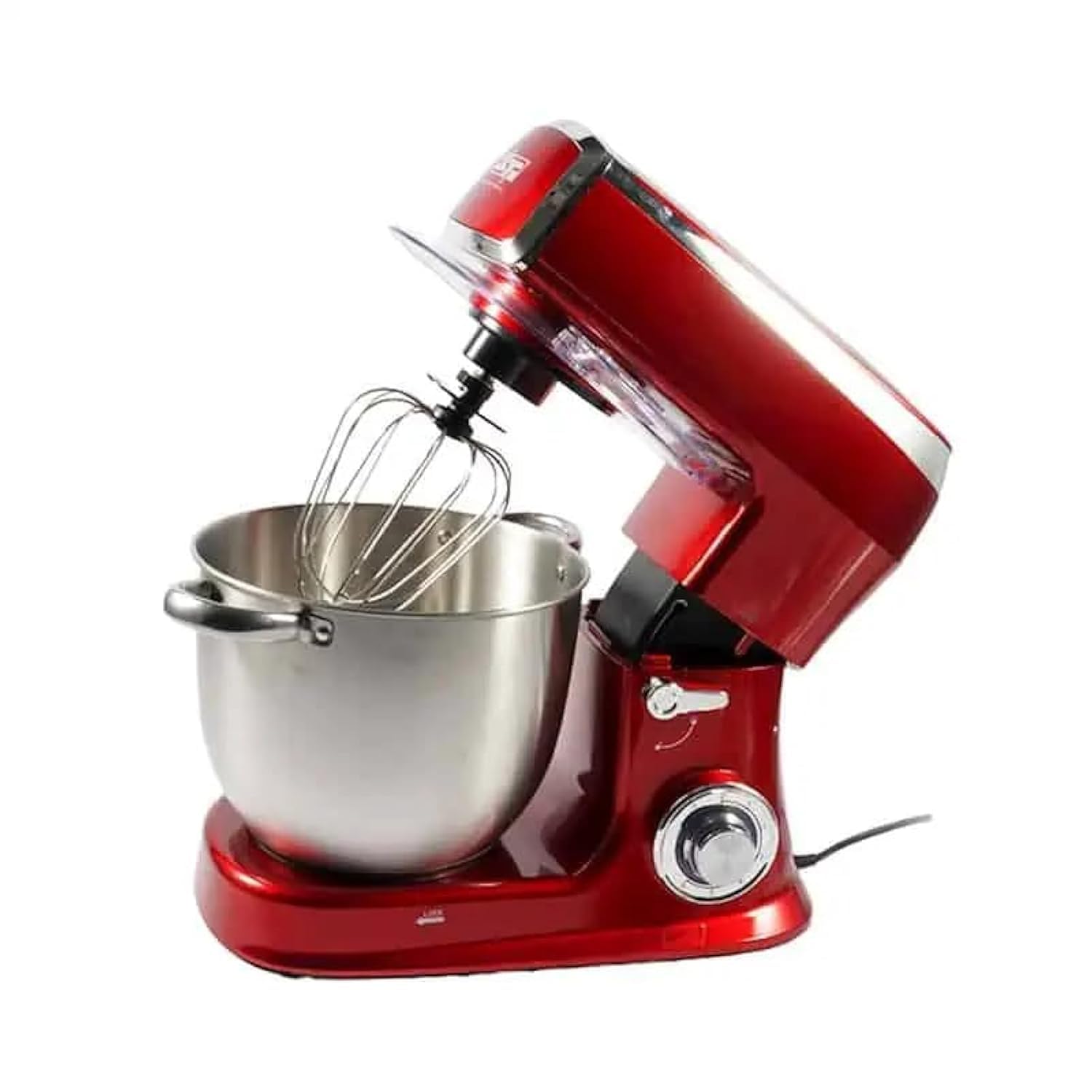
Image: Front view of the DSP Professional KM3051A Dough Mixer, showcasing its sleek red design, stainless steel bowl, and whisk attachment.
Components:
- Motor Unit: The main body housing the motor and control knob.
- Mixing Head: Tilts up for easy attachment and bowl removal.
- 8-Liter Stainless Steel Bowl: Large capacity for various recipes.
- Dough Hook: For kneading heavy doughs (e.g., bread, pizza).
- Beater (Flat Beater): For medium-heavy mixtures (e.g., cakes, cookies, mashed potatoes).
- Whisk: For light mixtures (e.g., egg whites, cream, light batters).
- Splash Guard: Prevents ingredients from splashing out during mixing.
- Speed Control Knob: Adjusts mixing speed.
- Head Release Lever: To tilt the mixing head.

Image: The DSP Professional KM3051A Dough Mixer shown with its three primary attachments: the dough hook, whisk, and flat beater.
3. Setup and Assembly
- Unpack: Carefully remove all components from the packaging. Retain packaging for future storage or transport.
- Clean: Before first use, wash the stainless steel bowl, dough hook, beater, whisk, and splash guard in warm soapy water. Rinse thoroughly and dry. The bowl is dishwasher safe.
- Position: Place the motor unit on a clean, dry, flat, and stable surface. Ensure it is near a power outlet and away from heat sources or water.
- Attach Bowl: Place the stainless steel mixing bowl onto the base and turn it clockwise until it locks securely into place.
- Lift Head: Press the head release lever and lift the mixing head until it clicks into the upright position.
- Attach Accessory: Select the appropriate attachment (dough hook, beater, or whisk) for your recipe. Insert the attachment into the shaft and turn it counter-clockwise until it locks into place.
- Lower Head: Press the head release lever again and gently lower the mixing head until it locks into the operating position.
- Attach Splash Guard: If desired, place the splash guard over the mixing bowl.
4. Operating Instructions
Follow these steps for safe and effective operation of your dough mixer.
- Prepare Ingredients: Place all necessary ingredients into the mixing bowl. Do not exceed the maximum capacity of 8 liters.
- Select Attachment: Ensure the correct attachment (dough hook, beater, or whisk) is securely installed for your recipe.
- Lower Head: Make sure the mixing head is fully lowered and locked.
- Plug In: Connect the power cord to a 220V power outlet.
- Select Speed: Turn the speed control knob to the desired setting. Start with a low speed and gradually increase as needed to prevent splashing and ensure thorough mixing.
- Speed 1-3 (Dough Hook): For kneading heavy doughs.
- Speed 2-4 (Beater): For mixing batters, cakes, and general mixing.
- Speed 5-6 (Whisk): For whipping eggs, cream, and light mixtures.
- Mix: Allow the mixer to operate until ingredients are thoroughly combined or the desired consistency is achieved.
- Stop: Turn the speed control knob to the "0" (off) position.
- Unplug: Always unplug the appliance from the power outlet after use.
- Remove Ingredients: Press the head release lever to lift the mixing head. Scrape down the sides of the bowl with a spatula if necessary. Remove the attachment by turning it clockwise and pulling it down. Unlock and remove the mixing bowl.
Note: Do not operate the mixer continuously for more than 10 minutes. Allow it to rest for at least 20 minutes before resuming operation to prevent overheating.
5. Maintenance and Cleaning
Regular cleaning and maintenance will ensure the longevity and optimal performance of your mixer.
- Always unplug the mixer before cleaning.
- Motor Unit: Wipe the exterior of the motor unit with a soft, damp cloth. Do not use abrasive cleaners or immerse the unit in water.
- Mixing Bowl: The stainless steel mixing bowl is dishwasher safe. Alternatively, wash it by hand with warm soapy water, rinse, and dry thoroughly.
- Attachments (Dough Hook, Beater, Whisk): These attachments are dishwasher safe. For hand washing, use warm soapy water, rinse, and dry completely.
- Splash Guard: Wash with warm soapy water, rinse, and dry.
- Storage: Store the mixer and its attachments in a clean, dry place. Ensure the power cord is neatly wrapped.
6. Troubleshooting
If you encounter any issues with your mixer, refer to the following common problems and solutions:
| Problem | Possible Cause | Solution |
|---|---|---|
| Mixer does not start. | Not plugged in; power switch off; head not locked. | Ensure the power cord is securely plugged into a 220V outlet. Turn the speed control knob to a setting other than "0". Make sure the mixing head is fully lowered and locked. |
| Attachments are difficult to install or remove. | Attachment not aligned correctly; debris in shaft. | Ensure the attachment is aligned with the shaft pin. Clean any food residue from the shaft and attachment. |
| Mixer makes unusual noise or vibrates excessively. | Bowl or attachment not properly secured; too much load. | Check that the mixing bowl and attachment are securely locked. Reduce the amount of ingredients if exceeding capacity. |
| Motor stops during operation. | Overheating protection activated; power surge. | Turn off the mixer and unplug it. Allow it to cool down for at least 30 minutes. Reduce the load if it was too heavy. Check your power supply. |
If the problem persists after trying these solutions, please contact customer support.
7. Product Specifications
| Brand Name | DSP |
| Model Number | KM3051A |
| Product Type | Stand Mixer |
| Color | Red |
| Power | 1500 Watts |
| Voltage | 220 Volts |
| Capacity | 8 Liters |
| Bowl Material | Stainless Steel |
| Blade Material (Attachments) | Stainless Steel |
| Control Type | Knob Control |
| Special Features | Heavy Duty |
| Product Dimensions (D x W x H) | 40 cm x 12 cm x 43 cm |
| Item Weight | 4 Kilograms |
| Dishwasher Safe (Bowl & Attachments) | Yes |
| Included Components | Dough Hook, Beater, Whisk, Mixing Bowl, Splash Guard |
| Country of Origin | China |
8. Warranty and Support
Warranty Information:
This DSP Professional KM3051A Dough Mixer comes with an International Warranty. Please refer to the warranty card included in your product packaging for specific terms, conditions, and duration of coverage. Keep your proof of purchase for warranty claims.
Customer Support:
For technical assistance, troubleshooting beyond this manual, or warranty inquiries, please contact DSP customer support. Contact details can typically be found on the manufacturer's official website or on the product packaging.
When contacting support, please have your model number (KM3051A) and proof of purchase ready.
Related documentsKM3051A

Ask a question about this manual
Ask about setup, troubleshooting, compatibility, parts, safety, or missing instructions. Manuals+ will review the question and use this page’s manual context to help answer it.