
Introduction
Thank you for choosing the YOOPAI 3D Printer Enclosure. This protective cover is designed to create an optimal printing environment for your 3D printer, ensuring consistent temperatures, reducing dust interference, and minimizing operational noise. By maintaining a stable internal climate, the enclosure helps improve print quality, prevent warping, and enhance overall printing efficiency. This manual provides detailed instructions for assembly, operation, maintenance, and troubleshooting to help you get the most out of your new enclosure.
Key Features
- Constant Temperature Environment: Provides a stable and controlled internal temperature, crucial for high-quality prints and reducing material wastage.
- Dustproof Protection: Prevents dust particles from affecting print quality, ensuring clean and precise results.
- Noise Reduction: The enclosed design effectively blocks printing noise, contributing to a quieter workspace.
- Fan Exhaust Kit Support: Features an opening on the right side for connecting an optional fan fume extraction kit (sold separately) to maintain fresh air.
- External Filament Transfer: A small hole on the left side allows for convenient external filament routing, ideal if your filament spools are stored outside the enclosure.
- Quick and Easy Installation: Designed for rapid assembly and disassembly, making it convenient for setup, relocation, or storage.
- Wide Compatibility: Accommodates various 3D printer models with dimensions smaller than 29.5×25.6×21.6 inches.
- Durable Construction: Made from Polyvinyl Chloride or Tarpaulin material, ensuring stability and long-term use.
- Convenient Access: Features a smooth zipper design for easy opening and closing, along with a dedicated power cable channel.
- Integrated Tool Storage: A side storage bag provides easy access for your essential tools.

Figure 1: Enclosure supporting fan exhaust kit installation. Note: Fan kit is not included.

Figure 2: Illustration of constant temperature maintenance within the enclosure for improved print quality.
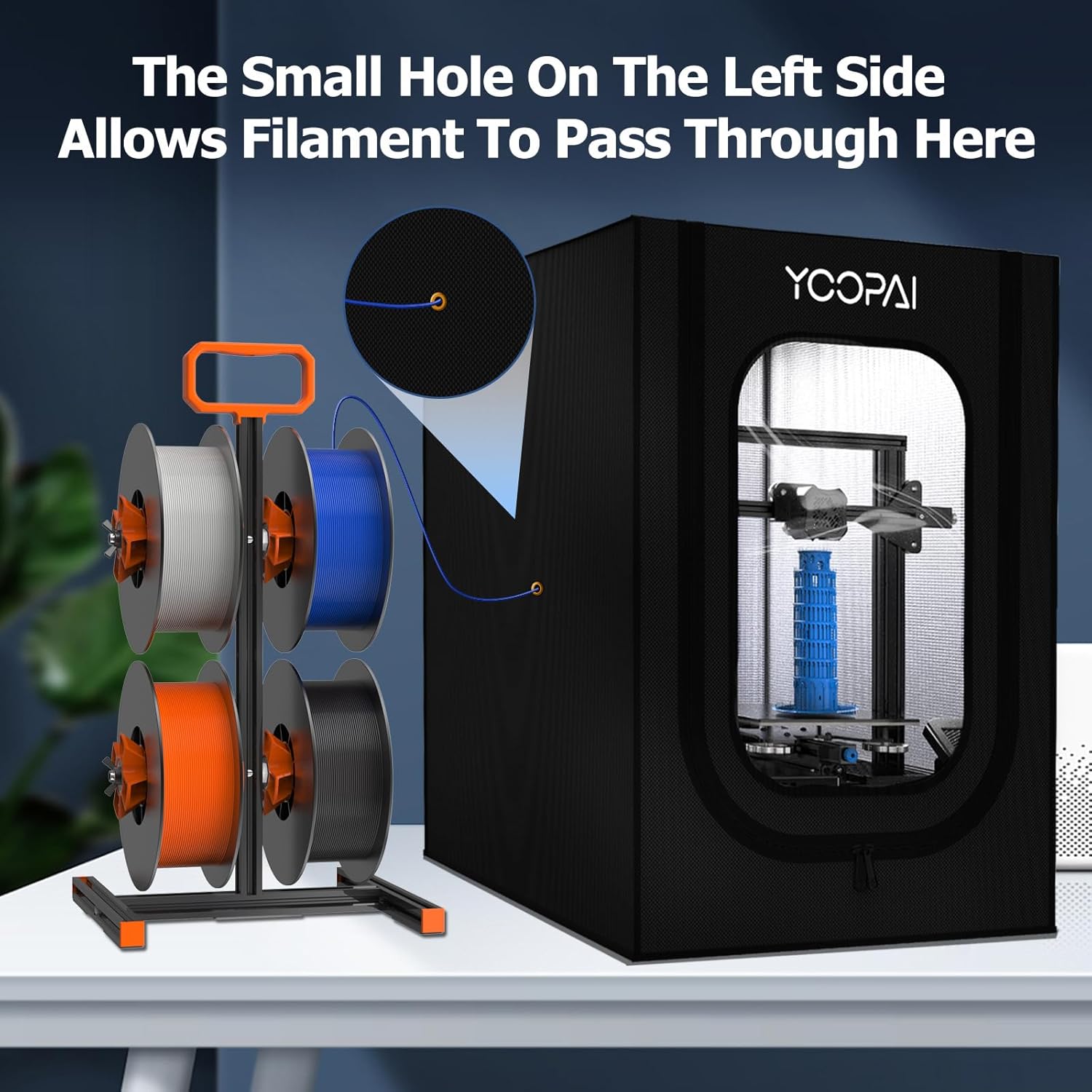
Figure 3: The small hole on the left side allows for external filament routing.

Figure 4: Details showing tool storage, waterproof material, smooth zipper, and convenient power cable location.
Setup and Installation
The YOOPAI 3D Printer Enclosure is designed for straightforward assembly. Please follow these steps carefully to ensure proper setup and avoid damage to the product or injury.
- Unpack Components: Carefully remove all parts from the packaging. Verify that you have the cloth cover, fiberglass rods, and all necessary installation accessories.
- Assemble the Frame: Connect the fiberglass rods to form the enclosure's frame. It is highly recommended to wear gloves during this step to prevent fiberglass splinters. Ensure that all mid-span connections and corners are fully seated. Apply firm, straight pressure to push the rods completely into the connectors. Uneven pressure can cause the couplings to break or the rods to splinter. Compare the length of assembled spars to ensure uniformity.
- Install the Fabric Cover: The fabric cover is designed to fit snugly. Begin by working the cover over the frame from the rear bottom edge to the rear top edge. Then, proceed to the front bottom, and finally, roll the top corners into place. It may feel tight, but this snug fit is essential for stability. Ensure that the zippers are fully unzipped before attempting to fit the cover, and be careful not to trap the zipper tabs behind the frame during installation.
- Position the Enclosure: Place the assembled enclosure on a stable, flat surface. The enclosure requires a surface at least 30 inches deep to ensure the front end is adequately supported.

Figure 5: The fully assembled YOOPAI 3D Printer Enclosure.
Operating Instructions
Once assembled, the YOOPAI 3D Printer Enclosure is ready to optimize your printing process.
- Printer Placement: Open the front zipper and carefully place your 3D printer inside the enclosure. Ensure there is adequate clearance around the printer for proper operation and air circulation.
- Cable Management: Utilize the designated power cable channel to route your printer's power cord and any other necessary cables outside the enclosure. This helps maintain the enclosed environment.
- Filament Routing (Optional): If you are using an external filament setup, feed the filament through the small hole on the left side of the enclosure. This is particularly useful for large filament spools or for maintaining dry filament storage outside the heated enclosure.
- Fan Exhaust (Optional): If you have purchased a separate fan fume extraction kit, connect it to the opening on the right side of the enclosure. This is recommended for printing with materials that produce fumes, such as ABS, to ensure proper ventilation and air quality in your workspace.
- Close the Enclosure: Once the printer and all necessary connections are in place, securely close the zippers. This creates the sealed environment necessary for temperature stability, dust protection, and noise reduction.
- Begin Printing: Operate your 3D printer as usual. The enclosure will work to maintain a consistent internal temperature, which is vital for preventing warping and improving the adhesion of certain filament types.
Maintenance
Regular maintenance will prolong the life of your YOOPAI 3D Printer Enclosure and ensure its continued effectiveness.
- Cleaning: The enclosure is made from Polyvinyl Chloride or Tarpaulin. To clean, wipe down the exterior and interior surfaces with a damp cloth and mild soap. Avoid abrasive cleaners or harsh chemicals that could damage the material. Ensure the enclosure is dry before zipping it up for storage or use.
- Frame Inspection: Periodically check the fiberglass rods and connectors for any signs of wear, damage, or loosening. Re-seat any loose connections to maintain the frame's integrity.
- Zipper Care: Keep the zippers clean and free of debris. If they become stiff, a small amount of zipper lubricant can be applied.
- Storage: If disassembling for storage, ensure all components are clean and dry. Store them in a cool, dry place away from direct sunlight to prevent material degradation.
Troubleshooting
Here are some common issues and their solutions:
| Problem | Possible Cause | Solution |
|---|---|---|
| Difficulty assembling the frame. | Rods not fully seated in connectors; tight fit. | Ensure rods are pushed firmly and straight into connectors. Wear gloves. The fit is intentionally snug for stability. |
| Cover tearing during installation. | Excessive force or incorrect fitting sequence. | Follow the recommended installation sequence (rear bottom to top, then front bottom to top corners). Do not overstretch. Ensure zippers are fully open. |
| Fiberglass splinters during assembly. | Direct contact with fiberglass rods. | Always wear protective gloves when handling the fiberglass rods. |
| Fumes or odors present during printing. | Printing with materials that produce fumes (e.g., ABS) without ventilation. | Consider installing a fan fume extraction kit (sold separately) to the designated port for proper ventilation. |
| Enclosure feels unstable. | Frame not fully assembled or placed on an uneven surface. | Verify all frame connections are secure. Place the enclosure on a flat, stable surface that supports its full depth. |
Specifications
- Model: Enclosure-BV
- Dimensions (L x W x H): 29.5 x 25.6 x 21.6 inches (750mm x 650mm x 550mm)
- Weight: 3.65 pounds (1.66 Kilograms)
- Material: Polyvinyl Chloride or Tarpaulin
- Color: Black
- Included Components: Cloth cover, fiberglass rods, installation accessories
- Compatibility: Compatible with 3D printers whose dimensions (including spool holder height) are smaller than 29.5×25.6×21.6". Examples include Creality Ender 3 V3 SE/KE/Ender 3V2/3V2 Neo/Ender 3S1/3S1 Pro/3S1 Plus/Ender 3Pro/Ender 3/3Neo/Ender 3Max/Neo/Ender 6SE/Ender 5/5Pro/5S1, Anycubic Kobra/Anycubic Mega Pro/ELEGOO 3D Printer.

Figure 6: Dimensions and examples of compatible 3D printer models.
Warranty and Support
The YOOPAI 3D Printer Enclosure comes with a 180-Day Warranty covering any product quality problems. If you encounter any issues or have questions regarding your enclosure, please do not hesitate to contact our customer service team.
How to Contact Support:
- Via Amazon: Navigate to the product page on Amazon and click on "ask a question" to find our seller contact information.
Our customer service team aims to respond to all inquiries within 24 hours.

