
Blütezeit ME-GO-600
Contents
Blütezeit 1400lb Sliding Gate Opener User Manual
Model: ME-GO-600
Brand: Blütezeit
1. Product Overview
The Blütezeit 1400lb Sliding Gate Opener is a robust and intelligent solution designed for automating sliding gates. It features a powerful 280W DC motor capable of handling gates up to 1400lb, ensuring smooth and quiet operation. This model includes a built-in lithium-ion battery for reliable backup power during outages and is compatible with solar power for eco-friendly operation. Advanced safety features like an infrared sensor prevent accidents, while smart WiFi control via the "eWeLink" app offers convenient remote operation and status monitoring.
The system is designed for durability with a weatherproof build and robust components, ensuring long-lasting performance in various environmental conditions.
2. Setup and Installation
2.1 Unboxing and Components
Carefully unpack all components and verify against the packing list. The package typically includes:
- 1 x Gate Opener Motor Unit
- 2 x Remote Controls (with pre-installed 12V 27A batteries)
- 2 x Manual Keys
- 1 x Infrared Sensor
- 1 x Installation Kits (including mounting hardware, bolts, nuts)
- User Manual (this document)

Figure 2.1: Main components of the Blütezeit Sliding Gate Opener kit, including the motor unit, remote controls, manual keys, infrared sensor, and various installation hardware.
2.2 Motor Installation
The motor unit is designed for secure mounting on various ground surfaces. Use the provided durable and solid installation kits to ensure proper placement and stability.
Video 2.2.1: An animated demonstration of the Blütezeit Sliding Gate Opener's features, including solar power compatibility, built-in battery, and smart app control. This video also illustrates the physical components and their integration.
The motor unit contains a built-in DC24V 6.0Ah lithium-ion battery, providing reliable backup power for up to 3 days without external power. For initial testing, connect to AC110V or a compatible solar power source.
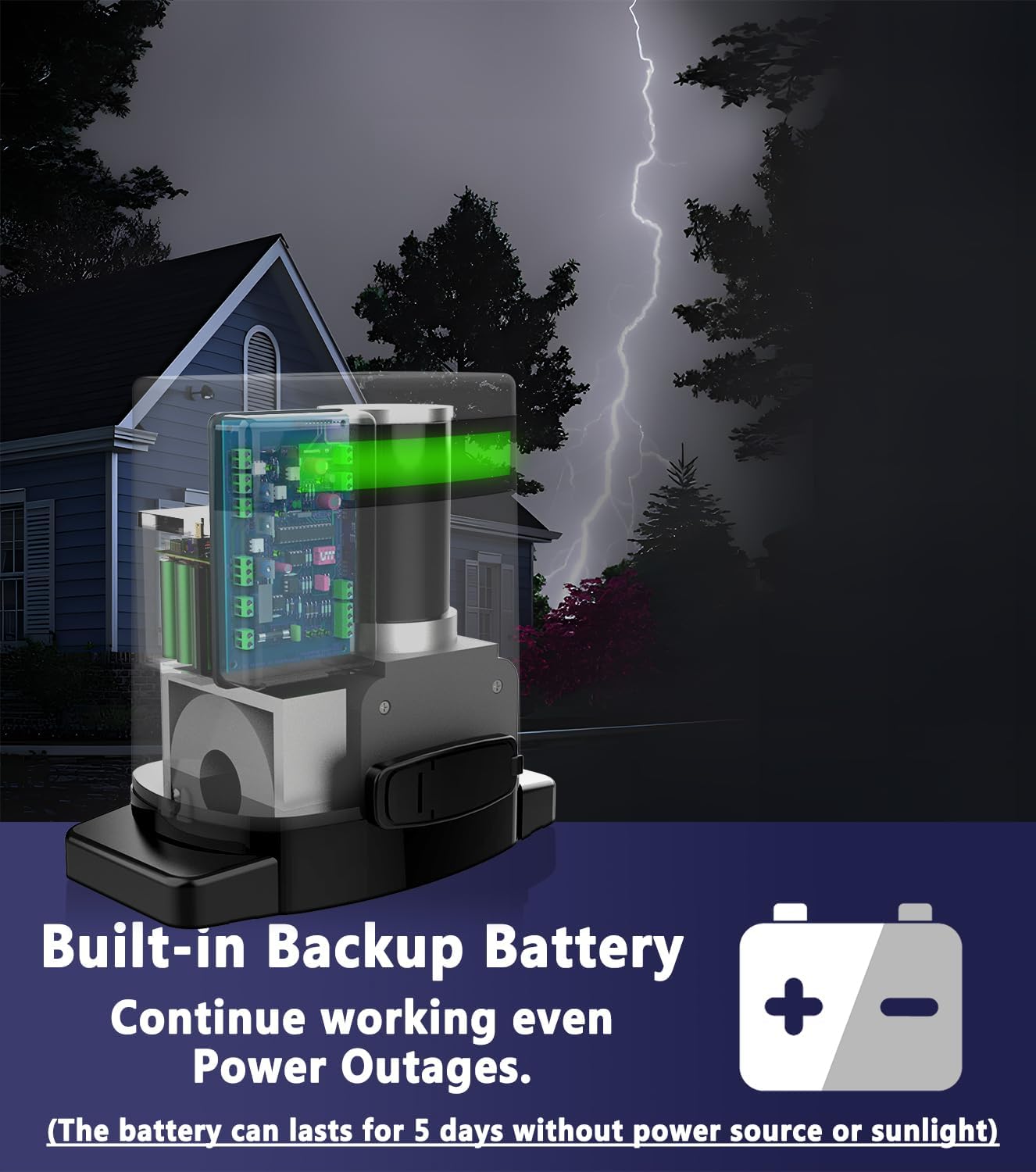
Figure 2.2.1: Illustration of the gate opener's built-in backup battery, designed to ensure continued operation during power outages.

Figure 2.2.2: Detailed view highlighting the upgraded lithium-ion battery technology within the gate opener, emphasizing its long-lasting performance.
2.3 Rack Gear Installation
The rack-driven design ensures smooth and quiet operation. Attach the 1.64-foot racks to your gate using the provided screws and nuts. Ensure the nuts are securely welded onto the gate for a stable connection.

Figure 2.3.1: Close-up view of the rack drive mechanism, illustrating the heavy and hard steel components designed for smooth and ultra-quiet operation.
2.4 Magnet Switch Installation
Install the magnet switches to define the open and close limits of the gate. One magnet should be positioned high for the open limit, and another low for the closed limit. Align and secure them precisely based on the motor's position along the rack to ensure accurate functionality.
2.5 Infrared Sensor Installation
The infrared sensor is a crucial safety component. Install it in a position where it can detect obstacles or people in the gate's path. If an obstruction is detected, the sensor will immediately stop and reverse the gate to prevent unintended contact or accidents.
2.6 Power Connection
This gate opener supports both AC/DC power and solar power input. It is compatible with 24~35V solar panels (not included), offering a flexible and eco-friendly power solution. The unit automatically manages charging for uninterrupted performance, regardless of the power source.
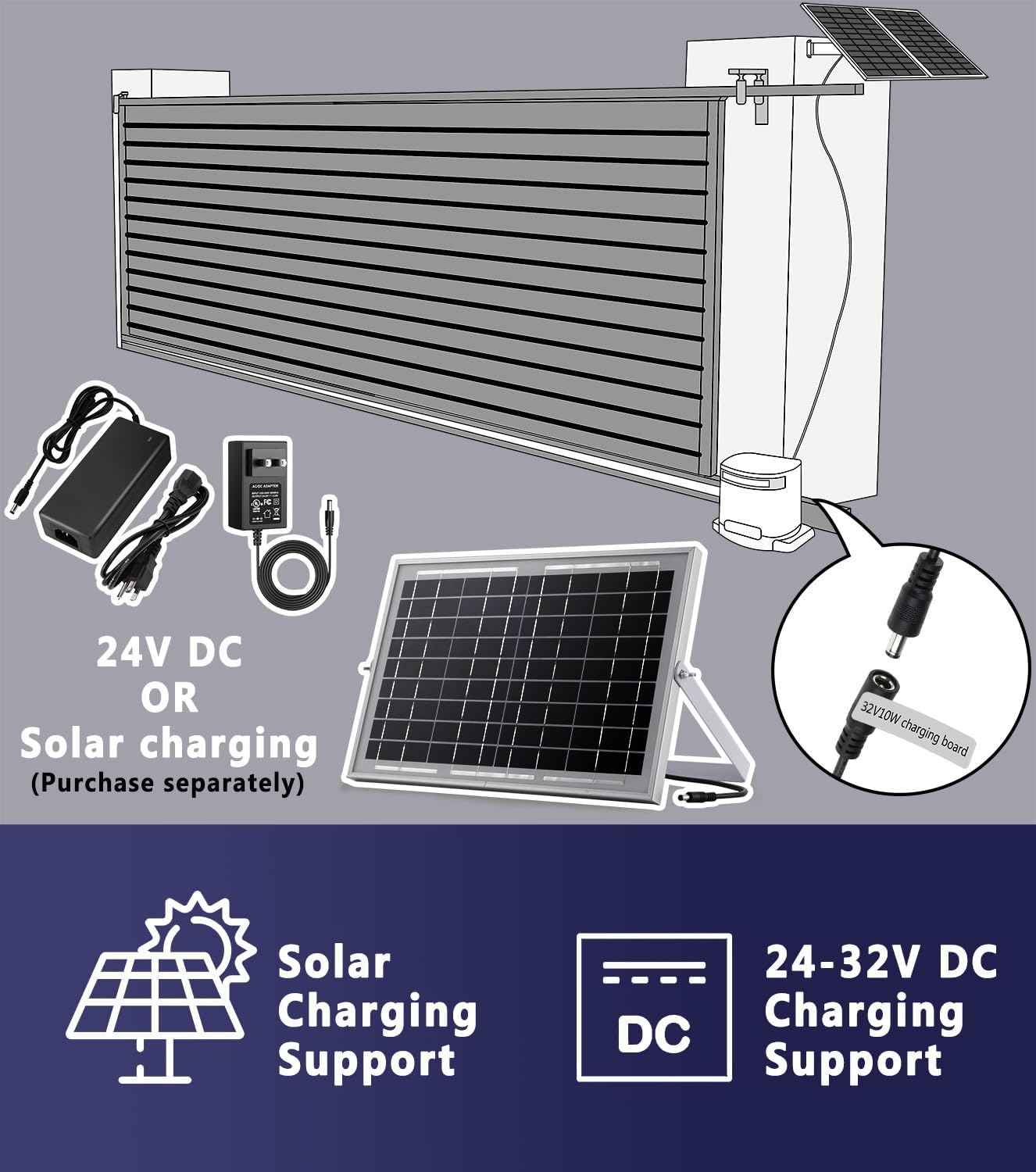
Figure 2.6.1: Diagram showing the solar charging support and 24-32V DC charging options for the gate opener, with solar panel and AC adapter shown separately.
3. Operating Instructions
3.1 Remote Control Operation
The gate opener comes with two remote controls, offering a control range of up to 165ft for convenient daily use. Press the designated button on the remote to open or close the gate.
3.2 Smart WiFi & App Control
The pre-installed WiFi module allows seamless control via the "eWeLink" app on your smartphone. Download the "eWeLink" app from the App Store or Google Play. Once connected, you can open or close your gate remotely and monitor its status.

Figure 3.2.1: Visual representation of the gate opener's Wi-Fi connectivity, showing compatibility with the eWeLink app, Amazon Alexa, Apple Watch-Siri Control, and Google Assistant.
The system is compatible with Amazon Alexa, Apple Siri, and Google Assistant, allowing for voice control and integration into your smart home ecosystem. It also supports connection to Home Assistant for advanced automation and control capabilities.
3.3 Auto-Close Feature
You can set your desired auto-close time between 1 to 60 seconds. This feature ensures the gate closes securely after every use, providing peace of mind and enhanced security.

Figure 3.3.1: Illustration of the auto-closing feature, which allows users to set a timer for the gate to close automatically after opening.
3.4 LED Status Indicator
The built-in LED indicator provides real-time gate status at a glance. A green light indicates the gate is open, and a red light indicates the gate is closed, improving visibility and ease of monitoring.
4. Maintenance
Regular maintenance ensures the longevity and optimal performance of your gate opener. Perform the following checks periodically:
- Cleaning: Keep the motor unit and rack gears free from dirt, debris, and obstructions. Use a soft, damp cloth for cleaning.
- Lubrication: Periodically lubricate the gate's moving parts, such as wheels and hinges, to ensure smooth operation.
- Battery Check: Monitor the backup battery's performance, especially after power outages. Ensure it charges properly when connected to AC or solar power.
- Sensor Check: Regularly test the infrared sensor by placing an object in its path to confirm it stops and reverses the gate correctly.
- Hardware Inspection: Check all mounting bolts and screws for tightness. Tighten any loose hardware to maintain stability.
5. Troubleshooting
If you encounter any issues with your Blütezeit gate opener, refer to the following general troubleshooting tips. For complex problems, contact customer support.
- Gate Not Moving:
- Check power supply: Ensure the unit is receiving power from AC or solar.
- Verify battery charge: Confirm the internal battery is charged.
- Inspect remote control: Check remote battery and ensure it's within range.
- Clear obstructions: Ensure no physical objects are blocking the gate's path or the infrared sensor.
- Gate Stops Mid-Operation:
- Check infrared sensor: An obstruction might have triggered the sensor. Clear the path.
- Inspect gate movement: Ensure the gate moves freely on its track without excessive friction.
- Remote Control Not Working:
- Replace remote battery: The 12V 27A battery might be depleted.
- Reprogram remote: Refer to the remote control pairing instructions in the full manual if necessary.
- App Connectivity Issues:
- Check WiFi signal: Ensure the gate opener is within range of your WiFi network.
- Restart app/device: Close and reopen the eWeLink app, or restart your smartphone.
- Re-pair device: If issues persist, try re-pairing the gate opener with the eWeLink app.
6. Specifications
| Feature | Specification |
|---|---|
| Brand | Blütezeit |
| Model Number | ME-GO-600 |
| Item Weight | 22.9 pounds |
| Product Dimensions | 11.81 x 8.27 x 10.63 inches |
| Power Source | AC/DC, Solar Power |
| Wattage | 280 watts |
| Horsepower | 0.38 hp |
| Battery Type | DC24V 6.0Ah Lithium-Ion (included) |
| Control Range (Remote) | Up to 165ft |
| Operating Temperature | -13℉ to 131℉ |
| Max Gate Weight | 1400lb |
7. Warranty and Support
For detailed warranty information and customer support, please refer to the official documentation provided with your product. A Certificate of Compliance is available for download:
Download Certificate of Compliance (PDF)
For technical assistance or inquiries, please contact Blütezeit customer service through the contact information provided in your product packaging or on the official Blütezeit website.
Documents and downloads
Ask a question about this manual
Ask about setup, troubleshooting, compatibility, parts, safety, or missing instructions. Manuals+ will review the question and use this page’s manual context to help answer it.