
1. Welcome
Thank you for purchasing the MONODEAL DAB Radio with Bluetooth. This compact and versatile radio offers high-quality audio with DAB/DAB+ and FM reception, seamless Bluetooth connectivity, and convenient features like an alarm clock and rechargeable battery. This manual will guide you through the setup, operation, and maintenance of your new device.
2. Important Safety Instructions
- Read all instructions carefully before use.
- Keep this manual for future reference.
- Do not expose the device to rain, moisture, or extreme temperatures.
- Do not disassemble or attempt to repair the device yourself. Refer all servicing to qualified personnel.
- Use only the specified charging cable and power adapter.
- Avoid placing the radio near heat sources or in direct sunlight.
- Ensure proper ventilation around the device during operation.
3. Product Overview
3.1 Package Contents
Ensure all items are present in the package:
- MONODEAL DAB Radio
- USB Type-C Charging Cable
- User Manual (this document)
3.2 Controls and Display
Familiarize yourself with the buttons, ports, and display of your radio.
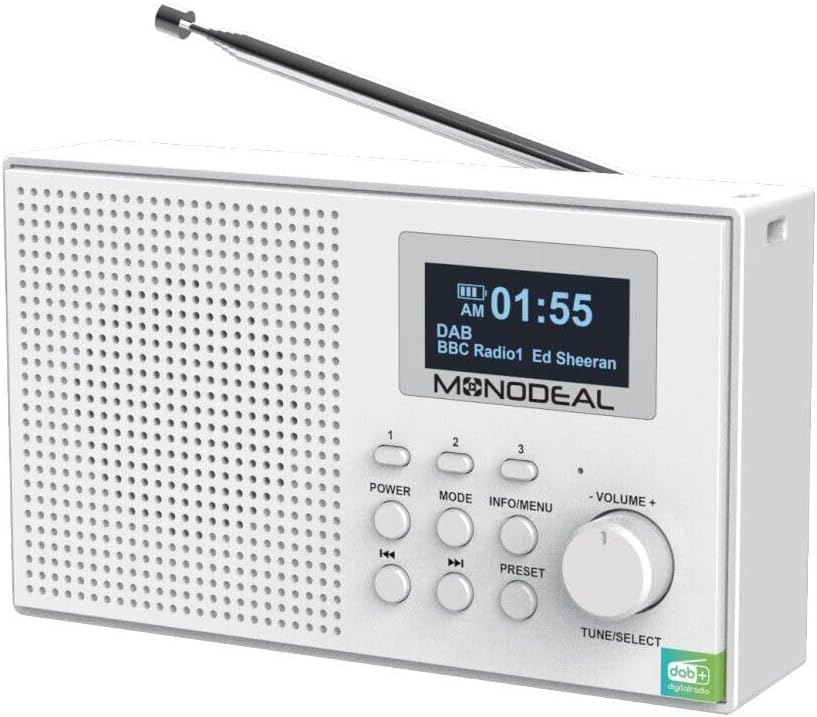
Figure 1: Front view of the MONODEAL DAB Radio, showing the speaker grille, LCD display, and control buttons including Power, Mode, Info/Menu, Volume knob, Tune/Select, and preset buttons.

Figure 2: The MONODEAL DAB Radio with its telescopic antenna extended, showcasing the clear LCD display and accessible control panel.
The radio features a clear LCD display with backlight, showing time, station information, and mode. Key controls include:
- POWER Button: Turns the radio on or off.
- MODE Button: Switches between DAB, FM, Bluetooth, AUX, USB, and TF card modes.
- INFO/MENU Button: Accesses menu options and displays station information.
- VOLUME + / - Knob: Adjusts the audio volume. Also functions as TUNE/SELECT for navigation and confirmation.
- PRESET Buttons (1, 2, 3): Quick access to stored favorite stations.
- Skip/Tune Buttons: Navigate through stations or tracks.
4. Setup
4.1 Charging the Battery
The MONODEAL DAB Radio has a built-in rechargeable battery. Before first use, fully charge the device.
- Connect the supplied USB Type-C cable to the charging port on the back of the radio.
- Connect the other end of the USB cable to a compatible USB power adapter (not included) or a computer USB port.
- The charging indicator on the display will show charging status. A full charge typically takes 4-5 hours and provides up to 12 hours of playback.
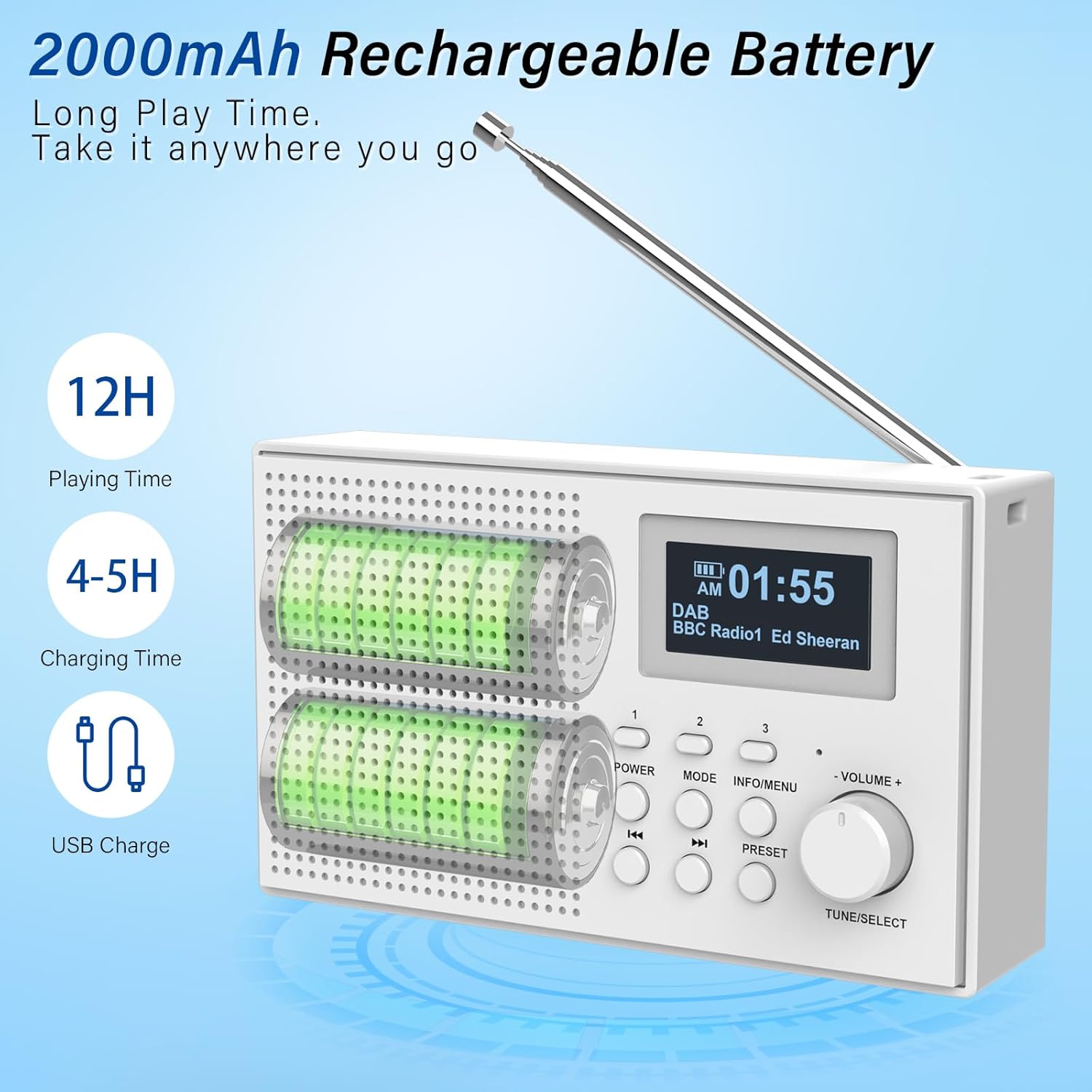
Figure 3: Illustration of the radio's rechargeable battery, indicating approximately 12 hours of playing time and 4-5 hours of charging time via USB.
4.2 Antenna Adjustment
For optimal radio reception, extend the telescopic antenna fully. Adjust its position for the best signal quality.
5. Operating Instructions
5.1 Power On/Off
Press the POWER button to turn the radio on or off.
5.2 Volume Control
Rotate the VOLUME + / - knob to increase or decrease the volume.
5.3 Mode Selection
Press the MODE button repeatedly to cycle through available modes: DAB, FM, Bluetooth, AUX, USB, and TF Card.

Figure 4: The radio supports multiple playback options including Bluetooth, headphone output, USB stick, AUX input, and TF card for versatile audio enjoyment.
5.4 DAB/DAB+ Radio Operation
In DAB mode, the radio automatically scans for available stations upon first use or when entering the mode. The display will show station names.
- Scanning: If no stations are found, or you wish to rescan, press and hold the INFO/MENU button to access the menu, then select "Full Scan".
- Selecting Stations: Rotate the TUNE/SELECT knob to browse through available stations. Press the knob to select a station.
- Storing Presets: To save a favorite station, press and hold one of the PRESET buttons (1, 2, or 3) until the display confirms the station is saved. To recall a preset, simply press the corresponding PRESET button. The radio can store up to 80 stations in total.

Figure 5: The radio features strong reception capabilities for DAB, DAB+, and FM bands, with automatic scanning and the ability to store up to 80 preset stations for quick access.
5.5 FM Radio Operation
In FM mode, you can manually tune or auto-scan for stations.
- Auto Scan: Press and hold the TUNE/SELECT knob to automatically scan and save available FM stations.
- Manual Tuning: Rotate the TUNE/SELECT knob to fine-tune to a specific frequency.
- Storing Presets: Similar to DAB mode, press and hold a PRESET button to save the current FM station.
5.6 Bluetooth Pairing
Connect your smartphone or tablet to the radio via Bluetooth 5.0.
- Switch the radio to Bluetooth mode using the MODE button. The display will show "Bluetooth Pairing" or similar.
- Enable Bluetooth on your external device and search for "MONODEAL Radio" (or similar name).
- Select the radio from the list to pair. Once connected, you can play audio from your device through the radio.
5.7 AUX Input
Use the 3.5mm AUX input to connect non-Bluetooth audio devices.
- Connect one end of a 3.5mm audio cable (not included) to the AUX IN port on the radio.
- Connect the other end to the headphone jack or audio output of your external device.
- Switch the radio to AUX mode using the MODE button.
5.8 USB/TF Card Playback
Play audio files directly from a USB stick or TF (Micro SD) card.
- Insert a USB stick into the USB port or a TF card into the TF card slot.
- Switch the radio to USB or TF Card mode using the MODE button.
- The radio will automatically detect and begin playing compatible audio files. Use the Skip buttons to navigate tracks.
5.9 Alarm Clock Function
The radio features two programmable alarms with a snooze function.

Figure 6: The radio's LCD display clearly shows the current time and date, along with an alarm icon indicating an active alarm setting.
- Press the INFO/MENU button to enter the menu.
- Navigate to "Alarm" settings using the TUNE/SELECT knob and press to select.
- Select Alarm 1 or Alarm 2.
- Set the alarm time, alarm source (radio or buzzer), and frequency (daily, weekdays, weekends, once).
- Confirm settings. When the alarm sounds, press any button (except Power) for snooze, or press Power to turn off the alarm.
6. Maintenance
6.1 Care and Cleaning
- Wipe the radio with a soft, dry cloth. Do not use abrasive cleaners or solvents.
- Keep the device free from dust and dirt.
- Do not immerse the radio in water or any other liquid.
6.2 Storage
When not in use for extended periods, store the radio in a cool, dry place away from direct sunlight and extreme temperatures. Ensure the battery is partially charged before storage to prolong its lifespan.
7. Troubleshooting Guide
If you encounter issues with your radio, please refer to the following table for common problems and solutions.
| Problem | Possible Cause | Solution |
|---|---|---|
| No power / Radio does not turn on | Battery is depleted. | Charge the radio fully using the supplied USB cable. |
| Poor radio reception (DAB/FM) | Antenna not extended or poor signal area. | Fully extend and adjust the telescopic antenna. Try moving the radio to a different location. Perform a full scan for stations. |
| Bluetooth device cannot pair | Radio not in Bluetooth mode or device too far. | Ensure the radio is in Bluetooth mode. Move the device closer to the radio (within 10 meters). Check if the radio is already paired with another device. |
| No sound from AUX/USB/TF | Incorrect mode selected or file format not supported. | Ensure the correct mode (AUX, USB, TF) is selected. Check if the audio files are in a compatible format (e.g., MP3). Ensure cables are securely connected. |
| Alarm does not sound | Alarm not set correctly or radio in standby. | Verify alarm settings (time, source, frequency). Ensure the radio is not completely powered off but in standby mode for the alarm to activate. |
8. Technical Specifications
| Feature | Specification |
|---|---|
| Brand | MONODEAL |
| Model Number | 3e33b388-4394-45ae-af8c-7f7070bc0d36 |
| Dimensions | 15.7 x 10.2 x 6.8 cm |
| Weight | 0.36 kg |
| Radio Bands Supported | DAB/DAB+, FM |
| Bluetooth Version | 5.0 |
| Battery Type | Lithium Ion (included) |
| Battery Life (Playback) | Up to 12 hours |
| Charging Time | 4-5 hours |
| Connectivity | 3.5mm Audio (AUX), USB, TF Card slot, Bluetooth |
| Display | LED with backlight |
| Additional Features | Rechargeable, Alarm Clock (Dual), Snooze Function |

Figure 7: Dimensions of the MONODEAL DAB Radio, highlighting its compact and portable design.
9. Warranty and Support
9.1 Warranty Information
Your MONODEAL DAB Radio is covered by a standard manufacturer's warranty against defects in materials and workmanship. Please retain your proof of purchase for warranty claims. The specific terms and duration of the warranty may vary by region. For detailed warranty information, please refer to the documentation provided at the time of purchase or contact customer support.
9.2 Customer Support
If you have any questions, require technical assistance, or experience issues not covered in this manual, please contact MONODEAL customer support. Contact details can typically be found on the product packaging, the official MONODEAL website, or through your retailer's support channels.