
Introduction
The NEEWER MB-N12 Vertical Battery Grip is designed to enhance the functionality of your Nikon Z8 camera. It provides an ergonomic grip for comfortable vertical shooting and extends your camera's operational time by accommodating two EN-EL15c batteries. This manual provides detailed instructions for setup, operation, and maintenance.

Image: NEEWER MB-N12 Vertical Battery Grip attached to a Nikon Z8 camera.
What's in the Box
- 1 x Vertical Battery Grip
- 2 x EN-EL15c Battery
- 1 x Dual Channel USB Charger
- 1 x Micro USB Cable
- 1 x Cleaning Cloth
- 1 x User Manual

Image: Contents of the NEEWER MB-N12 battery grip package, including the grip, batteries, charger, micro USB cable, cleaning cloth, and user manual.
Product Features
Extended Battery Life
The grip utilizes two EN-EL15c rechargeable batteries, significantly extending your camera's shooting and video recording time. It is also compatible with EN-EL15b, EN-EL15a, and EN-EL15 batteries, though EN-EL15a and EN-EL15 cannot be charged inside the grip.

Image: Two EN-EL15c batteries being inserted into the battery tray of the NEEWER MB-N12 grip.
Ergonomic Vertical Shooting
Designed for comfortable and stable vertical shooting, the grip includes a shutter release button, main and sub command dials, an AF-ON button, an Fn button, and a multi-selector, mirroring the camera's horizontal controls.

Image: A Nikon Z8 camera with the NEEWER MB-N12 grip shown in both horizontal and vertical shooting orientations, demonstrating ergonomic control.
Hot-Swappable Functionality
When two batteries are installed, the MB-N12 allows for hot-swapping, meaning you can replace one battery without powering down the camera, ensuring continuous operation.

Image: Diagram showing how to replace one battery in the grip without interrupting shooting, with a warning not to press the eject button.
Tripod Compatibility
A 1/4" tripod socket is integrated, enabling easy attachment to tripods, monopods, or camera sliders for stable long exposure photography and time-lapse videos.

Image: A Nikon Z8 with the NEEWER MB-N12 grip mounted on a tripod and a camera slider, illustrating tripod compatibility.
Product Details (Components)
Familiarize yourself with the various components of the NEEWER MB-N12 Vertical Battery Grip:
- Vertical Fn Button: Customizable function button for vertical shooting.
- Portrait Shutter Release Button: Dedicated shutter button for vertical orientation.
- Control Lock: Prevents accidental button presses.
- Vertical Secondary Command Dial: For adjusting camera settings in vertical orientation.
- 1/4" Thread: For mounting on tripods or other accessories.
- Lock Screw Knob: Secures the grip to the camera body.
- Charging Interface Cover: Protects the USB charging port.
- Battery Hatch Cover: Provides access to the battery compartment.
- Signal Contact: Connects the grip to the camera's electronic system.
- Battery Bay Cover Bracket: Stores the camera's original battery cover.
- Vertical Multiple Selector: For navigating menus and selecting focus points.
- Vertical AF-ON Button: Dedicated autofocus activation button for vertical shooting.
- Vertical Master Command Dial: For adjusting primary camera settings in vertical orientation.

Image: Detailed diagram of the NEEWER MB-N12 battery grip highlighting its various buttons, dials, and connection points.
Setup and Installation
Follow these steps to properly install the battery grip onto your Nikon Z8 camera:
- Step 1: Prepare the Camera. Switch off the camera, and remove the camera's battery cover and the installed battery.
- Step 2: Attach Battery Cover to Grip. Attach the camera's original battery cover to the designated battery cover slot on the grip. This ensures it is not lost.
- Step 3: Insert Battery Grip. Insert the battery grip into the camera's battery compartment, aligning the contacts carefully.
- Step 4: Secure the Grip. Turn the thumb screw on the battery grip until it is securely fastened to the camera body. Ensure there is no wobble.
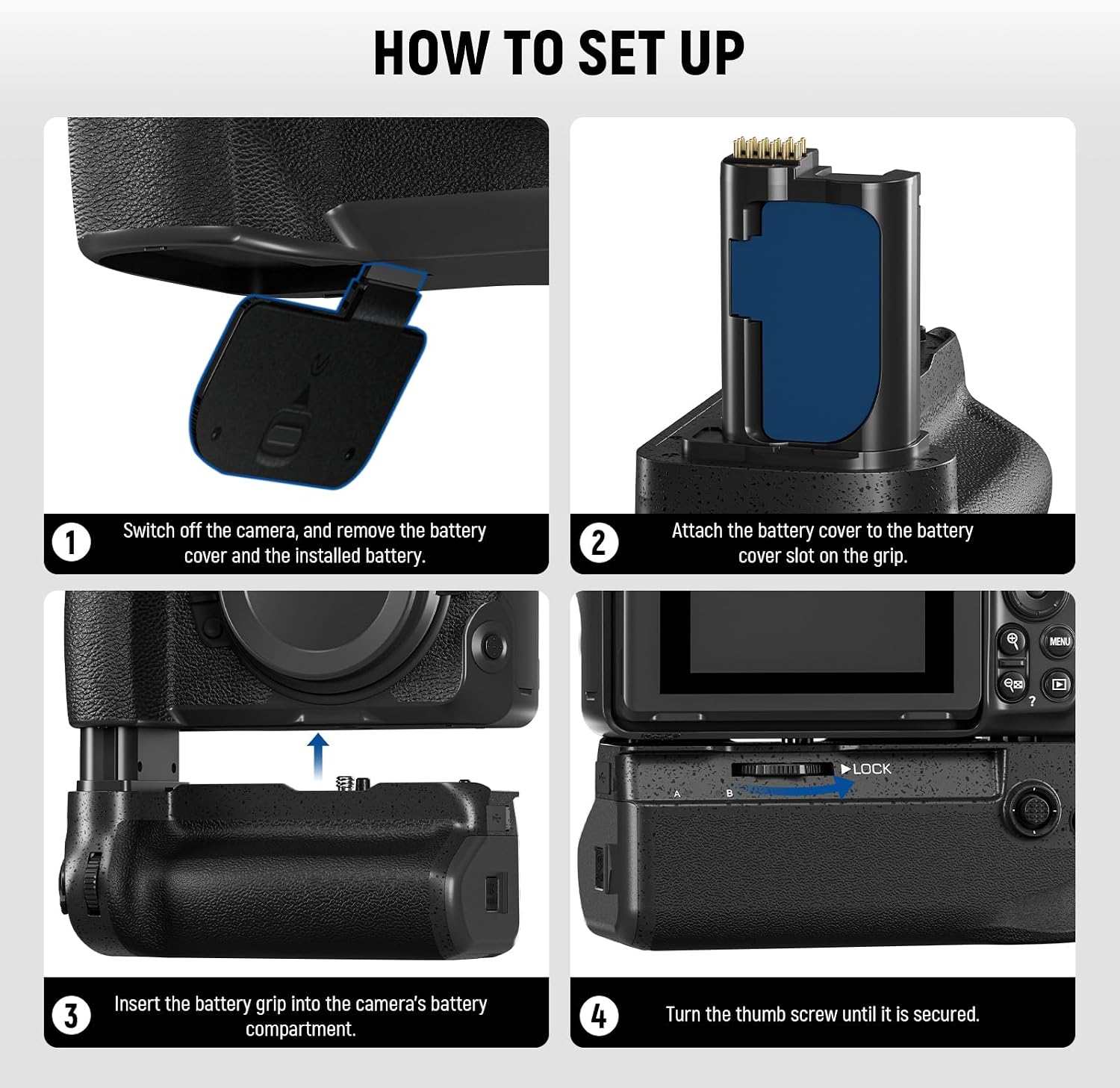
Image: Four-step visual guide demonstrating the installation process of the NEEWER MB-N12 battery grip onto a Nikon Z8 camera.
Operating Instructions
Once installed, the NEEWER MB-N12 Vertical Battery Grip integrates seamlessly with your Nikon Z8 camera. The integrated controls on the grip, including the shutter release button, main and sub command dials, AF-ON button, Fn button, and multi-selector, function identically to those on the camera body. This provides a consistent and intuitive shooting experience, especially when shooting in vertical orientation.
Charging Instructions
The EN-EL15c batteries can be charged using two methods:
- In-Grip Charging: Batteries can be charged directly inside the battery grip via a USB Type-C cable (not included).
- External Dual-Channel Charger: Use the included dual-channel USB charger to charge both batteries simultaneously.
Fully charging batteries typically takes approximately 5 hours. Please note that EN-EL15a and EN-EL15 batteries cannot be charged inside the battery grip; they must be charged using an external charger.

Image: A Nikon Z8 with the grip connected to a wall charger via USB-C, and a separate dual-channel USB charger with two batteries.
Troubleshooting
If you encounter issues with your NEEWER MB-N12 Vertical Battery Grip, consider the following troubleshooting steps:
- Camera Power Cycling or Lock-ups: If the camera experiences intermittent power cycling or locks up when the grip is attached:
- Ensure the grip is securely attached to the camera body and the thumb screw is fully tightened. A loose connection can cause power interruptions.
- Verify that the electrical contacts on both the grip and the camera are clean and free from dust, dirt, or debris. Use a clean, dry cloth to gently wipe the contacts.
- Test with different batteries to rule out a faulty battery as the cause of the issue.
- If the issue persists, remove the grip and test the camera with its internal battery to isolate whether the problem lies with the grip or the camera itself.
- Buttons or Dials Not Responding: If the buttons or command dials on the grip are not functioning:
- Check the control lock switch on the grip to ensure it is not engaged.
- Re-seat the grip to ensure a proper electrical connection with the camera.
- Batteries Not Charging in Grip: If EN-EL15a or EN-EL15 batteries are not charging when inserted into the grip:
- Remember that only EN-EL15c, EN-EL15b, and newer EN-EL15 batteries are supported for in-grip charging. Older EN-EL15a and EN-EL15 batteries require an external charger.
- Ensure the USB Type-C cable is properly connected to a power source and the grip.
Maintenance
To ensure the longevity and optimal performance of your NEEWER MB-N12 Vertical Battery Grip, follow these maintenance guidelines:
- Cleaning: Keep the battery grip clean and dry. Use a soft, dry cloth to wipe the exterior. Avoid using harsh chemicals or abrasive materials.
- Contacts: Regularly check and clean the electrical contacts on both the grip and the camera to ensure proper connection. Use a clean, lint-free cloth.
- Storage: Store the grip and batteries in a cool, dry place away from direct sunlight, extreme temperatures, and high humidity when not in use. Remove batteries from the grip if storing for extended periods.
- Handling: Handle the grip with care to prevent physical damage. Avoid dropping or subjecting it to strong impacts.
Specifications
| Model | MB-N12 |
| Item Type | Battery grip |
| Compatibility | For Nikon Z8 |
| Application | Vertical shots/portrait/sports |
| Main Features | For 2x battery/hot swappable |
| Mounting Points | 1/4" |
| Main Material | Plastic |
| Dimensions | 5.5"x4.6"x3" / 139x118x77mm |
| Weight | 9.2oz / 261g (no batteries) |
Warranty and Support
For detailed warranty information, product registration, or technical assistance, please refer to the specific documentation included with your purchase. You may also visit the official NEEWER website or contact NEEWER customer service directly for support.
