
Montech AX120 PWM BLACK
Montech AX 120 ARGB Fan User Manual
Model: AX120 PWM BLACK | Brand: Montech
Product Overview
The Montech AX 120 ARGB Fan is designed to enhance your PC's cooling performance and aesthetic appeal. Featuring a modern hexagonal RGB ring with 20 LEDs, this fan offers vibrant illumination. It incorporates advanced PWM controls for smart fan speed adjustments based on system temperature, ranging from 600 RPM to 1600 RPM. Engineered for quiet operation, it maintains noise levels under 27.9 dB(A) through optimized frames and blades. The fan is built with a high-end HDB bearing, ensuring a lifespan of 40,000 hours, and includes integrated anti-vibration pads to reduce resonance noise.

Figure 1: Front-side view of the Montech AX 120 ARGB Fan, showcasing its hexagonal RGB lighting.
What's in the Box
Upon unboxing your Montech AX 120 ARGB Fan, you will find the following components:
- Montech AX 120 ARGB Fan (1 unit)
- Mounting Screws (typically included for installation)
Setup and Installation
Proper installation ensures optimal performance and longevity of your Montech AX 120 ARGB Fan. Follow these steps carefully:
1. Prepare Your System
- Ensure your computer is powered off and unplugged from the wall outlet.
- Open your PC case to access the fan mounting locations.
2. Mounting the Fan
Identify the desired mounting location within your PC case (e.g., front, rear, top, bottom). The fan can be configured for intake or exhaust airflow depending on its orientation.

Figure 2: Rear view of the fan, indicating the power connector and product information.
- Position the fan against the mounting holes in your case.
- Secure the fan using the provided mounting screws. Ensure they are tightened firmly but do not overtighten to avoid damaging the fan frame. The fan features integrated anti-vibration pads at each corner to minimize noise from resonance.
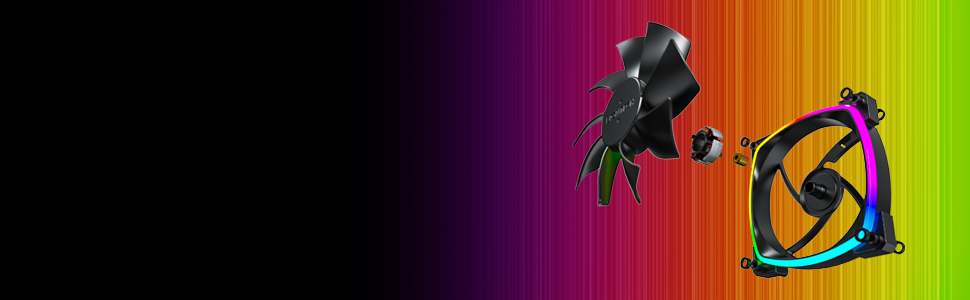
Figure 3: Detail of the integrated anti-vibration pads on the fan frame.
3. Connecting the Fan
The Montech AX 120 ARGB Fan uses a 4-pin connector for both power and PWM control, and a separate ARGB connector for lighting.
- Connect the 4-pin fan cable to an available 4-pin fan header on your motherboard. This allows for PWM (Pulse Width Modulation) control of the fan speed.
- Connect the ARGB cable to a compatible 3-pin 5V ARGB header on your motherboard or an ARGB controller. Note: Do not connect to a 12V RGB header, as this may damage the LEDs.

Figure 4: Example of Montech AX 120 ARGB Fans installed in a PC system.
Operating Instructions
Fan Speed Control (PWM)
The Montech AX 120 ARGB Fan supports PWM control, allowing your motherboard or fan controller to dynamically adjust the fan speed based on system temperature. This ensures efficient cooling when needed and quiet operation during lighter loads.
- Speed Range: 600 RPM to 1600 RPM.
- Configure fan curves in your motherboard's BIOS/UEFI settings or through compatible software provided by your motherboard manufacturer.
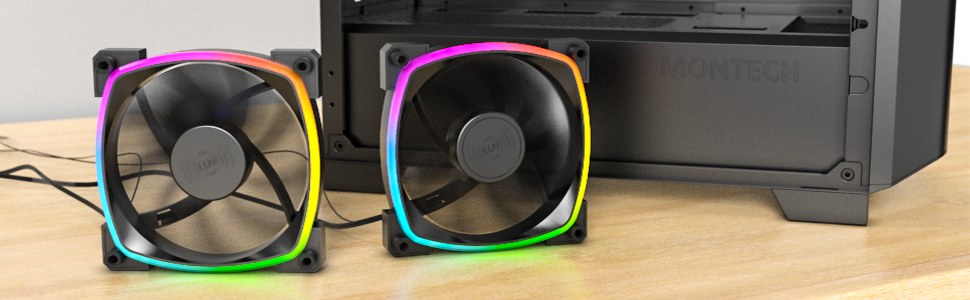
Figure 5: Visual representation of PWM fan speed adjustment.
ARGB Lighting Control
The fan's addressable RGB lighting can be controlled via your motherboard's ARGB software (e.g., ASUS Aura Sync, MSI Mystic Light Sync, GIGABYTE RGB Fusion, ASRock Polychrome Sync) or a dedicated ARGB controller. This allows for synchronization with other ARGB components and customization of lighting effects.
Silent Performance
The Montech AX 120 ARGB Fan is engineered for quiet operation, with noise levels typically under 27.9 dB(A) at maximum speed. This is achieved through optimized blade design and the inclusion of anti-vibration pads.

Figure 6: The fan's low noise output, measured at approximately 27.0 dB.
Maintenance
Regular maintenance helps ensure the longevity and optimal performance of your fan.
- Cleaning: Periodically clean the fan blades and frame to remove dust buildup. Use compressed air or a soft brush. Ensure the fan is powered off and disconnected before cleaning.
- Bearing Lifespan: The fan features a Hydro Dynamic Bearing (HDB) with an estimated lifespan of 40,000 hours, providing long-term reliability without requiring lubrication.

Figure 7: Exploded view illustrating the fan's durable components, including the HDB bearing.
Troubleshooting
If you encounter issues with your Montech AX 120 ARGB Fan, refer to the following common problems and solutions:
| Problem | Possible Cause | Solution |
|---|---|---|
| Fan not spinning |
|
|
| ARGB lighting not working |
|
|
| Excessive noise or vibration |
|
|
Specifications
| Feature | Detail |
|---|---|
| Model Number | AX120 PWM BLACK |
| Dimensions | 4.72 x 4.72 x 0.98 inches (120mm x 120mm x 25mm) |
| Weight | 5.93 ounces |
| Fan Speed | 600 - 1600 RPM (PWM controlled) |
| Noise Level | 27.9 dB(A) (Max) |
| Airflow | (Information not provided in source, typically measured in CFM) |
| Static Pressure | (Information not provided in source, typically measured in mmH2O) |
| Bearing Type | Hydro Dynamic Bearing (HDB) |
| Lifespan | 40,000 hours |
| Power Connector | 4-Pin PWM |
| ARGB Connector | 3-Pin 5V ARGB |
| Voltage | 12 Volts (Fan), 5 Volts (ARGB) |
| Wattage | 4.2 watts |
| Material | Plastic |
| Compatible Devices | Gaming PC |
Warranty and Support
For warranty information and technical support, please refer to the official Montech website or contact their customer service directly. Warranty terms and conditions may vary by region and retailer.
Montech Official Website: www.montechpc.com
Related documentsAX120 PWM BLACK

Ask a question about this manual
Ask about setup, troubleshooting, compatibility, parts, safety, or missing instructions. Manuals+ will review the question and use this page’s manual context to help answer it.