
Introduction
Thank you for choosing the AODK Electric Standing Desk with Drawers. This manual provides essential information for the safe and efficient assembly, operation, and maintenance of your new desk. Please read all instructions carefully before beginning assembly or use to ensure optimal performance and longevity of your product.
Safety Information
WARNING: Failure to follow these safety instructions may result in injury or damage to the product.
- Do not exceed the maximum weight recommendation of 150 pounds (68 kg). Overloading can cause instability and damage.
- Ensure proper assembly following the instructions provided to maintain stability and structural integrity.
- Keep children and pets away from the desk during operation, especially when adjusting height.
- Ensure all cables are properly managed and do not interfere with the desk's movement.
- Do not place liquids directly on the desk surface without protective coasters.
- Unplug the desk from the power outlet before cleaning or performing any maintenance.
- Avoid placing the desk in direct sunlight or near heat sources to prevent material degradation.
Product Features
- Electric Height Adjustment: Freely select adjustable standing desk height ranges from 30.7" to 47.6" (78 cm to 121 cm).
- Memory Presets: Features 3 height-memorizing settings for easy one-touch adjustment.
- Integrated Power Outlets: Includes a built-in power outlet with 3 AC outlets (120V/12A), 1 USB port (5V/2A), and 1 Type-C port (5V/2A) to conveniently charge your devices.
- Hidden Cable Management: A dedicated tray behind the desk helps manage cables, keeping your desktop clean and neat.
- 3 Cloth Drawers: Offers vast storage space for office accessories. Iron structures within the drawers simplify assembly.
- Sturdy Construction: Engineered wood desktop with metal furniture legs ensures durability and stability.
Specifications
| Attribute | Detail |
|---|---|
| Brand | AODK |
| Product Dimensions (D x W x H) | 21.25" x 47.24" x 30.9" (54 cm x 120 cm x 78.5 cm) |
| Adjustable Height Range | 30.7" to 47.6" (78 cm x 121 cm) |
| Color | Rustic Brown |
| Desktop Material | Engineered Wood |
| Leg Material | Metal |
| Number of Drawers | 3 (Cloth) |
| Maximum Weight Capacity | 150 Pounds (68 kg) |
| Power Outlets | 3 AC Outlets, 1 USB-A, 1 USB-C |
| Assembly Required | Yes (Recommended 1 person) |
Setup and Assembly
The AODK Electric Standing Desk is designed for straightforward assembly. All necessary tools and clearly labeled parts are included. For a visual guide, please refer to the official assembly video below. It is recommended to have ample space and follow the steps sequentially.
Video: AODK Standing Desk with Drawers - Full Assembly Guide. This video provides a comprehensive step-by-step walkthrough of the desk assembly process, including connecting components and installing the drawers.
Key Assembly Steps Illustrated:
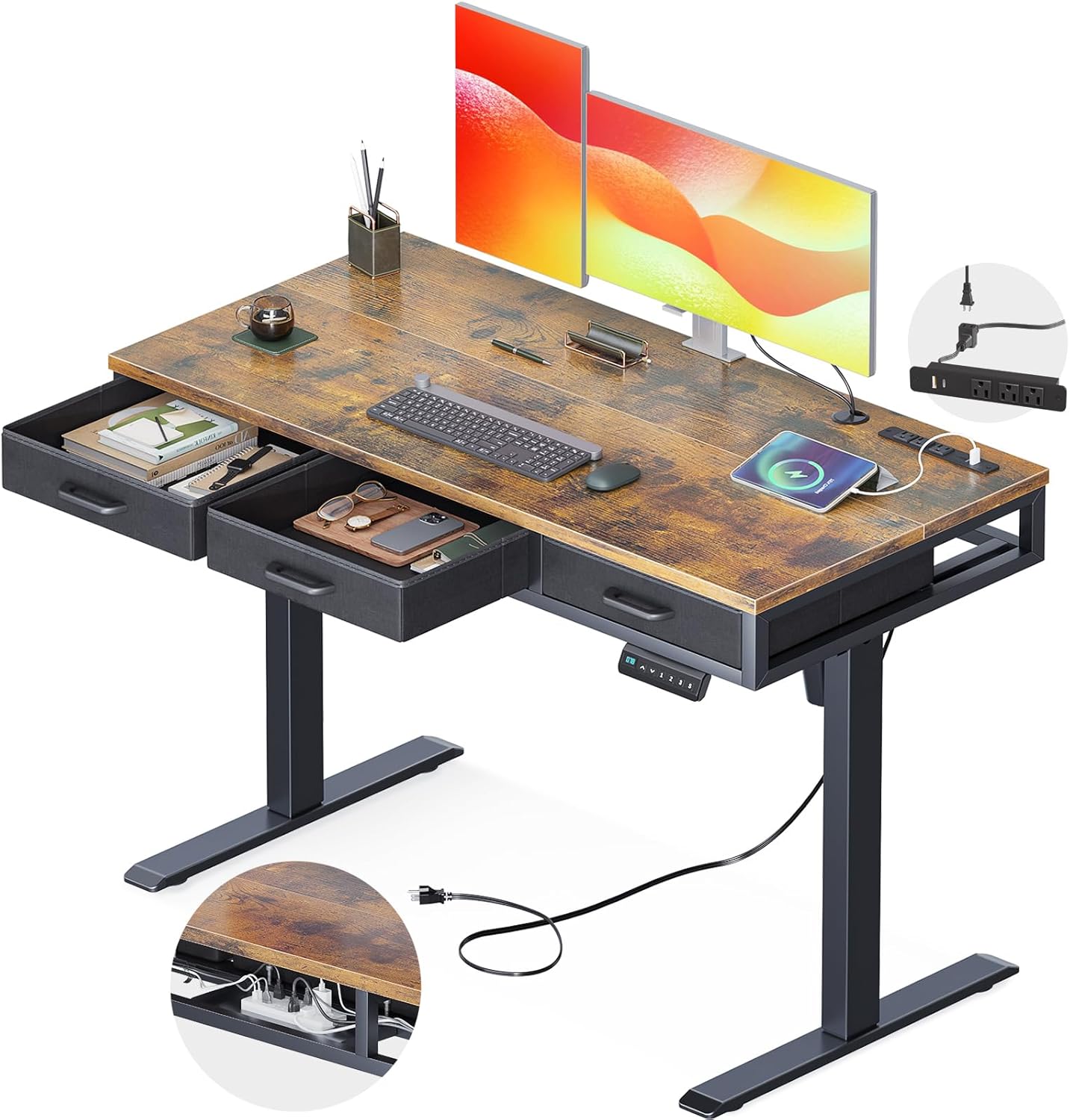
Image: The AODK Electric Standing Desk fully assembled, showcasing its spacious desktop, integrated power outlets, and convenient fabric drawers. Note the cable management tray visible underneath.

Image: Visual representation of the desk's adjustable height range, from a minimum of 30.7 inches for sitting to a maximum of 47.6 inches for standing. The maximum load capacity of 176 lbs is also indicated.

Image: Detailed view of the integrated power strip featuring 3 AC outlets, 1 USB port, and 1 Type-C port. The image also highlights the hidden cable organizer located underneath the desk for a tidy workspace.

Image: Illustration of the three high-quality fabric drawers, demonstrating their spacious interior for storing various office items. The design ensures easy access and contributes to a clutter-free environment.
Operating Instructions
Height Adjustment
The AODK Electric Standing Desk features an intuitive control panel for height adjustment. The control panel is located on the front underside of the desktop.
- Manual Adjustment: Use the ▲ and ▼ arrows on the control panel to manually raise or lower the desk to your desired height. The current height will be displayed on the LED screen.
- Memory Presets: The desk has 3 programmable memory settings (1, 2, 3).
- Adjust the desk to your desired height using the manual adjustment buttons.
- Press the "S" button (Save). The LED screen will flash.
- Immediately press the desired memory button (1, 2, or 3) to save the current height.
- To recall a saved height, simply press the corresponding memory button. The desk will automatically move to the programmed position.

Image: Close-up of the desk's control panel, highlighting the Up/Down arrows, three memory preset buttons (1, 2, 3), a save button (S), and the LED display for current height.
Using Power Outlets
The desk includes a built-in power strip for convenient charging of your devices.
- Plug your devices into the 3 AC outlets, 1 USB-A port, or 1 USB-C port located on the desktop.
- Ensure the desk is properly plugged into a wall outlet for the power outlets to function.
Maintenance
Regular maintenance will help prolong the life of your AODK Electric Standing Desk.
- Cleaning: Wipe the desktop surface with a soft, damp cloth. Avoid harsh chemicals or abrasive cleaners. For the metal frame, use a mild detergent solution if necessary.
- Cable Management: Periodically check the cable management tray to ensure cables are neatly organized and not pinched or tangled, which could impede desk movement.
- Drawer Care: The fabric drawers can be spot cleaned with a mild soap and water solution. Ensure they are completely dry before reinserting.
- Motor Inspection: Occasionally inspect the motor and connecting shaft for any signs of wear or loose connections. Do not attempt to repair the motor yourself; contact customer support if issues arise.
Troubleshooting
If you encounter issues with your AODK Electric Standing Desk, please refer to the following common troubleshooting tips:
- Desk Not Moving:
- Check if the power cord is securely plugged into both the desk and a working wall outlet.
- Ensure all motor and control panel cables are properly connected underneath the desk.
- If the desk has an overload protection feature, unplug it for 10-15 minutes and then try again.
- Uneven Movement/Noise:
- Verify that all assembly screws are tightened.
- Ensure the desk is placed on a flat, level surface.
- Check for any obstructions under or around the desk that might be interfering with its movement.
- Control Panel Not Responding:
- Perform a power cycle by unplugging the desk for 30 seconds and then plugging it back in.
- Refer to the full user manual (if provided separately) for specific reset procedures for the control panel.
If the problem persists after attempting these steps, please contact AODK customer support for further assistance.
Warranty and Support
Your AODK Electric Standing Desk comes with a Limited Warranty. For specific details regarding warranty coverage, duration, and terms, please refer to the warranty card included with your product packaging or contact AODK customer support.
For any questions, missing parts, or assistance with assembly or operation, please contact our professional customer support team. We are committed to helping you solve any problems within 24 hours.
Customer Support: Refer to your product packaging or the AODK official website for contact information.