
1. Product Overview
The Briidea Electricity Usage Monitor is designed to measure and display the power consumption of electronic devices. Featuring two independent outlets, it allows simultaneous monitoring of two appliances. This device provides real-time data on various electrical parameters, helping users understand and manage energy usage effectively.

Image 1.1: The Briidea Electricity Usage Monitor, showcasing its dual outlets and digital display for monitoring electrical parameters.
Key features include:
- Dual Outlets: Monitor two electronic devices concurrently.
- Power Off Memory: Retains cumulative time (CT) and energy consumption (EC-KWH) data during power interruptions.
- Safety Features: Constructed with ABS flame-retardant material and includes an overload warning.
- Accurate Monitoring: Measures power (W), voltage (V), amperage (A), frequency (Hz), kilowatt-hours (EC), cumulative time (CT), and power factor (PF).
2. Setup and Installation
The Briidea Electricity Usage Monitor is designed for simple plug-and-play operation, requiring no complex installation.
- Connect to Power: Plug the monitor's power cord directly into a standard 120-220V 50/60Hz wall outlet.
- Connect Devices: Plug the electronic devices you wish to monitor into the 'Outlet1' and/or 'Outlet2' receptacles on the monitor.

Image 2.1: The monitor in a typical usage scenario, connected to household appliances for energy monitoring.
3. Operating Instructions
3.1 Display Modes and Navigation
The monitor's display cycles through various electrical parameters. Use the control buttons to navigate and select specific readings.
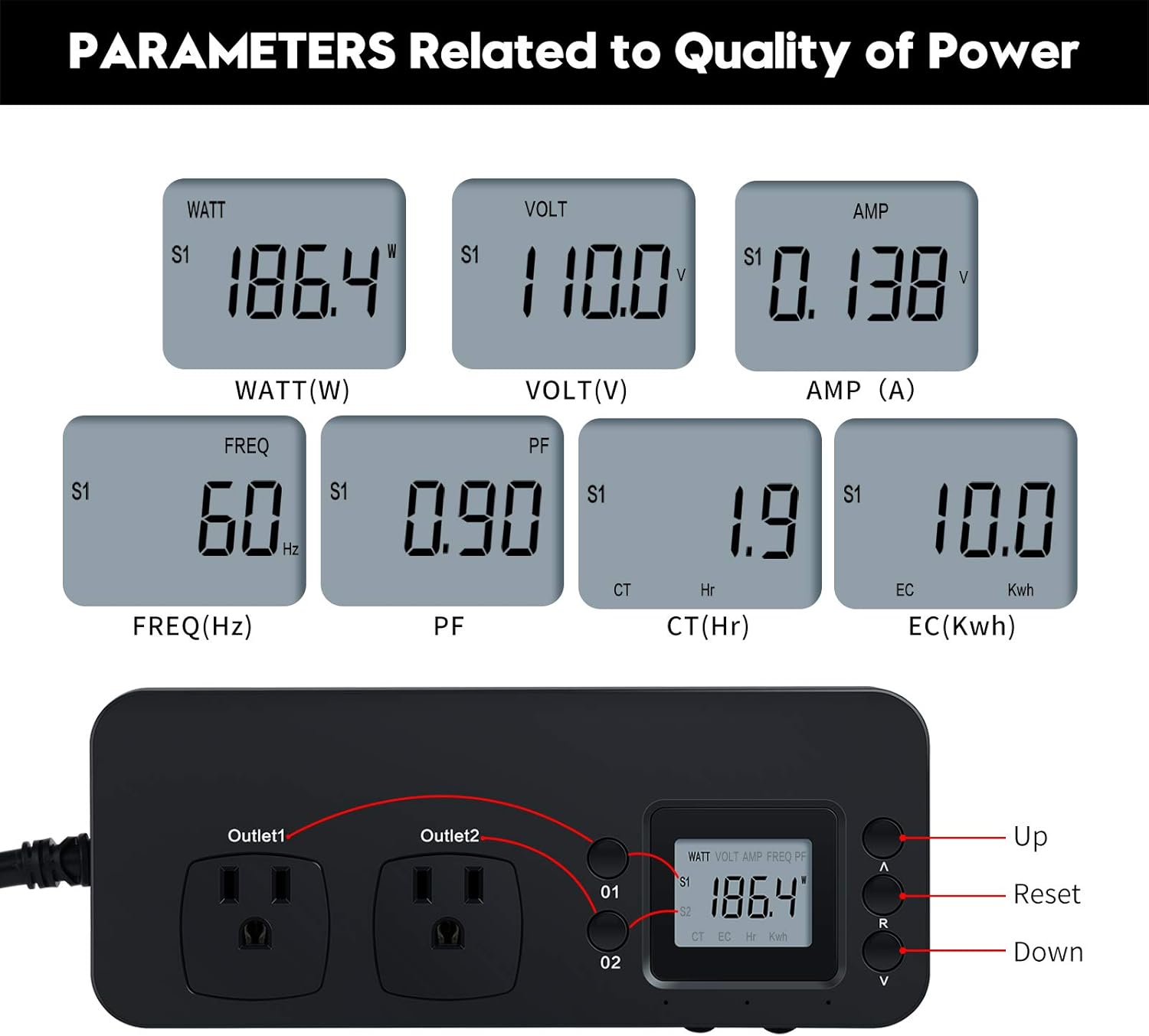
Image 3.1: Illustration of the monitor's display, showing various parameters like Watt, Volt, Amp, Frequency, Power Factor, Cumulative Time, and Energy Consumption, along with button functions.
- Parameter Display: The screen shows real-time values for Watt (W), Volt (V), Amp (A), Frequency (Hz), Power Factor (PF), Cumulative Time (CT in hours), and Energy Consumption (EC in KWh).
- Outlet Selection: Use the '01' and '02' buttons to switch between monitoring data for Outlet 1 and Outlet 2.
- Navigation Buttons:
- 'A' (Up): Cycles through display modes or increases values in settings.
- 'V' (Down): Cycles through display modes or decreases values in settings.
- 'R' (Reset): Used for clearing accumulated data.
3.2 Memory Function and Data Clearing
The monitor is equipped with a power-off memory function to preserve your monitoring data.

Image 3.2: The monitor displaying accumulated energy consumption (EC) and instructions for manually clearing data.
- Data Retention: Cumulative Time (CT) and Energy Consumption (EC-KWH) data are automatically saved in the event of a power failure.
- Viewing Accumulated Data: Use the 'A' or 'V' buttons to navigate to the 'EC' (KWh) or 'CT' (Hr) display mode to view accumulated values.
- Clearing Data: To clear the accumulated EC and CT data, press and hold the 'R' (Reset) button for approximately 6 seconds until the values reset to zero.
4. Safety and Overload Protection
The Briidea Electricity Usage Monitor incorporates several safety features to ensure reliable operation.
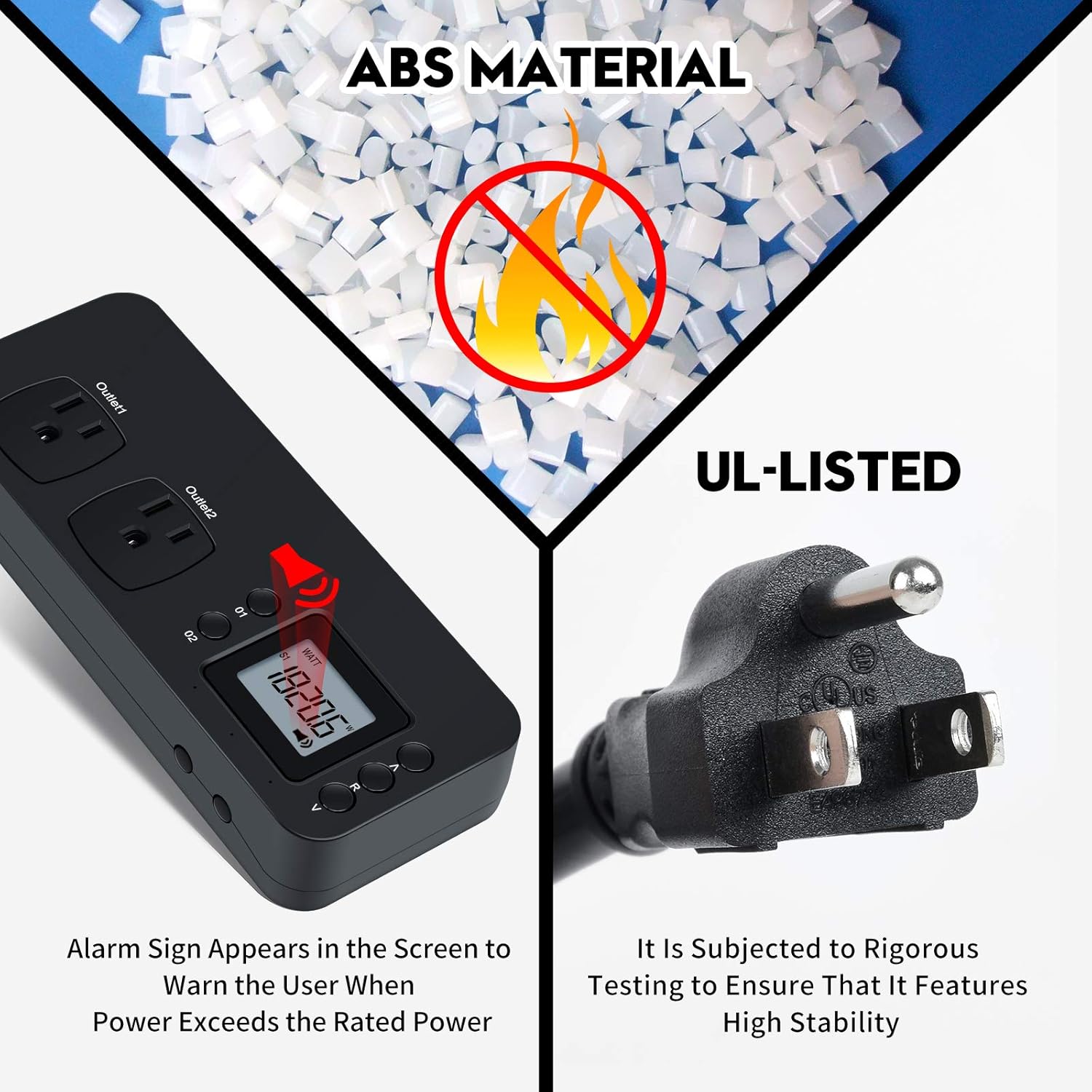
Image 4.1: Visual representation of the monitor's safety features, including its ABS flame-retardant casing, UL-listed plug, and an on-screen overload warning indicator.
- Material: The housing is made from full ABS flame-retardant material for enhanced safety.
- Heavy-Duty Cord: Equipped with a 14AWG heavy-duty extension cord for durability and heat resistance.
- Overload Warning: If the total power consumption exceeds 1200W, a warning indicator will appear on the screen, prompting the user to disconnect devices to prevent overload.
- UL-Listed: The product is UL-listed, indicating it meets specific safety standards.
5. Wide Application
This electricity usage monitor is suitable for a variety of household and office appliances, enabling users to track energy consumption across different devices.

Image 5.1: Examples of common appliances that can be monitored using the Briidea Electricity Usage Monitor, such as humidifiers, TVs, refrigerators, desk lamps, and HIFI systems.
Common applications include monitoring:
- Televisions
- Refrigerators
- Water purifiers
- HIFI Systems
- Desk lamps
- And other household appliances
6. Specifications
Technical specifications for the Briidea Electricity Usage Monitor:
| Parameter | Value |
|---|---|
| Power Input | 120-220V 50/60Hz |
| Power Factor | 0.001-1.000 |
| Resolution | 0.01W, 0.001A, 0.01V |
| Maximum Rated Current (Single Port) | 10A |
| Outlet Amount | Two outlets |
| Maximum Power (Output 1) | 1200W (120V/10A) |
| Maximum Power (Output 2) | 1200W (120V/10A) |
| Testable Range | >0.20 W |
| Maximum Electricity Consumption (EC) | 99,999 kWh |
| Maximum Cumulative Time (CT) | 99,999 minutes |
| Accuracy Standard | Class 1.0 |
| Power Dissipation | <1.00W |
| Inner & Outer Material | ABS+PC flame retarding material |
| Working Temperature | 0~45℃ |
| Storage Temperature | -20~60℃ |
| Item Weight | 15.4 ounces |
| Package Dimensions | 9.53 x 3.58 x 2.05 inches |
7. Maintenance
To ensure the longevity and accurate performance of your Briidea Electricity Usage Monitor, follow these simple maintenance guidelines:
- Cleaning: Wipe the device with a soft, dry cloth. Avoid using abrasive cleaners or solvents, as these can damage the display or casing.
- Storage: When not in use for extended periods, store the monitor in a cool, dry place away from direct sunlight and extreme temperatures.
- Inspection: Periodically check the power cord and plug for any signs of damage. Do not use the device if the cord or plug is damaged.
8. Troubleshooting
If you encounter issues with your Briidea Electricity Usage Monitor, consider the following common troubleshooting steps:
- No Display: Ensure the monitor is securely plugged into a live wall outlet. Check if the wall outlet is functioning correctly by plugging in another device.
- Inaccurate Readings: Verify that the connected appliance is functioning properly. Ensure the monitor is not overloaded (exceeding 1200W).
- Overload Warning Appears: If the overload warning activates, immediately unplug one or both connected devices to reduce the load below 1200W. Reconnect devices one at a time to identify the source of the overload.
- Data Not Clearing: Ensure you are pressing and holding the 'R' (Reset) button for the required 6 seconds until the values reset.
If problems persist after attempting these steps, please contact customer support.
9. Warranty and Support
For information regarding warranty coverage, technical support, or service inquiries, please refer to the product packaging or contact Briidea customer service directly. Contact details are typically available on the manufacturer's official website or included in the product documentation.