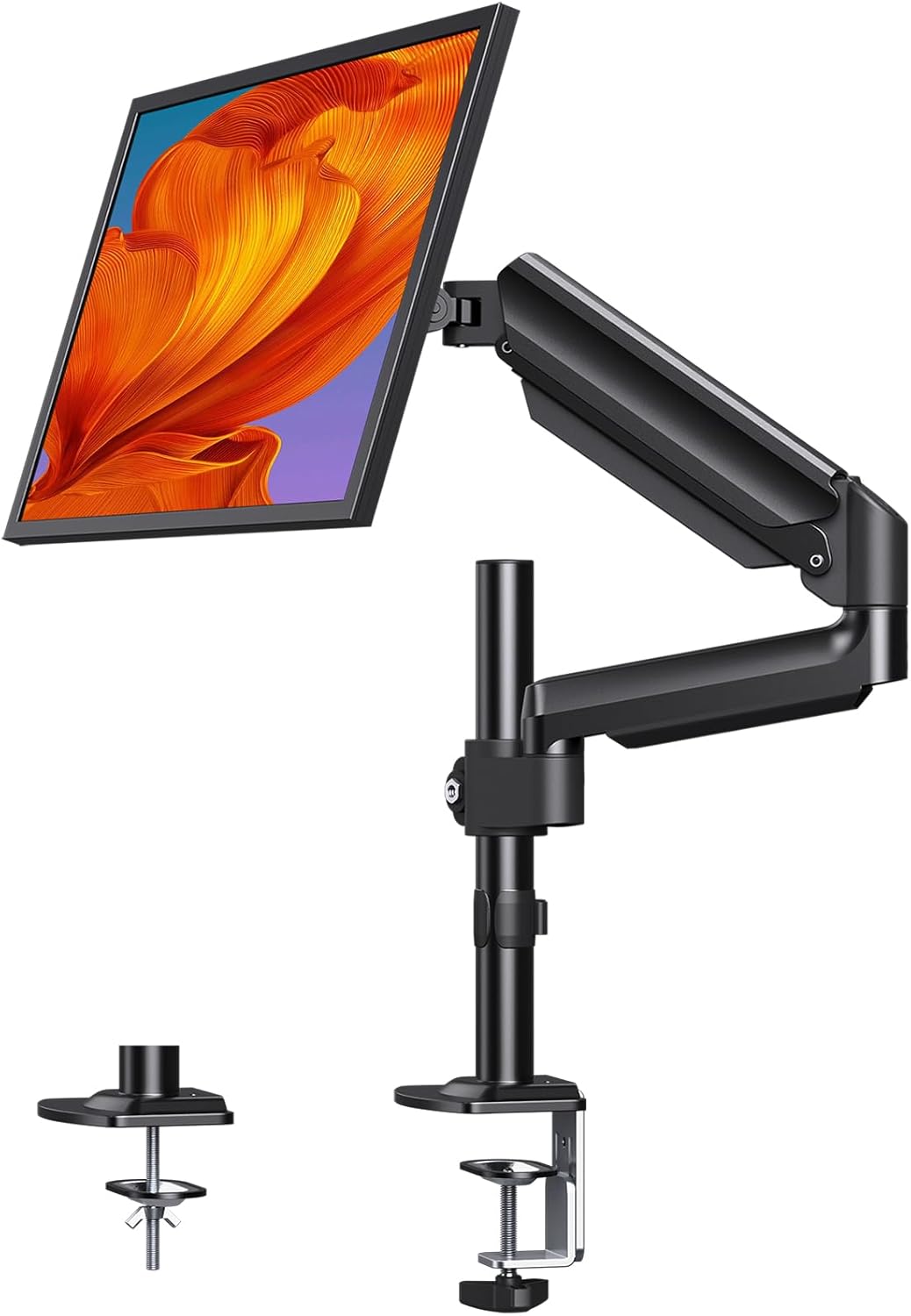
This manual provides detailed instructions for the assembly, operation, and maintenance of your ErGear Single Monitor Arm Desk Mount. Designed for monitors ranging from 13 to 32 inches and supporting weights up to 19.8 lbs, this mount enhances ergonomic comfort and optimizes workspace efficiency.
The mount features an extended height capability, allowing your monitor to be raised up to 20.87 inches above the desk surface. This provides a wider range of height settings, which is particularly beneficial for taller users, promoting better posture and reducing strain.
Figure 1: ErGear Single Monitor Arm Desk Mount
2. Key Features
Enhanced Ergonomics: Raises monitor up to 20.87 inches for optimal eye-level viewing.
Wide Compatibility: Supports 13-32 inch monitors weighing up to 19.8 lbs.
VESA Standard: Compatible with VESA 75x75mm and 100x100mm mounting patterns.
Flexible Adjustments: Offers +90°/-35° tilt, ±90° swivel, and 360° rotation for versatile positioning.
Durable Construction: Equipped with premium gas springs tested for 20,000 cycles.
Integrated Cable Management: Conceals cables for a tidy workspace.
Dual Mounting Options: Includes both C-clamp and grommet mounting for various desk types.
3. What's in the Box
The ErGear Single Monitor Arm Desk Mount comes with all necessary components for assembly and installation. Please verify that all parts are present before beginning the setup process.
Figure 2: Monitor arm supporting a large monitor.
Figure 3: ErGear's taller pole design.
4. Setup and Installation
The monitor arm offers two primary installation methods: C-clamp mounting and grommet mounting. Choose the method best suited for your desk.
4.1 VESA Compatibility Check
Before installation, ensure your monitor is VESA compatible (75x75mm or 100x100mm). Locate the four screw holes on the back of your monitor. If your monitor does not have VESA holes, a compatible adapter may be required (not included).
Figure 4: VESA mounting patterns and monitor preparation.
4.2 C-Clamp Mounting
For desks with a thickness between 0.39 and 3.15 inches (10-80mm), the C-clamp method is recommended. Securely attach the C-clamp to the edge of your desk, ensuring it is tightened firmly to prevent movement.
Figure 5: C-Clamp installation.
4.3 Grommet Mounting
If your desk has a grommet hole or you prefer to drill one, this method supports desk thicknesses between 0.39 and 2.76 inches (10-70mm). Follow the instructions to secure the grommet base through the desk hole.
Figure 6: Grommet installation.
4.4 Attaching the Monitor
Once the base is securely mounted, attach the VESA plate to the back of your monitor using the provided screws. Then, slide the monitor with the attached VESA plate onto the arm's mounting head until it clicks into place. Ensure all connections are tight.
5. Operating Instructions
The ErGear monitor arm provides extensive flexibility for optimal viewing angles and ergonomic positioning.
5.1 Adjusting Monitor Position
The gas spring mechanism allows for smooth and effortless height adjustments. Simply grasp the monitor and move it to your desired vertical position. The arm will hold its position once released.
Figure 7: Flexible adjustment options.
Tilt: Adjust the monitor screen +90° upwards to -35° downwards to reduce glare and optimize viewing comfort.
Swivel: Pivot the monitor ±90° left or right to share your screen with colleagues or adjust for different tasks.
Rotation: Rotate the monitor 360° from landscape to portrait orientation as needed for various applications.
6. Tension Adjustment
The gas spring tension may need to be adjusted based on the weight of your monitor to ensure it holds its position correctly. Use the provided Allen wrench to adjust the tension screw located on the arm. Turn clockwise to increase tension for heavier monitors, and counter-clockwise to decrease tension for lighter monitors.
Video 1: Demonstration of monitor arm tension adjustment.
Note: Adjust tension only after the monitor is securely installed. Do not adjust tension without a monitor attached, as the arm is under spring pressure and could cause injury or damage.
7. Cable Management
The monitor arm features integrated cable management clips to keep your workspace neat and organized. Route your power, video, and other cables through these clips along the arm to maintain a clean aesthetic and prevent cable clutter.
Monitor sags or does not stay in position: Adjust the gas spring tension using the provided Allen wrench. Increase tension for heavier monitors.
Monitor is too stiff to move: Decrease the gas spring tension. Ensure all pivot points are not overtightened.
Mount is unstable: Recheck the C-clamp or grommet mounting to ensure it is securely fastened to the desk. Verify the desk surface is sturdy enough to support the mount and monitor weight.
Cables are not staying in clips: Ensure cables are properly routed and not excessively pulled. Replace or adjust clips if necessary.
10. Maintenance
To ensure the longevity and optimal performance of your ErGear monitor arm, follow these simple maintenance guidelines:
Regular Cleaning: Wipe down the arm and base with a soft, damp cloth to remove dust and debris. Avoid abrasive cleaners.
Check Tightness: Periodically check all screws and bolts, especially those securing the mount to the desk and the monitor to the VESA plate, to ensure they remain tight.
Lubrication: No special lubrication is required for the gas spring mechanism.
11. Warranty and Support
For warranty information, technical support, or any questions regarding your ErGear Single Monitor Arm Desk Mount, please refer to the contact information provided on the product packaging or visit the official ErGear website. Keep your purchase receipt for warranty claims.
Related Documents - EGSS16B-US
ErGear Dual Desk Monitor Arm EODS15B/EODS15W Installation Manual Comprehensive instruction manual for the ErGear Dual Desk Monitor Arm models EODS15B and EODS15W. Learn how to check compatibility, install the base using C-clamp or grommet mounting, attach monitor plates, hang monitors, adjust gas spring tension, and manage cables.
ErGear EGCM12 Desk Monitor Arm Instruction Manual Comprehensive instruction manual for the ErGear EGCM12 Desk Monitor Arm. Includes compatibility checks for VESA patterns and weight, a detailed parts list, step-by-step installation guides for clamp and grommet mounting, and adjustment instructions for tilt, level, and swivel. Safety warnings and contact information are also provided.
ErGear EGSS2 Monitor Desk Mount Instruction Manual Comprehensive instruction manual for the ErGear EGSS2 Monitor Desk Mount, detailing installation, safety, weight restrictions, VESA compatibility, and tension adjustment for optimal monitor positioning.