
GOCHIFIX LG0304
GOCHIFIX LG0304 Handheld 3-in-1 Oscilloscope Multimeter Waveform Generator User Manual
Model: LG0304 | Brand: GOCHIFIX
1. Introduction
The GOCHIFIX LG0304 is a versatile handheld instrument integrating three essential functions: a dual-channel digital oscilloscope, a 6000-count digital multimeter, and a waveform generator. Designed for various applications including automotive diagnostics, electronic repair, and educational purposes, this device offers high-speed sampling and a clear display for accurate measurements and signal analysis.
This manual provides detailed instructions for the safe and effective operation, setup, and maintenance of your GOCHIFIX LG0304 device. Please read it thoroughly before use.
2. Key Features
- 3-in-1 Functionality: Integrates an 80MHz analog bandwidth oscilloscope, a 6000-count digital multimeter, and a signal source.
- Dual Channel Oscilloscope: Measures and displays two different signals simultaneously for comparative analysis.
- High-Speed Sampling: 200Msps sampling rate for quantitative analysis of signals up to 80MHz.
- Waveform Generator: Outputs sine (1Hz~5MHz), triangle (10Hz~1MHz), and square (10Hz~1MHz) waveforms for debugging and testing.
- Large Storage Capacity: Stores up to 2000 sets of DMM data and 200 oscilloscope waveforms.
- Long Battery Life: Built-in 2000mAh lithium battery provides approximately 10 hours of continuous use.
- 2.8-inch TFT Color Screen: Clear display for waveform and measurement data.
3. Setup and Initial Use
3.1 Unpacking and Inspection
Upon receiving your GOCHIFIX LG0304, carefully unpack all components and inspect for any signs of damage. Retain the packaging for future storage or transport.
- GOCHIFIX LG0304 Main Unit
- Standard Test Probes
- Oscilloscope Probe
- USB-C Charging Cable
- User Manuals (Quick Guide and Full Manual)
3.2 Charging the Device
The device is equipped with a built-in 2000mAh rechargeable lithium battery. Before first use, fully charge the device.
- Locate the USB-C charging port on the side of the device.
- Connect the provided USB-C cable to the device and to a compatible DC5V/3A charger (not included) or a computer's USB port.
- The charging indicator on the screen will show the charging status. A full charge typically takes several hours.

Figure 3.2.1: GOCHIFIX LG0304 charging via its USB-C port.
3.3 Powering On/Off
- To Power On: Press the central power button (usually illuminated) briefly.
- To Power Off: Press and hold the central power button until the device shuts down.
The device features an automatic shutdown function, configurable from 15 minutes to 60 minutes, or it can be disabled. This setting helps conserve battery life.
4. Operating Instructions
4.1 Device Overview and Controls
Familiarize yourself with the device's layout and controls before operation.

Figure 4.1.1: Front panel and port layout of the GOCHIFIX LG0304.
- 2.8-inch TFT Color Screen: Displays measurement data and waveforms.
- Function Keys (F1-F4): Context-sensitive keys for various settings.
- Navigation Cluster (Utility, Trig/▲, CH1, CH2, ENTER): Used for menu navigation, channel selection, trigger settings, and utility functions.
- MENU/AUTO Button: Accesses the function menu and initiates auto-setting for oscilloscope.
- SAVE Button: Saves current data or waveform.
- Input Terminals: 10A, mA, COM, VΩCap for multimeter functions.
- BNC Connectors: CH1, CH2 for oscilloscope input, Gen Out for waveform generator output.

Figure 4.1.2: Oscilloscope input channels (CH1, CH2) and Waveform Generator output (Gen Out).
4.2 Oscilloscope Operation
The GOCHIFIX LG0304 functions as a dual-channel digital oscilloscope with an 80MHz bandwidth and 200Msps sampling rate.
- Entering Oscilloscope Mode: Press either the CH1 or CH2 button to switch to oscilloscope mode.
- Connecting Probes: Connect the oscilloscope probe to the desired BNC input (CH1 or CH2). Ensure proper grounding.
- Auto Setup: Press the MENU/AUTO button to automatically adjust the time base and vertical amplitude for a stable waveform display.
- Manual Adjustments:
- Use the navigation buttons to adjust vertical sensitivity (V/div) and time base (s/div).
- Press Trig/▲ to access trigger settings (level, slope, position).
- Use F1-F4 keys for context-specific functions like measurement parameters (Vp-p, Vmax, Freq, Period).
- Dual Channel Display: When both CH1 and CH2 are active, the device displays two waveforms simultaneously, allowing for phase and amplitude comparisons.

Figure 4.2.1: Oscilloscope mode displaying two waveforms.
4.3 Digital Multimeter Operation
The integrated digital multimeter offers 6000 counts and various measurement functions.
- Entering Multimeter Mode: The device typically defaults to multimeter mode or can be switched by pressing the MENU/AUTO button and selecting the desired DMM function.
- Connecting Test Leads: Insert the red test lead into the VΩCap terminal and the black test lead into the COM terminal for most measurements (Voltage, Resistance, Capacitance, Diode, Continuity, Frequency, Duty Cycle). For current measurements, use the 10A or mA terminals as appropriate.
- Selecting Measurement Function: Use the MENU/AUTO button to cycle through or select functions like DC Voltage, AC Voltage, DC Current, AC Current, Resistance, Capacitance, Frequency, Diode Test, and Continuity Test.
- Automatic/Manual Ranging: The multimeter supports automatic range switching for most functions.
- Reading Measurements: The measured value will be displayed on the screen. An "O.L" (Over Load) indication means the input exceeds the selected range.
4.4 Waveform Generator Operation
The built-in waveform generator can output sine, square, and triangular waves.
- Accessing Waveform Generator: Press the AWG function key (often F4) to enter the waveform generator settings.
- Connecting Output: Connect a BNC cable from the Gen Out port to the circuit or device you wish to test.
- Selecting Waveform Type: Use the navigation buttons or function keys to select Sine, Square, or Triangular wave.
- Adjusting Parameters: Set the desired frequency and amplitude for the selected waveform.
- Sine Wave: 1Hz ~ 5MHz
- Square Wave: 10Hz ~ 1MHz
- Triangular Wave: 10Hz ~ 1MHz
- Amplitude: 5Vpp, 3Vpp, 2Vpp, 1Vpp, 500mVpp, 200mVpp, 100mVpp, 0Vpp
- Activating Output: Ensure the output is enabled to generate the waveform.
4.5 Data Storage
The device allows for saving measurement data and oscilloscope waveforms.
- Saving Data/Waveforms: While in oscilloscope or multimeter mode, press the SAVE button.
- Storage Capacity: The device can store up to 2000 DMM data records and 200 OSC waveform records.
- Viewing Stored Data: Refer to the full user manual for detailed instructions on accessing and reviewing saved data.

Figure 4.5.1: Data storage function, indicating 2000 data sets and 200 waveforms can be saved.
5. Maintenance
5.1 Cleaning
To maintain the device's performance and appearance:
- Wipe the exterior with a soft, damp cloth. Do not use abrasive cleaners or solvents.
- Ensure the device is powered off and disconnected from any power source before cleaning.
- Avoid getting moisture into the ports or openings.
5.2 Battery Care
The device uses a built-in lithium-ion battery. Follow these guidelines for optimal battery life:
- Charge the battery regularly, even if the device is not in frequent use.
- Avoid fully discharging the battery frequently.
- Store the device in a cool, dry place when not in use for extended periods.
- If the battery shows signs of swelling or damage, discontinue use and contact support.
5.3 Storage
When storing the device, especially for long periods:
- Ensure the device is powered off.
- Store it in its original packaging or a protective case to prevent damage.
- Keep it away from extreme temperatures, direct sunlight, and high humidity.
6. Troubleshooting
| Problem | Possible Cause | Solution |
|---|---|---|
| Device does not power on. | Low battery or completely discharged. | Connect the device to a charger and allow it to charge for at least 30 minutes before attempting to power on again. |
| No waveform displayed in oscilloscope mode. | Incorrect probe connection, wrong input settings (V/div, s/div), or trigger issues. |
|
| Multimeter displays "O.L" (Over Load). | Input value exceeds the current measurement range. | Switch to a higher range if available, or ensure the input is within the device's maximum specifications. |
| Waveform generator output is not detected. | Incorrect connection or output not enabled. |
|
| Screen is dim or unresponsive. | Backlight setting, low battery, or system error. |
|
7. Specifications
Detailed technical specifications for the GOCHIFIX LG0304.
7.1 General Specifications
- Display: 320×240, 2.8-inch TFT Color Screen
- Observation Area: 58mm x 45mm
- Backlight Brightness: Adjustable
- Backlight Time: 30s~120s or Disabled
- Battery: 2000mAh×2 Lithium Ion (included)
- Automatic Shutdown: 15min~60min or Disabled
- Charger: DC5V/3A (not standard, purchased separately)
- Usage Time: Approximately 10 hours
- Storage Capacity: 2000 DMM Data, 200 OSC Waveform Records
- Operating Environment: 0°C ~ +40°C; <75%RH
- Storage Conditions: -10°C ~ +60°C; <90%RH
- Overall Dimensions: 100mm x 210mm x 40mm (3.9 x 8.3 x 1.6 inches)
- Weight: 480g (1.06 lbs) (Excluding Accessories)
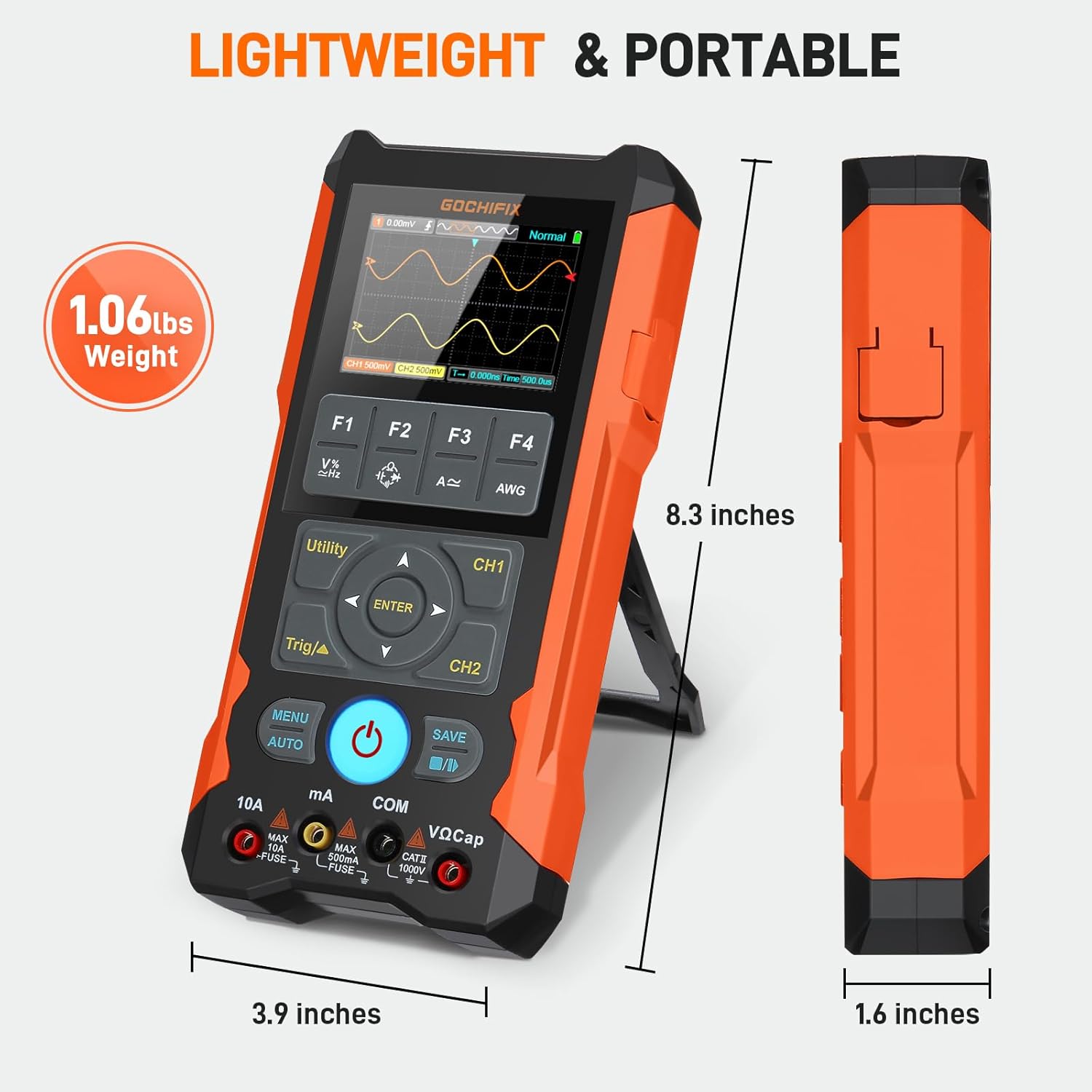
Figure 7.1.1: Physical dimensions and weight of the GOCHIFIX LG0304.
7.2 Oscilloscope Characteristics
- Analog Bandwidth: 80MHz
- Maximum Real-time Sampling Rate: 200Msps
- Vertical Resolution: 8 bits
- Nonlinearity: ±1 bit
- Number of Channels: 2
- Coupling Method: DC, AC, GND
- Input Impedance: Approximately 1MΩ
- Graduation: Vertical ± 4.0, Horizontal ± 6.0
- Vertical Sensitivity Range: 10mV/div ~ 10V/div at Input BNC
- Time Base Range: 5ns/div ~ 50s/div, 1-2-5 step
- Vertical Amplitude Accuracy: ± (5%+ 0.2div)
- Time Base Accuracy: ± (0.01% + 0.1div)
- Automatic Zero Reference: When Measuring at DC
- Scan Mode: Auto, Normal, Single
- Trigger Level: ± 4 div (0.04div per step)
- Trigger Slope Selection: Rising, Falling, Double
- Trigger Position Adjustment: ± 4 div (0.04div per step)
- Auto Setup: Automatically Sets Time Base and Vertical Amplitude
- Vernier Measurement Function: ΔV, ΔT
- Optional Bandwidth Limit: 20MHz, Typical
- Voltage Measurement Parameters: Vp-p, Vp, Vmax, Vmin, Vavg, Vrms
- Time Measurement Parameters: Freq, Period, +Width, -Width, +Duty, -Duty
- Automatic Measurement Accuracy: ± (5%+ 0.2div)
- Record Length: 6K Maximum for Single Channel, 3K per Channel for Dual Channel
7.3 Signal Source Characteristics
- Sine Wave, Waveform Frequency: 1Hz ~ 5MHz
- Square Wave, Waveform Frequency: 10Hz ~ 1MHz
- Triangular Wave, Waveform Frequency: 10Hz ~ 1MHz
- Waveform Amplitude: 5Vpp, 3Vpp, 2Vpp, 1Vpp, 500mVpp, 200mVpp, 100mVpp, 0Vpp
7.4 Digital Multimeter Characteristics
- Count: 6000
- DC Voltage: 0-1000V, Range: 600.0mV / 6.000V / 60.00V/ 600.0V / 1000V
- AC Voltage (True RMS): 0-750V, Range: 600.0mV / 6.000V / 60.00V/ 600.0V / 750V
- DC Current: 0-10A, Range: 60.00mA / 500.0mA / 6.000A / 10.00A
- AC Current (True RMS): 0-10A, Range: 60.00mA / 500.0mA / 6.000A / 10.00A
- Resistance: 0-60MΩ, Range: 600.0Ω / 6.000kΩ / 60.00kΩ / 600.0kΩ / 6.000MΩ / 60.00MΩ
- Capacitance: 0-100mF, Range: 9.999nF / 99.99nF / 999.9nF / 9.999µF / 99.99µF / 999.9µF / 9.999mF / 99.99mF
- Frequency: 9.999Hz ~ 9.999MHz
- Duty Cycle: 0.01~99.99% (AC 500mVp-p)
- Diode Test: Open Circuit Voltage: approximately 3.0 V, Maximum Test Current: approximately 2mA
- Continuity Test: Judgment Resistance: approximately 50Ω
- Automatic Range Switching: Applicable to each measurement function.
- Range Overflow Prompt: “O. L” (Over load)
- Multimeter Measurement Rate: 2.5 times/second
- Dynamic Data Window: Continues to dynamically refresh actual measurement data after the main display is maintained.
- Fuse Specifications: 500mA / 250V, 10A / 500V
8. Warranty and Support
For warranty information and technical support, please refer to the documentation included with your product or contact GOCHIFIX customer service through their official channels. Keep your purchase receipt as proof of purchase for warranty claims.
Return Policy: The product typically has a return policy of 31 days for refund/replacement. Please check with your retailer for specific terms.
Ask a question about this manual
Ask about setup, troubleshooting, compatibility, parts, safety, or missing instructions. Manuals+ will review the question and use this page’s manual context to help answer it.