1. Introduction
The MT-VIKI 8x8 4K Seamless HDMI Matrix Video Wall Controller is a versatile device designed for advanced video distribution and display management. It supports multiple display modes including video wall, matrix switching, and HDMI splitting, with resolutions up to 4K@30Hz. This manual provides detailed instructions for setup, operation, and troubleshooting to ensure optimal performance.
2. Package Contents
Verify that all items listed below are included in your package. If any items are missing or damaged, please contact customer support.
- 1x MT-VIKI 8x8 Seamless HDMI Matrix Switcher
- 1x Power Adapter
- 1x RS232 Cable
- 1x Ground Wire
- 1x IR Remote Controller
- 1x Rack Mount Ears & Screws
- 1x User Manual (QR code for digital version)

Scan the QR code for the user manual and software: http://qr61.cn/oVriYG/q16Y5HN
3. Setup and Connections
Follow these steps to properly connect your MT-VIKI HDMI Matrix Switcher.
3.1 Physical Connections
- Connect your HDMI source devices (e.g., PC, Laptop, Set-Top Box, Decoder) to the HDMI IN ports (IN 1-8) on the matrix switcher using HDMI cables.
- Connect your display devices (e.g., TV, Monitor, Projector, Splicing Screen) to the HDMI OUT ports (OUT 1-8) on the matrix switcher using HDMI cables.
- For audio output, connect external speakers to the 3.5mm Audio Out port.
- For control, connect an RS232 cable to the RS232 port or an Ethernet cable to the LAN port for Web GUI control.
- Connect the power adapter to the DC 12V port and plug it into a power outlet.
- Ensure the ground wire is properly connected for safety.
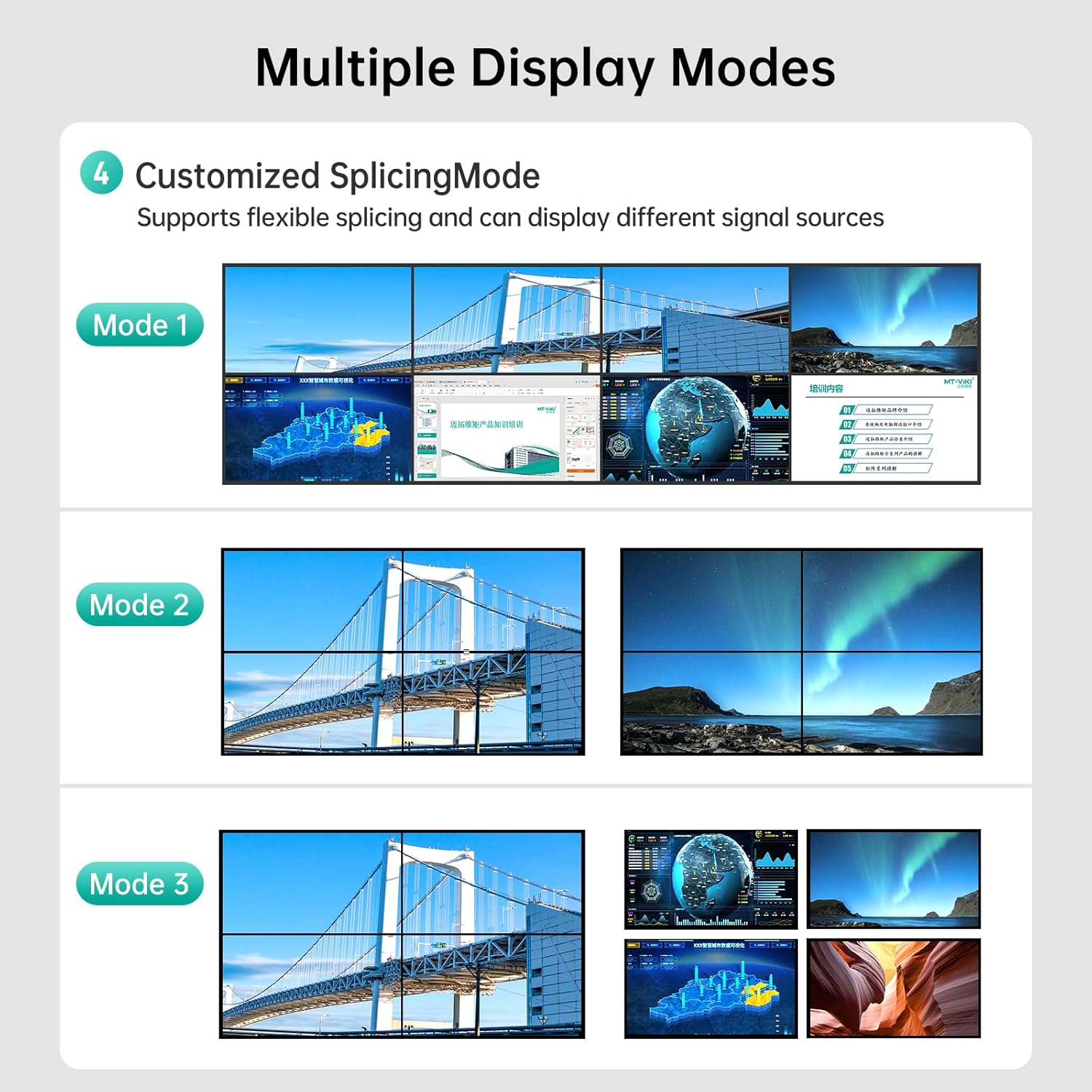

4. Operating Modes
The MT-VIKI HDMI Matrix Switcher supports several display modes to suit various applications.
4.1 Multiple Display Modes
- Splicing Mode (Video Wall): Combines multiple displays to form one large, high-definition image. Supports various configurations like 2x4, 4x2, 2x2, 1x8, 8x1. Output resolution is 1080p@60Hz in this mode.
- Splitter Display Mode: Duplicates a single input signal across multiple displays.
- Multi-view Mode: Displays multiple different input signals simultaneously on a single screen or across multiple screens.


4.2 Seamless Switching
The device features seamless switching, ensuring no delay or picture loss during transitions between input sources. This provides a smooth and professional viewing experience.

5. Control Methods
The MT-VIKI HDMI Matrix Switcher offers multiple ways to control its functions:
- Panel Buttons: Direct control using the buttons on the front panel.
- IR Remote: Use the included infrared remote control for convenient operation.
- RS-232: For professional integration and control via serial commands.
- LAN Port (Web GUI/APP): Access the device's web-based graphical user interface (GUI) or a dedicated mobile application for comprehensive control.

5.1 Web GUI Control
The Web GUI allows for intuitive control of input/output switching, scene management, and custom settings. It can be accessed via a web browser on a computer, iPad, or mobile phone connected to the same network as the matrix switcher.
Video 5.1: Demonstrates how to switch signal sources, rename channels, and manage scenes using the web GUI. This functionality is also available on mobile devices.

6. Advanced Features
6.1 EDID Management
The device supports EDID (Extended Display Identification Data) management to ensure optimal compatibility and display settings between sources and displays. This can help resolve issues like no display or incorrect resolutions.
Video 6.1: Guide on setting 1080p resolution for monitors and resolving 'no video source' issues by adjusting EDID settings on the matrix switcher.
Video 6.2: Instructions on how to configure EDID settings for optimal display performance.
6.2 Scene Storage and Recall
The device allows users to save up to 16 custom scene configurations, which can be recalled instantly. This is useful for quickly switching between complex display setups.

7. Specifications
| Feature | Detail |
|---|---|
| Product Dimensions | 7 x 19 x 4 inches |
| Item Weight | 6.19 pounds |
| ASIN | B0CQZL2KH6 |
| Manufacturer | MT-VIKI |
| Color | Black |
| Connector Type | HDMI |
| Compatible Devices | Gaming Console, Monitor, Television |
| Cable Type | HDMI |
| Max Resolution | 4K@30Hz (single screen), 1080p@60Hz (splicing mode) |
| Audio Support | PCM, Dolby AC3, DTS5.1, DTS7.1, DSD |
| HDCP Support | Yes |
8. Troubleshooting
This section addresses common issues you might encounter with the MT-VIKI HDMI Matrix Switcher.
8.1 No Display, Long Cable Issues, Snowflake, Moire
If you experience issues such as no display, signal degradation over long cables, or visual artifacts like snowflakes or moire patterns, adjusting the EDID settings can often resolve these problems. Refer to Section 6.1 for EDID management instructions.
Video 8.1: Solutions for display problems including no signal, issues with long cables, and visual noise.
8.2 Beep Sound Management
The device may emit a beep sound during operation or switching. You can enable or disable this sound as needed.
Video 8.2: Instructions on how to enable or disable the beep sound feature.
9. Maintenance
To ensure the longevity and optimal performance of your MT-VIKI HDMI Matrix Switcher, follow these maintenance guidelines:
- Cleaning: Use a soft, dry cloth to clean the exterior of the device. Avoid using liquid or aerosol cleaners, as they may damage the unit.
- Ventilation: Ensure proper ventilation around the device. Do not block any ventilation openings.
- Power: Disconnect the power adapter when the device is not in use for extended periods.
- Environment: Operate the device in a cool, dry environment, away from direct sunlight, heat sources, and excessive moisture.
10. Warranty and Support
For warranty information and technical support, please refer to the documentation provided with your product or visit the official MT-VIKI website. You may also contact MT-VIKI customer service directly for assistance with product setup, operation, or troubleshooting.
Manufacturer: MT-VIKI
Contact: Refer to the official MT-VIKI website or the contact information provided in your product packaging.


