
1. Introduction
This manual provides detailed instructions for the installation, operation, and maintenance of your Alpine HDS-990 Hi-Res Digital Media Player and Alpine HDP-D90 14-Channel Amplifier. Please read this manual thoroughly before using the product to ensure proper and safe operation.
The Alpine Status system is engineered to deliver an unparalleled audio experience, supporting Hi-Res Audio files at 192kHz/24bit, the current industry standard for high-fidelity music playback.
2. Product Overview
2.1. Alpine HDS-990 Hi-Res Digital Media Player
The HDS-990 is a high-resolution digital media audio source designed for superior sound quality. It features a compact system control panel and a hide-away black box for flexible installation. The hi-res color display provides all playback data, including album cover artwork.

Figure 2.1: Alpine HDS-990 Digital Media Player control unit. This image shows the front panel of the HDS-990 with its display, rotary encoder, and control buttons.
Key features include:
- High-performance RCA outputs.
- Optical TOSLINK port for digital audio connection.
- 4x 50 Watts hi-resolution amplified speaker output options.
- USB Host and Mix Port for various media inputs.

Figure 2.2: Alpine HDS-990 Digital Media Player black box. This image displays the main processing unit of the HDS-990, designed to be hidden from view.
2.2. Alpine HDP-D90 14-Channel Amplifier
The HDP-D90 is a 14-channel amplifier with integrated digital signal processing (DSP), providing powerful and precise audio amplification. It delivers 50 watts RMS x 8 channels and 80 watts RMS x 4 channels, making it suitable for complex audio systems.

Figure 2.3: Alpine HDP-D90 14-Channel Amplifier. This image shows the top view of the HDP-D90 amplifier, highlighting its sleek design and status indicator.
Key features include:
- Integrated Digital Signal Processing for fine-tuning audio.
- Multiple output channels for versatile speaker configurations.
- Robust power delivery for high-fidelity sound.
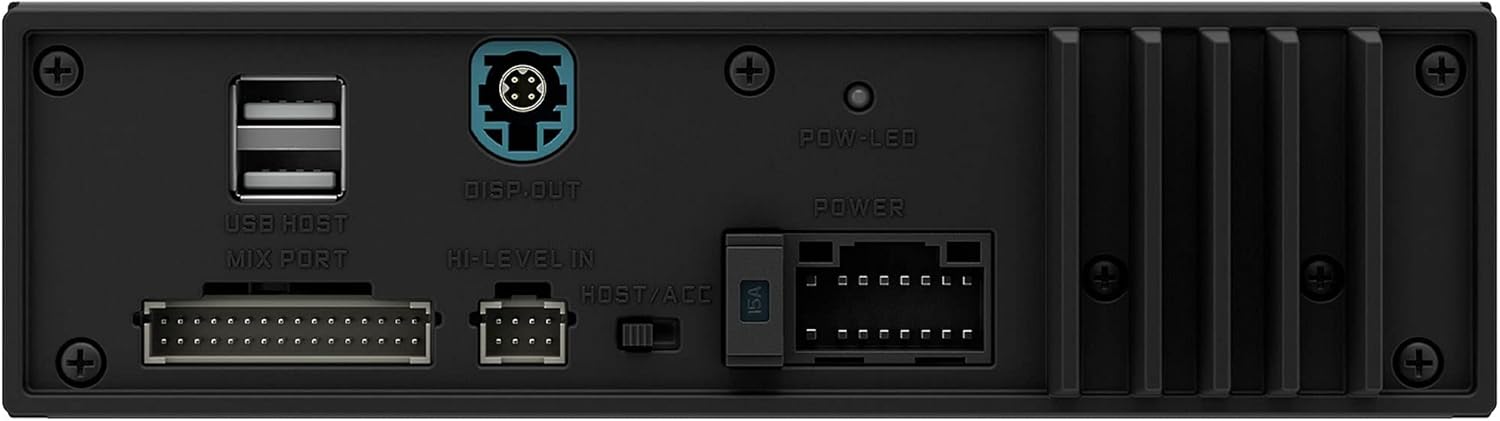
Figure 2.4: Alpine HDP-D90 Amplifier rear connections. This image details the power, ground, and speaker output terminals on the HDP-D90 amplifier.
3. Setup and Installation
Proper installation is crucial for optimal performance. It is highly recommended that installation be performed by a qualified professional.
3.1. Pre-Installation Checklist
- Ensure the vehicle's battery is disconnected before starting any wiring.
- Gather all necessary tools: wire strippers, crimpers, screwdrivers, multimeter.
- Confirm all components are present: HDS-990 control unit, HDS-990 black box, HDP-D90 amplifier, wiring harnesses.
3.2. Mounting Locations
Choose mounting locations that are dry, well-ventilated, and away from direct heat sources or moving parts.
- HDS-990 Control Unit: Typically mounted in the dashboard for easy access and visibility.
- HDS-990 Black Box: Can be hidden under a seat, behind the dashboard, or in the trunk.
- HDP-D90 Amplifier: Suitable locations include under a seat, in the trunk, or mounted to a custom amplifier rack. Ensure adequate airflow around the amplifier.
3.3. Wiring Connections
Refer to the detailed wiring diagrams provided in the separate installation guide for your specific vehicle. General connections include:
- Power and Ground: Connect the HDP-D90 amplifier directly to the vehicle's battery with appropriate gauge power and ground wires. Ensure a solid ground connection to the vehicle chassis.
- Remote Turn-On: Connect the remote turn-on lead from the HDS-990 black box to the HDP-D90 amplifier.
- Audio Signal: Connect the RCA outputs from the HDS-990 black box to the inputs of the HDP-D90 amplifier. Utilize the optical TOSLINK connection for the highest fidelity digital audio transfer if supported by your setup.
- Speaker Outputs: Connect speaker wires from the HDP-D90 amplifier's output terminals to your vehicle's speakers. Pay close attention to polarity.
- HDS-990 Control Unit to Black Box: Connect the control unit to the black box using the supplied proprietary cable.

Figure 3.1: Overview of Alpine HDS-990 and HDP-D90 components. This image shows both the HDS-990 control unit and black box, along with the HDP-D90 amplifier, illustrating the complete system.
4. Operating Instructions
4.1. Powering On/Off
The system will power on automatically when the vehicle's ignition is turned to the ACC or ON position, provided the remote turn-on wire is correctly connected. To power off, turn the ignition to the OFF position.
4.2. Basic Controls (HDS-990)
- Rotary Encoder: Turn to adjust volume. Press to confirm selections in menus.
- SRC Button: Press to cycle through available audio sources (USB, Bluetooth, Optical, etc.).
- Play/Pause: Controls media playback.
- Skip/Track: Navigates between tracks or menu items.
- Menu/Settings: Accesses system settings and audio adjustments.
4.3. Audio Source Selection
Use the SRC button on the HDS-990 control unit to select your desired audio source. The display will show the currently active source.
- USB: Connect a USB drive containing audio files. The HDS-990 supports various high-resolution formats.
- Bluetooth: Pair your mobile device via Bluetooth for wireless audio streaming.
- Optical: For external digital audio sources connected via the TOSLINK port.
4.4. Sound Customization (HDP-D90 DSP)
The HDP-D90's integrated DSP allows for extensive sound customization. Access these settings through the HDS-990's menu system. Adjustments may include:
- Equalizer: Fine-tune frequency response for optimal sound.
- Crossover: Set frequency cut-offs for different speaker types.
- Time Correction: Adjust delay for each speaker to ensure sound arrives at the listening position simultaneously.
- Level Control: Independently adjust output levels for each channel.
For detailed DSP adjustments, refer to the dedicated DSP software manual or consult an Alpine authorized dealer.
5. Maintenance
Regular maintenance ensures the longevity and optimal performance of your Alpine system.
5.1. Cleaning
- Control Unit Display: Use a soft, lint-free cloth to gently wipe the display. For stubborn smudges, slightly dampen the cloth with water or a screen-safe cleaner. Avoid abrasive materials or harsh chemicals.
- Components: Wipe down the HDS-990 black box and HDP-D90 amplifier with a dry, soft cloth. Ensure no dust or debris accumulates in ventilation openings.
5.2. Fuse Replacement (HDP-D90)
The HDP-D90 amplifier is protected by fuses. If the amplifier fails to power on, check the fuses. Always replace blown fuses with new ones of the exact same type and rating (e.g., 30A ATC fuse). Using an incorrect fuse can cause damage or fire.
Figure 5.1: HDP-D90 Amplifier fuse location. This image highlights the fuse compartment on the HDP-D90 amplifier's rear panel.
5.3. Software Updates
Periodically check the Alpine website for firmware updates for both the HDS-990 and HDP-D90. Updates can improve performance, add new features, or resolve bugs. Follow the instructions provided with the update files carefully.
6. Troubleshooting
If you encounter issues with your Alpine system, refer to the following common problems and solutions. If the problem persists, contact Alpine customer support or an authorized service center.
| Problem | Possible Cause | Solution |
|---|---|---|
| No Power to HDS-990/HDP-D90 | Blown fuse; Loose power/ground connection; Remote turn-on issue. | Check and replace fuses; Verify all power and ground connections are secure; Ensure remote turn-on wire receives 12V when ignition is on. |
| No Sound Output | Incorrect source selected; Muted volume; Loose RCA/speaker connections; DSP settings misconfigured. | Select correct audio source; Increase volume; Check all audio cables and speaker wires; Reset DSP settings to default or reconfigure. |
| Distorted Sound | Gain set too high; Speaker impedance mismatch; Damaged speaker/wiring. | Adjust amplifier gain settings; Verify speaker impedance matches amplifier output; Inspect speakers and wiring for damage. |
| Bluetooth Connection Issues | Device not paired; Interference; Bluetooth module error. | Ensure device is in pairing mode and HDS-990 is discoverable; Move closer to the unit; Try re-pairing or resetting Bluetooth settings. |
7. Specifications
Below are the key specifications for the Alpine HDS-990 and HDP-D90 system.
7.1. Alpine HDS-990 Digital Media Player
- Supported Audio Formats: Hi-Res Audio (192kHz/24bit), FLAC, WAV, MP3, WMA, AAC.
- Connectivity: USB Host, Bluetooth, Optical TOSLINK, RCA Outputs.
- Amplified Outputs: 4 x 50 Watts (Hi-Res amplified speaker output options).
- Display: Hi-Res Color Display.
7.2. Alpine HDP-D90 14-Channel Amplifier
- Channels: 14-Channel (12-channel with DSP).
- RMS Power Output: 50 Watts RMS x 8 channels + 80 Watts RMS x 4 channels.
- Total Output Wattage: 200 Watts (as per product specifications, likely referring to a specific configuration or peak).
- Audio Output Mode: Stereo.
- Surround Sound Channel Configuration: 7.1 (via DSP).
- Special Feature: Digital Signal Processing (DSP).
7.3. General System Specifications
- Brand: Alpine
- Model Numbers: HDS-990 (Digital Media Player), HDP-D90 (Amplifier)
- Connectivity Technology: RCA
- Compatible Devices: Speaker
- Date First Available: December 26, 2023
8. Warranty and Support
Alpine products are designed and manufactured to the highest quality standards. For warranty information, please refer to the warranty card included with your product or visit the official Alpine website. Keep your proof of purchase for warranty claims.
For technical support, service, or further inquiries, please contact Alpine customer service or an authorized Alpine dealer. You can find contact information on the official Alpine website: www.alpine-usa.com


