
1. Introduction
This manual provides essential information for the safe and efficient installation, operation, and maintenance of the Turck NI8U-EM12E-AP6X-H1141 Inductive Proximity Sensor. Please read this manual thoroughly before using the product and retain it for future reference. This sensor is designed for non-contact detection of metallic objects.
2. Safety Instructions
- Qualified Personnel: Installation, setup, and maintenance must only be performed by qualified personnel familiar with electrical systems and safety regulations.
- Power Disconnection: Always disconnect power to the device and associated equipment before performing any installation, wiring, or maintenance tasks.
- Environmental Conditions: Ensure the sensor is used within its specified environmental limits (temperature, humidity, vibration) to prevent damage and ensure reliable operation.
- Wiring: Follow all local and national electrical codes. Ensure correct polarity and voltage supply as specified in the technical data. Incorrect wiring can damage the sensor or connected equipment.
- Mounting: Securely mount the sensor to prevent movement or damage from vibration. Avoid mounting near strong magnetic fields or sources of electrical noise.
- Intended Use: Use the sensor only for its intended purpose of detecting metallic objects. Do not use it for safety-critical applications unless explicitly certified for such use.
3. Product Overview
The Turck NI8U-EM12E-AP6X-H1141 is an inductive proximity sensor designed for reliable detection in industrial environments. It features an M12 barrel housing, 3-wire DC PNP normally open (NO) output, and an 8mm non-flush sensing range. The sensor operates on a 10-30VDC supply voltage and connects via an M12 connector.
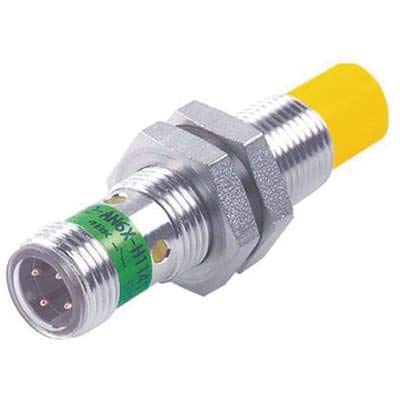
Figure 1: Turck NI8U-EM12E-AP6X-H1141 Inductive Proximity Sensor. This image shows the M12 barrel housing and the M12 connector end of the sensor.
Key Features:
- Model: NI8U-EM12E-AP6X-H1141
- Sensing Principle: Inductive
- Housing Style: M12 Barrel
- Output Type: 3-wire DC PNP, Normally Open (NO)
- Sensing Range: 8 mm (non-flush)
- Supply Voltage: 10-30 VDC
- Connection: M12 Connector
- Housing Material: Stainless steel, 1.4301
4. Setup & Installation
4.1 Mounting
- Select a mounting location that provides stable support and is free from excessive vibration or mechanical shock.
- Ensure sufficient clearance around the sensor head to avoid interference from surrounding metallic objects, especially for non-flush mounting types. The 8mm non-flush design requires a clear zone around the sensing face.
- Mount the sensor using appropriate mounting brackets or by threading it into a suitable M12 mounting hole. Tighten securely but do not overtighten.
- Position the sensor so that the target object will pass within the specified 8mm sensing range.
4.2 Wiring
The NI8U-EM12E-AP6X-H1141 is a 3-wire DC PNP sensor. Refer to the wiring diagram below for correct connections. Always ensure power is disconnected before wiring.
Figure 2: Typical 3-wire DC PNP Wiring Diagram. This diagram illustrates the connection of the sensor to a power supply and load. Brown wire connects to +VDC, Blue wire to 0VDC (GND), and Black wire to the load (output).
| Pin | Wire Color | Function |
|---|---|---|
| 1 | Brown | +VDC (10-30VDC) |
| 3 | Blue | 0VDC (GND) |
| 4 | Black | PNP Normally Open (NO) Output |
After wiring, connect the M12 connector securely to the sensor. Ensure the connection is tight to prevent ingress of dust and moisture.
5. Operating Principles
The Turck NI8U-EM12E-AP6X-H1141 is an inductive proximity sensor that operates on the principle of electromagnetic induction. An oscillating electromagnetic field is generated at the sensing face. When a metallic object enters this field, eddy currents are induced in the object. These eddy currents absorb energy from the oscillator, causing its amplitude to decrease. The sensor detects this change in oscillation amplitude and triggers its output when the amplitude drops below a certain threshold.
- Sensing Range: The sensor has a nominal sensing range of 8mm for standard target materials (e.g., mild steel). The actual sensing distance can vary depending on the target material, size, and shape.
- Output Function: This is a PNP Normally Open (NO) sensor. This means that when a metallic object is detected within the sensing range, the output (black wire) switches to the positive supply voltage (+VDC). When no object is detected, the output is open (off).
- LED Indicator: Most inductive proximity sensors include an LED indicator (often yellow or green) that illuminates when an object is detected, providing visual confirmation of operation.
6. Maintenance
The Turck NI8U-EM12E-AP6X-H1141 sensor is designed for minimal maintenance. However, regular inspection and cleaning can ensure optimal performance and longevity.
- Cleaning: Keep the sensing face free from dirt, dust, metal shavings, and other debris. Use a soft, damp cloth to clean the sensor. Avoid abrasive cleaners or solvents that could damage the housing material.
- Inspection: Periodically check the sensor for physical damage, such as cracks in the housing or bent wires. Ensure the M12 connector is securely fastened and free from corrosion.
- Mounting Security: Verify that the sensor is still securely mounted and has not shifted, which could affect its sensing performance.
- Environmental Check: Confirm that the operating environment remains within the sensor's specified limits.
7. Troubleshooting
If the sensor is not functioning as expected, refer to the following troubleshooting guide:
| Problem | Possible Cause | Solution |
|---|---|---|
| Sensor not detecting objects |
|
|
| Sensor output always ON (PNP NO) |
|
|
| Intermittent detection |
|
|
8. Specifications
| Parameter | Value |
|---|---|
| Model | NI8U-EM12E-AP6X-H1141 |
| Sensing Principle | Inductive |
| Housing Style | M12 Barrel |
| Output Type | 3-wire DC PNP, Normally Open (NO) |
| Sensing Range (Sn) | 8 mm |
| Mounting Type | Non-flush |
| Supply Voltage (Ub) | 10-30 VDC |
| No-load Current (Io) | ≤ 15 mA |
| Output Current (Ie) | ≤ 200 mA |
| Switching Frequency (f) | ≤ 1.5 kHz |
| Connection | M12 x 1 Connector |
| Housing Material | Stainless steel, 1.4301 |
| Operating Temperature | -25 °C to +70 °C (-13 °F to +158 °F) |
| Protection Class | IP67 |
9. Warranty & Support
Turck products are manufactured to high standards and are typically covered by a standard manufacturer's warranty against defects in materials and workmanship. For specific warranty terms and conditions, please refer to the documentation provided with your purchase or visit the official Turck website.
For technical support, service, or replacement parts, please contact your local Turck distributor or Turck customer service. When contacting support, please have your product model number (NI8U-EM12E-AP6X-H1141) and serial number (if applicable) readily available.
Turck Official Website: www.turck.com


