1. Introduction
The MAIWO 11-in-1 USB C Laptop Docking Station with M.2 Enclosure is a versatile peripheral designed to expand the connectivity and storage capabilities of your USB-C enabled devices. This compact hub integrates multiple ports for data transfer, video output, network connectivity, and power delivery, alongside a built-in M.2 SSD enclosure for additional storage.
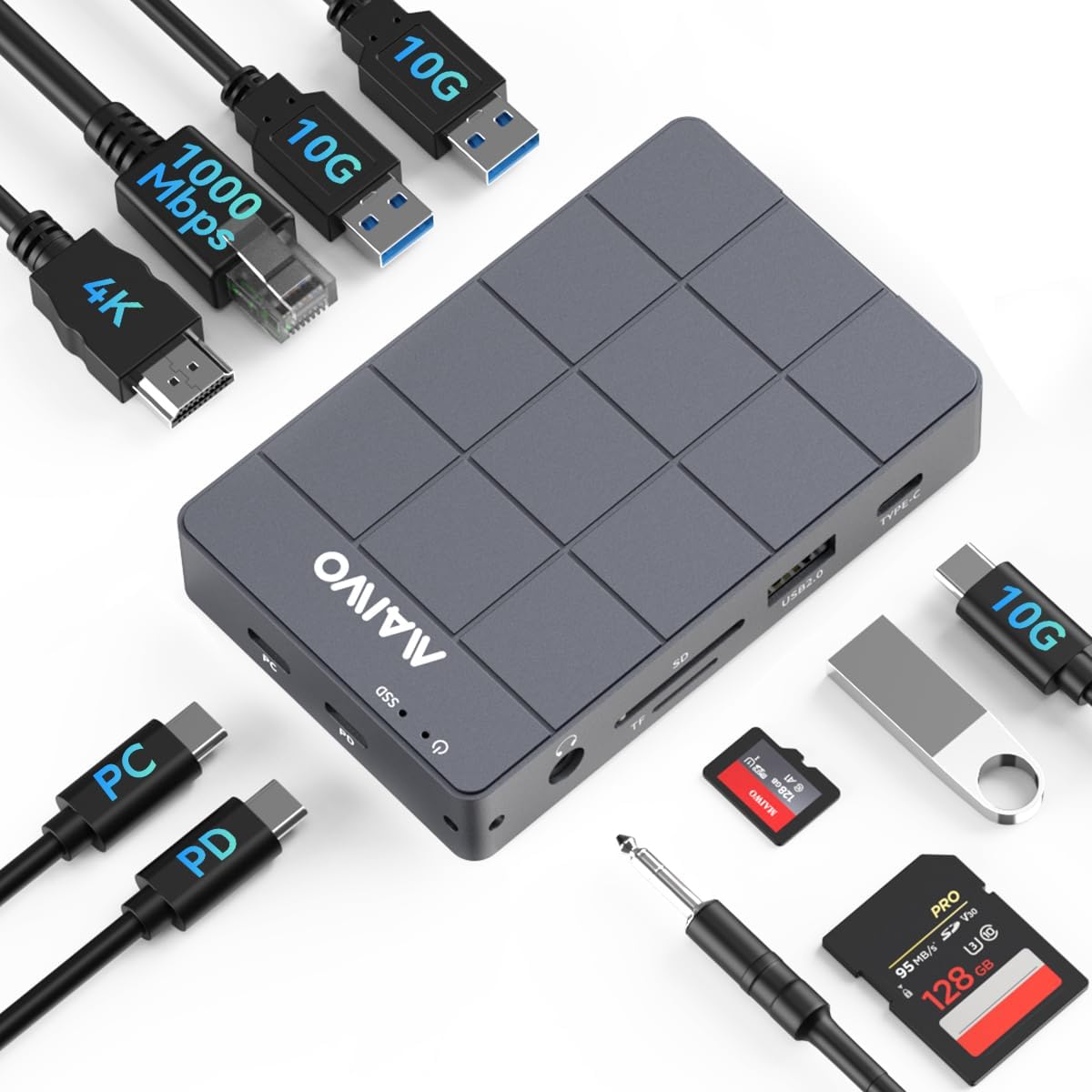
Figure 1: MAIWO 11-in-1 Docking Station with various connections.
2. Key Features
- 11-in-1 Connectivity: Features a 10Gbps M.2 NVMe/SATA SSD enclosure, 100W Power Delivery (PD) port, 4K HDMI video output, 10Gbps USB-C 3.1 Gen2 port, two 10Gbps USB-A 3.1 Gen2 ports, one USB-A 2.0 port, 1000Mbps Gigabit Ethernet, 3.5mm audio port, and SD/TF card readers.
- High-Speed Data Transfer: USB 3.1 Gen2 (Type-C) interface offers up to 10Gbps bandwidth, supporting M.2 NVMe/SATA SSDs in sizes 2230/2242/2260/2280 with UASP and TRIM support. Backward compatible with USB 3.1 Gen1 and USB 3.0 (up to 5Gbps).
- 100W Power Delivery: Provides up to 100W of power to ensure stable operation of the hub and connected devices, even under heavy data loads.
- Durable and Efficient Design: Constructed from low-density, high-strength aluminum alloy with CNC precision cutting and anodic oxidation for durability and effective heat dissipation. Includes a silicone thermal pad for optimal performance.
- Tool-Free M.2 SSD Installation: Features a magnetic aluminum cover for easy, tool-free installation of M.2 Solid State Drives.
- Wide Compatibility: Supports a broad range of devices including Laptops, MacBook Pro/Air, Mac Mini, iPad, iPad Pro, Nintendo Switch, Smartphones, Keyboards, Mice, Printers, and Hard Drives.
3. Package Contents
- 1x MAIWO 11-in-1 Laptop Docking Station with M.2 SSD Reader
- 1x USB-C to USB-C Data Cable with Audio Signal (80mm)
- 1x Silicone Heat Dissipation Pad
- 1x Silicone Plug for Fixing SSD
- 1x User Manual

Figure 2: Included items in the package.
4. Setup Guide
4.1. M.2 SSD Installation
- Gently slide open the magnetic aluminum cover of the M.2 enclosure section on the docking station.
- Insert your M.2 NVMe or SATA SSD (compatible with 2230/2242/2260/2280 sizes) into the designated slot. Ensure it is seated correctly.
- Secure the SSD using the provided silicone plug.
- Apply the silicone thermal pad onto the SSD to aid in heat dissipation.
- Close the magnetic aluminum cover until it clicks securely into place.

Figure 3: Compatible M.2 SSD types and sizes.

Figure 4: Tool-free M.2 SSD installation with magnetic cover.
4.2. Connecting to Your Laptop
- Connect the provided USB-C to USB-C data cable from the 'PC' port on the docking station to an available USB-C port on your laptop.
- For optimal performance and to power the docking station and connected devices, connect a 100W PD charger (not included) to the 'PD' port on the docking station.

Figure 5: Overview of docking station ports.
4.3. Connecting Peripherals
- HDMI: Connect an HDMI cable from the docking station to your monitor or TV for 4K HD video output.
- Ethernet: Plug an Ethernet cable into the RJ45 port for a stable 1000Mbps wired network connection.
- USB Devices: Use the USB-C 3.1 Gen2, USB-A 3.1 Gen2, and USB-A 2.0 ports to connect external hard drives, flash drives, keyboards, mice, and other USB peripherals.
- SD/TF Cards: Insert your SD or TF (MicroSD) cards into the respective slots for data access.
- Audio: Connect headphones or speakers to the 3.5mm audio port.
5. Operating Instructions
5.1. Power Delivery
The 100W PD port allows you to charge your laptop while using the docking station. Ensure a compatible USB-C PD charger is connected to the 'PD' port on the hub. This also provides sufficient power for all connected peripherals to function correctly.

Figure 6: 100W Power Delivery functionality.
5.2. Data Transfer
Utilize the USB 3.1 Gen2 ports (Type-C and Type-A) for high-speed data transfer up to 10Gbps. The M.2 SSD enclosure also supports these speeds for rapid file access and storage. The USB 2.0 port is suitable for connecting devices like keyboards and mice that do not require high bandwidth.

Figure 7: Support for various external storage devices.
5.3. Video Output
Connect an external display via the HDMI port to extend or mirror your laptop's screen. The HDMI port supports resolutions up to 4K at 60Hz, providing a clear and vibrant visual experience.
5.4. Network Connection
The integrated Gigabit Ethernet port provides a stable and fast wired network connection up to 1000Mbps, ideal for online gaming, streaming, and large file transfers where Wi-Fi might be unreliable.

Figure 8: Gigabit Ethernet Interface.
6. Maintenance
To ensure the longevity and optimal performance of your MAIWO docking station, keep it in a clean, dry environment. The aluminum alloy casing and included silicone thermal pad are designed for efficient heat dissipation. Avoid blocking the ventilation areas and ensure proper airflow around the device, especially during prolonged use or heavy data operations.

Figure 9: Heat Dissipation Design.
7. Troubleshooting
- No Power/Intermittent Connection: Ensure the 100W PD charger is securely connected to the docking station and the USB-C cable to your host device. Try a different USB-C port on your laptop if available.
- Display Issues: Verify that the HDMI cable is properly connected to both the docking station and the monitor. Check your display settings on your computer to ensure the external display is detected and configured correctly.
- M.2 SSD Not Detected: Confirm the M.2 SSD is correctly installed in the enclosure. For new SSDs, it may need to be initialized and formatted through your operating system's Disk Management utility.
- Slow Data Transfer: Ensure you are using USB 3.1 Gen2 compatible cables and devices for optimal 10Gbps speeds. Older USB devices or cables will operate at lower speeds.
- Ethernet Not Working: Check the Ethernet cable connection. Ensure your computer's network settings are configured to use the wired connection.
8. Specifications
| Product Dimensions | 4.13 x 2.6 x 0.79 inches |
| Item Weight | 1.1 pounds (0.5 Kilograms) |
| Model Number | 11-in-1 |
| Brand | MAIWO |
| Color | Dark Grey |
| Hardware Interface | 3.5mm Audio, Ethernet, USB 2.0 Type A, USB 3.1 Type A, USB 3.1 Type C, HDMI |
| Compatible Devices | Laptop, Mac, iPad, iPad Pro, Switch, Smartphone, Keyboard, Mouse, Printer, Hard Drive |
| Total USB Ports | 5 |
| Number of Ports | 10 (excluding M.2 slot) |
| Total HDMI Ports | 1 |
| Wattage | 100 watts (Power Delivery) |
9. Warranty and Support
For warranty information and technical support, please refer to the official MAIWO website or contact their customer service. Keep your purchase receipt for warranty claims.
10. Product Overview Video
Video 1: Official product video demonstrating the features and usage of the MAIWO USB C Hub with M.2 SSD Enclosure.


