
1. Introduction
The Viconor Red Light Therapy Device for Hands is designed to provide targeted red light and near-infrared light therapy to the hands, fingers, and wrists. This device combines 660nm red light and 880nm near-infrared (NIR) light to support hand comfort and well-being. It is suitable for individuals experiencing discomfort from manual labor, musical instrument playing, typing, or sports activities.
2. Safety Information
- Consult a Physician: If you have any pre-existing medical conditions, are pregnant, or are taking medications, consult your doctor before using this device.
- Eye Protection: Avoid direct eye exposure to the LED lights. Although the device is designed for hands, prolonged direct viewing of the lights is not recommended.
- Skin Sensitivity: If you experience any skin irritation, redness, or discomfort during or after use, discontinue use immediately.
- Temperature Control: The device offers various temperature settings. Always start with the lowest setting and gradually increase if comfortable. Do not use if the device feels excessively hot to the touch.
- Not Rechargeable: This device is not rechargeable. It requires a continuous power supply from a wall outlet or a mobile power bank during operation.
- Water and Liquids: Keep the device away from water and other liquids. Do not immerse the device in water.
- Children and Pets: Keep out of reach of children and pets.
- Damage: Do not use the device if it appears damaged or if the power cord is frayed.
3. Product Components
The Viconor Red Light Therapy Device for Hands typically includes the following components:
- Red Light Therapy Glove (one unit)
- USB Power Cable (integrated)
- User Manual (this document)

Image: The Viconor Red Light Therapy Device for Hands, a black glove-like mitt with a power button and USB cable.
4. Setup
The Viconor Red Light Therapy Device is designed for simple setup and immediate use.
- Unpack: Carefully remove the device from its packaging.
- Connect Power: Locate the integrated USB power cable. Connect the USB end of the cable to a suitable power source. This can be:
- A standard USB wall adapter (not included).
- A mobile power bank (not included).
- Placement: Ensure the device is placed on a flat, stable surface or worn comfortably on your hand.
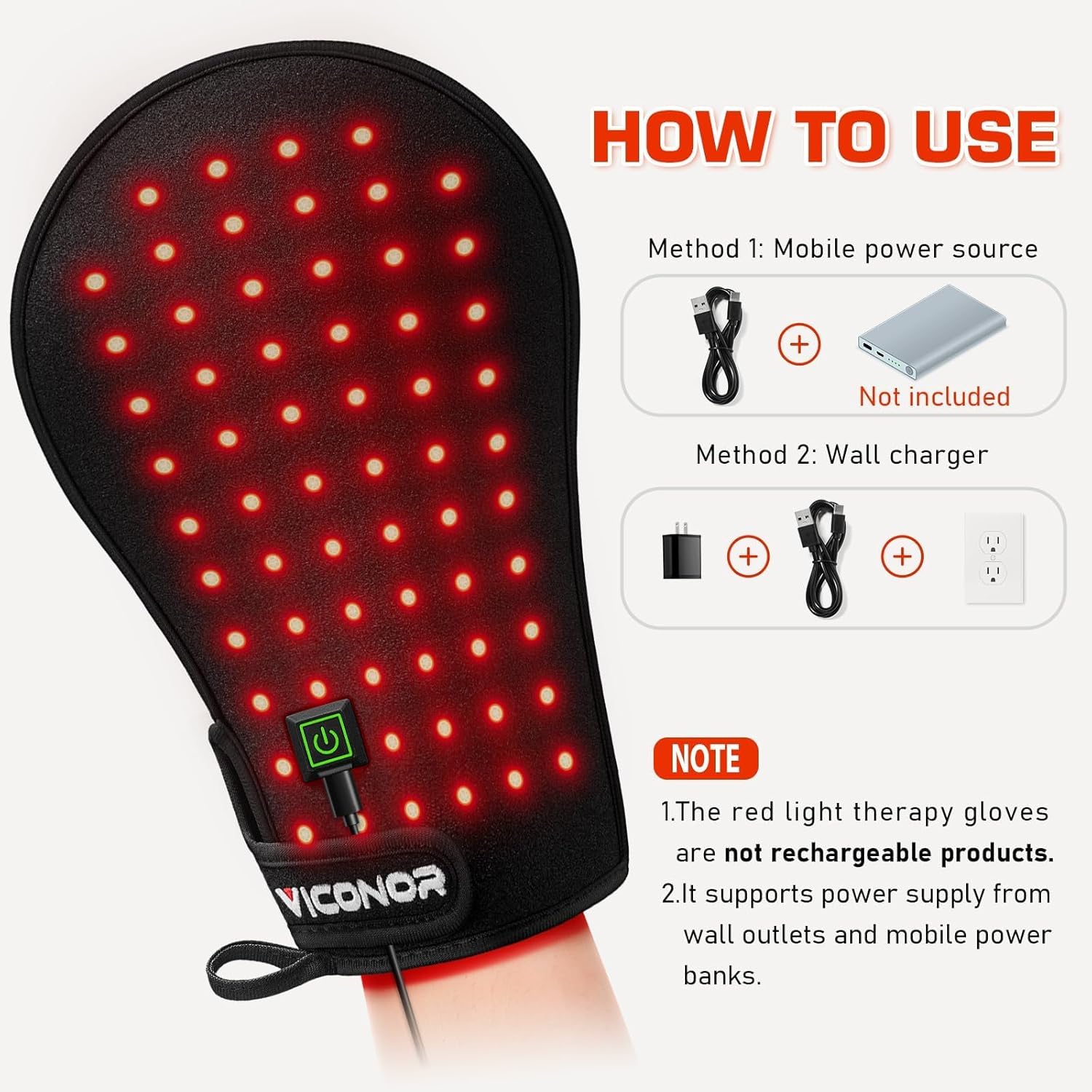
Image: Diagram showing two methods of powering the device: via a mobile power source (power bank) or a wall charger. Both require the integrated USB cable.
5. Operating Instructions
Follow these steps to operate your Viconor Red Light Therapy Device:
- Wear the Device: Slide your hand into the glove-like device. Ensure it fits comfortably. The material has a degree of elasticity, but it is not suitable for palm widths exceeding 15cm.
- Power On: Press the power button located on the device's strap. The device will illuminate, indicating it is active.
- Select Mode: The device features 4 modes, combining different light intensities and temperatures. Press the power button repeatedly to cycle through the modes:
- Mode 1 (Red Light): 2W, 97°F, 25% absorbed energy.
- Mode 2 (Blue Light): 4W, 110°F, 75% absorbed energy.
- Mode 3 (Green Light): 6W, 115°F, 100% absorbed energy.
- Mode 4 (Purple Light - Pulse Mode): 3W, 108°F, Pulse mode.
- Treatment Duration: A typical session duration is 30 minutes daily. Consistency is key for optimal results.
- Power Off: After your session, press and hold the power button until the lights turn off. Disconnect the device from the power source.

Image: An illustration detailing the four operating modes of the Viconor Red Light Therapy Device, showing different light colors, wattage, temperature, and absorbed energy levels.

Image: A person relaxing on a couch, using the Viconor Red Light Therapy Device on their hand, demonstrating comfortable use during leisure activities.
6. Maintenance
Proper care will extend the life of your Viconor Red Light Therapy Device.
- Cleaning: The device features a TPU film for easy cleaning. Wipe the surface with a soft, damp cloth. Do not use harsh chemicals or abrasive cleaners. Ensure the device is completely dry before storage or next use.
- Storage: Store the device in a cool, dry place away from direct sunlight and extreme temperatures.
- Cable Care: Do not bend or crimp the power cable excessively. Avoid placing heavy objects on the cable.

Image: A close-up view of the Viconor Red Light Therapy Device, highlighting the 3-in-1 lamp beads (660nm Red light, 850nm NIR light) and the skin-friendly, easy-to-clean TPU film.
7. Troubleshooting
If you encounter issues with your device, refer to the following common problems and solutions:
| Problem | Possible Cause | Solution |
|---|---|---|
| Device does not turn on. | Not connected to power, or power source issue. | Ensure the USB cable is securely connected to both the device and a working power source (wall adapter or power bank). Try a different power source or adapter. |
| Lights are dim or flickering. | Insufficient power supply. | Ensure your power source provides adequate power. If using a power bank, check its charge level. |
| Device feels too hot or not warm enough. | Incorrect mode selected. | Cycle through the modes by pressing the power button to find a comfortable temperature setting. If it feels too hot, discontinue use. |
If the problem persists after trying these solutions, please contact Viconor Customer Support.
8. Specifications
- Model: B0CQYHXJKP
- Brand: Viconor
- Light Wavelengths: 660nm (Red Light), 880nm (Near-Infrared Light)
- Power Modes: 4 (Red, Blue, Green, Purple Pulse)
- Temperature Range: Approximately 97°F to 115°F (depending on mode)
- Power Source: USB (requires external wall adapter or power bank, not included)
- Material: Baby-grade fabric with TPU film
- Item Weight: 11.3 ounces
- Package Dimensions: 12.09 x 7.72 x 0.67 inches
9. Warranty and Support
Viconor is committed to customer satisfaction. If you have any questions or require assistance with your device, please contact our After-Sales Service Team.
- Return Policy: The product includes 30-day hassle-free return support.
- Customer Service: Contact Viconor After-Sales Service Team anytime, anywhere for customized light therapy advice and support.