
1. Overview
The PGYTECH CapLock Action Camera Quick Release Set is an innovative system designed to streamline the process of attaching and detaching action cameras and smartphones to various mounting solutions. It eliminates the need for tedious manual adjustments, offering a quick, secure, and versatile connection for your photography and video equipment.
2. Key Features
- Quick Release System: Eliminates the tedious process of rotating and removing traditional sports camera interface knobs, realizing one-step installation, and the dual-lock design enhances security.
- Quick Connection: Enables rapid connection of small photography and video equipment such as action cameras and mobile phones to bracket products like tripods.
- Widely Adaptable: Features a 1/4-inch interface at the bottom, allowing broad adaptation to tripods, action camera mounts, camera cages, and other accessories.
- Two Quick-release Plates: Includes a standard action camera quick-release plate and a 1/4-inch quick-release plate, suitable for action cameras and mobile phones.
- Free Switching: The quick-release plate supports four-way installation, enabling smooth transitions between self-portraits and other photo/video captures.
3. Package Contents
Upon opening the package, you will find the following components:
- 1 x CapLock Base (with 1/4-inch threaded hole at the bottom)
- 1 x Universal Adapter (with 1/4-inch threaded stud at the top)
- 1 x Traditional Action Camera Adapter (three-finger design)
- 1 x Allen Wrench (for tightening the universal adapter)
- 1 x Instruction Manual
- 1 x Set of PGYTECH Stickers (white and black)

Image: All components included in the PGYTECH CapLock Action Camera Quick Release Set.
4. Setup Guide
4.1 Attaching Adapters to Your Camera
The kit provides two types of adapters to suit different camera mounting needs:
- Universal Adapter (1/4-inch threaded stud):
This adapter is ideal for action cameras or other devices with a 1/4-inch threaded hole at their base. Screw the universal adapter onto the bottom of your camera. Use the provided Allen wrench or a standard screwdriver/coin to firmly tighten the nut on the adapter's bottom for a secure fit. Once attached, this adapter can remain on your camera for quick attachment to the CapLock base.
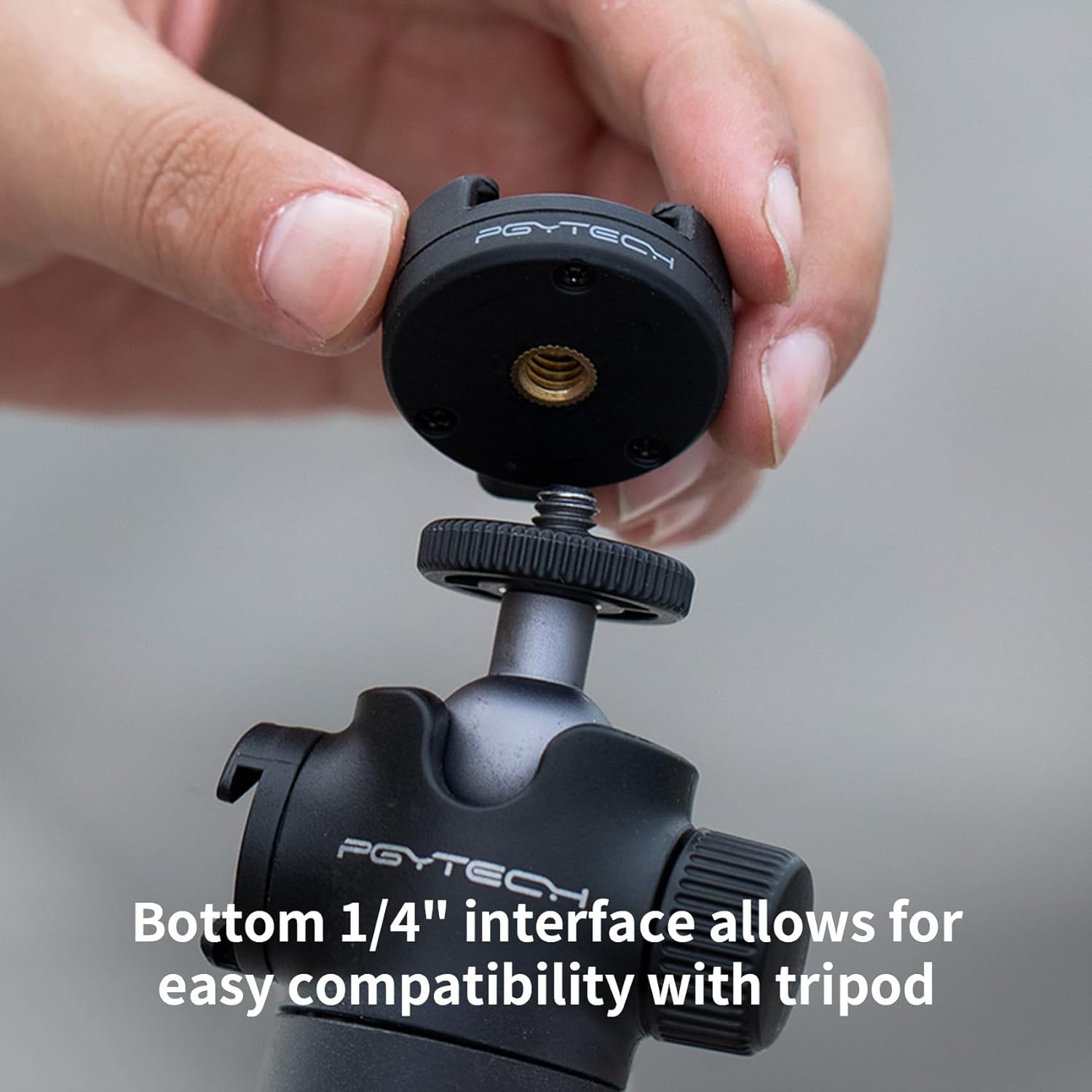
Image: Demonstrates attaching the 1/4-inch universal adapter to a camera, highlighting the threaded interface.
- Traditional Action Camera Adapter (Three-finger design):
This adapter is designed for action cameras that utilize the standard three-finger mounting system (e.g., GoPro, DJI OSMO Action). Slide your action camera into the adapter's base and secure it using the included knob. This adapter also allows for quick attachment to the CapLock base.

Image: The CapLock Action Camera Quick Release System shown with an action camera mounted, illustrating its compact design.
4.2 Attaching the CapLock Base to a Mount
The CapLock base features a 1/4-inch threaded hole at its bottom, making it compatible with a wide range of tripods, monopods, camera cages, and other mounting accessories that have a 1/4-inch threaded stud. Simply screw the CapLock base onto your desired mount until secure.
5. Operating Instructions
5.1 Attaching Your Camera to the CapLock Base
Once your camera has an adapter attached and the CapLock base is on your mount:
- Align the adapter on your camera with the slot on the CapLock base.
- Slide the adapter into the base until you hear a distinct "click." This indicates that the camera is securely snapped into place.
5.2 Securing with the Dual-Lock System
For enhanced security, the CapLock base features a dual-lock mechanism:
- On the back of the CapLock base, locate the swing arm with lock and unlock icons.
- After attaching your camera, swing the arm to the "locked" position. This prevents accidental release of the camera.

Image: Close-up of the CapLock base showing the dual-lock mechanism with lock and unlock icons, indicating enhanced security.
5.3 Detaching Your Camera from the CapLock Base
To remove your camera:
- Ensure the swing arm on the back of the base is in the "unlocked" position.
- Press the release button located on the side of the CapLock base. This will disengage the internal arms, allowing the camera to slide out.
- Gently slide the camera and its adapter out of the base.
5.4 Four-Way Installation and Switching
The quick-release plate design allows for four-way installation, providing flexibility in camera orientation. This feature enables smooth and rapid transitions between different shooting angles, such as switching from a forward-facing view to a self-portrait view without re-mounting the entire setup.

Image: Illustrates the four-way installation capability of the quick-release plate, allowing versatile camera positioning.
6. Maintenance
To ensure the longevity and optimal performance of your PGYTECH CapLock Quick Release Set:
- Keep the components clean and free from dust, dirt, and debris. Use a soft, dry cloth for cleaning.
- Avoid exposing the product to extreme temperatures or harsh chemicals.
- Regularly check the threaded connections for tightness, especially the 1/4-inch stud on the universal adapter, using the provided Allen wrench if necessary.
- Store the set in a dry, cool place when not in use.
7. Troubleshooting
If you encounter any issues with your CapLock Quick Release Set, consider the following:
- Difficulty attaching/detaching: Ensure the dual-lock swing arm is in the "unlocked" position before attempting to remove the camera. Check for any debris obstructing the sliding mechanism.
- Loose connection: Verify that the adapter is fully clicked into the base. For the universal adapter, ensure the 1/4-inch screw is tightly secured to your camera.
- Adapter feels stiff: New units may feel stiff initially. Repeated use will typically smooth out the mechanism. Ensure no foreign objects are lodged in the sliding parts.
If problems persist, please contact PGYTECH customer support for assistance.
8. Specifications
| Attribute | Detail |
|---|---|
| Model Number | CapLock Action Camera Quick Release Set |
| Item Weight | 2.82 ounces |
| Package Dimensions | 3.82 x 3.66 x 1.42 inches |
| Color | Black |
| Special Features | Universal |
| Compatible Devices | Cameras, Smartphones |
| Mounting Type | Cup Holder Mount (Note: Product is versatile, not limited to cup holder mount) |
9. Warranty and Support
PGYTECH products are designed for durability and performance. For specific warranty information, product registration, or technical support, please refer to the official PGYTECH website or contact their customer service directly. Keep your purchase receipt as proof of purchase for any warranty claims.