
Introduction
This manual provides essential information for the safe and effective use of your JTF Sonic Electric Toothbrush Model J40. Please read these instructions thoroughly before first use and retain for future reference.
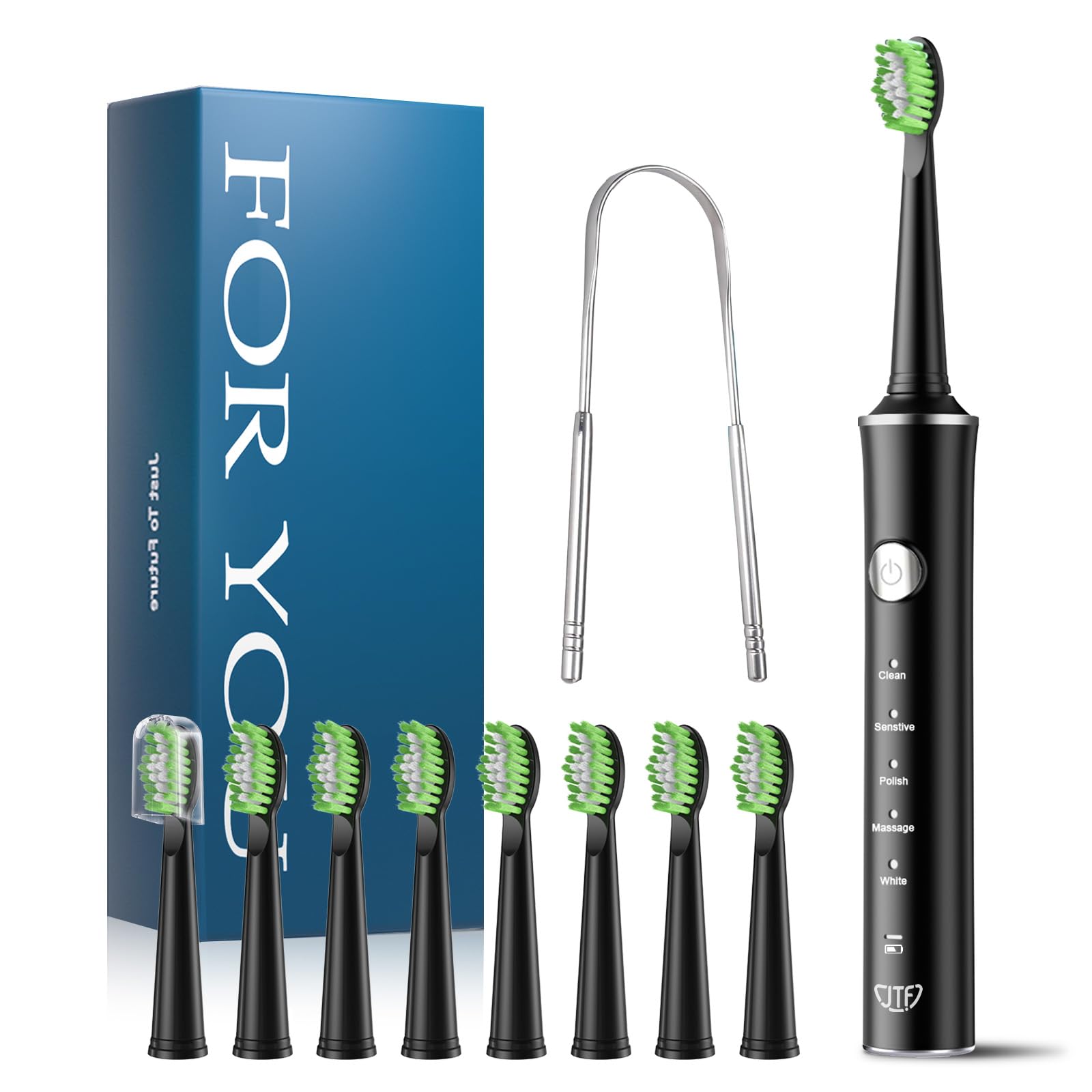
The JTF Sonic Electric Toothbrush Model J40, shown in black, is designed for effective daily oral hygiene.
What's in the Box
Verify that all components are present upon unpacking:
- 1 x JTF Sonic Electric Toothbrush Handle
- 8 x Replacement Brush Heads
- 1 x DC Charging Cable
- 1 x Travel Case
- 1 x Tongue Cleaner
- 1 x User Manual (this document)

Illustration of the JTF J40 Series package contents, showing the toothbrush handle, eight brush heads, a DC charging cable, and a tongue cleaner.
Product Overview
Key Features
- Effective Yet Gentle Cleaning: Advanced sonic technology removes plaque and stains without irritating gums.
- Long Battery Life: Up to 45 days of use on a single 2-hour charge.
- 5 Brushing Modes: Clean, Sensitive, White, Polish, and Massage for personalized oral care.
- Smart Timer: 2-minute timer with 30-second interval reminders for thorough brushing.
- IPX7 Waterproof: Fully waterproof design allows for safe use in the shower or bath.
- 8 Replacement Brush Heads: Provides approximately 2 years of quality brushing.
- Travel-Friendly: Compact and lightweight design with a protective travel case.
Components
- Brush Head (with W-shaped bristles)
- Toothbrush Handle (with power button and mode indicators)
- Charging Port (at the bottom of the handle)

The toothbrush features five personalized cleaning modes: Clean, Sensitive, Polish, Massage, and White.

The brush heads feature a W-shaped design with ultra-fine 0.125 cm nylon bristles for effective cleaning.
Setup
1. Charging the Toothbrush
Before first use, fully charge the toothbrush. Connect the DC charging cable to the charging port at the bottom of the handle and plug the other end into a 5V USB adapter (not included). The indicator light will show charging status. A full charge takes approximately 2 hours and provides up to 45 days of use.

The toothbrush offers a long battery life, providing 45 days of use from a 2-hour charge.
2. Attaching the Brush Head
Align the brush head with the metal shaft on the toothbrush handle and push down firmly until it clicks into place. Ensure it is securely attached before use.
Operating Instructions
1. Power On/Off and Mode Selection
- Press the power button once to turn on the toothbrush. It will start in the last used mode.
- Press the power button repeatedly within 5 seconds to cycle through the 5 modes: Clean, Sensitive, White, Polish, Massage.
- To turn off the toothbrush, press and hold the power button for 2 seconds, or press the power button after cycling through all modes.
2. Brushing Technique
- Wet the bristles and apply a small amount of toothpaste.
- Place the brush head against your teeth at a slight angle towards the gum line.
- Turn on the toothbrush. Gently move the brush head slowly across each tooth, allowing the sonic vibrations to clean. Do not scrub.
- The smart timer will pause briefly every 30 seconds to indicate when to move to a different quadrant of your mouth.
- The toothbrush will automatically turn off after 2 minutes, signaling the completion of the recommended brushing time.

The smart timer guides you through a 2-minute brushing cycle with 30-second quadrant reminders.
3. Using the Tongue Cleaner
After brushing your teeth, use the included tongue cleaner to remove bacteria and freshen breath. Gently scrape from the back of your tongue forward, rinsing the cleaner after each pass.

Using the tongue cleaner helps improve oral health by removing bacteria and freshening breath.
Maintenance
1. Cleaning the Toothbrush
- After each use, rinse the brush head thoroughly under running water.
- Remove the brush head and rinse the metal shaft area on the handle.
- Wipe the handle with a damp cloth. Do not immerse the handle in water for extended periods, despite its IPX7 rating, to prolong its lifespan.

The IPX7 waterproof rating allows for safe rinsing and use in wet environments.
2. Replacing Brush Heads
Dentists recommend replacing brush heads every 3 months, or sooner if the bristles become frayed. To replace, simply pull the old brush head off the handle and push a new one into place.

The product includes eight replacement brush heads, providing a supply for approximately two years.
3. Storage
Store the toothbrush in a dry place when not in use. Use the provided travel case for hygienic storage and protection during travel.
Troubleshooting
| Problem | Possible Cause | Solution |
|---|---|---|
| Toothbrush does not turn on. | Low battery or no charge. | Charge the toothbrush for at least 2 hours. Ensure the charging cable is properly connected. |
| Weak vibrations or poor cleaning. | Worn-out brush head or low battery. | Replace the brush head. Recharge the toothbrush. |
| Brush head falls off during use. | Brush head not securely attached. | Ensure the brush head is pushed down firmly until it clicks into place. |
| On/Off button unresponsive. | Internal malfunction or debris around the button. | Clean around the button. If the issue persists, contact customer support. |
| Toothbrush not charging. | Faulty charging cable or adapter. | Try a different 5V USB adapter and charging cable. Ensure the charging port is clean. |
Specifications
| Feature | Detail |
|---|---|
| Model Number | J40 |
| Power Source | Battery Powered (1 Lithium-ion battery included) |
| Battery Life | Up to 45 days on a 2-hour charge |
| Waterproof Rating | IPX7 |
| Number of Modes | 5 (Clean, Sensitive, White, Polish, Massage) |
| Movement Type | Pulsating (Sonic) |
| Handle Material | Acrylonitrile Butadiene Styrene (ABS) |
| Product Dimensions | 23.5 x 11.7 x 3.4 cm |
| Product Weight | 230 grams |
| Country of Origin | China |
Warranty and Support
Defective Product
If you receive a defective product, please contact our customer support immediately for a satisfactory resolution.
Product Failure within 1 Year
Should the product fail within 1 year of use due to a manufacturing defect:
- Contact JTF customer support.
- Provide photographs of the product and a description of the issue.
- If the issue is confirmed to be with the product itself, you will receive a replacement product.
For further assistance or inquiries, please refer to the contact information provided with your purchase or visit the official JTF website.
