
Ohniyou GLX067
Contents
Ohniyou 70-inch Large Ceiling Fan with Lights and Remote - Instruction Manual
Model: GLX067
Introduction
Thank you for choosing the Ohniyou 70-inch Large Ceiling Fan. This fan is designed to provide powerful and quiet air circulation with integrated dimmable LED lighting, suitable for large indoor and covered outdoor spaces. Its reversible DC motor allows for optimal air movement in both summer and winter. This manual will guide you through the installation, operation, and maintenance of your new ceiling fan.
The fan features 8 large blades and a copper DC motor for energy efficiency and stable performance. The integrated LED light offers adjustable color temperatures (3000K-6000K) and brightness (10%-100%), with a memory function to recall your last setting. Control is convenient with both a remote control and a dedicated mobile application.
Package Includes
Please verify that all components are present before beginning installation.

Image: All components included in the package.
- 8 Fan Blades
- Copper DC Motor
- 8" & 16" Downrods
- Coupling Cover
- Light Cover
- Canopy
- Remote Receiver & Remote Control
- Mounting Accessories
- Product Manual
Setup and Installation
For a visual guide, please refer to the official installation video below. Ensure power is OFF at the circuit breaker before starting installation.
Video: Detailed installation guide for the Ohniyou 70-inch ceiling fan.
Step-by-Step Installation:
- Remove Screws from Motor Top: Carefully remove the screws from the top of the motor housing. These screws will be used in the next step.

Image: Unscrewing the motor top.
- Install Fan Blades: Use the screws you just unscrewed to attach each of the 8 fan blades to the motor. Ensure they are securely fastened.

Image: Attaching the fan blades.
- Pass Canopy and Coupling Cover through Downrod: Slide the canopy and coupling cover onto the chosen downrod (8" or 16") in the correct order.

Image: Preparing the downrod with covers.
- Remove Cross Pin and Clamp: Remove the cross pin and clamp from the top of the motor's downrod attachment point.

Image: Removing downrod securing components.
- Pass Wire Through Downrod: Carefully thread the electrical wires from the fan motor through the inside of the downrod.

Image: Wiring through the downrod.
- Secure Downrod: Insert the downrod into the motor's attachment point and secure it with the cross pin, clamp, and screws.

Image: Securing the downrod.
- Connect Fan with Remote Receiver: Connect the fan's wiring to the remote receiver unit. Match the colored wires according to the labels.

Image: Connecting the remote receiver.
- Mount Mounting Bracket to Ceiling: Secure the mounting bracket to your ceiling using the appropriate screws (self-tapping for wooden ceilings, expansion screws for concrete ceilings).

Image: Mounting the ceiling bracket.
- Hang Fan and Connect to Home Circuit: Hang the ceiling fan on the mounting bracket using the hanging ball on the downrod. Then, connect the receiver to your home circuit wiring, following the labels on the wires.

Image: Hanging the fan and connecting wiring.
- Secure Canopy: Rotate the canopy counterclockwise to secure it in place against the ceiling. Tighten any necessary screws.

Image: Securing the canopy.
- Attach Light Cover: Attach the light cover by rotating it clockwise until it is securely in place. (It is recommended to remove gloves before this step to avoid smudges).

Image: Attaching the light cover.
Operating Instructions
Your Ohniyou ceiling fan offers multiple convenient control methods.
Video: Demonstrating multiple control methods for the 70-inch ceiling fan.
Remote Control:

Image: Remote Control Instructions.
- All Off: Turns off both the fan and the light.
- Light ON or OFF: Toggles the light on or off.
- F/R (Fan Forward or Reverse): Changes the direction of the fan blades for summer (downward airflow) or winter (upward airflow) operation.
- Button Sound Switch: Toggles the sound feedback from the fan.
- 6 Fan Speeds: Adjusts the fan speed from 1 (lowest) to 6 (highest).
- Setup of Pairing and Fan Off: Used for pairing the remote with the fan and can also turn the fan off.
- 1H/4H/8H Timer: Sets the fan to turn off automatically after 1, 4, or 8 hours.
- Warm Light (3000K): Sets the light to a warm white color temperature.
- Neutral White (4500K): Sets the light to a neutral white color temperature.
- Cold Light (6000K): Sets the light to a cool white color temperature.
- Increase Brightness: Increases the light brightness (10%-100%).
- Decrease Brightness: Decreases the light brightness (10%-100%).
Mobile Application (APP) Control:
Control your fan conveniently from your smartphone. For detailed app connection steps, please watch the video below.
Video: How to download and connect to the 'FanLamp Pro' APP.
- Download the APP: Scan the QR code in the image below or visit https://www.jasonghost.com/fanlamppro/ to download the 'FanLamp Pro' app.
- Pairing: Ensure your phone's Bluetooth is enabled. Open the app, add a device (e.g., 'Fan 1'), and confirm. Then, power cycle your fan (turn off at wall switch for 5 seconds, then on). Immediately tap the 'Pair' button in the app repeatedly (about 3 times) until you hear a beep from the fan and the light flashes.
- App Functions: The app allows control over fan speed (6 levels), motor direction (forward/reverse), light brightness (10%-100%), light color temperature (3000K, 4500K, 6000K), timer settings (1/2/4/8 hours), and mute function.

Image: Easily control the ceiling fan via remote and APP, including QR code for app download.
Reversible DC Motor:
The fan's reversible motor allows for year-round comfort and energy efficiency.
- Summer Mode (Cool Downward Wind): The fan blades rotate counter-clockwise, pushing cool air downwards to create a refreshing breeze.
- Winter Mode (Better Air Circulation): The fan blades rotate clockwise, pulling cool air up and pushing warm air down from the ceiling, helping to circulate heated air more efficiently.

Image: Reversible DC Motor for all seasons.
Dimmable LED Lights:
The integrated LED light offers customizable illumination to suit any mood or activity.
- Adjustable Color Temperature (CCT): Switch between 3000K (Warm Light for gathering), 4500K (Neutral White for daily life), and 6000K (Cold Light for reading or working).
- Adjustable Brightness: Dim the light from 10% to 100% to achieve your desired ambiance.
- Lighting Memory: The fan remembers your last light setting even after powering off, making it convenient for daily use.
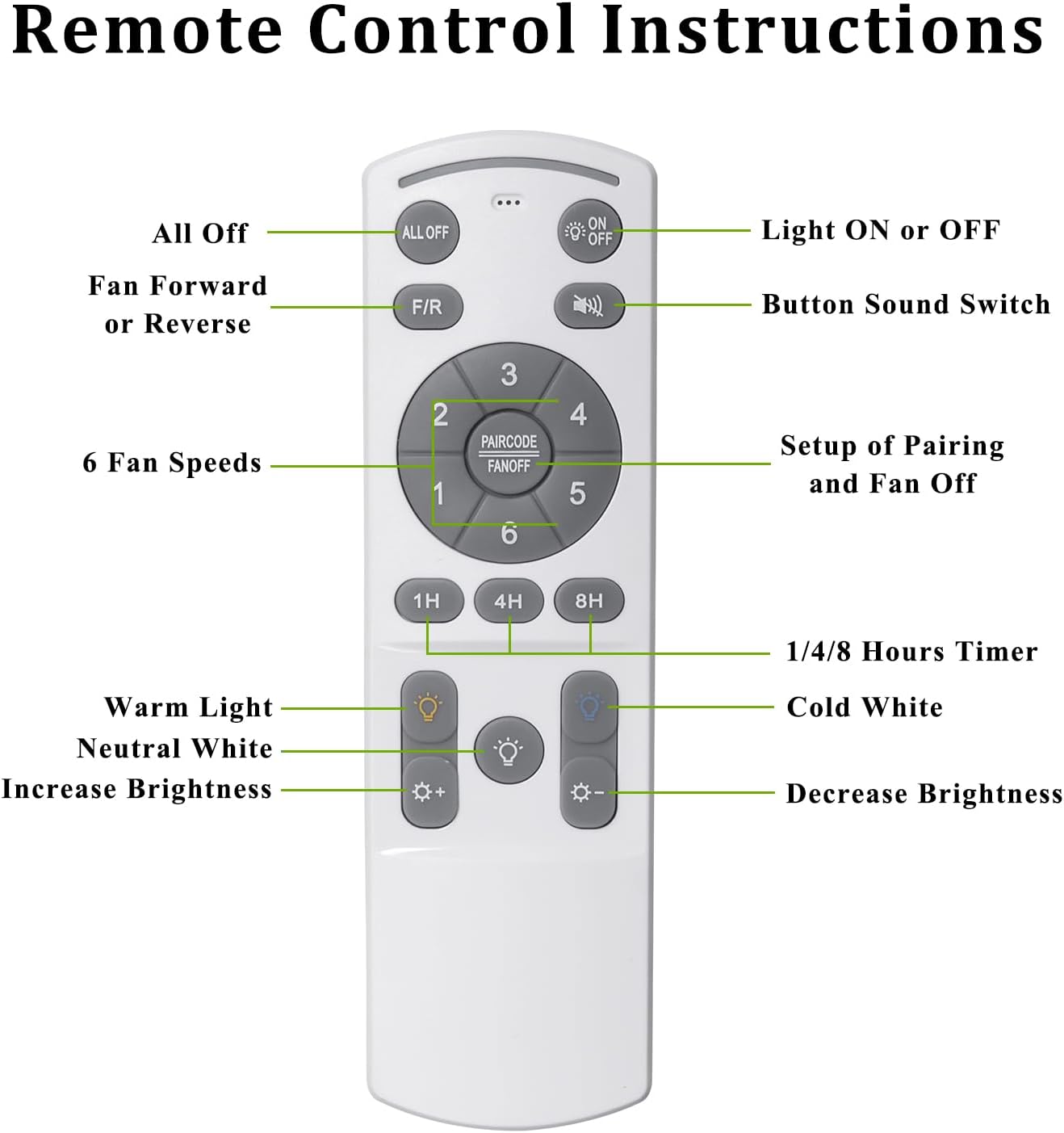
Image: Dimmable LED Lights with adjustable color temperature and brightness.
Maintenance
Regular maintenance will ensure the longevity and optimal performance of your ceiling fan.
- Cleaning: To clean the fan, wipe the blades and motor housing with a soft, damp cloth. Do not use abrasive cleaners or solvents, as they may damage the finish.
- Light Cover: The light cover can be removed by rotating it counter-clockwise for cleaning. Ensure it is dry before reattaching.
- Blade Balance: If the fan wobbles, check that all blade screws are tight. A balancing kit (not included) can be used if wobbling persists.
- Safety: Always turn off the power to the fan at the circuit breaker before performing any cleaning or maintenance.
Troubleshooting
If you encounter any issues with your fan, please refer to the following common problems and solutions:
| Problem | Possible Cause | Solution |
|---|---|---|
| Fan does not operate with remote/app. | No power; Remote/App not paired; Remote battery low. | Ensure power is on at circuit breaker. Re-pair remote/app following instructions in 'Operating Instructions' section. Replace remote battery. |
| Light does not turn on. | Loose wiring connection; Light cover not fully attached; LED module failure. | Check all electrical connections. Ensure light cover is securely rotated clockwise. Contact support if LED module is suspected to be faulty. |
| Fan wobbles. | Loose blade screws; Unbalanced blades; Loose mounting bracket. | Tighten all blade screws. Ensure mounting bracket is securely installed. Use a balancing kit if necessary. |
| Fan makes excessive noise. | Loose screws; Motor issue. | Check and tighten all screws on the fan and mounting bracket. If noise persists, contact customer support. |
| App connection issues. | Bluetooth off; Incorrect pairing steps. | Ensure Bluetooth is enabled on your device. Follow the app pairing instructions precisely, including the power cycle and repeated tapping of the pair button. |
Specifications
| Feature | Specification |
|---|---|
| Brand | Ohniyou |
| Model Name | 70 inch black ceiling fan (GLX067) |
| Product Dimensions | 70"D x 70"W x 24"H |
| Item Weight | 20.8 Pounds |
| Color | Black |
| Number of Blades | 8 |
| Blade Material | Plastic |
| Motor Type | DC Motor (Reversible) |
| Fan Speeds | 6 |
| Noise Level | 30 dB |
| Light Type | LED |
| Light Color Temperature | 3000K, 4500K, 6000K (Dimmable 10%-100%) |
| Control Method | Remote Control, Mobile App |
| Indoor/Outdoor Usage | Outdoor, Indoor (Covered areas) |
| Voltage | 110 Volts (AC) |
| Wattage | 74 watts |
| Air Flow Capacity | 6975 Cubic Feet Per Minute |
Warranty and Support
Ohniyou stands behind the quality of its products. For specific warranty details, please refer to the warranty card included in your product packaging or contact our customer support.
If you have any questions, require technical assistance, or need to claim warranty service, please do not hesitate to contact us:
- Email: ohniyou@ledphy.com
Our support team is dedicated to providing you with the best possible assistance.
Ask a question about this manual
Ask about setup, troubleshooting, compatibility, parts, safety, or missing instructions. Manuals+ will review the question and use this page’s manual context to help answer it.