Product Overview
The Ohniyou 58-inch Low Profile Ceiling Fan with Light is designed for both indoor and covered outdoor areas, offering efficient air circulation and adjustable lighting. It features a reversible DC motor for year-round comfort, multiple control methods including a remote and app, and a quiet operation.

Figure 1: Ohniyou 58-inch Low Profile Ceiling Fan with Light, showcasing its modern design and integrated light.
Key Features
- Efficient and Quiet Operation: Equipped with 5 blades and a copper DC motor, this fan offers strong power with better energy efficiency and quiet performance (less than 30dB).
- Reversible DC Motor: Provides 6 speeds for cooling in summer (downward airflow) and improved air circulation in winter (upward airflow).
- Dimmable LED Light: Integrated LED light with adjustable color temperature (3000K-6000K) and brightness (10%-100%). Features lighting memory to recall the last setting.
- Multiple Control Methods: Easily controlled via an included remote control and a dedicated mobile application.
- Versatile Application: Suitable for medium to large indoor or covered outdoor areas such as living rooms, bedrooms, dining rooms, kitchens, offices, patios, porches, gazebos, balconies, shops, and garages.
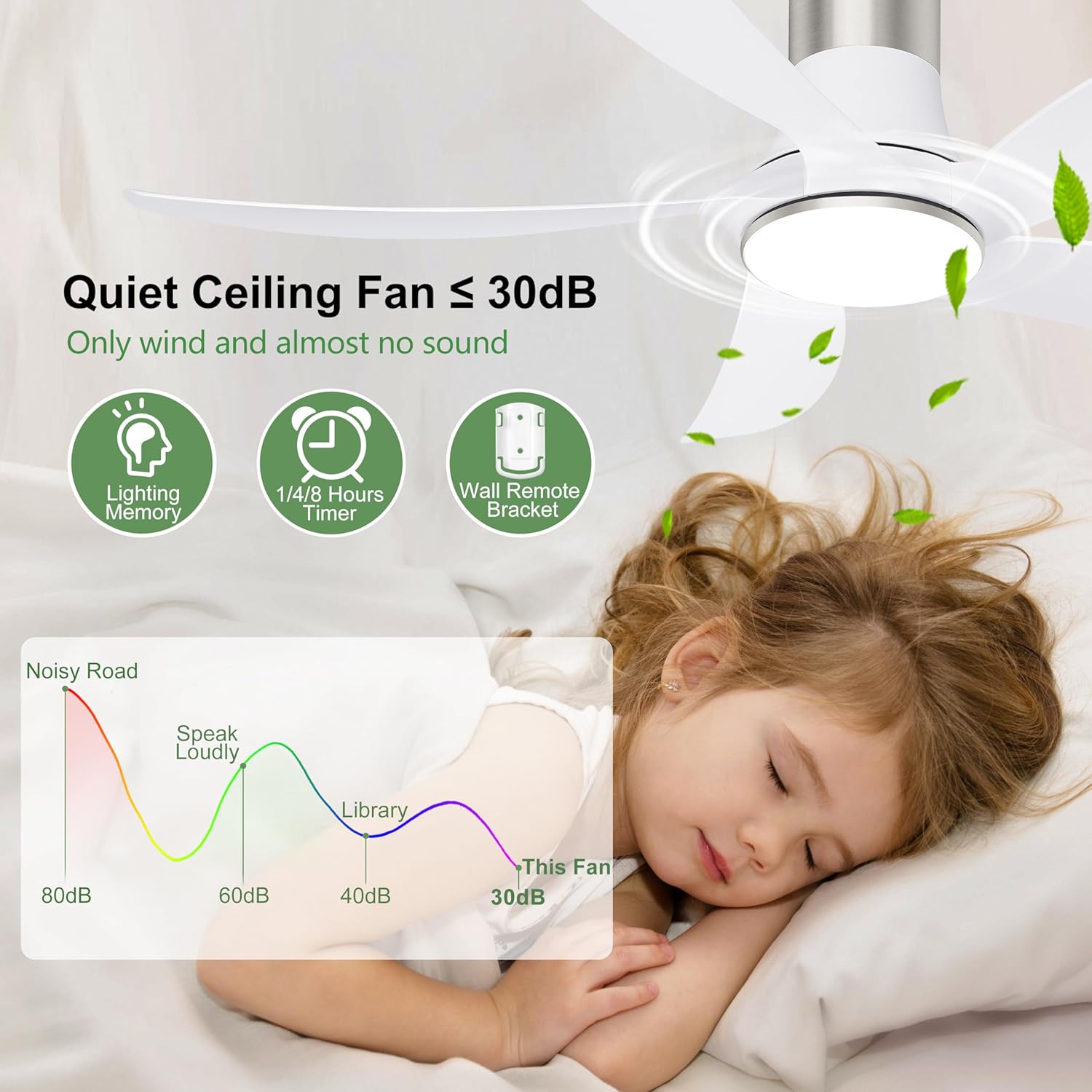
Figure 2: Illustration of the fan's quiet operation, demonstrating noise levels below 30dB, suitable for peaceful environments.
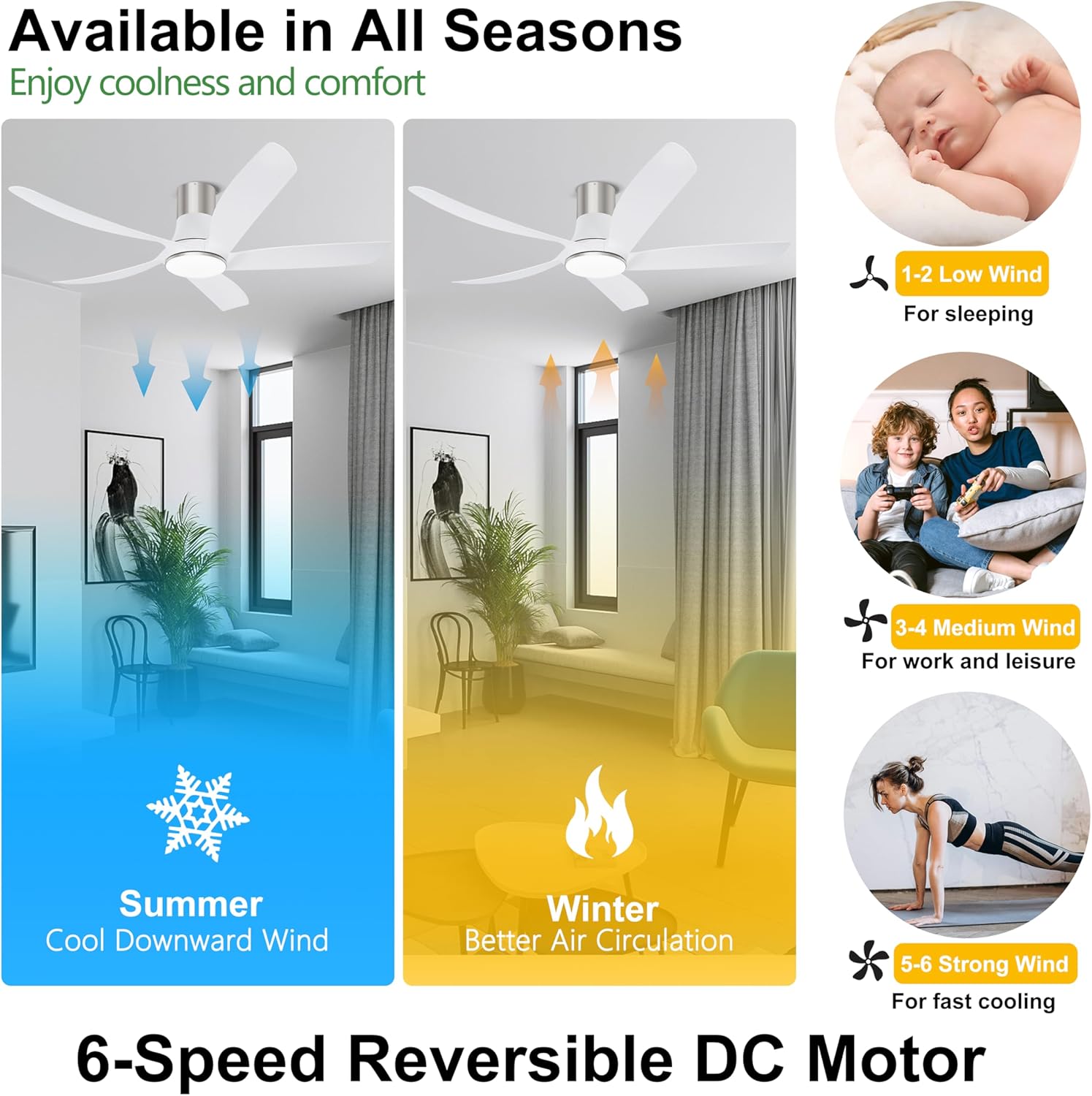
Figure 3: Visual representation of the fan's reversible DC motor, showing downward airflow for summer cooling and upward airflow for winter air circulation.
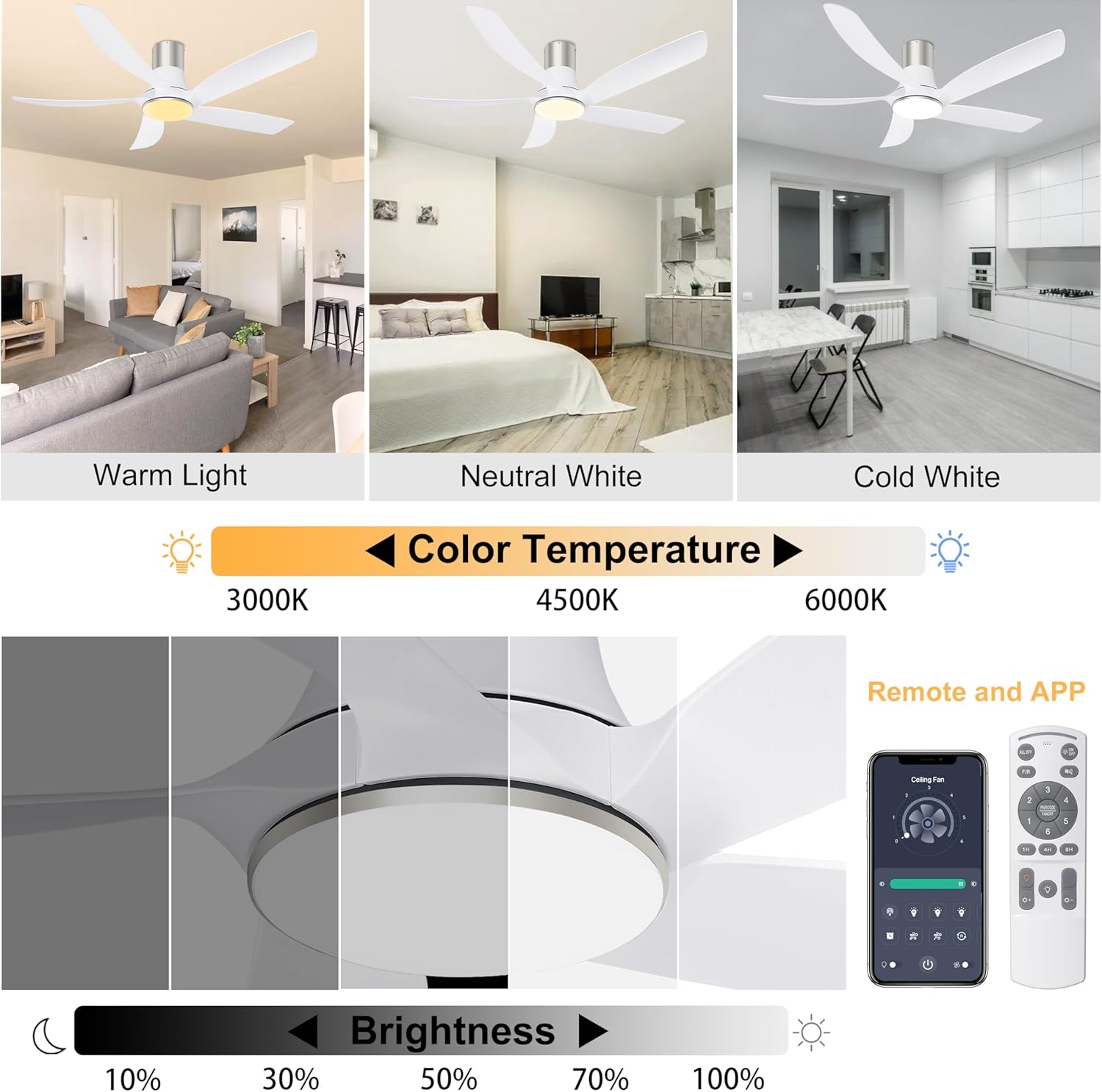
Figure 4: Display of the dimmable LED light's adjustable color temperatures (Warm, Neutral White, Cold White) and brightness levels (10%-100%).
Setup and Installation
The Ohniyou 58-inch Low Profile Ceiling Fan is designed for straightforward assembly and installation. Refer to the following instructions and video resources for guidance.
Installation Steps
- Preparation: Ensure power is turned off at the circuit breaker before beginning installation. Gather all included components and necessary tools.
- Mounting Bracket Installation: Secure the mounting bracket to the ceiling junction box. Ensure it is firmly attached and can support the fan's weight.
- Wiring: Connect the fan's electrical wires to the household wiring according to local electrical codes. Pay close attention to ground, neutral, and live wire connections.
- Fan Assembly: Attach the fan motor assembly to the mounting bracket. Install the fan blades securely to the motor housing.
- Light Kit Installation: Connect and install the LED light kit to the fan assembly.
- Canopy Installation: Secure the canopy to cover the wiring and mounting bracket, ensuring a flush and aesthetically pleasing finish.
Instructional Video: Installation
Video 1: Detailed step-by-step guide on the installation process of the Ohniyou 58-inch White Ceiling Fan with Light. This video covers mounting, wiring, and assembly.
Operating Instructions
The Ohniyou ceiling fan can be controlled using the included remote control or a dedicated mobile application.
Remote Control Operation
The remote control provides full functionality for the fan and light. Ensure batteries are correctly inserted.
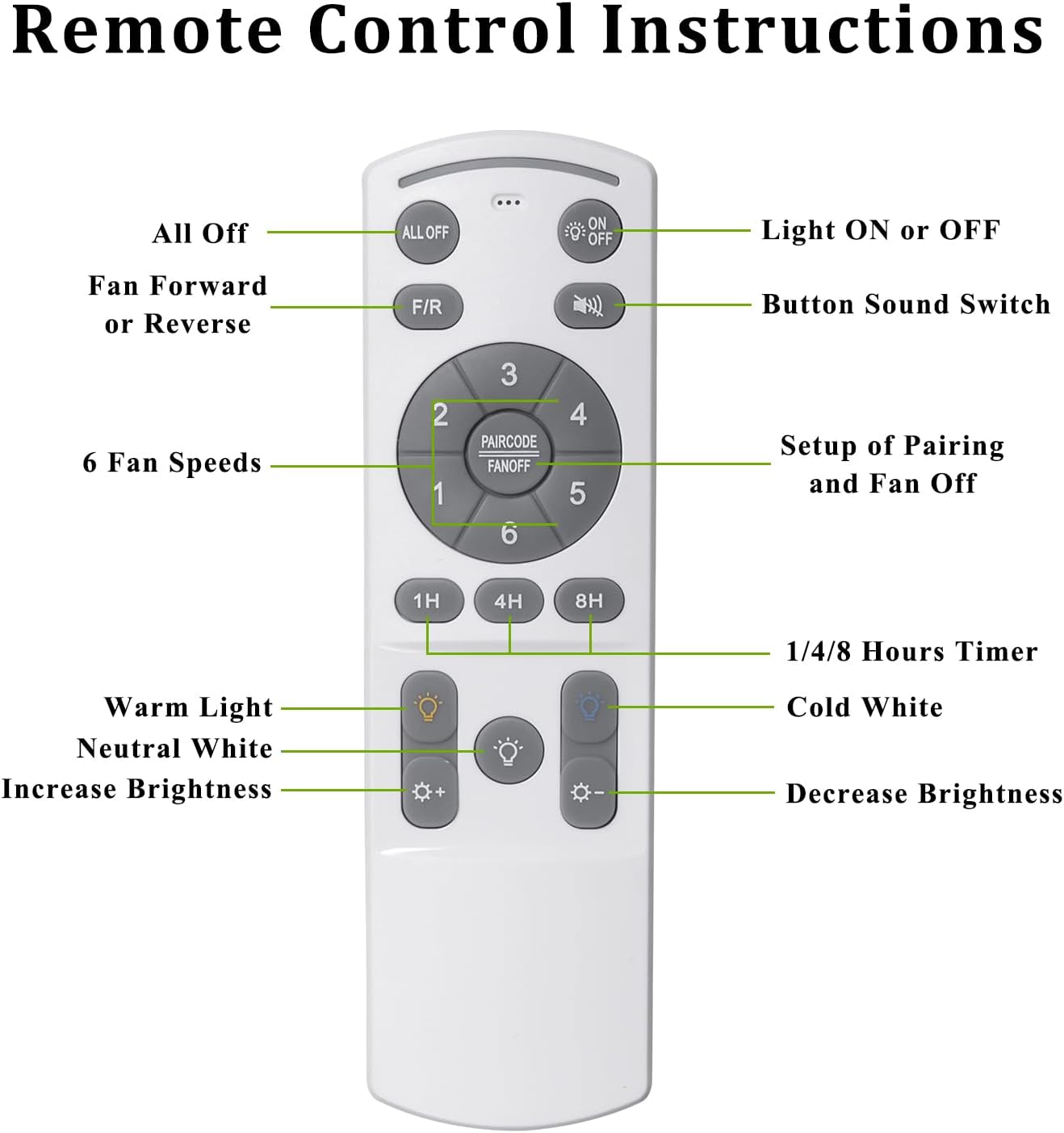
Figure 5: Diagram illustrating the functions of each button on the remote control, including fan speed, light control, and timer settings.
- Power On/Off: Use the dedicated power buttons for the fan and light.
- Fan Speed: Select from 6 fan speeds to adjust airflow intensity.
- Fan Direction (Reversible Motor): Switch between summer (downward) and winter (upward) modes to optimize air circulation.
- Light Control: Turn the light on/off, adjust brightness (dimmable), and change color temperature (Warm, Neutral White, Cold White).
- Timer Function: Set the fan to turn off automatically after 1, 4, or 8 hours.
Mobile Application Control
The FanLamp Pro app allows for convenient control of your ceiling fan from your smartphone. Ensure Bluetooth is enabled on your device.
- App Download: Scan the QR code or visit https://www.jasonghost.com/fanlamppro/ to download the "FanLamp Pro" app.
- Pairing: After turning on the fan's power, open the app and tap the pairing button. The fan light will blink to confirm successful pairing.
- Functions: Control fan speed, light settings (color temperature and brightness), fan direction, and set timers directly from the app interface.
Video 2: Demonstration of multiple control methods for the 58-inch ceiling fan, including remote and app functionalities.
Video 3: Instructions on how to download and connect to the FanLamp Pro application for controlling the ceiling fan.
Maintenance
Regular maintenance ensures optimal performance and longevity of your Ohniyou ceiling fan. Always disconnect power before performing any maintenance.
- Cleaning:
- Wipe fan blades and motor housing with a soft, damp cloth. Do not use abrasive cleaners or solvents.
- For plastic blades, a wet rag can be used for cleaning without concern for damage.
- Blade Balance: Periodically check that all blades are securely fastened and balanced to prevent wobbling and excessive noise.
- Light Cover: Ensure the light cover is twisted tightly into place to prevent it from falling.
- Electrical Connections: Annually inspect all electrical connections for tightness and signs of wear. If unsure, consult a qualified electrician.
Troubleshooting
This section addresses common issues you might encounter with your Ohniyou ceiling fan. For problems not listed here, contact customer support.
| Problem | Possible Cause | Solution |
|---|---|---|
| Fan does not operate. | No power supply; loose wiring; remote control battery low. | Check circuit breaker and wall switch. Ensure all wiring connections are secure. Replace remote control batteries. |
| Light does not turn on. | Loose wiring to light kit; LED module failure. | Check light kit wiring. If LED module is faulty, contact customer support for replacement. |
| Fan wobbles. | Loose fan blades; unbalanced blades; improper mounting. | Ensure all blade screws are tightened. Use a balancing kit if necessary. Verify mounting bracket is securely installed. |
| Remote control not working. | Battery low/dead; remote not paired; interference. | Replace batteries. Re-pair the remote control with the fan (refer to operating instructions). Reduce potential interference sources. |
| App control issues. | Bluetooth not enabled; app not paired; app permissions. | Ensure Bluetooth is on. Re-pair the app with the fan. Check app permissions for nearby devices. Reset fan by cycling power if needed. |
| Light cover falls off. | Light cover not securely twisted. | Ensure the light cover is twisted firmly into its locking position. |
Specifications
| Attribute | Detail |
|---|---|
| Brand | Ohniyou |
| Model Name | GLX066 |
| Color | White |
| Electric Fan Design | Ceiling Fan |
| Power Source | AC |
| Style | Modern |
| Product Dimensions | 58"D x 58"W x 13"H |
| Room Type | Living Room, Bedroom, Home Office, Patio, Dining Room |
| Special Features | Remote Controlled, Dimmable, LED Light, Timer, Flush Mount |
| Recommended Uses | Cooling, Air Circulation |
| Noise Level | 30 dB |
| Wattage | 63 watts |
| Finish Type | Brushed |
| Number of Blades | 5 |
| Air Flow Capacity | 5982.98 Cubic Feet Per Minute |
| Blade Length | 24 Inches |
| Speed | 200 RPM |
| Voltage | 110 Volts (AC) |
| Switch Type | Remote Control |
| Item Weight | 15.8 Pounds |
| Included Components | Mounting Accessories, 5 Blades, Light Kit, Remote, DC Motor |
| Indoor/Outdoor Usage | Outdoor, Indoor |
| Control Method | Remote |
| Light Type | LED |
| Blade Material | Plastic |
| Manufacturer | Ohniyou |
| Country of Origin | China |
Warranty and Support
For warranty information or technical support, please refer to the contact details provided with your purchase or visit the official Ohniyou website.
The manufacturer, Ohniyou, stands behind its products. For any issues or inquiries, please reach out to their customer service.
Email: ohniyou@ledphy.com


