
1. Introduction
This manual provides detailed instructions for the installation, operation, and maintenance of your Amazon Basics Gas Spring Single Monitor Arm Mount. Please read this manual thoroughly before installation and retain it for future reference. This monitor arm is designed to enhance your workspace ergonomics by providing flexible positioning for a single computer monitor.
2. Safety Information
- Ensure all components are present and undamaged before assembly. Do not use if any parts are missing or defective.
- Verify that the mounting surface (desk) is stable and capable of supporting the combined weight of the monitor arm and your monitor.
- Do not exceed the maximum weight capacity of 15.4 lbs (7 kg) for the monitor arm.
- During gas spring tension adjustment, hold the monitor arm firmly to prevent sudden movement and potential injury. Do not abruptly release the gas spring arm.
- Keep children and pets away during installation.
- Tighten all screws securely, but do not overtighten to avoid stripping threads or damaging components.
- Regularly check all connections and fasteners to ensure they remain tight and secure.
3. Package Contents
Please verify that all parts are included in your package:
- Gas Spring Monitor Arm (A)
- Desk Clamp Base (C)
- Grommet Base Plate (D)
- C-Clamp Assembly (E)
- VESA Mounting Plate (B)
- Hardware Kit (screws, washers, Allen keys)

Image: All components of the Amazon Basics Gas Spring Single Monitor Arm Mount.
4. Installation
4.1 Desk Compatibility
Ensure your desk meets the following requirements:
- Desk Thickness: 0.39 - 4 inches (1 - 10.2 cm) for C-clamp or grommet mount.
- Grommet Hole Diameter: 1.5 - 2.36 inches (4 - 6 cm) if using grommet mount.

Image: Illustration of the two available installation options: Grommet Mount and Clamp Mount, showing desk thickness and hole diameter requirements.
4.2 Mounting the Arm to the Desk
Choose either the C-clamp or grommet mount method based on your desk setup.
C-Clamp Installation:
- Attach the C-Clamp Assembly (E) to the Desk Clamp Base (C) using the provided screws.
- Position the assembled base on the edge of your desk.
- Tighten the C-clamp screw until the base is securely fastened to the desk.
Grommet Mount Installation:
- If your desk has a grommet hole, attach the Grommet Base Plate (D) to the Desk Clamp Base (C).
- Insert the pole of the Desk Clamp Base through the grommet hole.
- Secure the base from underneath the desk using the provided washer and nut.
4.3 Attaching the Monitor Arm
- Slide the Gas Spring Monitor Arm (A) onto the pole of the Desk Clamp Base (C).
- Ensure the arm is fully seated and secure.
4.4 Attaching the Monitor
The monitor arm supports VESA patterns of 75x75mm and 100x100mm.
- Attach the VESA Mounting Plate (B) to the back of your monitor using the appropriate screws (F or G) and washers (J) from the hardware kit. Ensure the plate is oriented correctly with the 'UP' indicator facing upwards.
- Carefully slide the monitor with the attached VESA plate onto the end of the monitor arm until it clicks into place.
- Tighten any security screws on the VESA plate to prevent accidental detachment.

Image: Demonstrates rotating the VESA panel 45 degrees horizontally and installing the monitor before final VESA panel adjustment for smoother rotation.

Image: A monitor securely mounted on the Amazon Basics Gas Spring Single Monitor Arm Mount, viewed from the rear.
5. Operation and Adjustment
5.1 Gas Spring Tension Adjustment
The gas spring is pre-set for 15.4 pound monitors. Adjust the tension to match your monitor's weight for optimal movement and stability.
- Hold the monitor arm in a horizontal position before adjusting the tension.
- Locate the tension adjustment screw on the arm (typically covered by a plastic cap).
- Use the provided Allen key (L) to adjust the tension:
- If the monitor sags, turn the tension nut counter-clockwise (+) to increase tension.
- If the monitor arm rises up, turn the tension nut clockwise (-) to decrease tension.
- Adjust gradually and test the arm's movement until the monitor stays in position when released.
Reference values for adjustment (adjust based on actual experience):
- 7 turns clockwise (-) for 13.2 lbs (6 kg)
- 12 turns clockwise (-) for 11 lbs (5 kg)
- 16 turns clockwise (-) for 8.8 lbs (4 kg)
- 19 turns clockwise (-) for 5.5 lbs (2.5 kg)
Video: Official Amazon Product Imaging video demonstrating the assembly and adjustment of the monitor arm, including gas spring tension and monitor positioning.
5.2 Monitor Position Adjustment
The monitor arm offers extensive flexibility for optimal viewing comfort:
- Tilt: -90° to +85°
- Swivel: ±90°
- Rotation: 360° (for landscape or portrait orientation)
- Extension: Up to 20.5 inches (52.1 cm) long
- Height: Up to 18.25 inches (46.4 cm) high
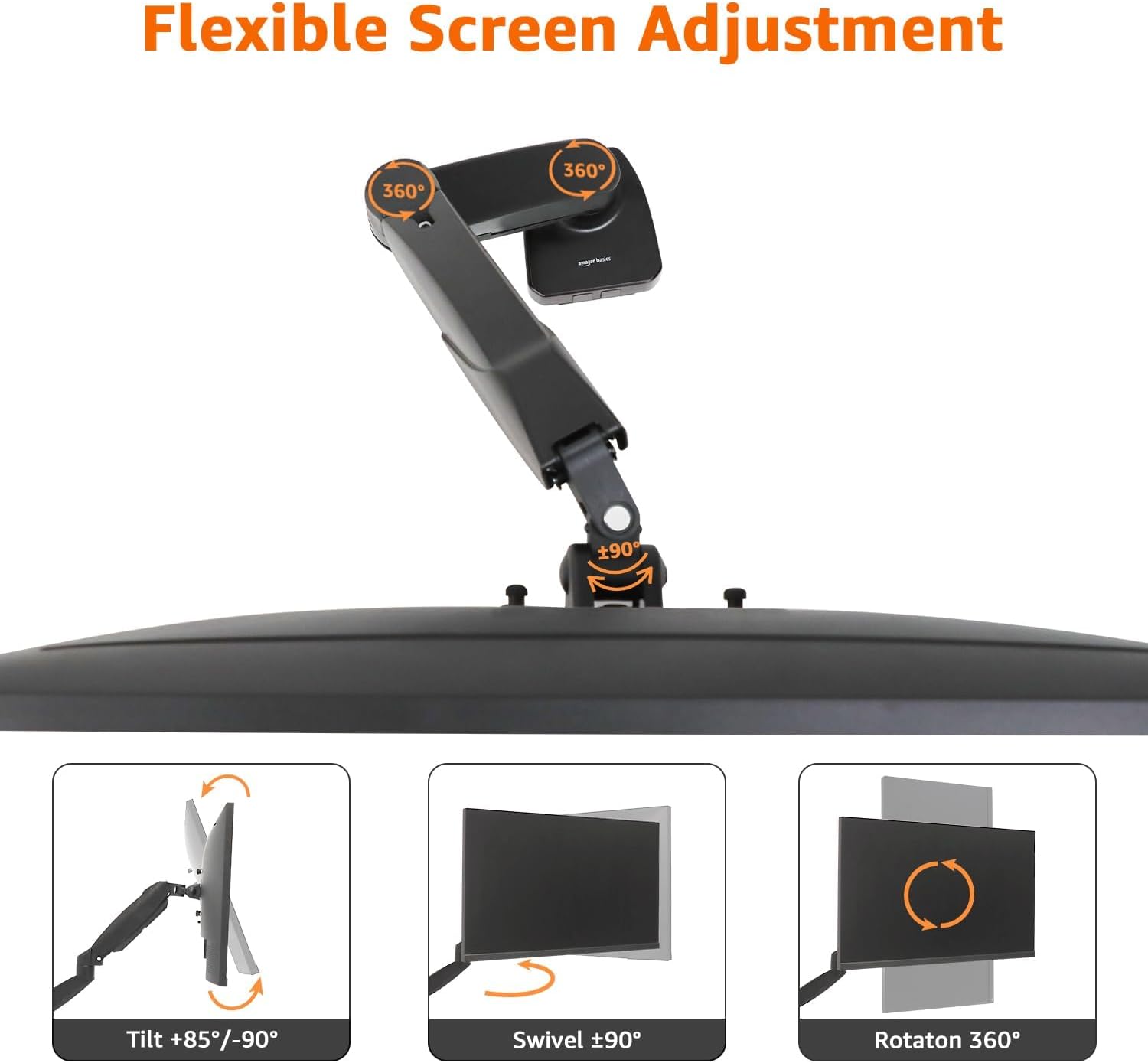
Image: Visual representation of the flexible screen adjustment options, including tilt, swivel, and 360-degree rotation.

Image: Diagram illustrating the adjustable height (5.7 to 18.25 inches) and length (3.1 to 20.5 inches) of the monitor arm.
6. Cable Management
The monitor arm features an integrated cable management system to keep your workspace tidy. Route your monitor and power cables along the arm and through the designated channels. This helps to reduce clutter and maintain a clean aesthetic.
7. Maintenance
- Clean the monitor arm regularly with a soft, dry cloth. Avoid abrasive cleaners or solvents.
- Periodically check all screws and connections to ensure they are tight. Re-tighten if necessary.
- Do not lubricate the gas spring mechanism unless specifically instructed by the manufacturer.
8. Troubleshooting
8.1 Monitor Sags or Rises Unexpectedly
- Solution: Adjust the gas spring tension as described in Section 5.1. Ensure the tension is correctly calibrated to your monitor's weight.
8.2 Monitor Arm is Loose on the Desk
- Solution: Re-tighten the C-clamp or grommet mount screws. Ensure the desk thickness is within the specified range for the chosen mounting method.
8.3 Monitor Does Not Rotate or Tilt Smoothly
- Solution: Check for any obstructions. Ensure all mounting screws are tightened appropriately, but not excessively, which could restrict movement.
9. Specifications
| Feature | Specification |
|---|---|
| Brand | Amazon Basics |
| Model Number | DS-MADSBE |
| Item Weight | 4.18 pounds (1.9 kg) |
| Product Dimensions (LxWxH) | 18.7 x 4.25 x 18 inches (47.5 x 10.8 x 45.7 cm) |
| Color | Black |
| Material | Aluminum |
| Mounting Type | Tabletop Mount (C-Clamp or Grommet) |
| Movement Type | Swivel, Tilt, Rotation, Height Adjustment |
| Compatible Devices | Monitors 15 to 27 inches |
| Weight Capacity | 4.4 - 15.4 pounds (2 - 7 kg) |
| VESA Compatibility | 75x75mm, 100x100mm |
| Tilt Range | -90° to +85° |
| Swivel Range | ±90° |
| Rotation | 360° |
| Max Extension | 20.5 inches (52.1 cm) |
| Max Height | 18.25 inches (46.4 cm) |
| Desk Thickness (C-Clamp/Grommet) | 0.39 - 4 inches (1 - 10.2 cm) |
| Grommet Hole Diameter | 1.5 - 2.36 inches (4 - 6 cm) |
| UPC | 840324414622 |

Image: Overview of the monitor arm's wide compatibility, including weight capacity (4.4-15.4 lbs), VESA sizes (75x75mm/100x100mm), and maximum screen size (27 inches).
10. Warranty and Support
For warranty information and customer support, please refer to the Amazon Basics official website or contact Amazon customer service directly. Keep your purchase receipt for warranty claims.