
KOSPET Tank M3
Contents
KOSPET Tank M3 Smart Watch User Manual
Model: Tank M3
Designed for durability, performance, and everyday life.
1. Setup Guide
1.1 Charging Your Smart Watch
Before initial use, fully charge your KOSPET Tank M3. The watch features a 480mAh pure cobalt battery, offering up to 60 days of standby time or over 2 weeks of normal use on a single charge.
- Connect the provided charging station to a USB power source.
- Align the watch with the charging pins on the station. The watch screen will indicate charging status.
- A full charge typically takes about one hour.
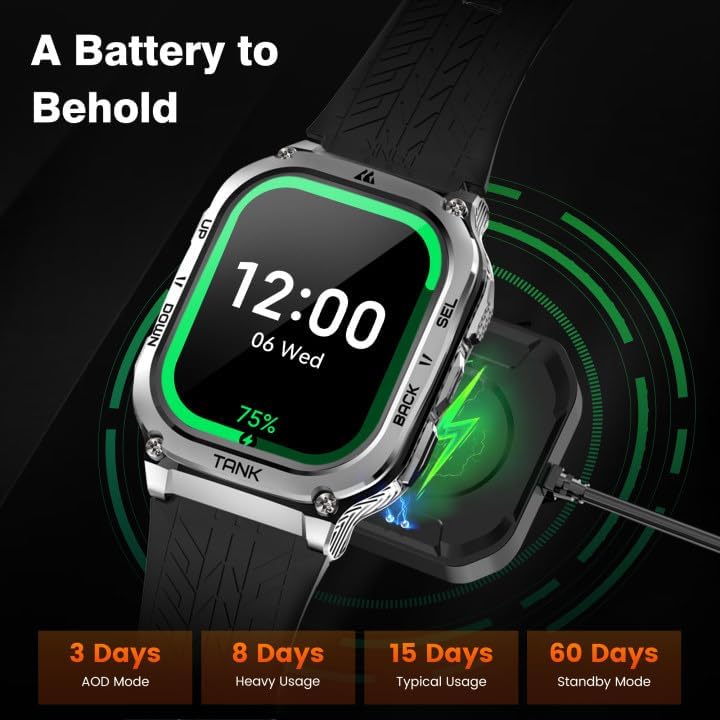
Image: The KOSPET Tank M3 Smart Watch on its magnetic charging station, illustrating the charging process and battery life indicators.
1.2 App Download and Pairing
To unlock the full potential of your KOSPET Tank M3, download the companion app and pair it with your smartphone.
- Download the App: Search for "KOSPET FIT" on Google Play Store (for Android) or Apple App Store (for iOS) and install it.
- Enable Bluetooth: Turn on Bluetooth on your smartphone.
- Add Device: Open the KOSPET FIT app, navigate to the "Device" section, and select "Add a new device."
- Pair: Follow the on-screen prompts to pair your watch. Confirm the pairing request on both your watch and smartphone.
- Grant Permissions: Allow necessary permissions for notifications, health data, etc., when prompted by the app.

Image: A visual guide demonstrating the steps to download the KOSPET FIT app and pair the smartwatch with a mobile device.
2. Operating Your Smart Watch
2.1 Basic Navigation
The KOSPET Tank M3 features a responsive 1.96-inch AMOLED display and physical buttons for intuitive navigation.
- Touchscreen: Swipe left/right, up/down to navigate through menus and widgets. Tap to select.
- Physical Buttons: Use the 'UP' and 'DOWN' buttons on the left side to scroll through lists. Use 'BACK' and 'SEL' (Select) buttons on the right for navigation and confirmation.
2.2 Making/Receiving Calls & AI Voice Assistant
With its upgraded dual-core CPU and Bluetooth chip, the Tank M3 allows for direct voice calls and AI voice assistant interaction.
- Making Calls: Access the call function from the main menu. You can dial directly or select from synced contacts.
- Receiving Calls: When a call comes in, you can answer or reject it directly from the watch screen.
- AI Voice Assistant: Use the voice assistant for tasks like playing music, checking weather, setting alarms, and timers.
Video: Official KOSPET video demonstrating the call functionality and AI voice assistant features of the Tank M3 Smart Watch.
2.3 Notifications
Receive messages and app notifications directly on your wrist.
- Enable Notifications: Ensure the KOSPET FIT app is running in the background on your phone. For Android, add the app to the whitelist in settings. Disable "Do Not Disturb" and "Low Power Mode" on your phone.
- App Permissions: Within the KOSPET FIT app, go to "Device" and then "App" to enable notifications for desired applications (e.g., Instagram, YouTube, Facebook).

Image: Steps to configure message and app notifications for iOS devices through the KOSPET FIT app.

Image: Steps to configure message and app notifications for Android devices through the KOSPET FIT app.
2.4 Music Playback Control
Control your smartphone's music playback directly from your watch.
- Access the music control interface from the watch's app menu.
- Play, pause, skip tracks, and adjust volume.
2.5 Flashlight Function
The watch features a built-in flashlight function for convenience in low-light conditions.
- Locate the flashlight icon in the app menu.
- Tap to activate the bright screen as a light source.
3. Product Features
3.1 Display and Design
The KOSPET Tank M3 boasts a 1.96-inch 3rd generation AMOLED Corning Gorilla screen, offering a bright and clear display with robust protection.

Image: The KOSPET Tank M3's display specifications, emphasizing its large, high-resolution, and bright AMOLED screen with Corning Gorilla Glass.
3.2 Military-Grade Durability
Engineered for extreme conditions, the Tank M3 features a full-metal, military-graded design, having passed 15 Military Tests (MIL-STD-810H) including salt spray, rain, and impact.

Image: Visual representation of the KOSPET Tank M3's military-grade durability, showcasing its resilience against various environmental stressors.
Video: A durability test of the KOSPET Tank M3 Ultra, showing it being frozen, dropped, and boiled to demonstrate its robust construction.
3.3 Water Resistance
The watch is equipped with a fully enclosed metal body, making it extremely resistant to water. It can be immersed in up to 50 meters of water (5ATM & IP69K waterproof).

Image: The KOSPET Tank M3's water resistance capabilities, suitable for swimming, handwashing, and even diving up to 50 meters.
3.4 Long-Lasting Battery Life
The 480mAh pure cobalt battery, combined with a super dual-membrane Bluetooth chip processor and extra-saving AI algorithm, minimizes power consumption for extended use.
Image: An illustration of the KOSPET Tank M3's impressive battery life under various usage scenarios, from Always-On Display to standby mode.
3.5 Health Monitoring
The smartwatch collects health data with its advanced real-time monitoring functions, including all-day sleep tracking, 24-hour heart rate monitoring, and real-time blood oxygen levels. It also provides sedentary reminders.

Image: Overview of the KOSPET Tank M3's multiple health monitoring capabilities, including heart rate, blood oxygen, and sleep analysis.

Image: Detailed sleep tracking features of the KOSPET Tank M3, providing insights into sleep stages, naps, and overall sleep quality.
3.6 Sports Modes and Intelligent Recognition
The KOSPET smart watch offers over 170 sports modes and features 6 intelligent recognition modes, assisting you in tracking various indoor and outdoor activities.
- 170+ Sports Modes: Track activities like walking, skiing, cycling, basketball, climbing, and more.
- 6 Intelligent Recognition: Automatically detects and tracks stationary state, walking, running, cycling, elliptical trainer, and rowing machine.

Image: The KOSPET Tank M3's extensive sports tracking capabilities, including over 170 modes and intelligent recognition for common activities.
4. Maintenance
To ensure the longevity and optimal performance of your KOSPET Tank M3, follow these maintenance guidelines:
- Cleaning: Wipe the watch and strap regularly with a soft, damp cloth. For stubborn dirt, use a mild soap solution and rinse thoroughly. Ensure the watch is completely dry before charging.
- Water Exposure: While the watch is 5ATM & IP69K waterproof, avoid prolonged exposure to hot water, steam, or harsh chemicals, which can compromise its seals.
- Storage: Store the watch in a cool, dry place away from direct sunlight and extreme temperatures.
- Avoid Impacts: Despite its military-grade durability, avoid unnecessary harsh impacts or dropping the watch from significant heights to prevent potential damage.
5. Troubleshooting
If you encounter issues with your KOSPET Tank M3, try the following solutions:
| Issue | Possible Solution |
|---|---|
| Screen is black/unresponsive | Try a forced reboot by pressing and holding the 'BACK' and 'SEL' buttons simultaneously until the watch restarts. Ensure it is charged. |
| Inaccurate step tracking | Ensure the watch is worn snugly on your wrist. Check app settings for proper calibration and ensure the app is running in the background. |
| Frequent disconnections from phone | Ensure Bluetooth is enabled on both devices and they are within range. Check app permissions and ensure the app is not being closed by your phone's battery optimization settings. Restart both devices. |
| Health metrics (HR, SpO2) not reading | Ensure the watch is worn correctly on your wrist, not too loose or too tight. Clean the sensors on the back of the watch. Remain still during measurement. |
| Weather information is incorrect/not updating | Ensure your phone is connected via Bluetooth and the KOSPET FIT app has location permissions enabled and is running in the background. Sync the app manually. |
6. Specifications
- Model: Tank M3
- Display: 1.96 Inches AMOLED
- Processor: Actions ATS3085L (Dual-core CPU)
- Battery Capacity: 480 Milliamp Hours (Lithium Polymer)
- Water Resistance: 5ATM & IP69K (50M)
- Durability: MIL-STD-810H Certified (15 Military Tests)
- Connectivity: Bluetooth
- Compatibility: Android and iOS
- Memory Storage Capacity: 256 MB
- Item Weight: 7.05 Ounces
- Package Dimensions: 7.13 x 3.82 x 0.94 inches
7. What's in the Box
- 1x KOSPET Tank M3 Smart Watch
- 1x Charging Station
- 1x User Manual
- 1x Warranty Card
8. Warranty and Support
For warranty information and customer support, please refer to the included Warranty Card or visit the official KOSPET website. Contact KOSPET customer service for any product-related inquiries or assistance.
Ask a question about this manual
Ask about setup, troubleshooting, compatibility, parts, safety, or missing instructions. Manuals+ will review the question and use this page’s manual context to help answer it.