
1. Introduction
The KOSPET Tank T3 is a rugged smartwatch designed for durability and extensive functionality. It features a 1.43-inch AMOLED display, long battery life, and a wide range of health and sports tracking capabilities. This manual provides essential information for setting up, operating, maintaining, and troubleshooting your device.
2. What's in the Box
- 1 x KOSPET Tank T3 Smart Watch
- 1 x Charger
- 1 x Watch Band (Liquid silicone rubber)
- 1 x User Manual
3. Setup Guide
3.1 Initial Charging
Before first use, fully charge your KOSPET Tank T3 Smart Watch using the provided charger. Connect the magnetic end of the charger to the charging points on the back of the watch. The watch display will indicate charging status.

3.2 App Installation and Pairing
To unlock the full potential of your KOSPET Tank T3, download and install the 'KOSPET FIT' app on your smartphone. The watch is compatible with Android 5.1+ and iOS 10.0+ devices.
- Download the 'KOSPET FIT' app from the Google Play Store or Apple App Store.
- Ensure your phone's Bluetooth is turned on.
- Open the 'KOSPET FIT' app, go to 'Device', and click 'Add a new device'.
- Confirm the Bluetooth pairing request on both your phone and the watch.
- Enable 'Notifications' permission for the app to receive alerts on your watch.
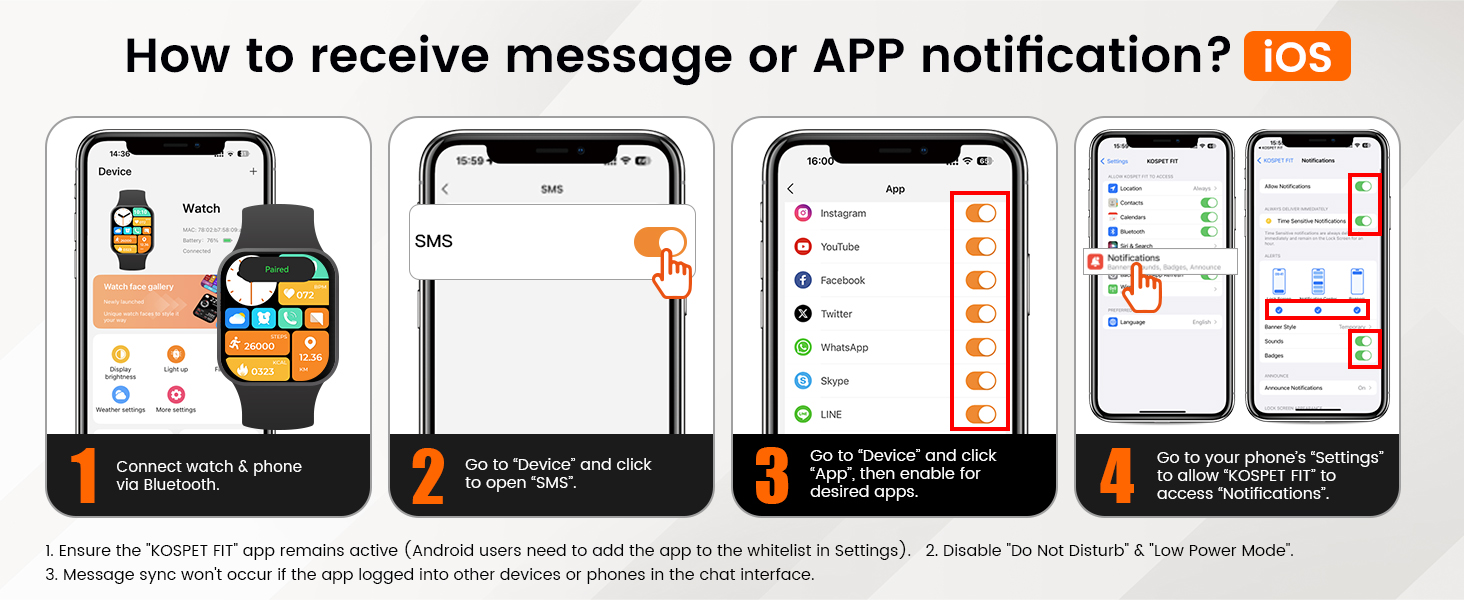
3.3 Receiving Notifications (iOS)
- Connect your watch and phone via Bluetooth.
- In the 'KOSPET FIT' app, go to 'Device' and click to open 'SMS'.
- In the app, go to 'Device' and click 'App', then enable notifications for desired applications.
- Go to your phone's 'Settings' to allow 'KOSPET FIT' to access 'Notifications'.
Note: Ensure the 'KOSPET FIT' app remains active. Message sync will not occur if the app is logged into other devices or phones in the chat interface. Disable 'Do Not Disturb' and 'Low Power Mode' on your phone for optimal notification delivery.

3.4 Receiving Notifications (Android)
- Connect your watch and phone via Bluetooth.
- In the 'KOSPET FIT' app, go to 'Device' and click to open 'SMS Reminder'.
- In the app, go to 'Device' and click 'App Reminder', then enable notifications for desired applications.
- Allow 'KOSPET FIT' to access 'Notifications' in your phone's settings.
Note: Ensure the 'KOSPET FIT' app remains active. Android users may need to add the app to the whitelist in Settings. Message sync will not occur if the app is logged into other devices or phones in the chat interface. Disable 'Do Not Disturb' and 'Low Power Mode' on your phone for optimal notification delivery.

4. Operating Your Smart Watch
4.1 Display and Navigation
The KOSPET Tank T3 features a vibrant 1.43-inch AMOLED display with a resolution of 466x466 pixels and a peak brightness of 1000 nits, ensuring clear visibility even in direct sunlight. Navigate through menus by swiping across the touchscreen or using the physical buttons on the side.

4.2 Core Functions
- Bluetooth Calling: Answer or make calls directly from your watch.
- AI Voice Assistant: Use voice commands for various tasks.
- Music Control: Manage music playback on your connected smartphone.
- Remote Photo Capture: Control your phone's camera remotely.
- Weather Forecast: Get real-time weather updates.
- Alarm Clock & Calculator: Essential daily tools.
- Sedentary Reminder: Prompts you to move after periods of inactivity.

4.3 Health Monitoring
The KOSPET Tank T3 provides comprehensive health tracking features:
- Heart Rate Monitor: Continuous heart rate tracking throughout the day.
- Blood Oxygen Monitor (SpO2): Measures blood oxygen levels.
- Sleep Tracker: Monitors sleep stages (deep, light, REM) and provides analysis.
- Blood Pressure: Provides an estimate of blood pressure.
- Stress & Emotion Tracking: Helps monitor your mental well-being.
- Breathing Exercises: Guided breathing sessions for relaxation.


4.4 Sports Modes and Smart Recognition
The watch supports over 170 sports modes, covering a wide array of activities. It also features smart recognition for 6 common sports:
- Walking
- Running
- Cycling
- Elliptical
- Rowing Machine
- Swimming (with professional SWOLF mode)
The smart recognition feature automatically detects when you start one of these activities and begins tracking without manual input.


5. Battery Life
The KOSPET Tank T3 is equipped with a 480mAh pure cobalt battery, offering extended usage times:
- AOD (Always-On Display) Mode: Up to 3 days
- Heavy Usage: Up to 8 days
- Typical Usage: Up to 15 days
- Low-Battery Mode: Up to 60+ days
Note: Actual battery life may vary based on settings, operation conditions, and other factors.

6. Durability and Water Resistance
The KOSPET Tank T3 is built to military standards (U.S. MIL-STD-810H) with a TC4 titanium alloy case and a 1.43" 3rd generation Corning Gorilla screen featuring 9H double-layer glass. It has passed 15 military-grade tests for anti-impact, anti-fluid corrosion, and extreme temperature resistance (-40°C to 70°C).
It boasts 5ATM and IP69K water resistance, allowing it to be submerged in 50 meters of water and withstand high-pressure water jets, making it suitable for swimming, diving, and surfing.


7. Specifications
| Feature | Detail |
|---|---|
| Model Name | TANK T3 |
| Operating System | Compatible for Android and iOS |
| Screen Size | 1.43 Inches |
| Display Type | AMOLED |
| Resolution | 466 x 466 pixels |
| Maximum Display Brightness | 1000 Nit |
| Battery Capacity | 480 Milliamp Hours (Lithium Polymer) |
| Battery Average Life | Up to 60 days (low-battery mode) |
| Connectivity Technology | Bluetooth |
| GPS | No GPS |
| Water Resistance Level | Waterproof (5ATM, 50 Meters depth) |
| Case Material Type | Metal (TC4 Titanium Alloy) |
| Band Material Type | Liquid silicone rubber |
| Item Dimensions | 7.68 x 3.43 x 0.71 inches |
| Target Audience | Men |
Note on Specifications: While the product specifications list "No GPS", some marketing materials and user reviews may suggest GPS functionality. This typically refers to utilizing a connected smartphone's GPS. The display resolution is visually indicated as 466x466 pixels in marketing images, despite a specification listing of 320x320 pixels.
8. Maintenance
- Cleaning: Regularly wipe the watch screen and strap with a soft, damp cloth. Avoid harsh chemicals.
- Drying: After exposure to water, ensure the watch is completely dry before charging or operating buttons.
- Storage: Store the watch in a cool, dry place away from direct sunlight and extreme temperatures.
- Charging: Use only the provided charger to prevent damage to the device.
9. Troubleshooting
- Watch not turning on: Ensure the watch is fully charged. Connect it to the charger for at least 30 minutes.
- Cannot pair with phone:
- Ensure Bluetooth is enabled on your phone.
- Make sure the watch is within range of your phone.
- Restart both the watch and your phone.
- Check the 'KOSPET FIT' app for any pending updates or permissions.
- Notifications not received:
- Verify notification permissions are granted to the 'KOSPET FIT' app in your phone's settings.
- Ensure 'Do Not Disturb' or 'Low Power Mode' is not active on your phone.
- Keep the 'KOSPET FIT' app running in the background.
- Inaccurate health data: Ensure the watch is worn snugly on your wrist, not too tight or too loose. Clean the sensors regularly.
10. Warranty and Support
The KOSPET Tank T3 Smart Watch comes with a 2-year limited warranty. For detailed warranty information, product support, or to explore other KOSPET products, please visit the KOSPET Store.
11. Official Product Video
Video 11.1: KOSPET TANK T3 Smart Watch for Men - Official Product Overview. This video provides a visual overview of the KOSPET TANK T3 smartwatch, showcasing its design, features, and functionality.


