1. Introduction
Thank you for choosing the YOMILUVE Computer Desk with 3 Drawers & Storage Shelf. This manual provides detailed instructions for assembly, setup, operation, and maintenance of your new desk. Please read this manual thoroughly before beginning assembly to ensure correct installation and safe use.
This versatile desk features ample storage with three fabric drawers, a monitor stand for ergonomic viewing, a grid shelf, and two hooks. Its reversible design allows for flexible placement in various home or office environments.

Figure 1.1: Fully assembled YOMILUVE Computer Desk.
2. Safety Information
WARNING: Failure to follow these safety instructions could result in injury or damage to the product.
- Always follow the assembly instructions carefully.
- Be cautious when adjusting the desk's height or moving components to prevent accidents.
- Ensure all screws and fasteners are securely tightened before use. Periodically check and re-tighten as necessary.
- Do not overload the desk, drawers, or shelves. Refer to the specifications section for weight limits.
- Keep small parts and packaging materials away from children and pets to prevent choking hazards.
- Assemble the desk on a soft, clean surface to prevent scratches.
- Use two people for assembly whenever possible to ensure safety and ease of installation.
3. Package Contents
Before beginning assembly, please verify that all parts listed below are present and undamaged. If any parts are missing or damaged, do not proceed with assembly. Contact customer support immediately.
3.1. Parts List
- Desktop Panel
- Monitor Stand
- Metal Frame Components (legs, crossbars)
- 3 Fabric Drawers
- Drawer Support Frame
- Grid Storage Shelf
- 2 Hooks
- Adjustable Foot Pads
- Hardware Pack (screws, Allen wrench, etc.)
- Instruction Manual
3.2. Tools Required (Included)
- Allen Wrench
Note: A Phillips head screwdriver may be helpful but is typically not required for this assembly.
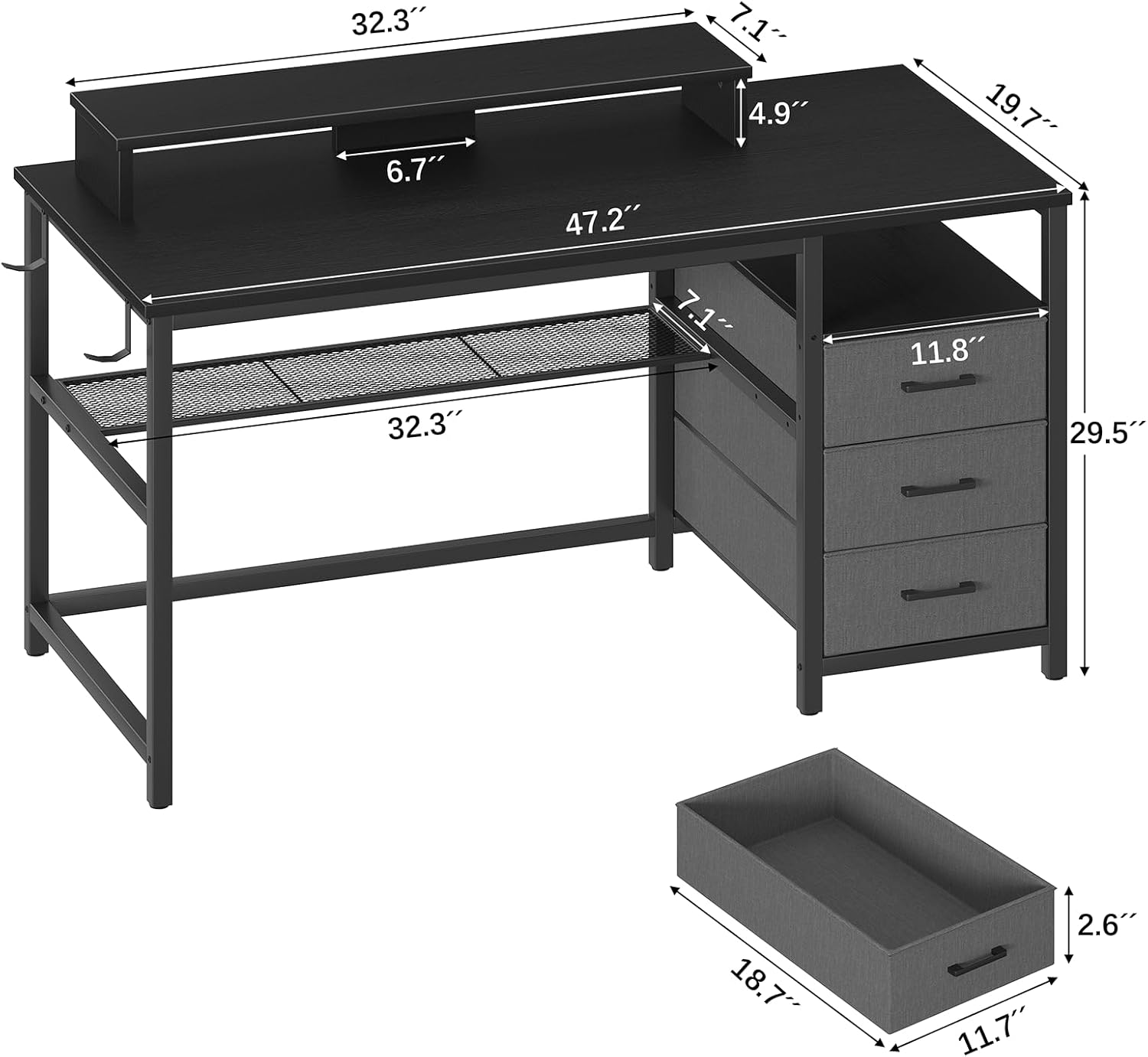
Figure 3.1: Desk dimensions and key components.
4. Assembly Instructions
Please follow these steps carefully. It is recommended to have a second person assist with assembly.
4.1. Preparation
- Clear a spacious area for assembly.
- Lay out all parts on a soft, clean surface to prevent scratches.
- Identify all hardware components and separate them for easy access.
4.2. Frame Assembly
- Attach the main desk legs to the crossbars using the provided screws. Do not fully tighten yet.
- Secure the desktop panel to the assembled frame. Ensure proper alignment before tightening all screws.
4.3. Drawer Unit Assembly and Reversibility
The drawer unit is reversible and can be installed on either the left or right side of the desk. Decide your preferred orientation before proceeding.

Figure 4.1: Reversible storage drawers configuration.
- Assemble the drawer support frame according to the chosen left or right configuration.
- Attach the assembled drawer support frame to the main desk frame.
- Assemble the three fabric drawers by inserting the bottom panels and handles.
- Slide the assembled fabric drawers into the drawer support frame.
4.4. Monitor Stand and Grid Shelf Installation
The monitor stand can be placed on top of the desk, and the grid shelf offers flexible installation options.
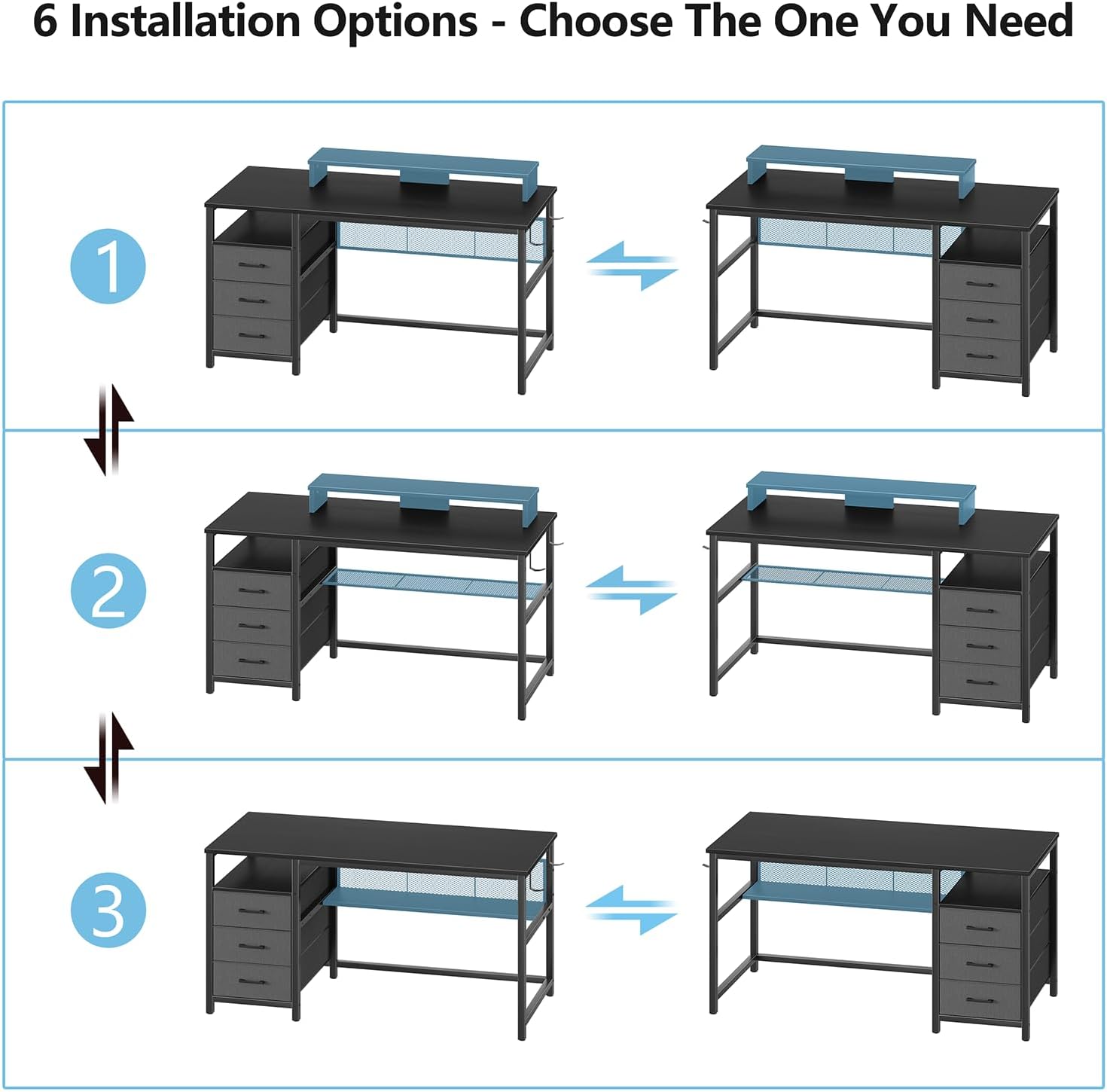
Figure 4.2: Various installation options for the desk components.

Figure 4.3: Grid shelf installation options (as backing board or shelf).
- Place the monitor stand on the desktop in your desired position. It is not permanently fixed, allowing for flexibility.
- Install the grid storage shelf. It can be used as a backing board or as a horizontal shelf below the desktop, depending on your storage needs. Refer to Figure 4.3 for options.
- Attach the two hooks to the side of the desk frame as desired for hanging headphones or bags.
4.5. Final Adjustments
- Ensure all screws are fully tightened.
- Adjust the foot pads at the bottom of the desk legs to ensure stability on uneven floors.

Figure 4.4: Adjustable foot pad for stability.
5. Setup
Once assembled, optimize your workspace with these setup tips:
- Monitor Stand Placement: Position the monitor stand to achieve an ergonomic viewing height, reducing neck and eye strain.
- Drawer Configuration: If you wish to change the side of the reversible drawer unit, carefully detach it from the main frame and reattach it to the opposite side.
- Grid Shelf Use: Utilize the grid shelf for books, small electronics, or decorative items. If used as a backing board, it can help organize cables.
- Hook Placement: The two included hooks can be attached to either side of the desk frame to hang headphones, bags, or other accessories, keeping your desktop clear.

Figure 5.1: Ergonomic benefits of the monitor stand.

Figure 5.2: Grid shelf in use for storage.

Figure 5.3: Hooks for accessories.
6. Operation
Your YOMILUVE Computer Desk is designed for daily use in a home or office environment. Here's how to best utilize its features:
- Using the Drawers: The three fabric drawers provide convenient storage for documents, office supplies, and personal items. Pull gently on the handles to open and push to close.
- Monitor Stand: Place your monitor, laptop, or other display devices on the stand to elevate them to a comfortable viewing height. The space underneath can be used for keyboard storage or small items.
- Grid Shelf: This shelf is ideal for storing books, binders, or small electronic devices, keeping them within reach but off the main desktop.
- Hooks: Use the side hooks to hang headphones, bags, or other items you need to access frequently, helping to maintain a tidy workspace.

Figure 6.1: Drawers for organized storage.
7. Maintenance
Proper care will extend the life and appearance of your desk.
- Cleaning: Wipe the desk surfaces with a soft, damp cloth. Avoid harsh chemicals or abrasive cleaners, which can damage the finish. For fabric drawers, spot clean with a mild detergent and allow to air dry.
- Hardware Check: Periodically check all screws and fasteners to ensure they remain tight. Re-tighten as needed to maintain stability.
- Avoid Extreme Conditions: Do not expose the desk to direct sunlight for prolonged periods or to extreme temperature changes, as this may cause warping or discoloration.
- Weight Distribution: Distribute weight evenly across the desktop and shelves to prevent stress on any single point.
8. Troubleshooting
If you encounter any issues with your YOMILUVE Computer Desk, please refer to the following common solutions:
- Desk is Wobbly:
a. Ensure all assembly screws are fully tightened.
b. Adjust the foot pads on the bottom of the legs to compensate for uneven flooring. - Drawers Do Not Slide Smoothly:
a. Check that the fabric drawers are assembled correctly and not overloaded.
b. Ensure the drawer support frame is securely attached and aligned. - Missing Parts:
a. Double-check the packaging and all corners for small components.
b. If a part is genuinely missing (e.g., a drawer bottom as reported by some users), contact YOMILUVE customer support with your purchase details and the specific part number from the instruction manual. - Scratches or Damage During Assembly:
a. If minor, touch-up pens or furniture markers can be used.
b. For significant damage, contact customer support.
If these steps do not resolve your issue, please contact YOMILUVE customer support for further assistance.
9. Specifications
| Feature | Detail |
|---|---|
| Brand | YOMILUVE |
| Product Dimensions (D x W x H) | 19.7"D x 47.3"W x 34.5"H |
| Color | Black |
| Style | Modern |
| Base Material | Metal |
| Top Material Type | Wood |
| Finish Type | Glossy |
| Special Feature | Adjustable Foot Pads, Reversible Storage |
| Number of Drawers | 3 |
| Number of Shelves | 1 (Grid Shelf) |
| Storage Options | Drawers, Monitor Stand, Grid Shelf, Hooks |
| Required Assembly | Yes |
| Includes All Assembly Tools | Yes |
10. Warranty & Support
YOMILUVE products are manufactured with quality and durability in mind. This product comes with a standard manufacturer's warranty covering defects in materials and workmanship under normal use.
For warranty claims, missing parts, or technical support, please contact YOMILUVE customer service through the retailer's platform where you purchased the product or visit the official YOMILUVE brand store online. Please have your purchase receipt and model number (B0CQX6BW4K) ready when contacting support.
We are committed to ensuring your satisfaction with our products.