Product Overview
The JUOVI J2601 Portable Power Bank is a high-capacity, fast-charging device designed to provide reliable power for your electronic devices on the go. Featuring 10000mAh capacity and 35W two-way fast charging, it includes dual Type-C ports for both input and output, and one USB-A output, ensuring broad compatibility with various devices such as smartphones, tablets, and laptops.

Figure 1: JUOVI J2601 Portable Power Bank with included cables.
What's in the Box
- JUOVI J2601 Power Bank 10000mAh 35W
- 3A Type-C to Type-C charging cable (30cm)
- Instruction Manual (this document)


Figure 2: Product packaging showing contents and key features.
Setup
Initial Charging of the Power Bank
Before first use, it is recommended to fully charge your JUOVI J2601 Power Bank. This ensures optimal battery performance and accuracy of the digital display.
- Connect the included Type-C to Type-C cable to either of the Type-C ports (Type-C1 or Type-C2) on the power bank.
- Connect the other end of the cable to a compatible USB-C wall charger (not included) with a minimum output of 35W for fastest charging.
- The digital display on the power bank will show the charging percentage. The power bank can be fully recharged in approximately 1.4 hours with a 35W PD charger.
- Once the display shows 100%, the power bank is fully charged and ready for use.

Figure 3: Recharging the power bank.
Operating Instructions
Identifying Ports and Indicators
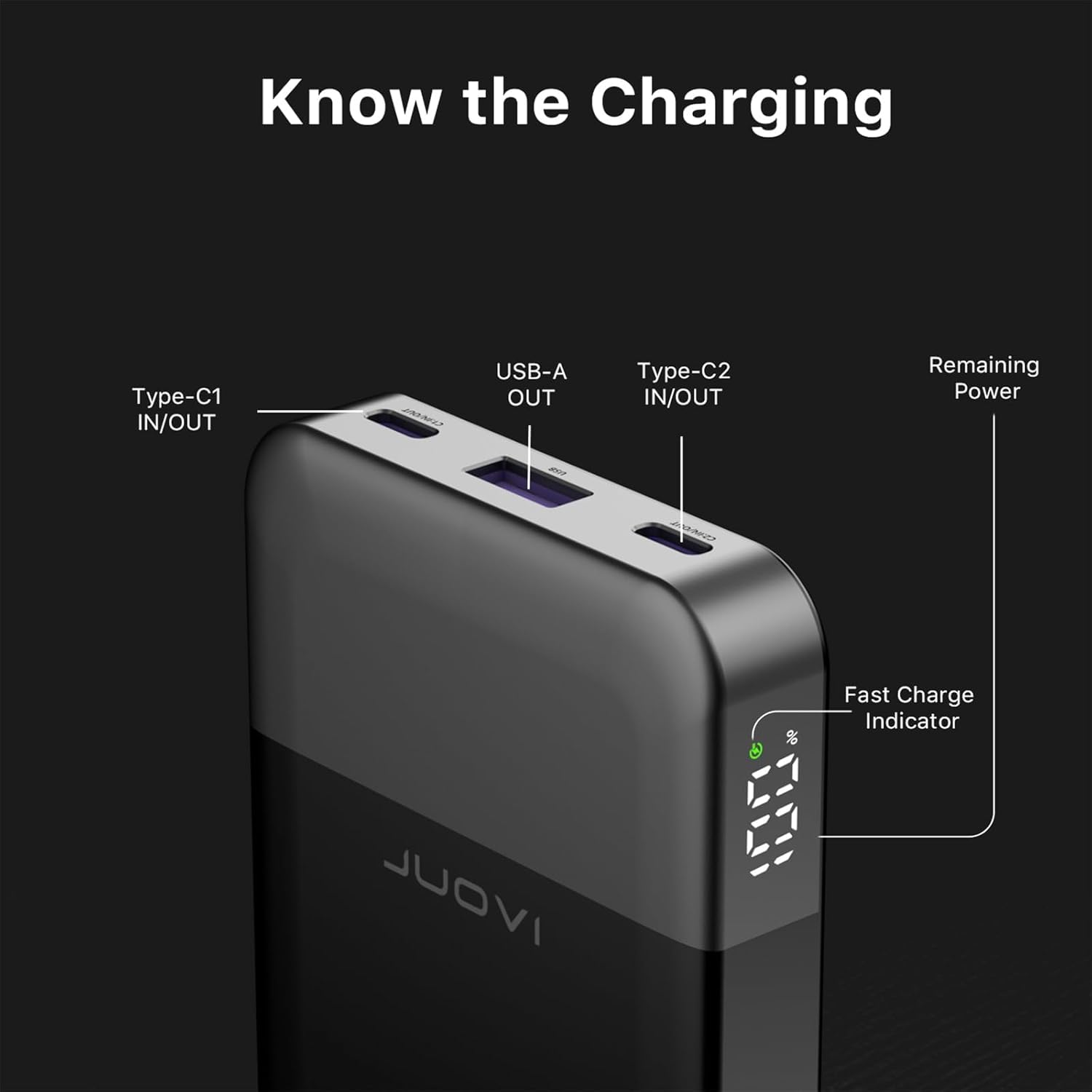
Figure 4: Port identification and digital display features.
- Type-C1 IN/OUT: Supports both charging the power bank and charging external devices.
- USB-A OUT: Dedicated output port for charging external devices.
- Type-C2 IN/OUT: Supports both charging the power bank and charging external devices.
- Digital Display: Shows the remaining battery percentage of the power bank.
- Fast Charge Indicator: An icon on the digital display indicates when fast charging is active.
Charging External Devices
The JUOVI J2601 Power Bank can charge a wide range of devices, including smartphones, tablets, laptops, smartwatches, and TWS earbuds.
- Connect your device's charging cable to the appropriate port on the power bank (Type-C1, Type-C2, or USB-A).
- Connect the other end of the cable to your device.
- The power bank will automatically begin charging your device. The digital display will show the remaining power.
- For optimal fast charging, use a compatible cable and ensure your device supports PD 3.0 or QC 4.0 technology.
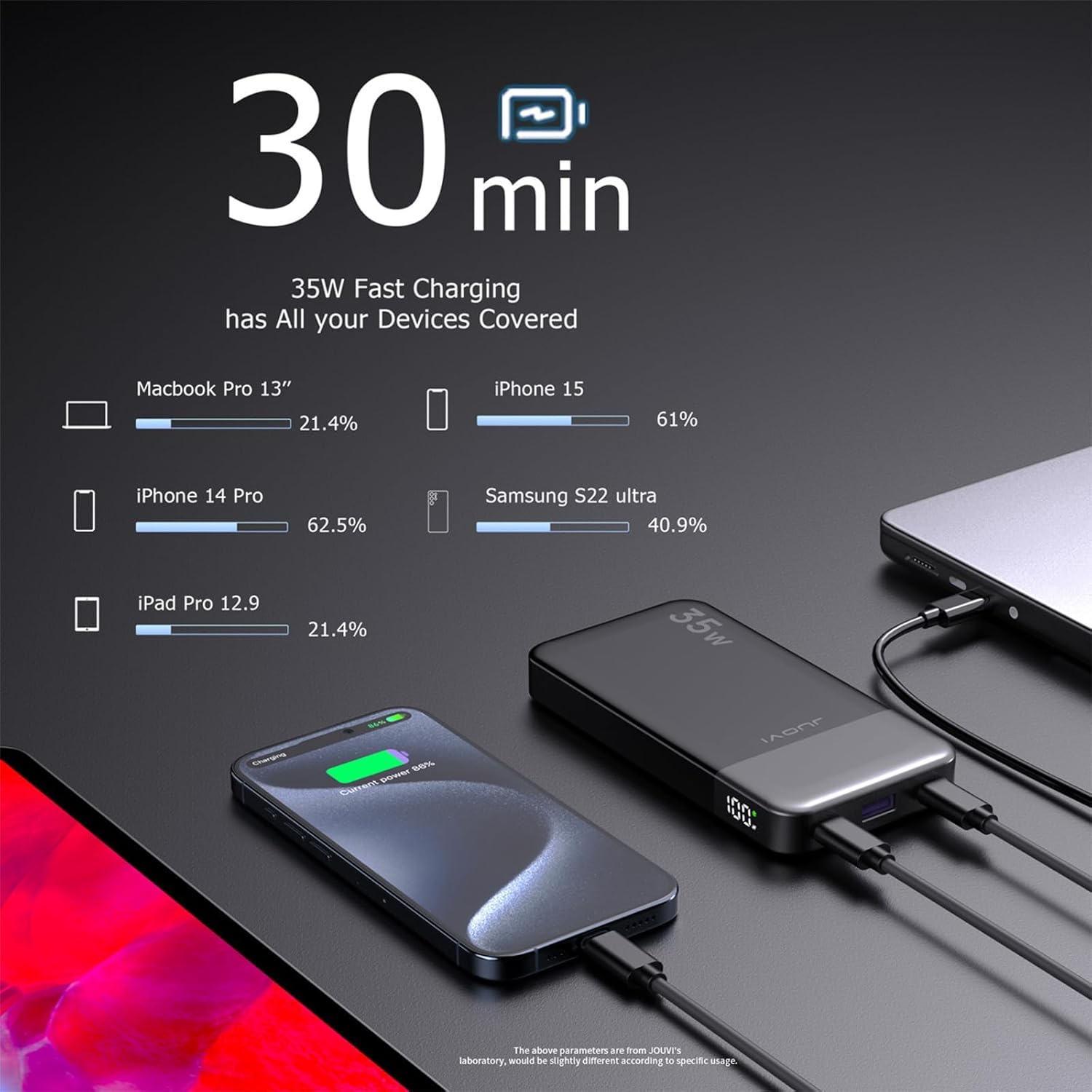
Figure 5: Charging various devices with the power bank.

Figure 6: Laptop charging capability.

Figure 7: Bidirectional charging functionality.

Figure 8: Multiple device charging in various scenarios.
Multi-Device Charging Configurations
The power bank supports charging multiple devices simultaneously. The output power will be distributed among the connected devices.

Figure 9: Charging configurations and power distribution.
- Single-port Charging:
- USB-C1: Up to 35W Max
- USB-C2: Up to 35W Max
- USB-A: Up to 30W Max
- Two-Port Charging:
- USB-C1 + USB-C2: 10W + 10W Max
- USB-C1 + USB-A: 10W + 10W Max
- USB-C2 + USB-A: 10W + 10W Max
- Three-Port Charging:
- USB-C1 + USB-C2 + USB-A: 10W + 10W + 10W Max
Safety Features and Protection
The JUOVI J2601 Power Bank is equipped with multiple safety features to protect both the power bank and your connected devices:

Figure 10: Built-in smart identifying chip system for multi-protection.
- Over-heat Protection: Prevents the device from overheating during charging or discharging.
- Over-current Protection: Safeguards against excessive current flow.
- Over-discharge Protection: Protects the battery from being fully depleted, extending its lifespan.
- Over-voltage Protection: Shields against voltage spikes.
- Short-circuit Protection: Automatically shuts off in case of a short circuit.
- Over-charge Protection: Prevents the battery from being overcharged.
- Auto Shut-Off: The power bank will automatically turn off when not in use or when charging is complete to conserve power.

Figure 11: Internal heat dissipation and temperature management.
Maintenance
To ensure the longevity and optimal performance of your JUOVI J2601 Power Bank, follow these maintenance guidelines:
- Storage: Store the power bank in a cool, dry place away from direct sunlight and extreme temperatures. Avoid environments with high humidity.
- Cleaning: Use a soft, dry cloth to clean the exterior of the power bank. Do not use liquid cleaners or abrasive materials.
- Battery Care: For best battery health, avoid completely draining the power bank frequently. Recharge it when the battery level is low. If storing for extended periods, charge it to about 50-70% every three months.
- Avoid Drops: Protect the power bank from drops and impacts, which can damage internal components.
Troubleshooting
| Problem | Possible Cause | Solution |
|---|---|---|
| Power bank not charging |
|
|
| Device not charging from power bank |
|
|
| Digital display remains on continuously |
|
|
| Power bank charges only to a certain percentage (e.g., 71%) |
|
|
Specifications
| Feature | Detail |
|---|---|
| Model Number | J2601 |
| Battery Capacity | 10000 Milliamp Hours (mAh) |
| Product Dimensions | 5.4 x 2.75 x 0.66 inches (137 x 70 x 16.8 mm) |
| Item Weight | 8 ounces (approx. 228g) |
| Connector Type | 2x USB Type-C (Input/Output), 1x USB Type-A (Output) |
| Max Output Power | 35W |
| Special Features | Auto Shut-Off, Digital Display, Fast Charging, Over Charging Protection, Short Circuit Protection |
| Color | Black |
| Manufacturer | TianJin Zowda New Energy Technology Co.,Limited |
| Date First Available | December 25, 2023 |
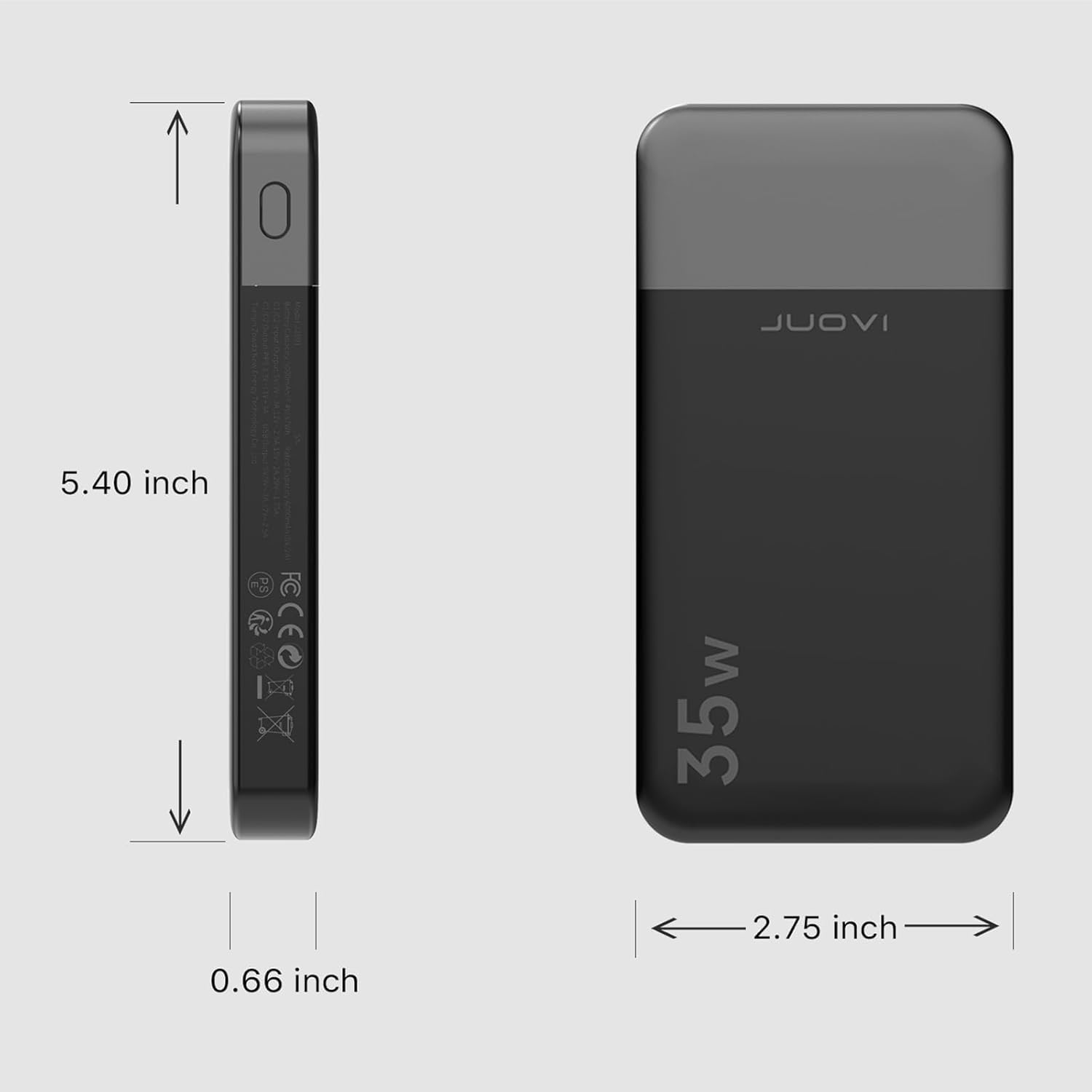
Figure 12: Product dimensions.

Figure 13: Detailed specifications from packaging.
Warranty and Support
For warranty information and customer support, please refer to the documentation provided with your purchase or contact the seller directly. The manufacturer of this product is TianJin Zowda New Energy Technology Co.,Limited.
If you purchased this product from Amazon, you may contact the seller "Xintaistore" through your Amazon order history for assistance.


