
1. Setup and Initial Use
This section guides you through the initial setup of your Dollarfix PF8 OBD2 Scanner Diagnostic Tool.
1.1 Unpacking and Components
Carefully unpack all items from the box. Verify that all components listed below are present.
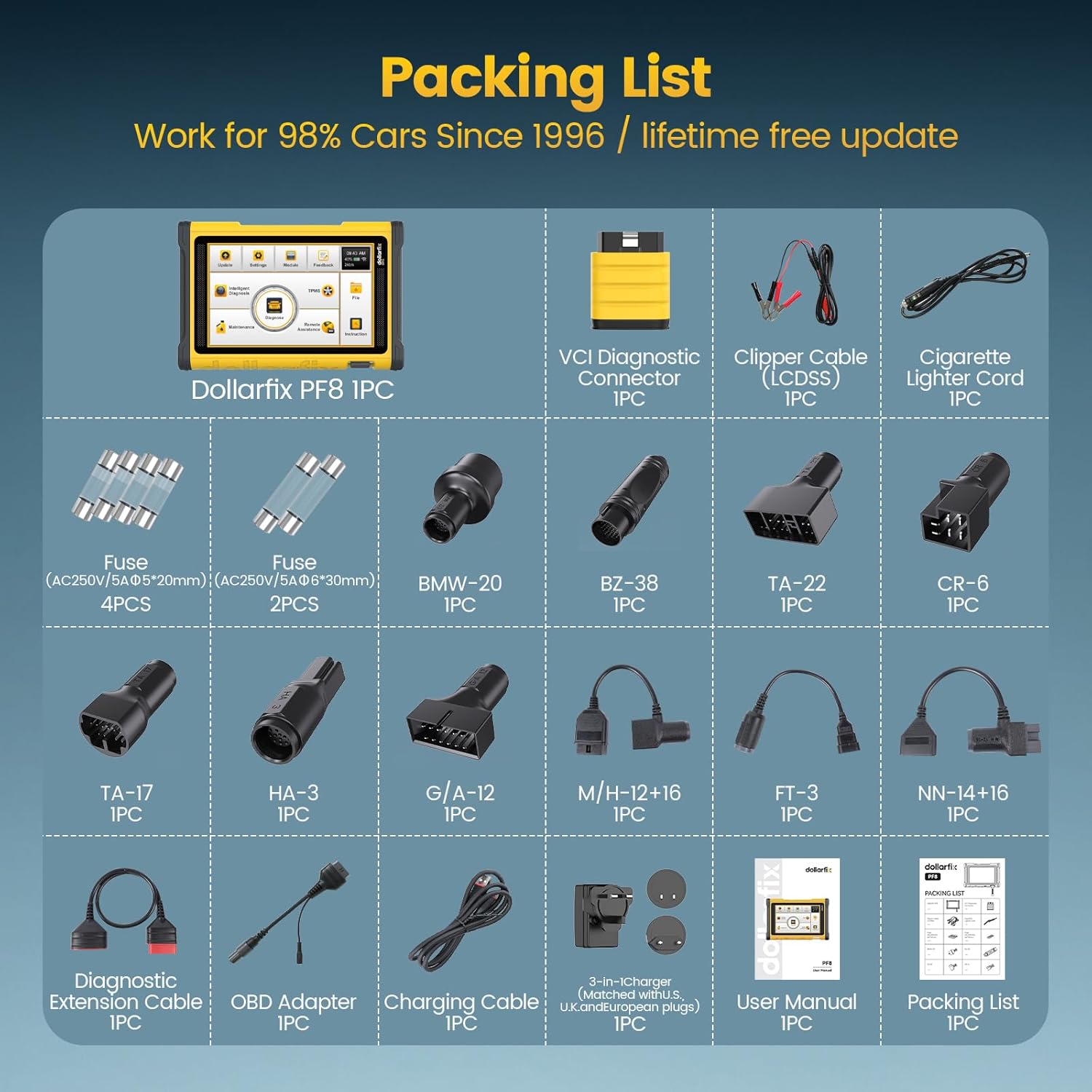
Image 1.1: The packing list for the Dollarfix PF8 OBD2 Scanner, showing the main unit, VCI diagnostic connector, various adapter cables (Clipper, Cigarette Lighter, BMW-20, BZ-38, TA-22, CR-6, TA-17, HA-3, G/A-12, M/H-12+16, FT-3, NN-14+16), diagnostic extension cable, OBD adapter, charging cable, power adapter, user manual, and additional fuses.
The package typically includes:
- Dollarfix PF8 Main Unit
- VCI Diagnostic Connector
- Clipper Cable (Lcbss)
- Cigarette Lighter Cord
- Fuses (AC250V/5A Φ5*20mm - 4PCS, AC250V/5A Φ6*30mm - 2PCS)
- Various Car Connectors: BMW-20, BZ-38, TA-22, CR-6, TA-17, HA-3, G/A-12, M/H-12+16, FT-3, NN-14+16
- Diagnostic Extension Cable
- OBD Adapter
- Charging Cable
- 8-in-1 Charger (matched with U.S., U.K., and European plugs)
- User Manual
- Packing List
1.2 Powering On and Initial Configuration
- Charge the Device: Connect the charging cable to the PF8 unit and a power source using the provided charger. Ensure the device is fully charged before first use.
- Power On: Press and hold the power button located on the device until the screen illuminates.
- Language Selection: Follow the on-screen prompts to select your preferred language.
- Wi-Fi Connection: Connect the device to a stable Wi-Fi network. This is crucial for software updates and online functions.
- Software Update: After connecting to Wi-Fi, navigate to the update section (usually labeled "Update" or "APP Update") and download any available system and car brand diagnostic software updates. Regular updates ensure optimal performance and expanded vehicle compatibility.

Image 1.2: The Dollarfix PF8 scanner displaying its software update interface, indicating progress for various software components like Engine Speed and A/F Reset. The image highlights the 8" HD touchscreen, 1280x800 resolution, Android 8.1 system, 2GB RAM, 64GB ROM, 12600mAh battery, 4-core 1.5GHz CPU, and wireless Bluetooth connectivity.
2. Operating Instructions
This section details the various diagnostic and service functions of the Dollarfix PF8.
2.1 Connecting to a Vehicle
- Locate the OBD-II Port: The OBD-II port is typically located under the dashboard on the driver's side.
- Select Appropriate Connector: Use the standard OBD-II connector or one of the specialized connectors (e.g., BMW-20, BZ-38) if your vehicle requires it.
- Connect the VCI: Plug the VCI Diagnostic Connector into the vehicle's OBD-II port.
- Connect to PF8: Establish a wireless Bluetooth connection between the VCI and the PF8 main unit.
- Turn Ignition On: Turn the vehicle's ignition to the "ON" position (engine off).
- Start Diagnosis: On the PF8, select the "Diagnose" option to begin vehicle communication. The device supports Auto VIN/Scan for automatic vehicle identification.

Image 2.1: The main interface of the Dollarfix PF8 scanner, showcasing key features such as 34+ Reset Functions, OE-Level Full System Diagnosis, ECU Coding, Bidirectional Control, FCA AutoAuth, and lifetime free updates. It also highlights Auto VIN/Scan, Online Calibration, Guided Functions, 12 in 1 Data Stream, Unlock Special Functions, 98% Car Coverage Since 1996, and 27 Languages.
2.2 Full System Diagnostics
The PF8 provides comprehensive, OE-level diagnostics for all available vehicle systems. This includes reading and clearing diagnostic trouble codes (DTCs), viewing live data streams, and accessing ECU information.
- Read Codes: Retrieve current, pending, and permanent DTCs from all control modules.
- Clear Codes: Erase DTCs after repairs have been completed.
- Live Data: View real-time parameters from various sensors and components in text or graph format.
- ECU Information: Access vehicle control unit information such as VIN, calibration IDs, and calibration verification numbers.
- Freeze Frame: View a snapshot of sensor values at the moment a DTC was set.

Image 2.2: The Dollarfix PF8 scanner displaying an OE-Level All Systems Diagnostic Scan, showing various vehicle systems like A/F, Engine, Oil, Lighting, BMS, ABS, Door, Airbag, Starter, and TMPS. The screen shows a list of detected control modules and their status.
2.3 Bidirectional Control (Active Tests)
The bidirectional control feature allows the PF8 to send commands to vehicle systems and components to perform specific tests and functions, verifying their operational status without using the vehicle's controls.
- Actuate solenoids and actuators for active testing.
- Test components such as radiator fans, throttle modulation, window operation, mirror adjustments, injector buzz tests, interior/exterior lights, and horn.

Image 2.3: The Dollarfix PF8 scanner demonstrating bidirectional control and active tests, with examples of components that can be tested, including windows, mirrors, headlights, horns, wipers, fuel injectors, air conditioner, cycle A/C clutch, and ABS pump test. The scanner's screen shows a diagnostic process for various control modules.
2.4 Advanced Maintenance and Reset Functions (34+)
The PF8 offers over 34 professional reset and maintenance service functions to assist with various vehicle repairs and adjustments.

Image 2.4: The Dollarfix PF8 scanner highlighting its 34+ maintenance service functions. Examples shown include Oil Reset, EPB Reset, SAS Reset, BMS Reset, ABS Bleeding, Throttle Matching, ECU Reset, and Injector Coding. A list of other functions includes Sunroof Reset, Suspension Reset, Gearbox Reset, AFS Headlamp Reset, Gear Learning, TPMS Reset, A/F Reset, Coolant Bleed, Language Change, Seat Calibration, STOP/START, Reset AIRBAG, Transport Mode, TIRE Reset, Windows Calibration, Clutch Matching, FRM Matching, Gateway Module Data Calibration, Rainfall Light Sensor, and Turbocharging Matching.
Key functions include:
- Oil Reset: Resets the engine oil life system.
- EPB Reset: Resets the electronic parking brake pads after replacement.
- SAS Reset: Calibrates the steering angle sensor.
- BMS Reset: Registers the new battery to the ECU.
- ABS Bleeding: Performs ABS brake bleeding procedures.
- Throttle Matching: Relearns the throttle body position.
- ECU Reset: Resets the Engine Control Unit.
- Injector Coding: Codes new injector numbers to the ECU.
- Key Programming: Adds, deletes, and reprograms keys, including smart keys.
- Cylinder Power Balance Test: Helps identify engine misfires and power issues.
- N.o.x Sensor Reset: Resets the NOx sensor.
- A.d.b.l.u.e Reset: Resets the AdBlue system.
- Unlock Engine After Collision: Resets the engine after a collision event.
- Cancel ABS Driving Test: Disables the ABS driving test.
2.5 ECU Coding and Special Functions
The PF8 supports advanced ECU coding and customization features.

Image 2.5: The Dollarfix PF8 scanner demonstrating advanced ECU coding capabilities. The image shows options to Unfold Special Features, Optimize Vehicle's Performance, Disable Annoying Functions, and Customize OE-Settings. The scanner's screen displays a menu with Update, Settings, Module, Feedback, Intelligent Diagnosis, Maintenance, Diagnose, Remote Assistance, and Instruction options.
- Online Coding: Match, learn, or code newly replaced ECUs.
- Customization: Unfold hidden features or disable unwanted functions (e.g., 3-time flasher setting, auto lock/unlock, one-touch signal flickers, deactivate buzzing sounds, needle sweep, rear-view mirror folding, disable daytime running light, disable seat belt alarm beep, remove maximum speed limiter).
- Programmable Module Installation (PMI): Used when replacing or initializing a module (compatible with Ford, Lincoln, Mazda, etc.).
- AutoAuth for FCA SGW: Supports secure gateway access for FCA vehicles.
- V.A.G Guided Function: Provides guided procedures for Volkswagen Audi Group vehicles.
3. Maintenance
Proper maintenance ensures the longevity and optimal performance of your Dollarfix PF8 scanner.
- Software Updates: Regularly connect the device to Wi-Fi and check for system and car brand software updates. These updates expand vehicle coverage, add new functions, and improve performance.
- Cleaning: Use a soft, damp cloth to clean the screen and exterior of the device. Avoid abrasive cleaners or solvents.
- Storage: Store the device in a cool, dry place away from direct sunlight and extreme temperatures.
- Battery Care: For optimal battery life, avoid fully discharging the battery frequently. Charge the device regularly, especially if storing it for extended periods.
4. Troubleshooting
This section addresses common issues you might encounter with your Dollarfix PF8 scanner.
4.1 General Issues
- Device does not power on:
- Ensure the battery is charged. Connect the device to the charger and try again.
- Check the power button for any physical damage.
- Cannot connect to vehicle:
- Verify the VCI is securely plugged into the vehicle's OBD-II port.
- Ensure the vehicle's ignition is in the "ON" position (engine off).
- Check the Bluetooth connection between the PF8 unit and the VCI.
- Confirm that the correct vehicle connector is being used if it's not a standard OBD-II port.
- Ensure the vehicle's battery has sufficient voltage.
- Software functions not working or limited:
- Connect to Wi-Fi and perform all available software updates. Many advanced functions and vehicle compatibilities are added via updates.
- Note that specific reset and special functions may not be supported by all car brands or models. Refer to the manufacturer's support for a detailed compatibility list if needed.
- Slow performance:
- Close any unnecessary applications running in the background.
- Ensure sufficient storage space is available on the device.
- Perform a system update if available.
If you encounter persistent issues, please contact Dollarfix customer support for assistance.
5. Specifications
Detailed technical specifications for the Dollarfix PF8 OBD2 Scanner Diagnostic Tool.
| Feature | Detail |
|---|---|
| Brand | Dollarfix |
| Model | PF8 |
| Operating System | Android 8.0 (some sources indicate Android 10.0) |
| Processor | MT8362 4-Core Contex-A35 1.5Ghz |
| RAM | 2GB |
| ROM (Storage) | 64GB |
| Screen Size | 8.0 inches |
| Native Resolution | 1280 x 800 |
| Battery | 12600mAh rechargeable battery |
| Connectivity | 2.4Ghz Wi-Fi, Bluetooth 4.0 |
| Camera | 8MP Rear Camera |
| Power Source | Battery Powered |
| Special Functions | 34+ Reset Functions, ECU Coding, Bidirectional Control, Active Test, Key Programming, AutoAuth FCA SGW, PMI, Cylinder Power Balance Test, V.A.G Guided Function, Flash Hidden Functions, Anti-theft IMMO Service, N.o.x Sensor Reset |
| Languages Supported | 27 Languages |
| Updates | Lifetime Free Update |
6. Warranty and Support
Dollarfix is committed to providing high-quality products and customer satisfaction.
6.1 Warranty Information
Please refer to the warranty card included in your product packaging or visit the official Dollarfix website for detailed warranty terms and conditions. The warranty typically covers manufacturing defects and malfunctions under normal use.
6.2 Customer Support
For technical assistance, troubleshooting, or any questions regarding your Dollarfix PF8 OBD2 Scanner, please contact our customer support team. You can usually find contact information (email, phone, or online chat) on the official Dollarfix website or in the product documentation.
When contacting support, please have your product model (PF8) and any relevant purchase information ready to expedite the process.


