
Introduction
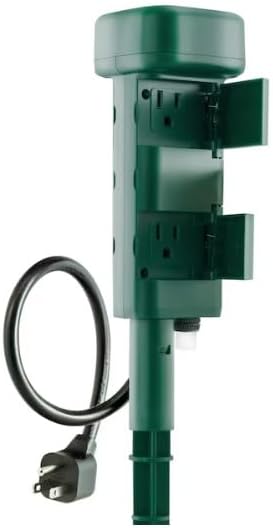
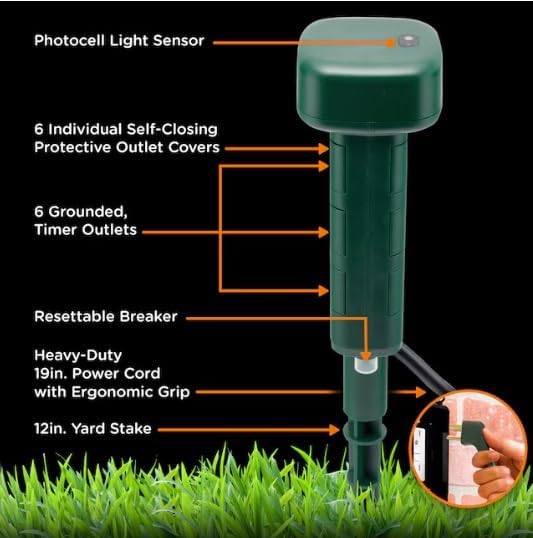
The JASCO MTS Photocell Stake Timer (Model 78428-DI1) is designed to automate outdoor lighting and electrical devices. This timer features light-sensing technology for automatic dusk-to-dawn operation, providing convenience and enhancing home security by creating a lived-in appearance. It includes six grounded outlets with weather-resistant, self-closing covers, a durable 12-inch stake for secure ground placement, and a 19-inch heavy-duty power cord with an ergonomic plug. An integrated circuit breaker offers overload protection for connected devices. Its green finish allows it to blend seamlessly into outdoor environments such as yards and gardens.
Package Contents
- JASCO MTS Photocell Stake Timer Unit
- Ground Stake (multi-piece assembly)
- Remote Control
- Remote Control Battery
- Instruction Manual
Setup Instructions
- Assemble the Stake: Connect the multi-piece ground stake by twisting the sections together until secure.
- Attach Timer to Stake: Securely twist the timer unit onto the top of the assembled ground stake.
- Insert Remote Battery: Open the battery compartment on the remote control and insert the provided battery, ensuring correct polarity.
- Position the Timer: Choose a location in your outdoor area where the timer's photocell sensor will receive direct sunlight and is not obstructed by nighttime light sources (e.g., floodlights, security lights). Firmly push the stake into the ground until the timer unit is stable.
- Connect to Power: Plug the timer's heavy-duty power cord into a grounded outdoor receptacle. Ensure the receptacle is weather-protected.
- Connect Devices: Open the weather-resistant covers on the six grounded outlets and plug in your outdoor lights or other electrical devices. Close the covers securely around the cords to maintain weather protection.


Operating Instructions
The JASCO MTS Photocell Stake Timer offers multiple operating modes for flexible control of your outdoor devices.
Using the Remote Control:
The included remote control allows you to conveniently manage the timer's functions from a distance.
- ON/OFF: Press the 'ON' button to turn all connected devices on, and 'OFF' to turn them off immediately.
- Sensor Mode: Press the 'Sensor' button to activate dusk-to-dawn operation. Devices will automatically turn on at sunset and off at sunrise.
- Timed Modes: Select 2H, 4H, 6H, or 8H to set the duration for which devices remain on after sunset. For example, selecting '4H' in sensor mode will turn devices on at dusk and off after 4 hours.
- Timer Mode: Use the 'Timer' button to cycle through preset timed intervals (e.g., 2, 4, 6, 8 hours) for continuous operation, independent of the photocell sensor.
Manual Operation:
The timer unit also features a manual ON/OFF switch for direct control.
- Press the power button on the timer unit to manually cycle through ON, OFF, and Sensor modes.
Features
- Automatic Lighting: Automates outdoor lighting and seasonal décor with sunset-activated operation, which can deter crime by giving your home a lived-in appearance.
- Heavy Duty Construction: Weather-resistant construction and self-closing outlet covers withstand the elements. A durable stake, high-quality cord, and green finish allow secure placement in natural areas.
- Program-Free Control: Light-sensing technology activates the timer at sunset and turns off at dawn. For proper operation, place the timer in direct sunlight and away from nighttime light sources.
- Grounded Outlets: Six three-prong outlets provide increased plug-in capacity and control connected devices simultaneously.
- Ergonomic Plug: A unique design of the grounded plug makes unplugging the cord easier while better accommodating duplex receptacles and weather-proof boxes.
Specifications
| Attribute | Value |
|---|---|
| Model Number | 78428-DI1 |
| Brand | Jasco |
| Color | Green |
| Material | Plastic |
| Product Dimensions | 4.7"D x 3.2"W x 9.4"H |
| Item Weight | 0.53 Pounds (8.5 ounces) |
| Number of Settings | 1 (Dusk-to-Dawn with timed options) |
| UPC | 030878784283 |
Maintenance
- Cleaning: Periodically wipe the timer unit with a damp cloth to remove dirt and debris. Do not immerse in water.
- Inspect Cords: Regularly check the power cord and any connected device cords for damage, fraying, or exposed wires. Replace damaged cords immediately.
- Outlet Covers: Ensure all unused outlet covers are securely closed to prevent moisture and debris from entering.
- Photocell Sensor: Keep the photocell sensor clean and free from obstructions (e.g., leaves, dirt) to ensure accurate dusk-to-dawn operation.
Troubleshooting
- Devices Not Turning On:
- Check if the timer is properly plugged into a live outlet.
- Ensure the manual ON/OFF switch on the timer unit is in the 'ON' position or the desired mode.
- Verify that the connected devices are working correctly by plugging them directly into a standard outlet.
- If using photocell mode, ensure the sensor is not obstructed and is receiving sufficient light.
- Devices Not Turning Off:
- In photocell mode, check if the sensor is exposed to artificial light sources at night, which may prevent it from turning off.
- If a timed mode is set, ensure the duration has elapsed.
- Remote Control Not Working:
- Replace the remote control battery.
- Ensure there are no obstructions between the remote and the timer unit.
- Circuit Breaker Tripped: If the integrated circuit breaker trips (indicated by a red button), unplug all devices, reset the breaker, and then plug devices back in one by one to identify the overloaded device. Do not exceed the maximum load capacity.
Safety Information
- For outdoor use only.
- Do not immerse the unit in water.
- Ensure all connections are secure and outlet covers are closed when not in use or during wet conditions.
- Do not exceed the maximum electrical ratings of the timer.
- Always plug into a grounded outdoor receptacle.
- Keep children and pets away from the unit during operation.
Warranty and Support
For warranty information or technical support, please refer to the contact details provided in your product packaging or visit the official Jasco website. Keep your purchase receipt as proof of purchase for warranty claims.