
KOSPET T3-Black
Contents
KOSPET T3-Black Smart Watch User Manual
Model: T3-Black | Brand: KOSPET
Introduction
The KOSPET T3-Black Smart Watch is engineered for durability and performance, designed to withstand challenging environments while providing comprehensive smart features. This manual provides essential information on setting up, operating, maintaining, and troubleshooting your device to ensure optimal performance and longevity.

Figure 1: KOSPET T3-Black Smart Watch Overview
What's in the Box
Verify that all items are present in the package:
- 1*Smart Watch
- 1*charger
- 1*watchband
- 1*user manual
Setup
1. Charging the Device
Before first use, fully charge your KOSPET T3-Black Smart Watch using the provided magnetic charger. Connect the charger to a USB power source. The watch display will indicate charging status.

Figure 2: Charging the Smart Watch
2. App Download and Pairing
To unlock the full functionality of your KOSPET T3-Black, download the KOSPET FIT app on your smartphone. The watch is compatible with iOS 10.0+ and Android 5.1+ devices.
- Download the 'KOSPET FIT' app from Google Play Store or Apple App Store.
- Turn on your phone's Bluetooth.
- Open the KOSPET FIT app, go to 'Device' and click 'Add a new device'.
- Click 'Pair' in the pop-up window of the watch and app to establish the connection.
- Enable 'Notifications' permission when prompted.

Figure 3: Connecting Your Smart Watch
3. Receiving Notifications (iOS)
- Connect watch & phone via Bluetooth.
- Go to "Device" in the KOSPET FIT app and click to open "SMS".
- Go to "Device" and click "App", then enable for desired apps.
- Go to your phone's "Settings" to allow "KOSPET FIT" to access "Notifications".
Note: Ensure the "KOSPET FIT" app remains active. Message sync won't occur if the app is logged into other devices or phones in the chat interface. Disable "Do Not Disturb" & "Low Power Mode".
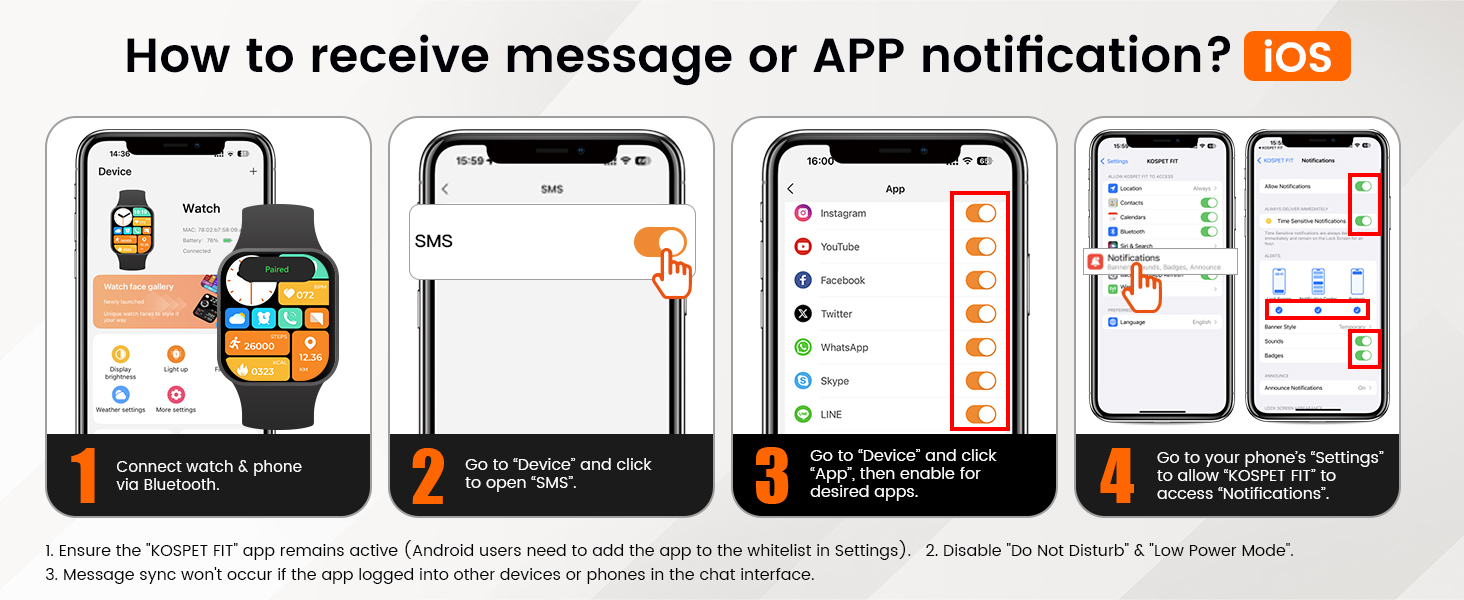
Figure 4: iOS Notification Setup
4. Receiving Notifications (Android)
- Connect watch & phone via Bluetooth.
- Go to "Device" in the KOSPET FIT app and click to open "SMS Reminder".
- Click the NOTE to allow "KOSPET FIT" to access "Notifications".
- Go to "Device" and click "App Reminder", then enable for desired apps.
Note: Ensure the "KOSPET FIT" app remains active (Android users need to add the app to the whitelist in Settings). Message sync won't occur if the app is logged into other devices or phones in the chat interface. Disable "Do Not Disturb" & "Low Power Mode".

Figure 5: Android Notification Setup
Operating Your Smart Watch
Display and Customization
The KOSPET T3-Black features a vibrant 1.43-inch AMOLED display with a resolution of 466*466 pixels and a peak brightness of 1,000 nits, ensuring clear visibility even in direct sunlight. The Always-On Display (AOD) function allows you to see essential information at a glance without needing to activate the screen.
Customize your watch face from over 500 exquisite options available through the KOSPET FIT app, including many specifically designed for AOD.

Figure 6: AMOLED Display Features

Figure 7: Watch Face Customization
Call Functionality and AI Voice Assistant
With built-in Bluetooth calling, you can answer or make calls directly from your wrist. The integrated AI Voice Assistant allows for hands-free control and quick access to information, making it convenient during activities like driving or exercising.

Figure 8: Bluetooth Call and Voice Assistant
Health Monitoring
The KOSPET T3-Black provides comprehensive health tracking, including heart rate, blood oxygen saturation, and sleep monitoring. These features help you stay informed about your well-being throughout the day and night.
- Heart Rate Monitoring: Tracks your heart rate continuously.
- Blood Oxygen Monitoring: Measures your SpO2 levels.
- Sleep Tracking: Analyzes sleep stages (light, deep, REM) and provides insights into sleep quality.

Figure 9: Sleep Tracking Features
Sports Modes and Smart Recognition
Engage in your favorite activities with over 170 built-in sports modes. The watch also features smart recognition for 6 common sports (walking, running, cycling, elliptical, rowing machine, stationary state), automatically detecting and recording your activity.

Figure 10: 170+ Sports Modes

Figure 11: Smart Recognition of Sports
Maintenance
Waterproofing and Durability
The KOSPET T3-Black is built to military standards, featuring a full-metal body, 3rd generation Corning Gorilla Glass, and 9H double-layer glass display. It is 5ATM and IP69K waterproof, allowing it to be submerged up to 50 meters and withstand high-pressure water jets. This makes it suitable for swimming, diving, and other water activities.

Figure 12: Waterproofing Capabilities

Figure 13: Military-Grade Toughness
General Care
- Clean the watch regularly with a soft, damp cloth.
- Avoid exposing the watch to extreme temperatures for prolonged periods.
- Do not use harsh chemicals or abrasive materials for cleaning.
- Ensure the charging contacts are clean and dry before charging.
Troubleshooting
| Problem | Possible Cause | Solution |
|---|---|---|
| Watch not turning on | Low battery; device frozen. | Charge the watch for at least 30 minutes. Press and hold the power button for 10-15 seconds to force restart. |
| Bluetooth disconnection | Out of range; Bluetooth off on phone/watch; app not running in background. | Ensure watch and phone are within Bluetooth range. Verify Bluetooth is enabled on both devices. Keep the KOSPET FIT app running in the background. Restart the app or phone if necessary. |
| Notifications not received | App permissions not granted; "Do Not Disturb" mode active; app not whitelisted (Android). | Check app notification permissions in phone settings. Disable "Do Not Disturb" or "Low Power Mode". For Android, add KOSPET FIT to the whitelist for background activity. |
| Inaccurate health data (HR, SpO2) | Watch not worn correctly; sensor obstructed. | Ensure the watch is snug but comfortable on your wrist, about one finger's width above the wrist bone. Clean the sensor on the back of the watch. |
| Screen appears corrupted or unresponsive | Software glitch; physical damage. | Perform a force restart (hold power button). If the issue persists, contact KOSPET customer support. |
Specifications
| Feature | Detail |
|---|---|
| Model Number | T3-Black |
| Display Size | 1.43 Inches AMOLED |
| Display Resolution | 466*466 pixels |
| Peak Brightness | 1000 nits |
| Water Resistance | 5ATM & IP69K |
| Battery Capacity | 0.48 Amp Hours (480mAh) |
| Typical Battery Life | Up to 15 days |
| Standby Battery Life | Up to 60+ days |
| Connectivity | Bluetooth |
| Operating System Compatibility | Android 5.1+ and iOS 10.0+ |
| Item Weight | 7.8 ounces |
| Material | Full metal body, TC4 titanium alloy case, Corning Gorilla Glass |
| Special Features | Activity Tracker, Heart Rate Monitor, Sleep Monitor, Blood Oxygen Monitor, Always On Display, Phone Call, Notifications, AI Voice Assistant, 170+ Sports Modes with 6 Smart Recognition |
Warranty and Support
KOSPET products are designed for reliability and performance. For warranty information, product support, or technical assistance, please refer to the official KOSPET website or contact their customer service directly. Keep your purchase receipt as proof of purchase for warranty claims.
You can visit the official KOSPET store on Amazon for more information: KOSPET Store
Ask a question about this manual
Ask about setup, troubleshooting, compatibility, parts, safety, or missing instructions. Manuals+ will review the question and use this page’s manual context to help answer it.