
1. Product Overview
The Devoko Height Adjustable Desk is designed to provide a versatile workspace, allowing users to switch between sitting and standing positions. It features a robust construction, integrated charging ports, and memory functions for height settings.
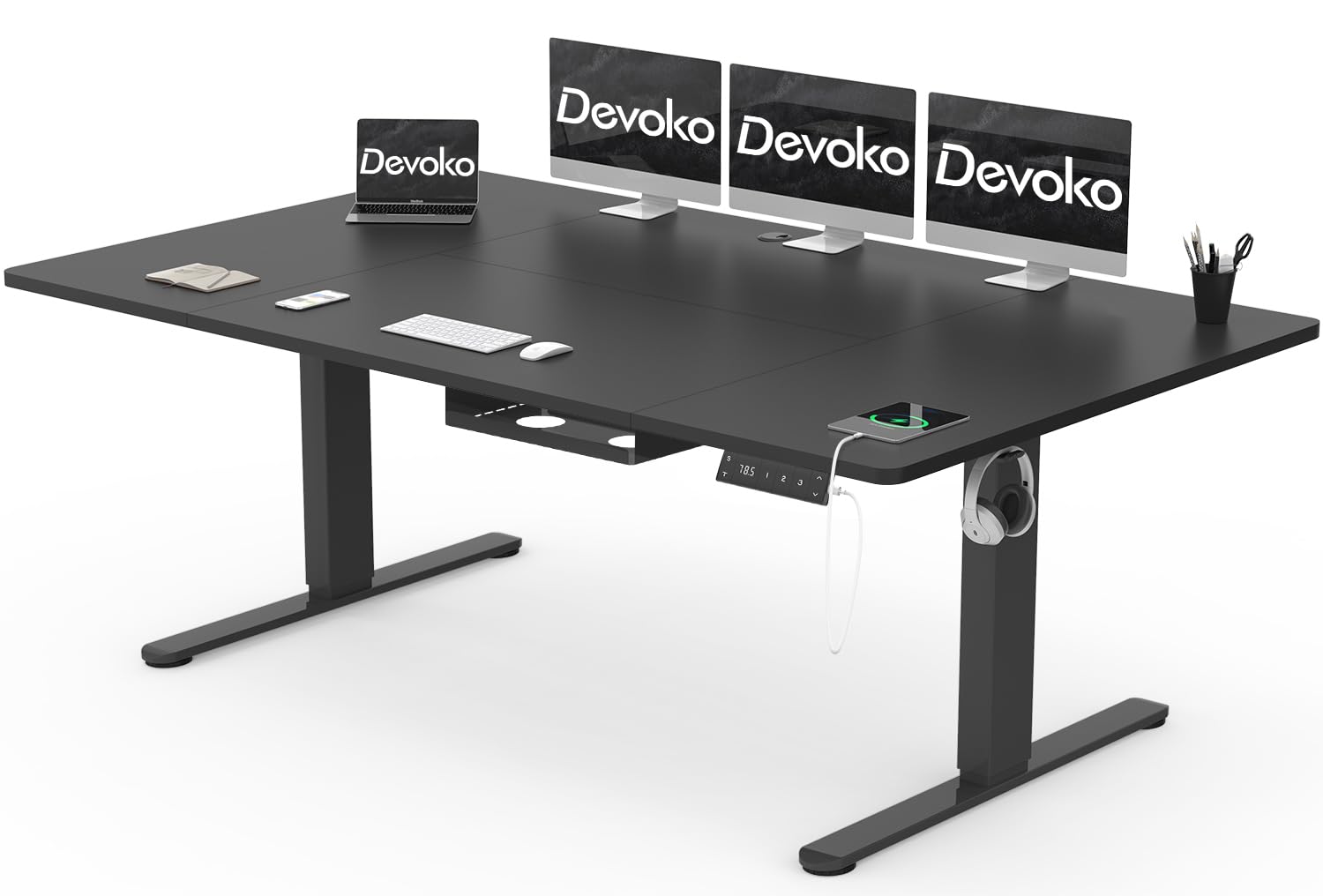
Image: Devoko Height Adjustable Desk (Model 0428). This image displays the desk in its black finish, highlighting the spacious 200 x 80 cm desktop, the robust alloy steel frame, and the integrated control panel on the right side of the desk.
2. Safety Information
- Always ensure the desk is properly assembled and stable before use.
- Do not exceed the maximum weight capacity of 70 kg (dynamic) or 80 kg (static) to prevent accidents and damage.
- Keep the desk away from heat sources and direct sunlight.
- Avoid placing heavy objects on the edges of the desk to maintain stability.
- Ensure no obstructions are present during height adjustment to prevent collisions. The desk features an anti-collision system, but manual vigilance is recommended.
- Keep children and pets away from the desk during operation.
3. Setup and Assembly
Assembly of the Devoko Height Adjustable Desk requires careful attention to detail. It is recommended that two people perform the assembly.
3.1. Unpacking and Preparation
- Carefully unpack all components and verify against the included parts list (not provided in this manual, refer to packaging).
- Place all components on a soft, clean surface to prevent scratches.
- Ensure all necessary tools are available (e.g., screwdriver, Allen wrench, typically included).
3.2. Assembly Steps (General Guidelines)
- Attach the lifting columns to the desktop frame using the provided screws.
- Secure the feet to the bottom of the lifting columns.
- Mount the desktop (four 15 mm plates) onto the assembled frame. Ensure proper alignment and secure all fasteners.
- Install the control panel and connect its cable to the motor control box.
- Install the cable management tray as per the specific instructions in your product packaging.
- Connect the power adapter to the control box and then to a power outlet.
Note: For detailed, step-by-step assembly instructions, please refer to the graphical manual included in your product packaging.
4. Operating Instructions
4.1. Height Adjustment
The desk's height can be adjusted between 72 cm (minimum) and 118 cm (maximum). The lifting speed is approximately 20mm/s, operating at less than 45dB.
- To Raise: Press and hold the "Up" arrow button on the control panel. Release the button when the desired height is reached.
- To Lower: Press and hold the "Down" arrow button on the control panel. Release the button when the desired height is reached.
4.2. Memory Presets
The desk features 3 height storage buttons to save and recall your preferred sitting and standing heights.
- Adjust the desk to your desired height using the Up/Down buttons.
- Press the "M" (Memory) button, then immediately press one of the numbered preset buttons (e.g., "1", "2", or "3"). The display will confirm the setting.
- To recall a saved height, simply press the corresponding numbered preset button. The desk will automatically move to the saved position.
4.3. Anti-Collision System
The desk is equipped with a sensitive anti-collision system that detects reaction forces. If an obstruction is encountered during height adjustment, the desk will automatically stop and slightly reverse direction to prevent damage or injury.
4.4. USB Charging Ports
The control panel includes integrated USB-A and USB-C charging ports for convenient charging of various devices. Simply connect your device's charging cable to the appropriate port.
5. Maintenance
- Cleaning: Wipe the desktop and frame with a soft, damp cloth. Avoid abrasive cleaners or harsh chemicals that could damage the finish.
- Inspection: Periodically check all screws and fasteners to ensure they are tight. Retighten if necessary.
- Cable Management: Ensure cables are neatly organized within the cable management tray to prevent snagging during height adjustments.
- Power Cord: Inspect the power cord for any signs of damage. If damaged, discontinue use and contact support.
6. Troubleshooting
If you encounter issues with your Devoko Height Adjustable Desk, refer to the following common troubleshooting steps:
- Desk Not Moving:
- Check if the power cord is securely plugged into both the desk and the wall outlet.
- Ensure there are no obstructions preventing movement.
- If an error code is displayed, refer to the specific error code section in your product's full manual (if available).
- Uneven Movement:
- Verify that the desk is placed on a level surface.
- Check that all assembly screws are tightened evenly.
- Memory Presets Not Working:
- Ensure you are following the correct procedure for saving and recalling presets (Press "M" then number to save; press number to recall).
- If the issue persists, try resetting the desk (refer to your product's full manual for reset procedures, typically involves holding down specific buttons).
- USB Ports Not Charging:
- Confirm the desk is powered on and connected to a working electrical outlet.
- Test with a different USB cable and device to rule out cable or device issues.
If these steps do not resolve the issue, please contact Devoko customer support.
7. Specifications
| Brand | Devoko |
| Model Number | 0428 |
| Desktop Dimensions (L x W) | 200 cm x 80 cm (78.74" x 31.5") |
| Overall Dimensions (D x W x H) | 31.5"D x 78.74"W x 45.67"H (Max Height) |
| Height Adjustment Range | 72 cm (28.35") to 118 cm (45.67") |
| Lifting Speed | 20 mm/s |
| Noise Level | Less than 45 dB |
| Dynamic Load Capacity | 70 kg (154 lbs) |
| Static Load Capacity | 80 kg (176 lbs) |
| Tabletop Material | FSC-certified Chipboard (15 mm thickness) |
| Frame Material | Industrial Grade Alloy Steel |
| Special Features | 3-Function Memory Presets, Anti-Collision System, USB-A & USB-C Charging Ports, Cable Management Tray |
| Certifications | TÜV, CE |
| Assembly Required | Yes (Recommended 2 people) |
| Item Weight | 17 Kilograms |
8. Warranty Information
The Devoko Height Adjustable Desk comes with a Limited Warranty. The specific terms and conditions of this warranty, including coverage duration and what is covered, are detailed in the warranty card or documentation provided with your product packaging.
Please retain your proof of purchase for any warranty claims. For full warranty details, refer to the official Devoko warranty policy or contact Devoko customer support.
9. Customer Support
For further assistance, technical support, or warranty inquiries, please contact Devoko customer service.
- Manufacturer: Devoko
- Online Store: Visit the Devoko Store on Amazon
- Please refer to your product packaging or the official Devoko website for the most current contact information.


