
1. Introduction
This manual provides detailed instructions for the assembly, operation, and maintenance of your Best Choice Products Pretend Play Corner Kitchen. Designed for interactive play, this wooden playset features realistic lights, sounds, and various kitchen components to enhance your child's imaginative experience. Please read this manual thoroughly before assembly and use to ensure safe and correct operation.
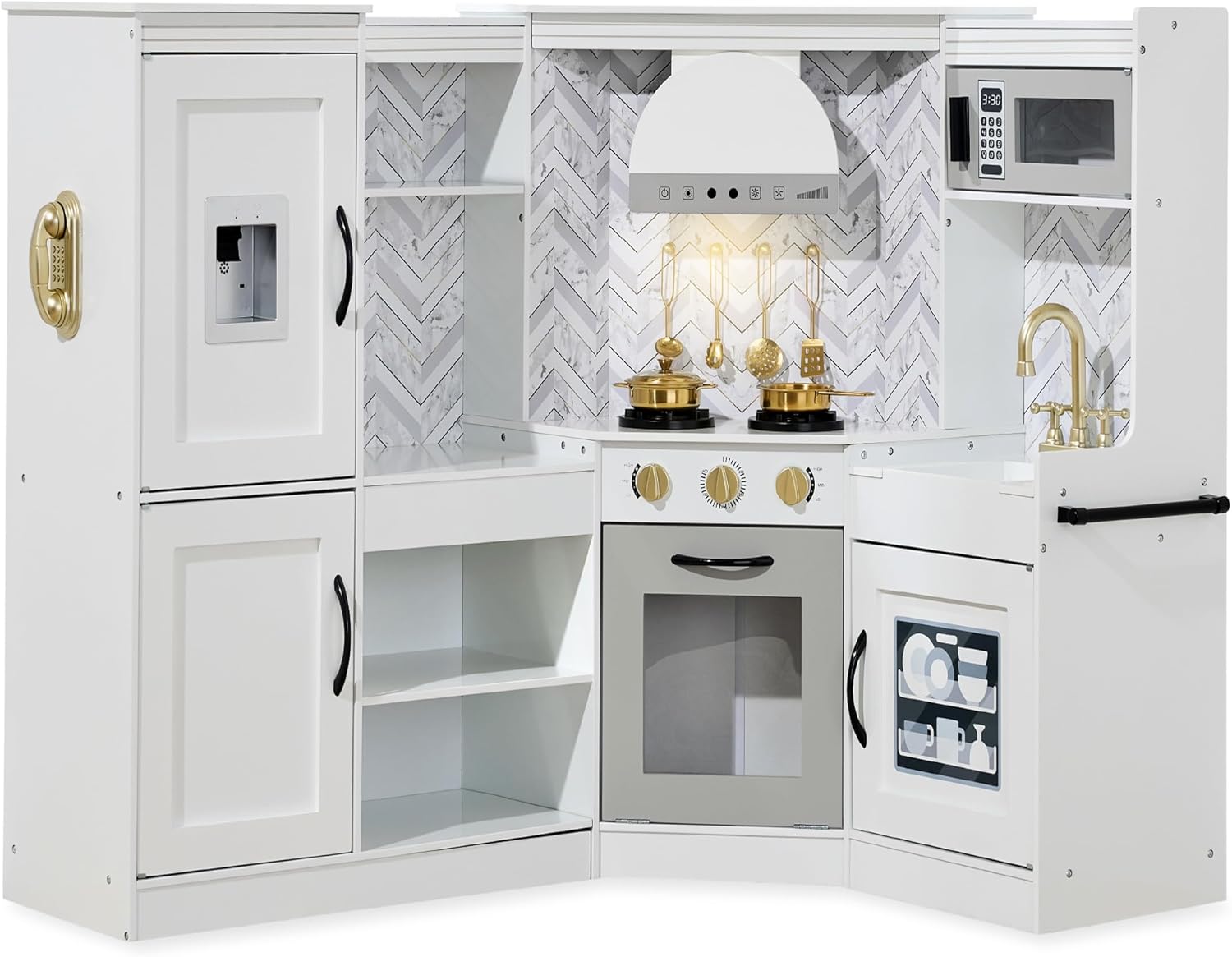
Image 1.1: The Best Choice Products Pretend Play Corner Kitchen in white, showcasing its L-shape design and various interactive features.
2. Safety Information
WARNING: Not for children under 3 years old.
- Adult supervision is recommended during play.
- Ensure all fasteners are securely tightened during assembly to prevent hazards.
- Keep small parts away from young children to avoid choking hazards.
- Regularly inspect the playset for any loose or damaged components. Discontinue use if damage is found.
- This product is intended for indoor use only.
- Batteries should be inserted with the correct polarity. Do not mix old and new batteries. Remove exhausted batteries promptly.
3. What's in the Box
Verify that all components are present before beginning assembly. Refer to the included Assembly Guide for a complete list of parts and hardware.
- Wooden Playset Components
- Hardware (screws, fasteners, etc.)
- Assembly Guide
- 6 Play Accessories (for battery-powered stove)
4. Assembly Instructions
Assembly of the Pretend Play Corner Kitchen requires time and patience due to the number of components and fasteners. It is recommended to have an electric screwdriver for efficiency. Follow the included Assembly Guide carefully, step-by-step, to ensure correct construction and stability.
- Unpack and Organize: Carefully unpack all components and lay them out. Identify each part by referring to the Assembly Guide's parts list.
- Hardware Check: Ensure all screws and fasteners are present.
- Follow the Guide: Adhere strictly to the sequence of steps provided in the Assembly Guide. Pay close attention to diagrams and illustrations.
- Secure Fasteners: Tighten all screws and fasteners firmly, but avoid over-tightening which could damage the wood.
- Component Integration: Install interactive elements such as the stove hood, ice maker, and stove burners as directed.
- Final Inspection: Once assembled, check all connections for stability and ensure all doors and drawers open and close smoothly.
Note: Some users have reported that screw holes may be slightly misaligned. Exercise caution and ensure proper alignment before tightening screws to prevent damage to the pressed board.

Image 4.1: Close-up of the play kitchen materials, highlighting the child-friendly construction.
5. Operating Instructions
The Pretend Play Corner Kitchen features several interactive elements designed to enhance the play experience. These features typically require batteries (not included) for full functionality.
5.1 Light-Up Stove Hood
The stove hood includes lights and mimics authentic sounds. Locate the battery compartment (usually on the underside or back of the hood) and insert the required batteries (e.g., AAA batteries). Press the designated buttons on the hood to activate the lights and sounds.

Image 5.1: A child interacting with the light-up stove hood, demonstrating its operational buttons.
5.2 Pretend Ice Maker
The ice maker features interactive lights and sounds. Install the necessary batteries into its compartment. Press the dispenser lever or button to activate the lights and sounds, simulating ice dispensing.

Image 5.2: A child pressing the lever on the pretend ice maker, which produces lights and sounds.
5.3 Interactive Stove and Oven Knobs
The stove and oven knobs are designed to produce realistic clicking sounds when turned, enhancing the cooking experience. No batteries are required for the clicking knobs.

Image 5.3: A child turning the interactive stove knobs, which produce clicking sounds.
5.4 Battery-Powered Stove Burners
The stove burners glow and produce cooking sounds. Insert the required batteries into the designated compartment(s) for the stove. Place the included play accessories (pots, pans) on the burners to activate the glowing lights and sounds.

Image 5.4: The battery-powered stove burners, showing their glowing effect when activated, with included play accessories.
6. Maintenance
- Cleaning: Wipe surfaces with a soft, damp cloth. Avoid abrasive cleaners or harsh chemicals that could damage the finish.
- Dusting: Regularly dust the playset to maintain its appearance.
- Battery Replacement: Replace batteries in interactive components as needed. Always use the correct battery type and ensure proper polarity.
- Fastener Check: Periodically check all screws and fasteners to ensure they remain tight. Re-tighten if necessary.
- Storage: Store the playset in a dry environment away from direct sunlight or extreme temperatures to prevent warping or fading.
7. Troubleshooting
| Problem | Possible Cause | Solution |
|---|---|---|
| Interactive features (lights/sounds) not working. |
|
|
| Stove burner sounds are too loud. | Speaker output is at a fixed volume. | To reduce volume, a small piece of tape can be placed over the speaker opening (located on the underside of the burner unit) to muffle the sound. |
| Playset feels wobbly or unstable. | Loose fasteners or incorrect assembly. | Review the Assembly Guide and re-tighten all screws and fasteners. Ensure all components are correctly aligned. |
| Doors or drawers do not close properly. | Misaligned hinges or panels. | Check hinge alignment and adjust if necessary. Ensure panels are installed correctly according to the Assembly Guide. |
8. Specifications
| Feature | Detail |
|---|---|
| Product Dimensions (L x W x H) | 57" x 24" x 37.5" |
| Item Weight | 56 pounds |
| Model Number | SKY6910 |
| Recommended Age | 3 years and up |
| Materials | Engineered wood with metal components |
| Certifications | ASTM & CPSIA-certified |

Image 8.1: Detailed diagram illustrating the overall dimensions of the play kitchen.
9. Warranty and Support
Best Choice Products stands behind the quality of its products. For specific warranty information, please refer to the documentation included with your purchase or visit the official Best Choice Products website. For customer support, including assistance with assembly, missing parts, or operational issues, please contact Best Choice Products customer service directly.
Contact Information:
- Website: Best Choice Products Store on Amazon (for general product information)
- Refer to your purchase receipt or packaging for direct customer service contact details.
10. Additional Information
The L-shape design of this playset is intended for space-saving placement in room corners, allowing for versatile integration into play areas.

Image 10.1: A child enjoying the L-shaped corner kitchen, demonstrating its space-saving design.
The playset also offers ample storage within its fridge, pantry, oven, and sink shelves, providing space for play accessories and encouraging organized play.

Image 10.2: An interior view of the play kitchen, highlighting the various storage compartments and cubbies.