
1. Product Overview
The Jadeshay DC24V Digital Cycle Timer Relay is an advanced timing control device designed for automated control circuits. It features a digital LED display for clear time indication and offers a wide timing range from 0.1 seconds to 99 hours. This relay is suitable for various applications including remote control, communication systems, automatic control, and mechatronics.
Key Features:
- Wide Compatibility: Time range from 0.01 seconds to 99 hours, suitable for various automated control circuits.
- Easy to Use: Digital LED display provides clear time readings, making it convenient to set time intervals accurately.
- Broad Application: Enhanced precision and durability for use in factory equipment, street lights, electrical cabinet equipment, automation equipment, instruments, and meters.
- Stable and Reliable: Low power consumption, compact structure, and good contact performance ensure stable operation.
- Durable Material: Flame-retardant PC shell, impact-resistant, high-temperature resistant, waterproof, and dustproof for extended service life.
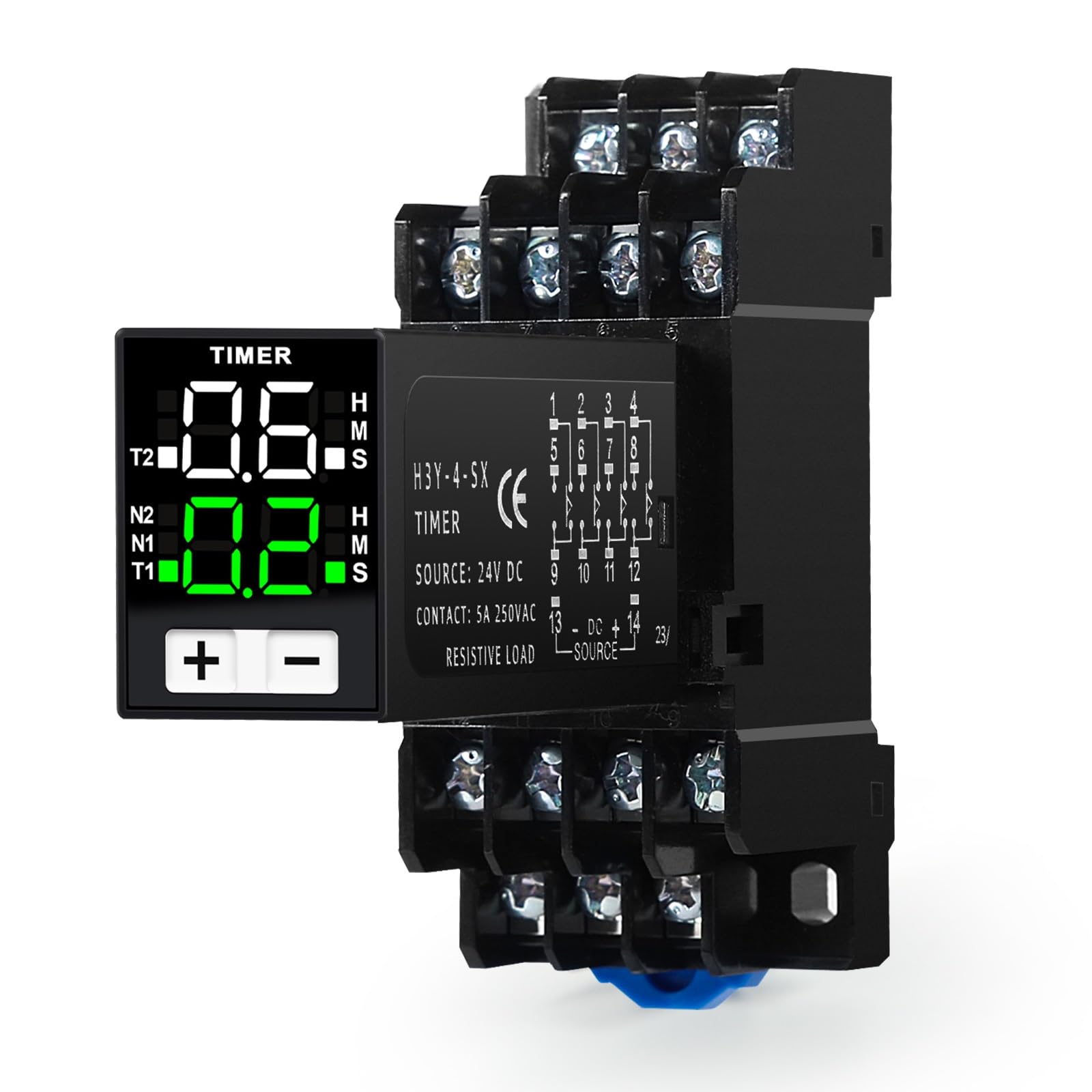
The Jadeshay DC24V Digital Cycle Timer Relay, featuring a clear LED display and a robust base for installation.
2. Setup and Wiring
2.1 Display and Controls

This image highlights the intuitive LED display of the timer relay, showing 'Travel time display' (0.6 H M S) and 'Setting display' (0.2 H M S), along with mode indicators (N2, N1, T1) and setting buttons (+ and -). It also details N1 (Power-on delay), N2 (Delayed release), and T1/T2 (Cycle delay) modes, with a time range of 0.1S-99H.
2.2 Wiring Diagram (H3Y-4-SX)
Refer to the following diagram for proper wiring of the H3Y-4-SX timer relay. This diagram is applicable for N1 (power-on delay) or T1/T2 (cycle delay) modes.

This image presents the wiring diagram for the H3Y-4-SX model, applicable for N1 or T1/T2 power-on delay. It clearly labels normally closed and normally open contacts (1-8), public ends (9-12), and control power connections (13-14).
2.3 Self-Locking Circuit Wiring
Important note: When you need to use a set of instantaneous contacts to achieve circuit self-locking, set the mode to N2 and then wire according to Figure 2, which is simpler and more reliable.

Figure 1: H3Y-2H1 Instantaneous Relay Wiring Diagram (N1 Power-on Delay)
Operating principle: When the start button is pressed, the relay is powered through the normally closed contact. Once the relay is energized, the instantaneous contact opens and closes immediately to achieve self-locking. When the delay time expires, the delayed normally closed contact opens and the relay loses power. Power off, operation completed.

Figure 2: Alternative Wiring Diagram to Figure 1 (Adjusted for N2 Delayed Release Mode)
Operating principle: When the start button is pressed, the relay closes immediately after receiving power, achieving self-locking. When the time expires, the delayed release contact returns to its initial normally open state, the relay loses power, and the work is completed.
3. Operating Instructions
The timer relay offers three main operating modes: N1 (Power-on Delay), N2 (Delayed Release), and T1/T2 (Cycle Delay).
| Category | Description |
|---|---|
| Mode Description | Mode N1 is power-on delay, N2 is delayed release, T1 and T2 are cycle delays. |
| Operating Mode | Press and hold the + and - keys for more than 3 seconds, then press the - key to change the operating mode. |
| Time Setting | Press and hold the + key for more than 3 seconds to enter, then press the + key again to modify the time specification. In cycle mode, press the - button to modify the T2 time specification. |
| Numeric Setting | Pressing the + key increases the time, while pressing the - key decreases it. In cycle mode, press and hold the - key for more than 3 seconds to access the T2 value setting. |
| Extended Explanation | If no operation is performed for more than 5 seconds, the current settings are saved and the program exits. |

This table provides detailed instructions for setting up and operating the timer relay, including mode selection and time adjustments.
4. Maintenance
To ensure optimal performance and longevity of your Jadeshay Digital Cycle Timer Relay, follow these maintenance guidelines:
- Regular Cleaning: Keep the device free from dust and debris. Use a soft, dry cloth to wipe the exterior. Avoid using harsh chemicals or abrasive materials.
- Environmental Conditions: Ensure the relay is operated within its specified temperature and humidity ranges. Avoid exposure to extreme conditions, direct sunlight, or corrosive environments.
- Connection Integrity: Periodically check all wiring connections to ensure they are secure and free from corrosion. Loose connections can lead to intermittent operation or damage.
- Inspection for Damage: Regularly inspect the casing for any signs of physical damage, cracks, or discoloration. If any damage is found, discontinue use and consult a qualified technician.
- Power Supply: Ensure the power supply voltage remains stable and within the specified DC24V range to prevent damage to the internal components.
5. Troubleshooting
If you encounter issues with your Jadeshay Digital Cycle Timer Relay, refer to the following troubleshooting steps:
- No Display/No Power:
- Check the power supply connection to terminals 13 and 14. Ensure it is DC24V and correctly polarized.
- Verify that the power source is active and providing the correct voltage.
- Inspect the power cable for any damage.
- Timer Not Activating/Deactivating:
- Confirm that the operating mode (N1, N2, T1/T2) is correctly selected according to your application.
- Check the time settings. Ensure the delay time is set to a non-zero value and the unit (H, M, S) is correct.
- Verify the wiring of the load to the relay contacts (e.g., Normally Open, Normally Closed). Ensure the load is connected to the correct terminals for the desired operation.
- Test the load independently to ensure it is functioning correctly.
- Inaccurate Timing:
- Re-check the time settings on the display. Ensure the desired time and unit are accurately entered.
- Ensure the device is operating within stable environmental conditions, as extreme temperatures can affect electronic timing.
- Buttons Unresponsive:
- Ensure the device is powered on.
- If the device has been idle for more than 5 seconds, settings are saved and the program exits. Try pressing buttons again to re-enter setting mode.
- Gently press the buttons to ensure they are not stuck.
If the problem persists after following these steps, contact customer support for further assistance.
6. Specifications
Detailed technical specifications for the Jadeshay DC24V Digital Cycle Timer Relay (Model H3Y-4-SX).
| Specification | Value |
|---|---|
| Product Name | Time Relay |
| Product Model | H3Y-4-SX |
| Material | PC (Flame-retardant), Zinc-plated Copper (Contacts) |
| Coil Voltage | DC24V |
| Contact Capacity | Resistive load 5A 250VAC |
| Contact Type | 4NO 4NC (4 Normally Open, 4 Normally Closed) |
| Rated Current | 5 Ampere |
| Minimum Switching Voltage | 24 Volt (DC) |
| Delay Adjustable Range | 0.1 seconds to 99 hours |
| Number of Pins | 14 pins |
| Mounting Type | Surface Mount |
| Operating Mode | Automatic |
| Item Weight | 90 Grams |
| Country of Origin | China |

This image provides a technical drawing with key dimensions and a table listing product specifications.

An exploded view of the timer relay, showcasing its internal components such as the digital display, microcontroller, copper core coil, and various contacts.
7. Warranty and Support
Jadeshay products are manufactured to high-quality standards. For specific warranty information, please refer to the documentation included with your purchase or contact the seller directly.
If you require technical assistance, have questions about installation, operation, or troubleshooting that are not covered in this manual, please contact Jadeshay customer support through the retailer's platform or the official brand website.
Please provide your product model number (LTXOLATXY-JAY-GS109820-04) and a detailed description of the issue when seeking support to ensure a prompt and accurate resolution.