
Braun Silk-expert Pro 5 PL5382
Contents
Braun IPL Silk-expert Pro 5 PL5382 User Manual
Model: Silk-expert Pro 5 PL5382 | Model Number: 7500435238281
Introduction
The Braun Silk-expert Pro 5 is an advanced Intense Pulsed Light (IPL) hair removal device designed for effective and long-lasting hair reduction. This manual provides essential information for the safe and proper use, maintenance, and troubleshooting of your device. Please read all instructions carefully before first use and retain this manual for future reference.
This IPL device is not a laser hair removal system but utilizes advanced IPL technology to deliver smooth skin for up to 1 year, with visible results in as little as 2 weeks when following the recommended treatment plan. Individual results may vary.
Package Contents
Upon opening the package, ensure all components are present and in good condition:
- Braun Silk-expert Pro 5 IPL Device
- Precision Head
- Standard Head
- Wide Head
- Venus Razor
- Power Supply Unit
- Storage Pouch/Case
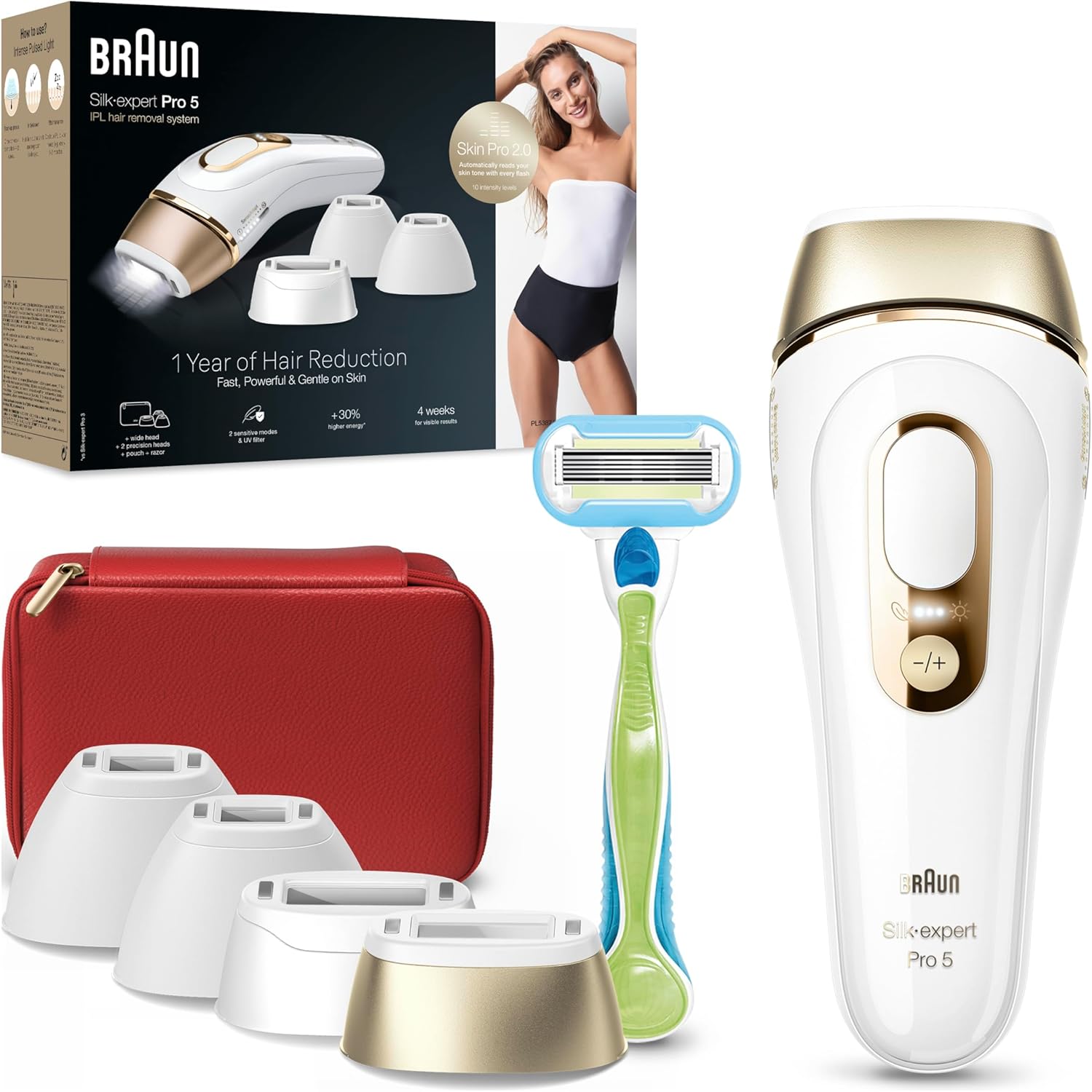
Figure 1: Braun IPL Silk-expert Pro 5 device and included accessories.
Setup
- Prepare the Skin: Before each treatment, ensure the skin area is clean, dry, and free of any lotions, creams, or deodorants. Shave the area to be treated using the included Venus razor or your preferred method. Do not wax or epilate, as the IPL targets the hair root.
- Connect Power: Plug the power supply unit into the device and then into an electrical outlet. The device is designed for corded use.
- Select Treatment Head: Choose the appropriate treatment head for the area you intend to treat. The standard head is suitable for most body areas, the wide head for larger areas like legs, and the precision head for smaller, sensitive areas like the face or bikini line.
Operating Instructions
The Silk-expert Pro 5 features SkinProtection MAX (SensoAdapt™) technology, which automatically and continuously adapts each light flash to your skin tone for safe and effective treatment. It also offers 3 intensity levels for comfortable use, even in sensitive areas.
Treatment Procedure:
- Power On: Press the power button to turn on the device.
- Skin Contact: Place the treatment window of the device firmly against the skin area you wish to treat. The device will only flash when full skin contact is detected.
- Automatic Skin Tone Adaptation: The SensoAdapt™ sensor will automatically detect your skin tone and adjust the light intensity accordingly. The indicator lights on the side of the device will show the detected skin tone level.
- Flash: Press the flash button. A flash of light will be emitted.
- Glide or Stamp Mode:
- Glide Mode: For larger areas like legs or arms, hold down the flash button and slowly glide the device over the skin, ensuring continuous contact. The device will flash automatically every 0.5 seconds.
- Stamp Mode: For smaller or curved areas like underarms or bikini line, place the device on the skin, press and release the flash button, then lift and reposition the device to the next adjacent area.
- Repeat: Continue treating the entire desired area. Avoid overlapping flashes excessively.
- Sensitive Mode: For sensitive areas or if you experience discomfort, press the sensitive mode button (usually indicated by a feather icon or similar) to reduce the light intensity. The device has 2 sensitive modes for comfortable treatment.

Figure 2: Treating the underarm area.

Figure 3: Treating the leg area.

Figure 4: Device automatically adapting to skin tone.

Figure 5: Treating the facial area.

Figure 6: Treating the intimate area.
Treatment Schedule:
For optimal results, follow the recommended treatment schedule:
- Weeks 1-12: Treat once a week.
- After 12 weeks: Continue treatments as needed, typically once every 2-4 weeks, to maintain results.

Figure 7: Clinically proven effectiveness after 12 treatments.
Safety Warnings
Adhere to the following safety guidelines to prevent injury or skin irritation:
- Do not use the device near water or while it is charging.
- Avoid direct eye exposure to the light flashes. While the device has a UV filter, it is recommended to wear protective eyewear during use, especially for sensitive eyes.
- Do not use on irritated, sunburned, or broken skin.
- Consult a medical professional before use if you have any pre-existing skin conditions, take photosensitive medications, or are pregnant/breastfeeding.
- The device is designed for specific skin and hair tones. Refer to the skin tone chart in the user manual (not provided in this output, but generally included with the product) to ensure suitability.
- Keep out of reach of children.
Maintenance
Cleaning:
- Always unplug the device before cleaning.
- Wipe the treatment window and the outer surface of the device with a dry, lint-free cloth after each use.
- Do not use abrasive cleaners, alcohol, or harsh chemicals, as these can damage the device.
- Ensure the device is completely dry before storing.
Storage:
- Store the device and its accessories in the provided storage pouch/case.
- Keep the device in a cool, dry place, away from direct sunlight and extreme temperatures.
Troubleshooting
| Problem | Possible Cause | Solution |
|---|---|---|
| Device does not turn on. | Not properly connected to power outlet. | Ensure the power supply unit is securely plugged into both the device and a working electrical outlet. |
| Device does not flash. | Insufficient skin contact; Skin tone is too dark; Hair color is too light. | Ensure the treatment window is in full contact with the skin. The device will not flash if skin tone is too dark or hair color is too light for IPL treatment (refer to product suitability guidelines). |
| No visible results after several weeks. | Inconsistent treatment schedule; Incorrect usage; Hair/skin tone not suitable. | Ensure you are following the recommended weekly treatment schedule. Verify proper technique (full skin contact, no missed spots). Confirm your skin and hair tone are suitable for IPL. Results vary individually. |
| Skin irritation or discomfort. | High intensity setting; Sensitive skin; Improper skin preparation. | Use the sensitive mode. Ensure skin is clean and dry before treatment. If irritation persists, discontinue use and consult a dermatologist. |
If the problem persists after attempting these solutions, please contact Braun Customer Service for further assistance.
Specifications
| Model Name | Braun Silk-expert Pro 5 |
| Model Number | 7500435238281 |
| Brand | Braun |
| Color | White/Gold |
| Power Source | Corded Electric (via included Power Supply Unit) |
| Voltage | 240 Volts |
| Weight | 1500 Grams (1.5 kg) |
| Dimensions (L x W x H) | 10 x 28 x 20 cm |
| Water Resistance Level | Not Waterproof |
| Recommended Product Uses | Leg, Face, Arm (also suitable for underarms, chest, back, intimate area) |
| Operating Time | 10 Minutes (for full body session) |
| Country of Origin | United Kingdom (Designed in Germany) |
Warranty and Support
The Braun Silk-expert Pro 5 is designed and manufactured with high quality standards. This product is backed by a 5-year warranty. For detailed terms and conditions, please refer to the official Braun website or the warranty card included with your product.
For technical support, troubleshooting assistance, or warranty claims, please contact Braun Customer Service. Contact information can typically be found on the Braun official website or on the product packaging.
Documents and downloads
Ask a question about this manual
Ask about setup, troubleshooting, compatibility, parts, safety, or missing instructions. Manuals+ will review the question and use this page’s manual context to help answer it.