
Smartbarry C90
Contents
Smartbarry C90 ULTRA Smart Watch User Manual
Model: C90 ULTRA
1. Introduction
Thank you for choosing the Smartbarry C90 ULTRA Smart Watch. This device combines advanced smartwatch functionalities with 4G connectivity, allowing you to stay connected, track your fitness, and enjoy various applications directly from your wrist. Featuring 4GB RAM and 64GB internal memory, it offers ample space for apps and data. This manual provides essential information for setting up, operating, and maintaining your new smartwatch.
2. Package Contents
- Smartbarry C90 ULTRA Smart Watch
- 2 x Watch Straps
- Charging Cable (USB)
- User Manual (this document)
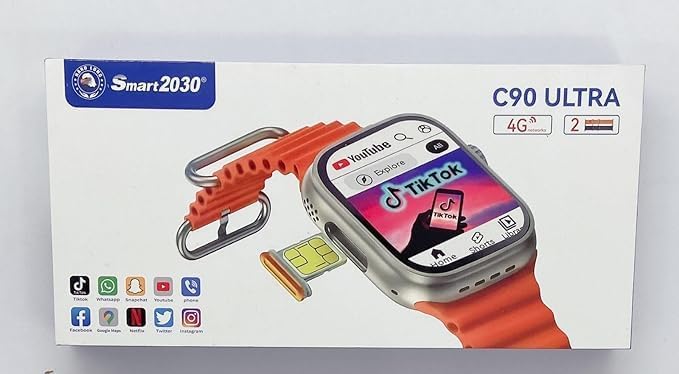
Image: The retail packaging of the Smartbarry C90 ULTRA Smart Watch, displaying the watch with its orange strap, an additional strap, and a SIM card tray. The box highlights 4G connectivity and the model name.
3. Setup
3.1 Charging the Device
Before first use, fully charge your Smartbarry C90 ULTRA. Connect the provided USB charging cable to the watch's charging port and the other end to a standard USB power adapter (not included) or a computer's USB port. The charging indicator will appear on the screen.
3.2 SIM Card Installation
The C90 ULTRA supports a single Nano SIM card for 4G network connectivity, enabling calls and data usage directly from the watch without needing a connected phone.
- Locate the SIM card slot on the side of the watch.
- Carefully insert a Nano SIM card into the tray, ensuring correct orientation.
- Push the SIM tray back into the watch until it clicks into place.
3.3 Initial Power On
Press and hold the power button (usually on the side of the watch) until the Smartbarry logo appears. Follow the on-screen prompts to complete the initial setup, including language selection, time zone, and network configuration.
4. Operating Instructions
4.1 Basic Navigation
The C90 ULTRA features a responsive touchscreen for navigation. Swipe left, right, up, or down to access different screens, menus, and notifications. Tap to select items. The physical buttons on the side provide additional control, such as returning to the home screen or accessing specific functions.
4.2 Communication Features
- Calls: With a SIM card installed, you can make and receive calls directly from your watch. Use the dialer app or access your contacts.
- Messages: Send and receive text messages. Notifications for incoming messages will appear on the screen.
- Social Media Apps: Download and use popular social media applications like WhatsApp, Facebook, YouTube, Telegram, and TikTok directly on your watch, leveraging the 64GB internal memory.
4.3 Health and Fitness Tracking
- Heart Rate Tracker: Monitor your heart rate throughout the day. Access the heart rate app to view real-time data and historical trends.
- Pedometer: Tracks your steps taken, distance covered, and calories burned.
- Sleep Tracker: Monitors your sleep patterns, including deep and light sleep stages.
- GPS: Utilize the built-in GPS for location tracking and route mapping during outdoor activities.
4.4 Smart Features
- Alarm Clock: Set multiple alarms for reminders.
- Calendar: View your schedule and appointments.
- World Time: Check time in different global zones.
- Speedometer: Measure your speed during activities.
- Remote Control: Control certain functions of your paired smartphone (if applicable, though primary function is standalone).
4.5 Connectivity
- 4G Network: Enables standalone calls, messages, and internet access via SIM card.
- Wi-Fi: Connect to Wi-Fi networks for faster data transfer and app downloads.
- Bluetooth: Connect to Bluetooth headphones or other compatible devices.
5. Maintenance
5.1 Cleaning
Gently wipe the watch screen and body with a soft, lint-free cloth. For stubborn smudges, slightly dampen the cloth with water. Avoid using harsh chemicals or abrasive materials.
5.2 Water Resistance (IP67)
The Smartbarry C90 ULTRA is rated IP67 waterproof. This means it is protected against dust ingress and can withstand immersion in water up to 1 meter for up to 30 minutes. It is suitable for daily use and splashes, but not recommended for swimming, diving, or prolonged exposure to water.
5.3 Battery Care
- Avoid extreme temperatures, which can affect battery life.
- Charge the watch regularly, but avoid leaving it fully discharged for extended periods.
- Use only the provided charging cable.
6. Troubleshooting
| Problem | Possible Solution |
|---|---|
| Watch does not power on. | Ensure the battery is charged. Connect to the charger and wait a few minutes before attempting to power on again. |
| Cannot make or receive calls. | Check if the SIM card is correctly inserted and activated. Verify network signal strength. Ensure your SIM plan supports calls. |
| Screen is unresponsive. | Restart the watch by holding the power button. If unresponsive, allow the battery to drain completely and then recharge. |
| Battery drains quickly. | Reduce screen brightness. Close unused applications. Limit background data usage. |
7. Specifications
| Feature | Detail |
|---|---|
| Model Number | C90 |
| Operating System | Android 9.0 |
| RAM | 4GB |
| Internal Memory | 64GB |
| Screen Size | 2 Inches (44-49mm range mentioned in description) |
| Battery Capacity | 380mAh Lithium Polymer |
| Network Connectivity | 2G/3G/4G (Single Nano SIM Slot) |
| Wireless Communication | Bluetooth, Wi-Fi |
| Waterproof Rating | IP67 |
| Dimensions | 16 x 8 x 16 cm |
| Weight | 180 g |
| Special Features | Heart Rate Sensor, Acceleration Monitor, GPS (via smartphone) |
8. Warranty and Support
For warranty information and customer support, please refer to the documentation provided with your purchase or contact Smartbarry customer service through their official website. Keep your proof of purchase for warranty claims.
Manufacturer: Smaerbarry (as per product specifications, likely a typo for Smartbarry)
Date First Available: 21 December 2023
Documents and downloads
Ask a question about this manual
Ask about setup, troubleshooting, compatibility, parts, safety, or missing instructions. Manuals+ will review the question and use this page’s manual context to help answer it.