
ARCCAPTAIN TIG200PACDC
ARCCAPTAIN TIG200pacdc 7-in-1 AC/DC TIG Welder Instruction Manual
Model: TIG200PACDC
1. Introduction
This manual provides detailed instructions for the safe and effective operation, setup, and maintenance of your ARCCAPTAIN TIG200pacdc 7-in-1 AC/DC TIG Welder and its accompanying 71-piece TIG Torch Accessories Kit. This versatile welding machine supports multiple welding methods, including TIG AC Square, TIG AC Triangular, TIG AC Pulse Square, TIG AC Pulse Triangular, TIG DC Pulse, TIG DC, and STICK welding, making it suitable for a wide range of materials from aluminum alloys to various types of steel.
2. Safety Information
Always prioritize safety when operating welding equipment. Failure to follow safety guidelines can result in serious injury or death. Read and understand all safety warnings before use.
- Electric Shock: Welding current can cause fatal electric shock. Ensure proper grounding and insulation. Never touch live electrical parts.
- Fumes and Gases: Welding fumes and gases can be hazardous to your health. Work in a well-ventilated area or use local exhaust ventilation.
- Arc Rays: Arc rays can burn eyes and skin. Wear appropriate welding helmet with proper shade, safety glasses, and protective clothing.
- Fire and Explosion: Welding can cause fire or explosion. Keep flammable materials away from the welding area. Have a fire extinguisher readily available.
- Burns: Hot metal and equipment can cause severe burns. Wear protective gloves and clothing.
3. Product Overview and Components
The ARCCAPTAIN TIG200pacdc welder is designed for versatility and precision. This kit includes the main welding unit and a comprehensive set of TIG torch accessories.

Image 1: ARCCAPTAIN TIG200pacdc Welder shown with the included 71-piece TIG Torch Accessories Kit. The welder features a red and black casing with a digital control panel.
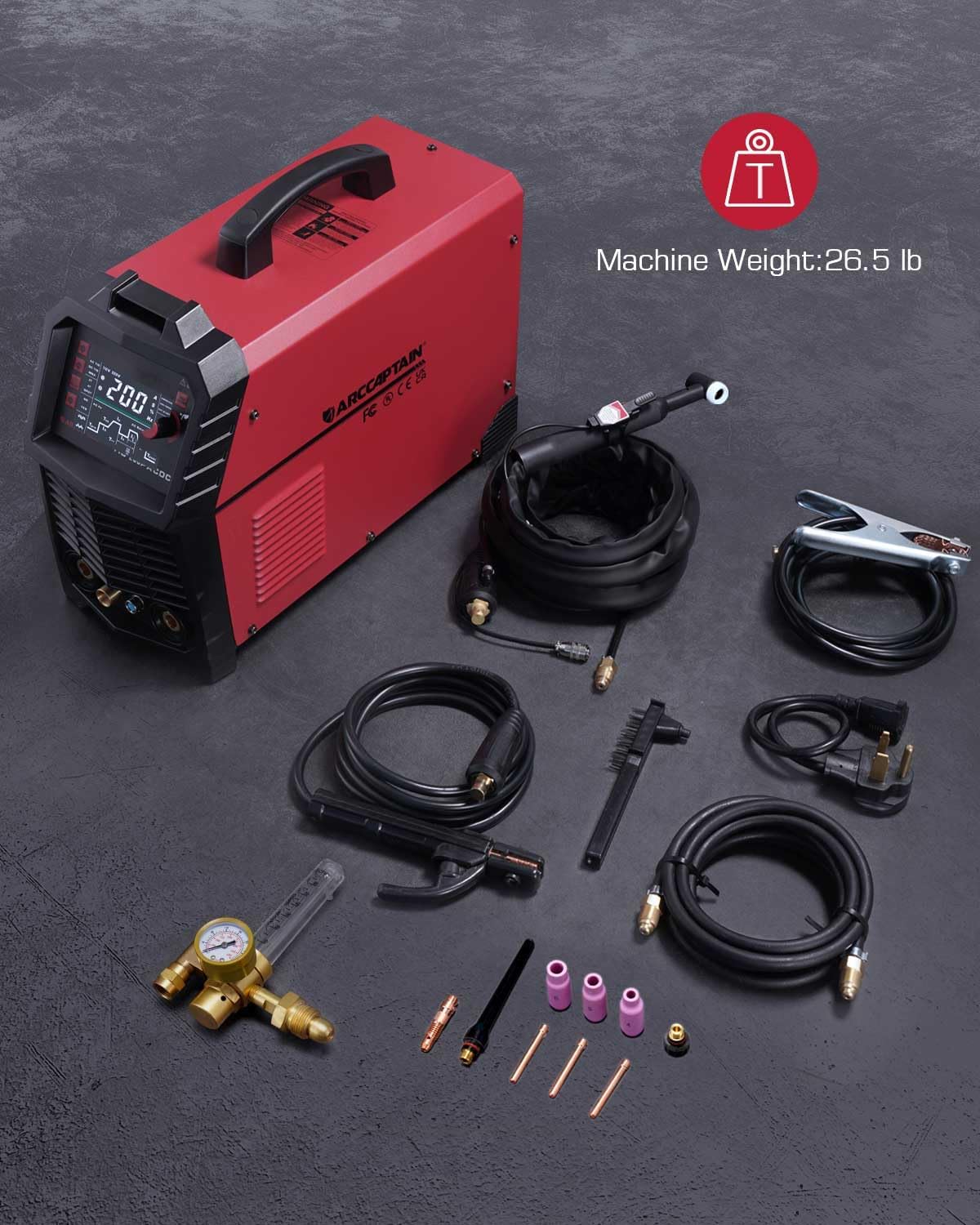
Image 2: Overview of the ARCCAPTAIN TIG200pacdc Welder and its primary accessories, including the ground clamp, gas regulator, welding cables, and various TIG torch consumables. The machine weighs 26.5 lbs.
Included Components:
- ARCCAPTAIN TIG200pacdc Welding Machine
- TIG Torch (with cable)
- Ground Clamp (with cable)
- Gas Regulator
- 71-Piece TIG Torch Accessories Kit (various collets, collet bodies, ceramic nozzles, back caps, etc.)
- Power Cord
4. Setup
Proper setup is crucial for safe and efficient welding. Follow these steps carefully.
4.1 Power Connection
- Ensure the welder is turned off before connecting to power.
- Connect the power cord to a suitable power outlet (110V or 220V, as indicated on the machine and required by your setup).
- Verify the power source meets the machine's specifications.
4.2 Gas Connection (for TIG Welding)
- Connect the gas hose from the welder to the gas regulator.
- Attach the gas regulator to your shielding gas cylinder (e.g., Argon for TIG welding).
- Ensure all connections are tight to prevent gas leaks.
4.3 Torch and Ground Clamp Connection

Image 3: The ARCCAPTAIN TIG200pacdc Welder with its essential accessories connected, including the ground clamp, gas regulator, and welding cables, demonstrating a typical setup.
- Connect the TIG torch cable to the appropriate positive (+) or negative (-) terminal on the welder, depending on the welding process (DCEN for most TIG applications).
- Connect the ground clamp cable to the remaining terminal.
- Securely attach the ground clamp to the workpiece or welding table, ensuring good electrical contact.
4.4 Foot Pedal Connection (Optional)

Image 4: A welder operating the ARCCAPTAIN TIG200pacdc with an optional foot pedal for precise remote heat control. Note that the foot pedal is not included with this kit.
- If using a foot pedal (not included), connect it to the designated port on the front panel of the welder.
- The foot pedal allows for remote control of welding current, providing enhanced precision.
5. Operating Instructions
The ARCCAPTAIN TIG200pacdc features an intuitive digital control system for easy parameter adjustment and mode selection.
5.1 Digital Control Panel
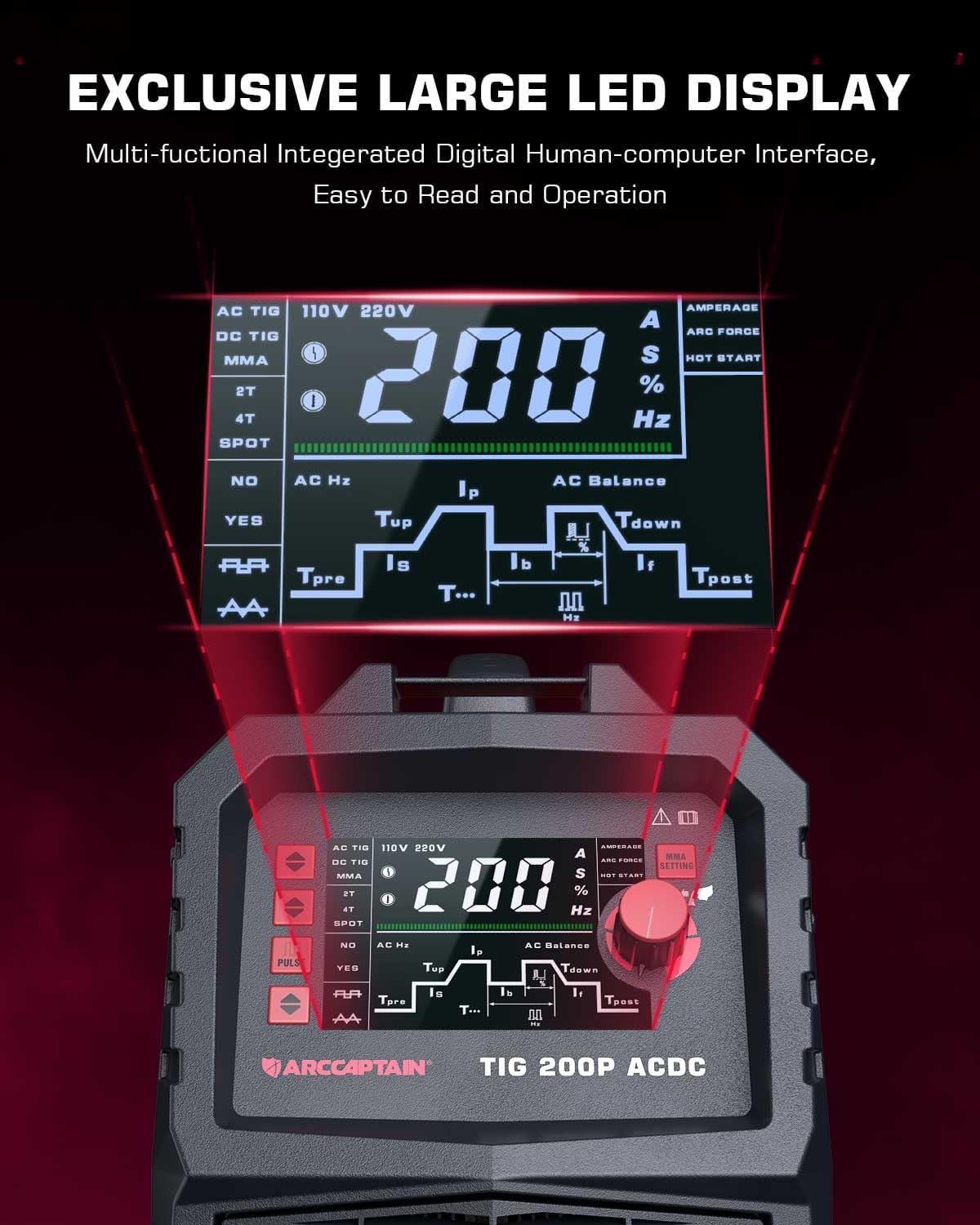
Image 5: Close-up view of the ARCCAPTAIN TIG200pacdc's exclusive large LED digital display, showcasing its multi-functional human-computer interface for easy reading and operation of welding parameters.
The large LED display provides clear visibility of all welding parameters. Use the control knob and buttons to navigate and adjust settings.
5.2 Welding Modes (7-in-1 Functionality)

Image 6: Illustration of the ARCCAPTAIN TIG200pacdc's 7-in-1 multi-function capabilities, showing diagrams for TIG AC Square, TIG AC Triangular, TIG AC Pulse Square, TIG AC Pulse Triangular, TIG DC Pulse, TIG DC, and MMA (STICK) welding modes.
This machine offers a comprehensive range of welding modes:
- TIG AC Square: Ideal for aluminum and aluminum alloys, providing a stable weld pool.
- TIG AC Triangular: Reduces heat input effectively, suitable for thin metals.
- TIG AC Pulse Square: Combines benefits of square wave with pulsed current for enhanced control.
- TIG AC Pulse Triangular: Combines benefits of triangular wave with pulsed current for precise thin metal welding.
- TIG DC Pulse: For controlled heat input on various steels.
- TIG DC: For welding stainless steel, carbon steel, copper, and other ferrous metals.
- STICK (MMA): For general purpose stick welding.
5.3 Parameter Adjustment
The MCU Digital control system allows for precise adjustment of various welding parameters:
- Pre-flow: Time for gas to flow before arc ignition.
- Initial Current: Starting current for arc ignition.
- Up-slope: Time for current to ramp up to peak current.
- Peak Current: Maximum welding current.
- Base Current: Minimum current during pulse welding.
- Down-slope: Time for current to ramp down from peak to crater current.
- Crater Current: Final current before arc extinction.
- Post-flow: Time for gas to flow after arc extinction to protect the weld pool.
- Pulse Duty: Percentage of time spent at peak current during pulse welding.
- AC Frequency: Frequency of the AC waveform (for AC TIG).
- AC Balance: Controls the cleaning action and penetration for AC TIG welding.
- Pulse Frequency: Number of pulses per second during pulse welding.
The machine also supports 2T/4T/Spot welding TIG torch control.
5.4 DASH-ARC Technology

Image 7: Demonstration of the exclusive DASH-ARC® patent, highlighting a 99.99% arc striking success rate and a 400% increase in arcing response speed, leading to improved welding efficiency.
The patented DASH-ARC technology significantly improves arc striking speed from 200ms to 40ms, achieving a 99.99% arc striking success rate. This enhances welding efficiency and contributes to better welding results. Digital constant current regulation technology ensures low noise and high stable arc quality.
5.5 Pulse & Square & Triangular Waveform

Image 8: Visual explanation of TIG AC Pulse Square and Triangular waveforms. Square wave provides a hard, dynamic arc for a stable weld pool, ideal for aluminum. Triangular wave offers narrow, concentrated penetration, preventing weld deformation and making it easy for thin metal welding.
Understanding waveforms is key to optimizing your welding:
- Square Wave: Provides a hard, dynamic arc for a stable weld pool. Excellent for cleaning aluminum oxide film, resulting in precise welding on aluminum or aluminum alloy.
- Triangular Wave: Reduces heat input effectively, minimizing material distortion. The weld forms rapidly, making it easy for thin metal welding.

Image 9: Examples of real welding results on aluminum. The top image shows a weld on 1mm aluminum using TIG AC with Pulse (Triangular waveform), and the bottom image shows a weld on 2mm aluminum using TIG AC with Pulse (Square waveform), demonstrating the quality achievable with different settings.
6. Maintenance
Regular maintenance ensures the longevity and optimal performance of your welding machine.
- Cleaning: Periodically clean the machine's exterior with a dry, soft cloth. Use compressed air to blow out dust from cooling vents, ensuring the machine can dissipate heat effectively.
- Cable Inspection: Regularly inspect all welding cables, torch, and ground clamp for signs of wear, cuts, or damage. Replace damaged components immediately.
- Connections: Ensure all electrical and gas connections are tight and secure before each use.
- Consumables: Replace TIG torch consumables (tungsten electrodes, collets, collet bodies, ceramic nozzles) as they wear out to maintain arc quality and performance.
- Storage: Store the welder in a clean, dry environment, away from excessive dust, moisture, and extreme temperatures.
7. Troubleshooting
This section provides solutions to common issues you might encounter.
| Problem | Possible Cause | Solution |
|---|---|---|
| No power to machine | Power cord unplugged; Circuit breaker tripped; Machine switch off | Check power cord connection; Reset circuit breaker; Turn machine switch ON |
| No arc ignition | Poor ground connection; Incorrect tungsten electrode; Gas flow issue; Machine settings incorrect | Ensure good ground contact; Use correct tungsten type and size; Check gas supply and flow rate; Verify welding mode and current settings |
| Unstable arc | Contaminated tungsten; Incorrect gas flow; Dirty workpiece; Loose connections | Clean or regrind tungsten; Adjust gas flow; Clean workpiece surface; Tighten all connections |
| Poor weld quality | Incorrect parameters (current, pulse, frequency); Improper technique; Contaminated material | Adjust welding parameters; Practice proper torch angle and travel speed; Ensure material is clean |
| Overheating protection activated | Exceeded duty cycle; Insufficient ventilation | Allow machine to cool down; Ensure adequate airflow around the machine; Reduce welding time or current |
If you encounter issues not listed here or if solutions do not resolve the problem, please contact ARCCAPTAIN customer support.
8. Specifications
| Feature | Specification |
|---|---|
| Model | TIG200PACDC |
| ASIN | B0CQRJF4XT |
| Welding Methods | TIG AC Square, TIG AC Triangular, TIG AC Pulse Square, TIG AC Pulse Triangular, TIG DC Pulse, TIG DC, STICK (MMA) |
| Arc Striking Success Rate | 99.99% (DASH-ARC Technology) |
| Arc Response Speed | Increased by 400% (DASH-ARC Technology) |
| Control System | MCU Digital Control |
| Display | Large LED Digital Display |
| Remote Control Support | Foot Pedal (not included) |
| Machine Weight | 26.5 lb |
| Date First Available | December 21, 2023 |
9. Warranty and Support
ARCCAPTAIN products are manufactured to high-quality standards and are backed by a manufacturer's warranty. Please refer to the warranty card included with your product for specific terms and conditions, including warranty period and coverage details.
Customer Support:
For technical assistance, troubleshooting, or warranty claims, please contact ARCCAPTAIN customer support through the official website or the contact information provided in your product packaging. When contacting support, please have your product model number (TIG200PACDC) and ASIN (B0CQRJF4XT) ready.
Related documentsTIG200PACDC


Ask a question about this manual
Ask about setup, troubleshooting, compatibility, parts, safety, or missing instructions. Manuals+ will review the question and use this page’s manual context to help answer it.