
1. Introduction
This manual provides essential instructions for the safe and effective use of your onerbl Car DC Power Adapter. This adapter is designed as a high-quality replacement power supply for various Dynex portable DVD players, ensuring reliable operation and charging.
The onerbl adapter converts AC power from standard electrical outlets into the DC power required by your compatible device. It is engineered with quality materials and tested to meet the power needs of your device, offering features like over voltage and over heat protection.
2. Safety Information
Please read all safety instructions carefully before using this product.
- Do not expose the adapter to water, rain, or excessive moisture.
- Do not disassemble or modify the adapter. This may cause electric shock or fire.
- Ensure the adapter is connected to a power outlet with the correct voltage (AC 100-240V).
- Avoid placing the adapter in direct sunlight or near heat sources.
- Keep out of reach of children.
- Disconnect the adapter from the power outlet when not in use for extended periods.
- If the adapter is damaged, discontinue use immediately and contact support.
3. Setup Instructions
Follow these steps to set up your onerbl Car DC Power Adapter:
- Unpack the Adapter: Carefully remove the adapter from its packaging. Inspect it for any visible damage.
- Verify Compatibility: Ensure your device is listed as compatible with this adapter. This adapter is a replacement for Dynex models including DXPDVD9A, DX-P9DVD, DX-P9DVD11, DX-P9DVD11/A, DX-P7DVD, DX-P7DVD11, DX-P7DVD11/A, DX-PDVD10, E-AWB135-090A, DX-BPDVD9, DX-PD510, and DX-PDVD9.
- Connect to Device: Plug the DC output connector of the adapter into the power input port of your compatible Dynex portable DVD player. Ensure a firm connection.
- Connect to Power Outlet: Plug the AC input plug of the adapter into a standard electrical wall outlet (AC 100-240V, 50/60Hz).
- Power On Device: Once connected, you can power on your device. The adapter will supply power for operation and charge the device's battery if applicable.
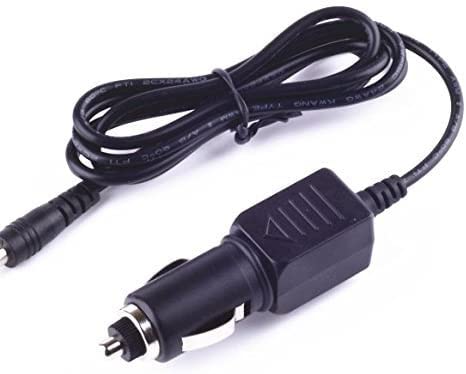
Image showing the onerbl Car DC Power Adapter, a compact black power supply unit with a power cord.
4. Operating Instructions
The onerbl Car DC Power Adapter operates automatically once connected. It provides a stable power supply to your compatible device.
- Power Supply: The adapter continuously supplies power to your device when plugged into an active electrical outlet.
- Battery Charging: If your device has a rechargeable battery, the adapter will charge it while connected and the device is either on or off (depending on the device's design).
- Disconnection: To disconnect, first power off your device, then unplug the adapter from the wall outlet, and finally disconnect the DC connector from your device.
5. Maintenance
Proper maintenance ensures the longevity and safe operation of your adapter.
- Cleaning: Use a soft, dry cloth to clean the adapter. Do not use liquid cleaners or solvents.
- Storage: When not in use, store the adapter in a cool, dry place, away from direct sunlight and extreme temperatures. Avoid tightly winding the cable.
- Inspection: Periodically inspect the adapter and its cables for any signs of damage, such as frayed wires or cracked casing. If damage is found, discontinue use.
6. Troubleshooting
If you encounter issues with your onerbl Car DC Power Adapter, refer to the following common problems and solutions:
| Problem | Possible Cause | Solution |
|---|---|---|
| Device not powering on or charging. |
|
|
| Adapter feels unusually hot. |
|
|
If troubleshooting steps do not resolve the issue, please contact the manufacturer or seller for further assistance.
7. Specifications
| Feature | Detail |
|---|---|
| Brand | onerbl |
| Model Number | 1 |
| Input Voltage | AC 100-240V, 50/60Hz |
| Power Source | Corded Electric |
| Main Power Connector Type | 2 pin |
| Special Feature | Travel, Over Voltage Protection, Over Heat Protection |
| Specification Met | UL |
| Compatible Devices | Dynex DXPDVD9A, DX-P9DVD, DX-P9DVD11, DX-P9DVD11/A, DX-P7DVD, DX-P7DVD11, DX-P7DVD11/A, DX-PDVD10, E-AWB135-090A, DX-BPDVD9, DX-PD510, DX-PDVD9 |
| Manufacturer | Shenzhen Waweis Technology Co., Ltd |
8. Warranty and Support
Warranty information for your onerbl Car DC Power Adapter is typically provided with the product packaging or can be obtained directly from the seller or manufacturer.
For technical support, warranty claims, or further inquiries, please refer to the contact information provided at the point of purchase or on the manufacturer's official website.