
1. Introduction
The Douk Audio MC105 is a versatile 5-channel stereo audio splitter designed to manage multiple XLR audio connections. This 1-IN-5-OUT version allows a single audio source to be distributed to five different amplifiers or speakers simultaneously. It eliminates the need for repeatedly plugging and unplugging cables, preserving connection integrity and convenience.
The MC105 is built with high-quality components, including imported NEC relays and gold-plated XLR connectors, housed in a durable metal casing to ensure high-quality signal transmission and minimize external noise interference. It features a remote control for easy operation and a Type-C USB interface for power.
2. Product Overview
Key Features:
- 5-Channel Operation: Supports 1 XLR input to 5 XLR outputs, or 5 XLR inputs to 1 XLR output (this manual focuses on the 1-IN-5-OUT configuration).
- Simultaneous Output: All 5 output channels can operate simultaneously.
- High-Quality Components: Utilizes imported NEC relays, gold-plated XLR connectors, and a robust metal casing for optimal signal integrity.
- Noise Reduction: Designed to effectively prevent external noise.
- Flexible Connectivity: Features HOT/COLD mode switching and common GND connection.
- Remote Control: Convenient wireless operation.
- Power Interface: USB Type-C for DC 5V power.
Package Contents:
- 1x Douk Audio MC105 XLR Audio Switcher
- 1x Remote Control
- 1x USB Cable (for power)

3. Setup
3.1 Unpacking and Inspection
Carefully remove all components from the packaging. Inspect the device and accessories for any signs of damage. If any damage is found, contact customer support immediately.
3.2 Power Connection
- Connect the provided USB cable to the Type-C power interface on the MC105.
- Connect the other end of the USB cable to a DC 5V (≥ 1A) power adapter (not included).
- Ensure the power adapter is plugged into a functional power outlet.
Note: A DC 5V power adapter (minimum 1A) is required and must be purchased separately.
3.3 Audio Connections (1-IN-5-OUT Configuration)
This version is designed to take one XLR audio input and distribute it to five XLR audio outputs.
- Input Connection: Connect your audio source (e.g., CD/DVD player, decoder) to the 1x Female input XLR ports on the rear panel of the MC105. Ensure both left (L) and right (R) channels are connected.
- Output Connections: Connect your five audio receiving devices (e.g., power amplifiers, mixers, preamps) to the 5x Male output XLR ports (labeled 1 through 5) on the rear panel. Ensure both left (L) and right (R) channels are connected for each output.


4. Operation
4.1 Front Panel Controls
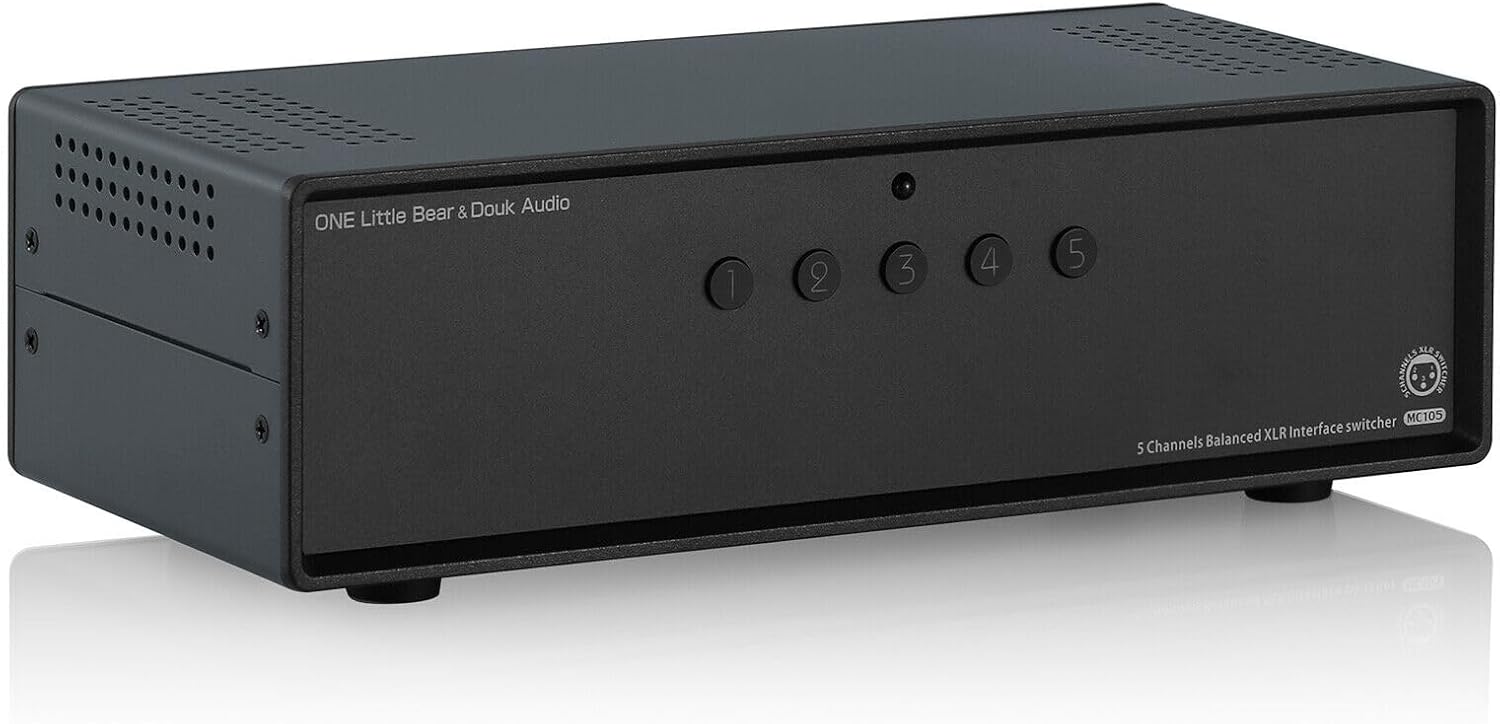
- Input Select Buttons (1-5): These buttons correspond to the five output channels. Pressing a button will activate the corresponding output channel, sending the single input signal to that specific output. Multiple buttons can be pressed to activate multiple outputs simultaneously.
- Infrared Receiver: This small window receives signals from the remote control. Ensure it is not obstructed for proper remote functionality.
4.2 Remote Control Operation
The included remote control allows for convenient wireless operation of the MC105.
- Battery Installation: Open the battery compartment on the remote control and insert 2 AAA batteries (not included), observing correct polarity.
- Power On/Off: Use the power button on the remote to turn the unit on or off.
- Channel Selection: Use the numbered buttons (1-5) on the remote to select or deselect output channels.
Note: The remote control requires 2 AAA batteries, which are not included. Please prepare them yourself.
4.3 Mode Switching (HOT/COLD and GND)
The MC105 supports HOT/COLD mode switching and common GND connection. These settings are typically configured internally or via specific controls not detailed in the basic user operation. Refer to advanced documentation if specific configuration is required for your setup.
5. Specifications
| Parameter | Value |
|---|---|
| Audio Input | 1 group XLR Female |
| Audio Output | 5 groups XLR Male |
| Simultaneous Channel Operation | Supported |
| Configuration Save Option | Supported |
| Operating Voltage | DC 5V (≥ 1A) |
| Power Interface | USB Type-C |
| Dimensions (L x W x H) | 280 x 80 x 122 mm / 11.02 x 4.80 x 3.15 inches |
| Net Weight | 980 g / 2.16 lb |
| Package Weight | 1.30 kg / 2.87 lb |
| Color | Black |
| Compatible Devices | Game console, Monitor, Personal computer, Laptop, Satellite receiver, Television |
6. Troubleshooting
- No Sound Output:
- Ensure the MC105 is properly powered via the USB Type-C port and a DC 5V (≥ 1A) adapter.
- Verify all XLR cables are securely connected to both the MC105 and your audio devices.
- Check that the correct output channel(s) are selected on the front panel or via the remote control.
- Confirm your audio source is active and producing sound.
- Ensure your receiving devices (amplifiers, speakers) are powered on and set to the correct input.
- Background Noise or Hum:
- While the MC105 is designed to minimize noise, some setups may experience ground loops or interference. If common background noise occurs, consider adding an audio isolation module between the MC105 and your affected device.
- Ensure all cables are of good quality and properly shielded.
- Check for nearby electronic devices that might be causing interference.
- Remote Control Not Responding:
- Check if the AAA batteries in the remote control are correctly inserted and not depleted. Replace if necessary.
- Ensure there are no obstructions between the remote control and the infrared receiver on the MC105 front panel.
- Point the remote directly at the infrared receiver.
- Low Volume:
- Ensure the volume levels on your audio source and receiving devices are appropriately set.
- For the 1-IN-5-OUT version, ensure only one input source is connected. Connecting multiple inputs to a 5-IN-1-OUT version (if applicable) can lead to low volume or noise.
7. Maintenance
- Cleaning: Use a soft, dry cloth to clean the exterior of the unit. Avoid using harsh chemicals or abrasive cleaners.
- Storage: Store the device in a cool, dry place away from direct sunlight and extreme temperatures.
- Cable Management: Ensure cables are not excessively bent or strained to prevent damage.
- Ventilation: Do not block the ventilation holes on the unit to ensure proper heat dissipation.
8. Warranty and Support
For warranty information and technical support, please refer to the documentation provided with your purchase or visit the official Douk Audio website. Douk Audio aims to provide prompt customer support, typically responding to inquiries within 12 hours.
Contact Information: Please refer to your purchase platform or the official Douk Audio website for the most current support contact details.