
Introduction
This manual provides comprehensive instructions for the safe and effective use of your WholeFire WF1612A-FBA rechargeable LED flashlight. Please read this manual thoroughly before operating the device and retain it for future reference.

Figure 1: WholeFire WF1612A-FBA Rechargeable LED Flashlight. This image displays the flashlight from an angled perspective, highlighting its textured body, digital battery display, and USB charging ports.
Product Features
- High Brightness: Up to 990000 lumens output.
- Rechargeable: Integrated USB charging (Type-C input, Type-A output for power bank function).
- Adjustable Focus: Allows switching between narrow spotlight and wide floodlight beams.
- Multiple Lighting Modes: High, Medium, Low, Strobe, and SOS.
- Durable Construction: Made from aircraft-grade aluminum alloy.
- Waterproof: IP65 rated for resistance against water splashes.
- Digital Display: Shows battery percentage.
Package Contents
Verify that all items are present in the package:
- WholeFire WF1612A-FBA LED Flashlight
- USB Charging Cable (Type-C)
- User Manual (this document)
Setup
1. Initial Charging
Before first use, fully charge the flashlight's internal battery. The digital display will show the charging progress.
- Locate the USB Type-C charging port on the flashlight. This is typically covered by a rubber flap for water resistance.
- Open the rubber flap.
- Connect the provided USB Type-C cable to the flashlight's charging port.
- Connect the other end of the USB cable to a compatible USB power adapter (not included) or a computer USB port.
- The digital display will show the battery percentage increasing during charging.
- Once the display shows 100%, the flashlight is fully charged. Disconnect the cable and securely close the rubber flap to maintain water resistance.

Figure 2: Charging the flashlight and using its power bank function. This image illustrates the flashlight being charged via its USB-C port and also demonstrates its ability to charge a mobile phone using its USB-A output port.
Operating Instructions
1. Power On/Off and Brightness Modes
The flashlight features a dual-switch system for controlling power and special modes.
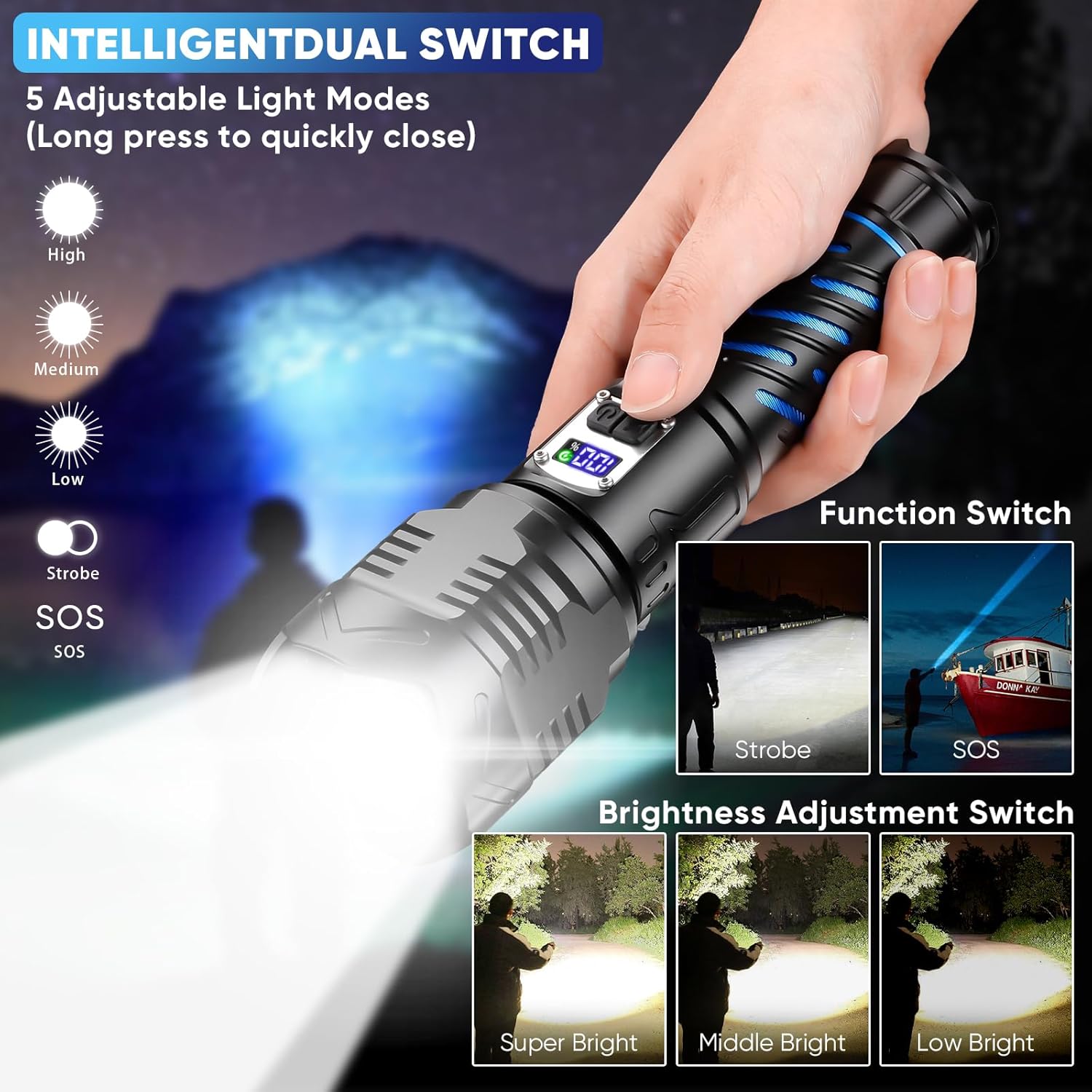
Figure 3: Dual switch operation for the WholeFire flashlight. This image highlights the two control buttons: one for standard brightness modes (High, Medium, Low) and another for special modes (Strobe, SOS).
- Function Switch (Main Power/Brightness):
- Press once to turn on the flashlight in High mode.
- Press again to cycle through Medium, Low, and Off.
- Long press (approximately 3 seconds) from any mode to turn off the flashlight directly.
- Brightness Adjustment Switch (Special Modes):
- Press once to activate Strobe mode.
- Press again to activate SOS mode.
- Press a third time to turn off the special mode.
- Long press (approximately 3 seconds) from any special mode to turn off the flashlight directly.
2. Adjustable Focus
The flashlight features an adjustable head to change the beam pattern.
- To adjust the focus, gently slide the head of the flashlight forward or backward.
- Sliding the head forward will narrow the beam, creating a focused spotlight for long-distance illumination (up to 4921 ft).
- Sliding the head backward will widen the beam, creating a broad floodlight for illuminating a larger area (up to 1640 ft).

Figure 4: Demonstrating the flashlight's adjustable beam. The top panel shows a narrow 25-degree beam reaching up to 4921 feet, while the bottom panel illustrates an 85-degree wide beam covering up to 1640 feet.
3. Power Bank Function
The flashlight can also serve as a power bank to charge other devices.
- Open the rubber flap covering the USB ports.
- Connect your device's charging cable to the USB Type-A output port on the flashlight.
- The flashlight will begin charging your device. Monitor your device's battery indicator.
- Disconnect the cable once charging is complete and securely close the rubber flap.
Maintenance
1. Cleaning
- Wipe the flashlight body with a soft, damp cloth.
- Do not use abrasive cleaners or solvents, as these may damage the finish or internal components.
- Ensure the USB port cover is closed before cleaning to prevent water ingress.
2. Storage
- Store the flashlight in a cool, dry place away from direct sunlight and extreme temperatures.
- For long-term storage, charge the battery to approximately 50-70% every 3-6 months to maintain battery health.
3. Battery Care
- Avoid fully discharging the battery frequently, as this can reduce its lifespan.
- Use only the provided or a compatible USB Type-C cable for charging.
Troubleshooting
| Problem | Possible Cause | Solution |
|---|---|---|
| Flashlight does not turn on. | Battery is depleted. | Charge the flashlight fully using the provided USB-C cable. |
| Flashlight does not charge. | Charging cable or adapter is faulty; USB port cover not fully open; incompatible charger. | Try a different USB-C cable or power adapter. Ensure the USB port cover is fully open and the cable is securely connected. Some high-speed chargers may not be compatible; try a standard 5V USB charger. |
| Beam is dim or inconsistent. | Low battery; lens is dirty. | Recharge the battery. Clean the lens with a soft, lint-free cloth. |
| Adjustable focus is stiff. | Dirt or debris in the mechanism. | Gently clean the area around the adjustable head. Avoid forcing the mechanism. |
Specifications
| Feature | Detail |
|---|---|
| Model Number | WF1612A-FBA |
| Light Source | LED (50W) |
| Brightness | Up to 990000 Lumens |
| Light Modes | High, Medium, Low, Strobe, SOS |
| Battery Type | Rechargeable Lithium-Ion |
| Charging Port | USB Type-C Input |
| Output Port | USB Type-A Output (Power Bank Function) |
| Material | Aircraft-grade Aluminum Alloy |
| Water Resistance | IP65 Waterproof |
| Dimensions | 8.26 x 2.36 x 1.57 inches |
| Weight | 1.3 pounds |

Figure 5: Durability features of the WholeFire flashlight. This image highlights its IP65 waterproof rating and construction from aviation-grade aluminum alloy, showing it resisting water and being run over by a tire.
Safety Information
- Do not shine the flashlight directly into eyes, as the high lumen output can cause temporary vision impairment.
- Keep out of reach of children.
- Do not disassemble the flashlight, as this may void the warranty and cause damage.
- Avoid exposing the flashlight to extreme heat or fire.
Warranty and Support
Information regarding specific warranty terms and customer support contact details is not provided in the product data. Please refer to the product packaging or the retailer's website for warranty information and support contacts.
For general inquiries or assistance, you may visit the WholeFire Store on Amazon.