
1. Introduction and Overview
The ERICKHILL ROOKPRO 2-in-1 Infrared Thermometer Gun is a versatile and essential tool designed for precise and rapid temperature measurement. It uniquely combines non-contact infrared (IR) technology for surface temperatures with a foldable stainless steel probe for internal readings. This dual functionality makes it an indispensable device for a wide array of applications, including culinary arts (cooking, grilling, baking), HVAC system diagnostics, and automotive maintenance.
Its intuitive design, large backlit display, and robust construction ensure ease of use and reliable performance in various environments.

Image: The ERICKHILL ROOKPRO 2-in-1 Infrared Thermometer Gun, showcasing its sleek design and digital display.
2. Key Features
- 2-in-1 Functionality: Seamlessly measures both internal temperatures using the foldable probe and surface temperatures with the non-contact infrared sensor.
- Fast & Accurate Stainless Steel Probe: Achieves high precision readings (±1°F) within just 0.5 seconds, ideal for food and liquids.
- Non-Contact & Photoelectric Sensors: Features a 12:1 distance-to-spot ratio for safe and accurate surface temperature readings from a distance.
- Wide Temperature Range: IR mode measures from 0°F to 1022°F (0°C to 550°C); Probe mode measures from -58°F to 572°F (-50°C to 300°C).
- User-Friendly Backlit Display: Large, clear color LED screen displays current, MAX, MIN, and AVG temperature results, ensuring easy readability in various lighting conditions.
- 180° Foldable Probe: Designed for convenience, safety, and easy storage.
- Smart Functions: Includes auto shut-off to conserve battery life and a data hold function to freeze readings on the display.
- Durable Construction: Made with an ABS material shell for a comfortable grip and enhanced wear resistance.

Image: Illustrates the dual functionality of the thermometer, showing its use for both pizza oven surface temperature and internal meat temperature.
3. What's in the Box
Upon opening your ERICKHILL ROOKPRO package, you should find the following items:
- 1 x ERICKHILL ROOKPRO 2-in-1 Infrared Thermometer
- 2 x 1.5V AAA Batteries
- 1 x User Manual
4. Setup
- Battery Installation: Locate the battery compartment on the back of the device. Open the cover and insert the two included 1.5V AAA batteries, ensuring the correct positive (+) and negative (-) polarity as indicated inside the compartment. Close the battery cover securely.
- Power On: Press the 'M' (Mode) button to power on the device. The backlit display will illuminate, and the thermometer will be ready for use.
5. Operating Instructions
General Operation
- Power On/Off: Press the 'M' button to power on. The device will automatically shut off after a period of inactivity to conserve battery.
- Mode Selection: Press the 'M' button repeatedly to switch between Infrared (IR) measurement mode and Probe measurement mode. An icon on the display will indicate the active mode (a laser icon for IR, a probe icon for the foldable probe).
- Unit Conversion: Press the 'C/°F' button to toggle between Celsius (°C) and Fahrenheit (°F) temperature units.
Infrared (IR) Measurement
- Ensure the device is in IR mode (laser icon visible on the display).
- Point the infrared sensor (located at the top of the gun) towards the target surface.
- Press and hold the trigger button. A red laser dot will indicate the center of the measurement area.
- The surface temperature will be displayed instantly. Release the trigger to hold the reading on the screen.
- For optimal accuracy, consider the Distance-to-Spot (D:S) ratio of 12:1. This means that at a distance of 12 inches, the thermometer measures a 1-inch diameter spot. Adjust your distance accordingly for precise measurements of smaller or larger areas.
- Use the 'FUNC' button to cycle through additional display options such as Maximum (MAX), Minimum (MIN), and Average (AVG) temperature readings during continuous measurement.

Image: Close-up view of the infrared sensor and laser, demonstrating accurate positioning for surface temperature readings.

Image: The thermometer being used to measure the temperature inside a pizza oven, highlighting its non-contact capability.
Probe Measurement
- Gently unfold the stainless steel probe until it clicks into its fully extended, 180° position. The device will automatically switch to probe measurement mode.
- Carefully insert the tip of the probe into the center of the food or liquid you wish to measure. Avoid touching bones or the bottom of the cooking vessel for the most accurate reading.
- The internal temperature will be displayed on the screen. Allow a few seconds for the reading to stabilize.
- Once measurement is complete, fold the probe back into the device for safe storage.

Image: Demonstrates the 180-degree foldable design of the meat probe, emphasizing its convenience and safety.
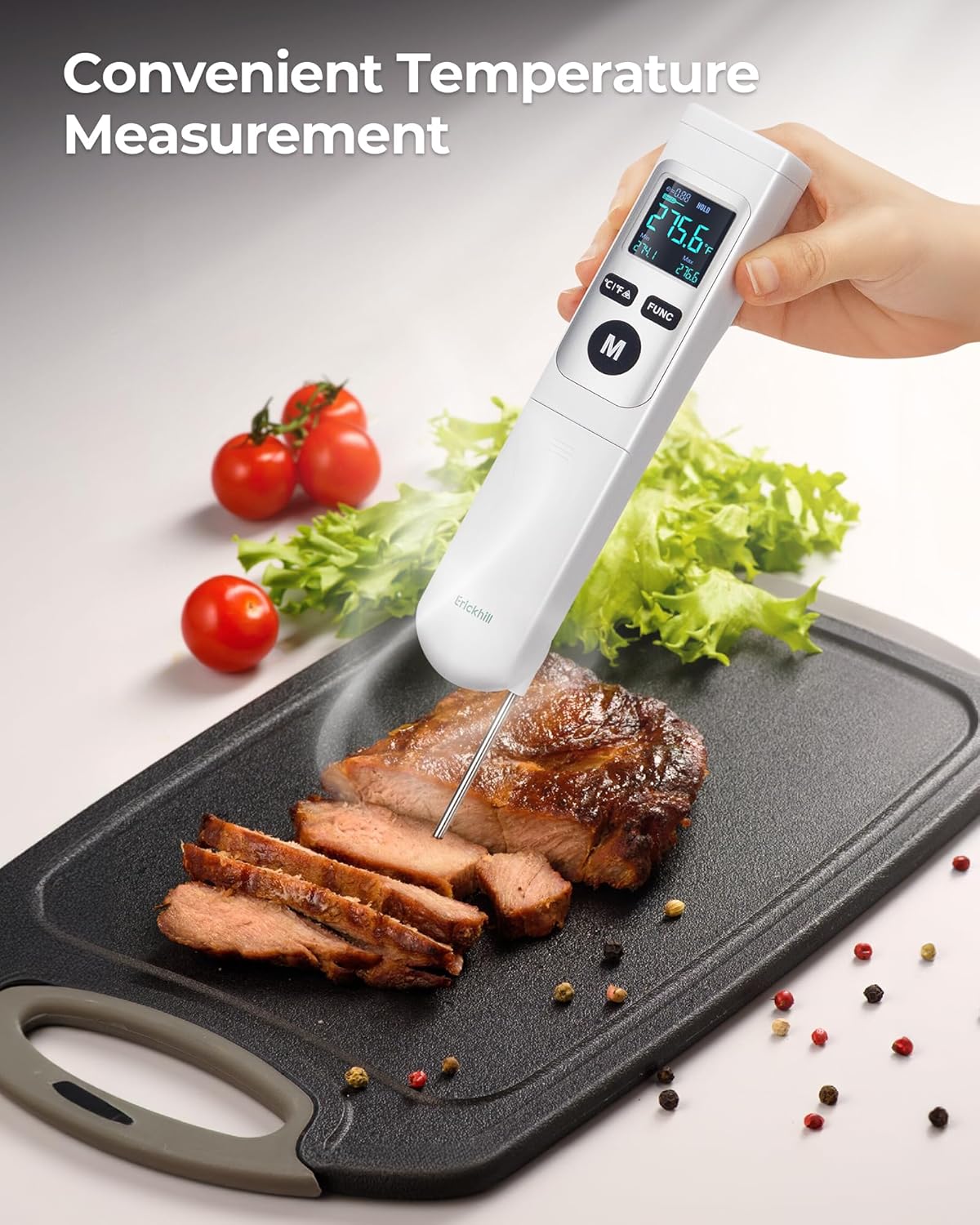
Image: The thermometer's probe being used to measure the internal temperature of sliced meat, illustrating its practical application.
Emissivity Adjustment (IR Mode Only)
Emissivity (E) is a measure of a material's ability to emit infrared energy. Different materials have different emissivity values, which can affect the accuracy of IR temperature readings. The ROOKPRO allows for emissivity adjustment to improve precision.
- Ensure the device is in IR mode.
- Press the 'FUNC' button repeatedly until the 'E' indicator appears on the display, usually accompanied by a numerical value (e.g., 0.95).
- Use the 'C/°F' and 'M' buttons to increase or decrease the emissivity value. Refer to a standard emissivity table for common materials to set the appropriate value. The default setting of 0.95 is suitable for most organic materials, painted surfaces, and water.


Images: Examples of different emissivity values for various materials, illustrating the importance of adjustment for accuracy.
6. Maintenance
- Cleaning the Device: Wipe the main body of the thermometer with a soft, slightly damp cloth. Do not use abrasive cleaners or immerse the device in water.
- Cleaning the Probe: After each use, especially with food, clean the stainless steel probe with mild soap and water. Rinse thoroughly and ensure the probe is completely dry before folding it back into the device.
- Storage: Store the ERICKHILL ROOKPRO in a cool, dry place, away from direct sunlight, extreme temperatures, and high humidity. Keep it out of reach of children.
- Battery Replacement: When the low battery indicator appears on the display, replace both AAA batteries promptly to ensure continued accurate operation.
7. Troubleshooting
- Device Does Not Power On:
- Check if the batteries are correctly installed with the proper polarity.
- Ensure the batteries are not depleted. Replace with fresh AAA batteries if necessary.
- Press the 'M' button firmly to ensure proper contact.
- Inaccurate Temperature Readings:
- IR Mode: Verify that the emissivity setting is appropriate for the material being measured. Ensure the target is within the optimal distance-to-spot ratio. Avoid measuring through glass or highly reflective surfaces, as these can distort readings.
- Probe Mode: Ensure the probe is fully inserted into the center of the food or liquid and is not touching bone, fat, or the bottom/sides of the cooking vessel.
- Allow the thermometer to acclimate to the ambient temperature if it has been moved from a significantly different temperature environment.
- Laser Pointer Not Visible:
- Confirm that the device is in IR measurement mode.
- Ensure the trigger button is being pressed and held down.
- Check for any physical obstructions blocking the laser emitter.
8. Specifications
| Model | PRO (ROOKPRO) |
| IR Temperature Range | 0°F to 1022°F (0°C to 550°C) |
| Probe Temperature Range | -58°F to 572°F (-50°C to 300°C) |
| IR Accuracy | ±1% or ±1°C (±2°F) |
| Probe Accuracy | ±1°F |
| Response Time (IR) | < 500ms |
| Distance Spot Ratio (D:S) | 12:1 |
| Emissivity | Adjustable (0.10-0.95), Default 0.95 |
| Display Type | Digital, Backlit Color LED |
| Power Source | 2 x 1.5V AAA Batteries |
| Auto Shut-off | Yes |
| Material | Acrylonitrile Butadiene Styrene (ABS) |
| Dimensions | 8.27 x 2.48 x 2.24 inches |
| Weight | 6.74 ounces |
9. Warranty and Support
ERICKHILL is committed to providing high-quality products and excellent customer service.
- 3-Year Warranty: The ERICKHILL ROOKPRO Infrared Thermometer is backed by a 3-year limited warranty from the date of purchase. This warranty covers defects in materials and workmanship under normal use.
- 30-Day Free Return Policy: Enjoy peace of mind with a 30-day free return policy for eligible purchases, allowing you to assess the product's suitability.
- 24-Hour Customer Support: For any inquiries, technical assistance, or warranty claims, please contact ERICKHILL customer support. We are dedicated to providing a guaranteed reply within 24 hours. Refer to the included User Manual for specific contact details or visit the official ERICKHILL website for the most up-to-date support information.