
1. Introduction
This manual provides detailed instructions for the setup, operation, and maintenance of your PXN-V99 Gaming Steering Wheel. Please read this manual thoroughly before using the product to ensure proper functionality and a safe gaming experience.
The PXN-V99 is a high-performance gaming steering wheel designed for an immersive racing simulation experience. It features 3.2Nm force feedback, a detachable wheel, Hall magnetic induction pedals, and a 6+1 gear shift rod. It is compatible with multiple platforms including PC, PS4, Xbox One, and Xbox Series X/S.
2. Product Overview
2.1 Components
- PXN-V99 Steering Wheel Base
- Detachable Steering Wheel Rim (300mm Race-Grade)
- Hall Magnetic Induction Pedal Unit (3-pedal setup: throttle, brake, clutch)
- 6+1 Gear Shift Rod
- Power Adapter
- USB Main Cable
- Micro USB Data Cable (for controller connection)
- Mounting Clamps
2.2 Key Features
- 3.2Nm Dual Motor Force Feedback: Provides realistic tactile feedback simulating road bumps, body tilt, acceleration, and collisions.
- 270°/900° Rotation: Easily switch between 270-degree and 900-degree rotation angles for different racing styles.
- Detachable Steering Wheel: Allows for future upgrades or customization.
- Hall Magnetic Sensor Pedals: High-precision linear braking and adjustable pedal angle for an authentic driving experience.
- Formula-Style Four Paddle Design: Seamless shifting and drifting with L1/R1 and linear L2/R2 paddles.
- 6+1 Gear Shifter: Supports both sequential and manual H-pattern shifting.
- PXN Wheel App: Dedicated mobile application for personalized parameter configuration, including steering wheel rotation angle, force feedback adjustment, button mapping, and game preset import.
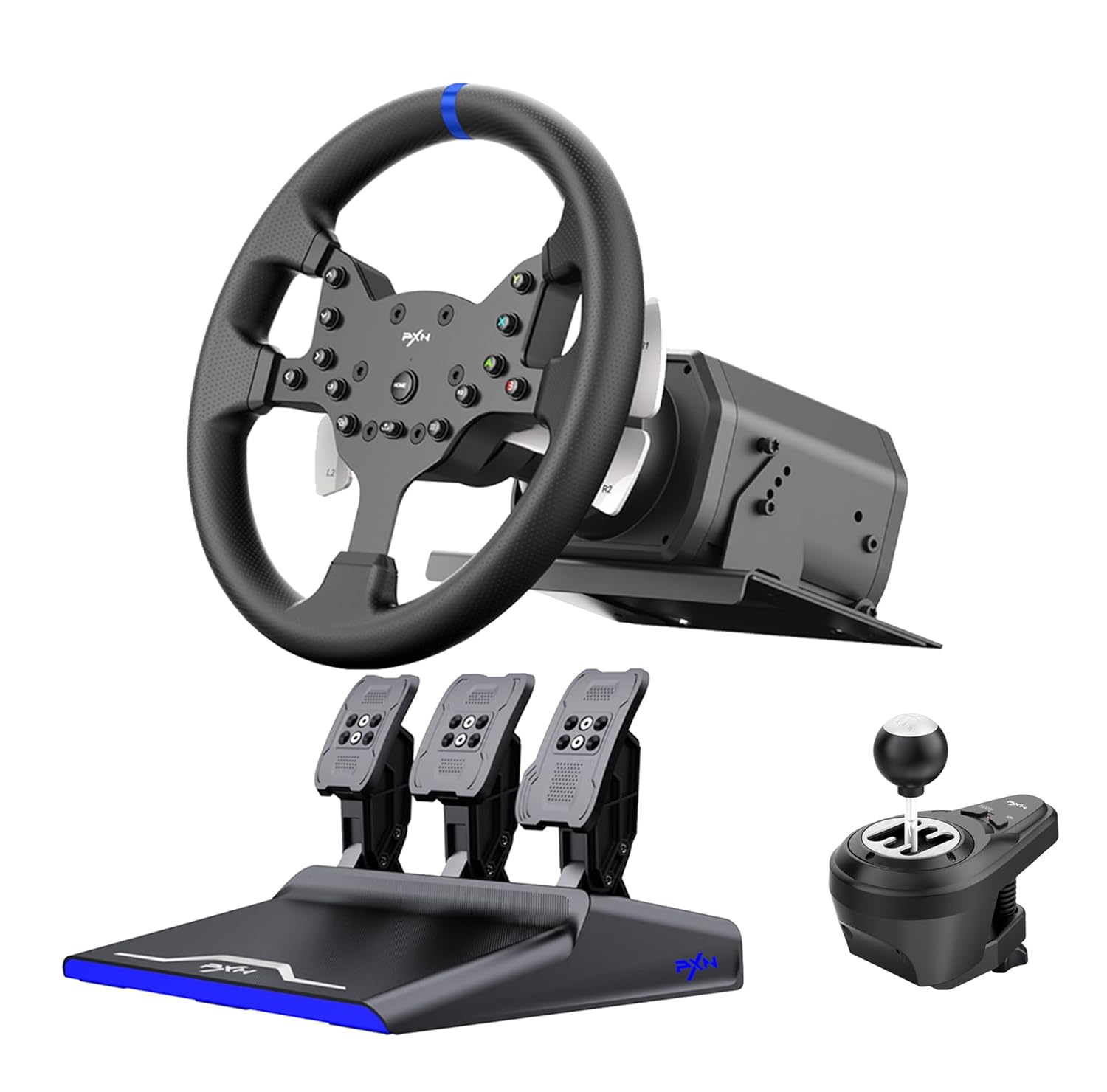
Figure 1: PXN-V99 Gaming Steering Wheel, Pedal Unit, and Shifter.

Figure 2: Illustration of the 3Nm Dual Motor Force Feedback system.

Figure 3: Detailed view of the Hall Magnetic Sensor Pedal unit.
3. Setup Instructions
3.1 Initial Connection (PS4 Example)
- Plug the power adapter into a wall socket and connect it to the rear interface of the steering wheel base.
- Use a micro USB data cable to connect the original PS4 controller to the USB port on the back of the steering wheel base. Ensure the PS4 controller is turned off at this time.
- Plug the USB main cable of the steering wheel base into the PS4 console.
- After successful connection, the steering wheel will perform a self-check, and the indicator light on the wheel will stay lit in blue, indicating it is ready for use.
Video 1: Step-by-step guide on how to connect the PXN-V99 steering wheel to a PS4 console. This video demonstrates connecting the power adapter, the PS4 controller via micro USB to the wheel base, and then the wheel base to the PS4 console.
3.2 Mounting the Steering Wheel
The PXN-V99 steering wheel can be securely mounted to a desk or racing cockpit using the included mounting clamps. Ensure the surface is stable and the clamps are tightened firmly to prevent movement during use.
4. Operating Instructions
4.1 Basic Operation
- Power On/Off: The wheel powers on automatically when connected and performs a self-check.
- Mode Switching (270°/900°): Refer to the specific button combination in the quick start guide or PXN Wheel App for switching between 270-degree and 900-degree rotation modes.
- Console Navigation: Use the HOME button on the steering wheel to navigate the console's interface once connected.
4.2 Using the PXN Wheel App
The PXN Wheel App allows for advanced customization of your steering wheel. You can download the "PXN V Series" app from your mobile phone's app store.
- Adjust steering wheel effective angle.
- Configure force feedback settings.
- Customize button mapping.
- Set multi-point curves for pedals.
- Import game configuration presets.

Figure 4: The PXN Wheel App interface for personalized settings.
4.3 Compatible Games
The PXN-V99 is compatible with a wide range of racing games across supported platforms. Some examples include:
- European Truck Simulation 2
- Dirt Rally 2.0
- Assetto Corsa Competizione
- RFactor 2
- WRC 9
- F1 2020
- Project Cars 2
- Beamng.drive
- Automobilista 2
- Need for Speed 20
- Super Route
- F1 2019
- Driving Club
- Racing Project 2
- Mario Kart 8 (Switch)
- GRIP: Combat Racing (Switch)
- The Crew 2 (PS3/PS4)
- Gran Turismo 5 (PS3/PS4)
- Forza Horizon 4 (Xbox)
- Dirt 3 (Xbox)

Figure 5: Examples of racing games compatible with the PXN-V99.
5. Maintenance
- Cleaning: Use a soft, dry cloth to clean the steering wheel, pedals, and shifter. Avoid using abrasive cleaners or solvents.
- Storage: Store the product in a cool, dry place away from direct sunlight and extreme temperatures when not in use.
- Cable Management: Ensure cables are not tangled or pinched to prevent damage.
6. Troubleshooting
| Problem | Possible Cause | Solution |
|---|---|---|
| Steering wheel not recognized by console/PC. | Incorrect connection, driver issue (PC), or controller not turned off (PS4). | Ensure all cables are securely connected. For PS4, verify the original controller is off before connecting. For PC, install the latest drivers from the PXN website. Try a different USB port. |
| No force feedback or weak force feedback. | Force feedback settings too low in game or PXN App, or a connection issue. | Check force feedback settings in the game and the PXN Wheel App. Ensure the power adapter is correctly connected. Restart the console/PC and the steering wheel. |
| Pedals not responding or incorrect input. | Loose pedal cable connection, or calibration issue. | Verify the pedal unit cable is firmly connected to the steering wheel base. Calibrate pedals using the PXN Wheel App or within game settings if available. |
| Steering wheel not centering properly. | Calibration issue or physical obstruction. | Ensure no physical obstructions are preventing the wheel from centering. Recalibrate the steering wheel using the PXN Wheel App or console/PC settings. |
7. Specifications
| Feature | Detail |
|---|---|
| Model | PXN-V99 |
| Force Feedback | 3.2Nm Dual Motor |
| Rotation Angle | 270° / 900° (Switchable) |
| Pedal Type | Hall Magnetic Induction (3-pedal) |
| Shifter | 6+1 Gear Shift Rod |
| Compatibility | PC (Windows 7/8/10/11), PS4, PS3, Xbox One, Xbox Series X/S, Switch |
| Item Weight | Approximately 21.6 pounds (9.8 kg) |
| Package Dimensions | 16.5 x 15.63 x 15.63 inches (41.9 x 39.7 x 39.7 cm) |
8. Warranty and Support
PXN products are designed and manufactured to the highest standards. For warranty information, technical support, or service inquiries, please refer to the warranty card included with your product or visit the official PXN website. You may also contact the seller directly for assistance.
For additional resources and updates, visit the PXN Store on Amazon.


