
Introduction
Thank you for purchasing the Studebaker SB2000 Retro Classic Portable AM/FM Radio. This manual provides essential information for the safe and efficient operation of your new radio. Please read it thoroughly before use and retain it for future reference.
Important Safety Instructions
- Read all instructions before operating the appliance.
- Keep these instructions for future reference.
- Heed all warnings on the appliance and in the operating instructions.
- Follow all instructions.
- Do not use this apparatus near water.
- Clean only with a dry cloth.
- Do not block any ventilation openings. Install in accordance with the manufacturer's instructions.
- Do not install near any heat sources such as radiators, heat registers, stoves, or other apparatus (including amplifiers) that produce heat.
- Protect the power cord from being walked on or pinched, particularly at plugs, convenience receptacles, and the point where they exit from the apparatus.
- Only use attachments/accessories specified by the manufacturer.
- Unplug this apparatus during lightning storms or when unused for long periods of time.
- Refer all servicing to qualified service personnel. Servicing is required when the apparatus has been damaged in any way, such as power-supply cord or plug is damaged, liquid has been spilled or objects have fallen into the apparatus, the apparatus has been exposed to rain or moisture, does not operate normally, or has been dropped.
Package Contents
Please check that all items listed below are included in your package:
- Studebaker SB2000 Radio
- Power Adapter
- Owner's Manual (this document)
Product Overview
Front View

This image displays the front of the Studebaker SB2000 radio, featuring the large circular speaker grille on the left, the tuning dial with AM/FM frequency markings on the right, and the combined power/volume knob below the tuning dial. The Studebaker logo is visible at the bottom of the speaker grille.
- Speaker Grille: Covers the internal speaker.
- Tuning Dial: Used to select AM or FM radio frequencies.
- Power/Volume Knob: Turns the radio on/off and adjusts the audio volume.
Side View
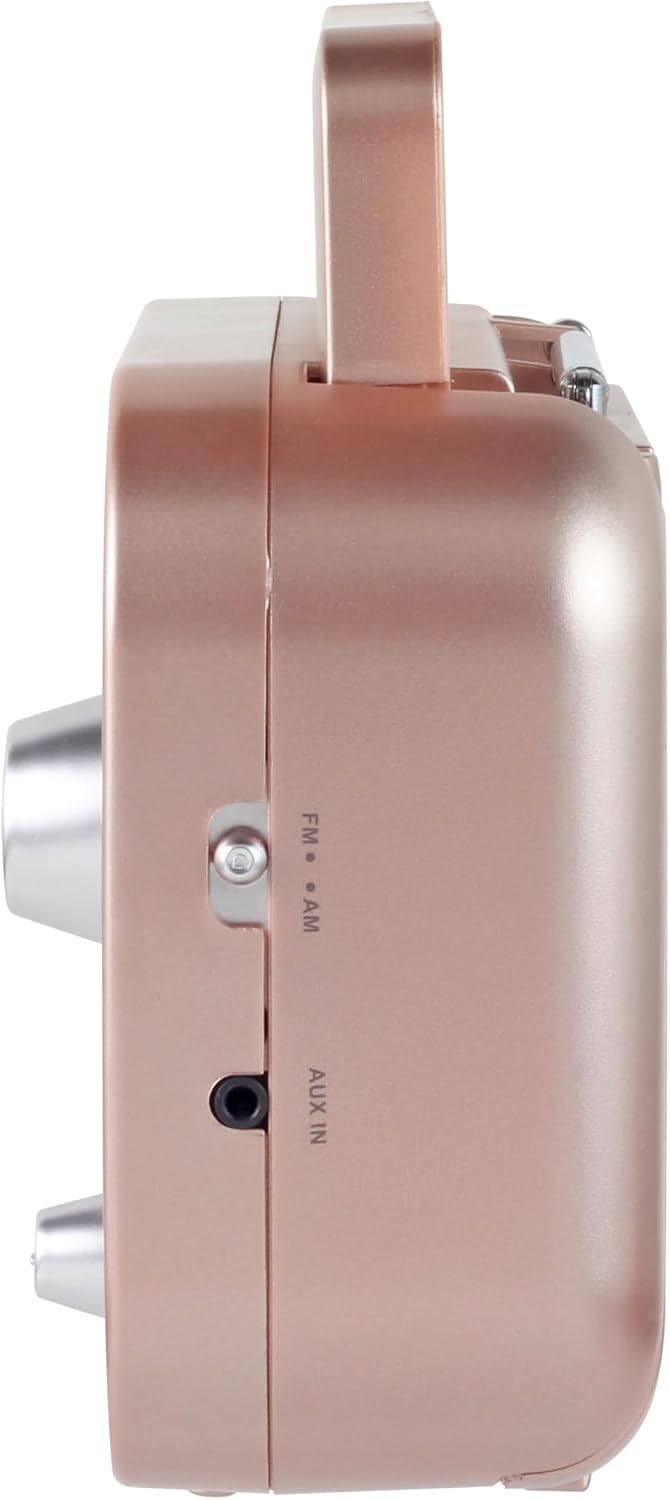
This image shows the right side of the Studebaker SB2000 radio, where the AM/FM band selector switch and the Auxiliary Input (AUX IN) jack are located.
- AM/FM Band Switch: Selects between AM and FM radio bands.
- AUX IN Jack: Connects external audio devices.
Rear View

This image illustrates the rear panel of the Studebaker SB2000 radio, featuring the battery compartment cover and the AC power input jack.
- Battery Compartment: Holds 4 'C' (UM-2) batteries for portable operation.
- AC Power Input: Connects the provided AC power adapter.
Setup
Powering the Unit
AC Power Operation
- Ensure the radio is turned off.
- Connect the provided AC power adapter to the AC Power Input jack on the rear of the radio.
- Plug the other end of the adapter into a standard 120V/60Hz AC wall outlet.
- The radio is now ready for operation using AC power.
Battery Operation (Batteries Not Included)
- Ensure the radio is turned off.
- Open the battery compartment cover located on the rear of the radio.
- Insert 4 x 'C' (UM-2) size batteries, observing the correct polarity (+/-) as indicated inside the compartment.
- Close the battery compartment cover securely.
- The radio is now ready for portable operation using battery power.
Operation
Turning On/Off and Volume Control
- To turn the radio on, rotate the Power/Volume knob clockwise from the 'OFF' position.
- Continue rotating the knob clockwise to increase the volume.
- To decrease the volume, rotate the knob counter-clockwise.
- To turn the radio off, rotate the Power/Volume knob counter-clockwise until it clicks into the 'OFF' position.
AM/FM Radio Operation
- Turn on the radio using the Power/Volume knob.
- Slide the AM/FM Band Switch on the side of the radio to select either 'AM' or 'FM'.
- For FM reception, extend the telescopic antenna fully and adjust its position for optimal signal reception.
- For AM reception, the radio has a built-in antenna. Rotate the entire radio for best reception.
- Rotate the Tuning Dial to scan through the frequencies and find your desired radio station.
- Adjust the volume to a comfortable listening level.
Auxiliary Input Operation
- Ensure the radio is turned on.
- Connect one end of a 3.5mm audio cable (not included) to the AUX IN jack on the side of the radio.
- Connect the other end of the audio cable to the headphone jack or audio output of your external audio device (e.g., MP3 player, smartphone, tablet).
- The radio will automatically switch to AUX input mode.
- Control playback (play, pause, skip tracks) directly from your external audio device.
- Adjust the volume using the Power/Volume knob on the radio and/or the volume control on your external device.
Maintenance
- Cleaning: Wipe the exterior of the radio with a soft, dry cloth. Do not use abrasive cleaners or solvents.
- Battery Care: If the radio will not be used for an extended period, remove the batteries to prevent leakage and corrosion.
- Storage: Store the radio in a cool, dry place away from direct sunlight and extreme temperatures.
- Antenna: Handle the telescopic antenna gently to avoid bending or breaking.
Troubleshooting
| Problem | Possible Cause | Solution |
|---|---|---|
| No power | Power/Volume knob is OFF. AC adapter not connected or faulty. Batteries are dead or incorrectly inserted. | Rotate Power/Volume knob clockwise. Check AC adapter connection and wall outlet. Replace batteries or check polarity. |
| Poor radio reception | Antenna not extended/adjusted (FM). Radio position (AM). Weak signal in area. | Extend and adjust FM telescopic antenna. Rotate the entire radio for better AM reception. Try moving the radio to a different location. |
| No sound from AUX input | Audio cable not connected properly. External device volume too low. External device not playing. | Ensure 3.5mm audio cable is fully inserted into both devices. Increase volume on both the radio and the external device. Check if the external device is playing audio. |
Specifications
| Feature | Description |
|---|---|
| Model | SB2000 |
| Power Source | AC 120V/60Hz or 4 x 'C' (UM-2) Batteries (not included) |
| Radio Bands Supported | AM, FM |
| Connectivity Technology | Auxiliary Input (3.5mm) |
| Product Dimensions (L x W x H) | 3.25" x 7" x 5.13" (8.25 cm x 17.78 cm x 13.03 cm) |
| Item Weight | 1.56 pounds (0.71 kg) |
| Special Feature | Lightweight, Portable, Foldable Carrying Handle, Rotary Telescopic Antenna |
Warranty and Support
Studebaker products are designed for reliability and performance. For information regarding warranty coverage, technical support, or service inquiries, please refer to the warranty card included with your product or visit the official Studebaker website. Please have your model number (SB2000) and purchase date available when contacting support.