Introduction
This manual provides essential information for the safe and efficient operation, maintenance, and troubleshooting of your JINGEDD Commercial Conveyor Toaster, Model HET-300. Please read these instructions thoroughly before using the appliance and retain them for future reference.
Important Safety Instructions
- Read all instructions before operating the toaster.
- Do not touch hot surfaces. Use handles or knobs.
- To protect against electrical hazards, do not immerse cord, plugs, or the appliance in water or other liquid.
- Close supervision is necessary when any appliance is used by or near children.
- Unplug from outlet when not in use and before cleaning. Allow to cool before putting on or taking off parts.
- Do not operate any appliance with a damaged cord or plug, or after the appliance malfunctions or has been damaged in any manner. Contact customer service for examination, repair, or adjustment.
- The use of accessory attachments not recommended by the appliance manufacturer may cause injuries.
- Do not use outdoors.
- Do not let cord hang over edge of table or counter, or touch hot surfaces.
- Do not place on or near a hot gas or electric burner, or in a heated oven.
- Always attach plug to appliance first, then plug cord into the wall outlet. To disconnect, turn any control to "off", then remove plug from wall outlet.
- Do not use appliance for other than intended use.
- Oversize foods, metal foil packages, or utensils must not be inserted in a toaster as they may create a fire or risk of electric shock.
- A fire may occur if toasters are covered or touching flammable material, including curtains, draperies, walls, and the like, when in operation.
- Do not attempt to dislodge food when toaster is plugged in.
- Ensure the crumb tray is properly installed before operation.
Product Overview
The JINGEDD HET-300 Commercial Conveyor Toaster is designed for high-volume toasting in commercial environments. It features a stainless steel construction, adjustable conveyor speed, and multiple heating modes for various bread products.
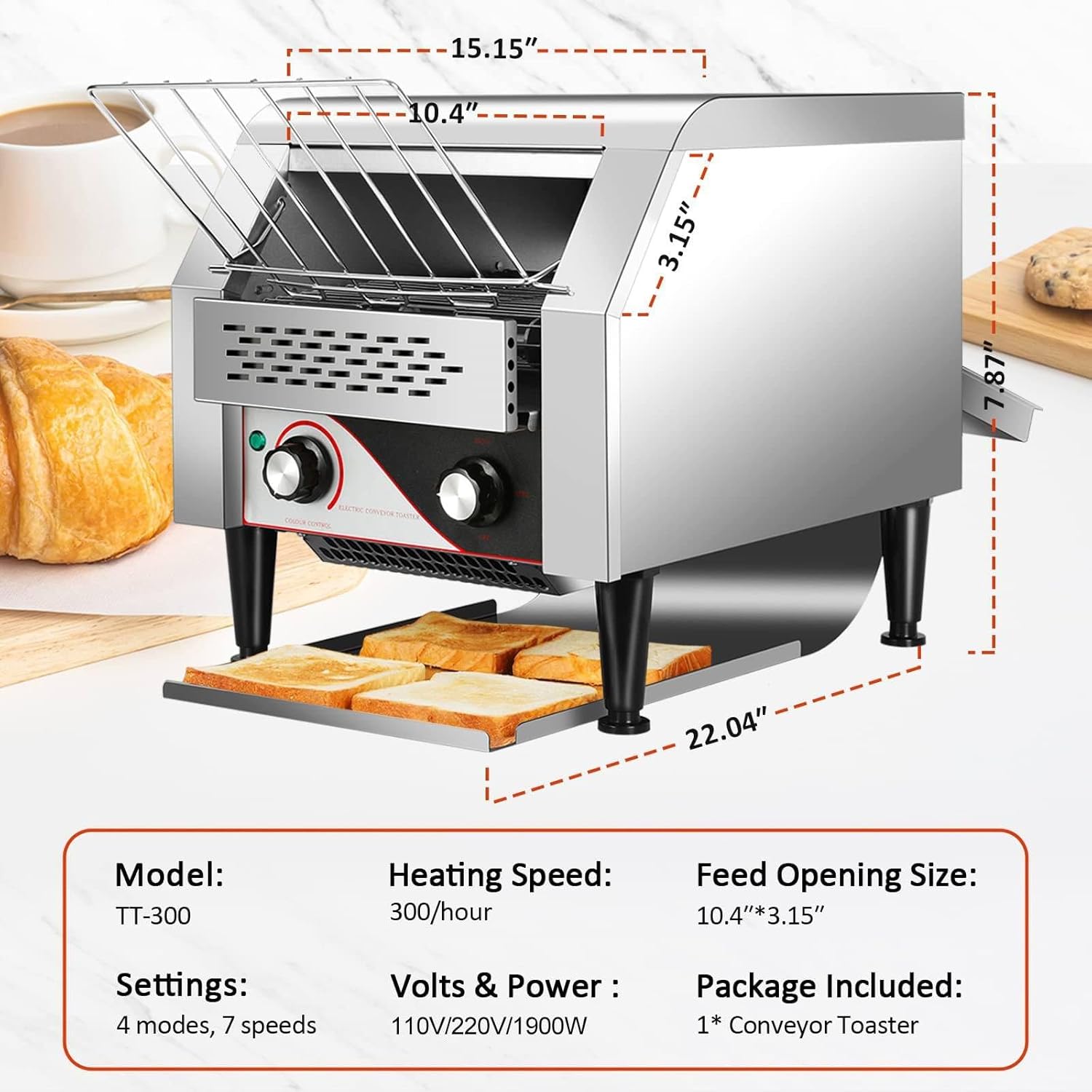
Image: Front view of the JINGEDD Commercial Conveyor Toaster, highlighting its compact design and key dimensions. The model is identified as TT-300 in this image, but the primary model for this product is HET-300. It also shows the feed opening size and power specifications.

Image: Close-up view of the internal chain transfer design, illustrating the mechanism for fast and smooth conveyance of bread products through the toaster for efficient baking.
Setup
- Unpacking: Carefully remove the toaster from its packaging. Retain packaging materials for future transport or storage.
- Placement: Place the toaster on a stable, heat-resistant, and level surface. Ensure adequate clearance (at least 10 cm or 4 inches) around all sides for proper ventilation. Do not place near flammable materials.
- Power Connection: Ensure the power supply matches the voltage specified on the appliance (220V/110V, 50Hz/60Hz). Plug the power cord into a grounded electrical outlet.
- Crumb Tray Installation: Slide the removable crumb tray into its designated slot at the bottom front of the toaster.
- Initial Cleaning: Before first use, wipe down the exterior with a damp cloth. Run the toaster empty for approximately 5-10 minutes on a medium setting to burn off any manufacturing residues. Ensure the area is well-ventilated during this process.
Operating Instructions
Follow these steps for efficient toasting:

Image: Visual guide demonstrating the four main steps for using the toaster: 1. Loading bread, 2. Adjusting the roasting degree, 3. Selecting heating mode, and 4. Retrieving finished toast.
- Power On: Turn the main power switch to the 'ON' position. The heating elements will begin to warm up.
- Select Heating Mode: Use the 'BREAD/BUNS/STBY' selector knob to choose the desired heating mode. Options typically include:
- BREAD: Heats both top and bottom elements for standard toast.
- BUNS: Heats only the top element, ideal for toasting the cut side of bagels or buns while keeping the bottom soft.
- STBY (Standby): Keeps the toaster warm at a lower power setting, ready for quick use.
- Adjust Toasting Level/Speed: Use the 'COLOUR CONTROL' knob to adjust the conveyor belt speed, which directly controls the toasting time and resulting color. A higher number typically means a slower speed and darker toast.
- Load Product: Place bread slices, bagels, or other suitable items onto the loading rack at the front of the toaster. The conveyor belt will automatically pull them through the heating chamber.
- Retrieve Toasted Product: Once toasted, items will exit the heating chamber and drop onto the collection tray at the bottom front of the appliance.
- Power Off: When finished, turn the main power switch to the 'OFF' position and unplug the appliance.

Image: A dial illustrating 7 different toasting levels, from light and fluffy (Level 1) to extra crispy (Level 7), corresponding to the 'COLOUR CONTROL' setting.
This toaster is suitable for various baked goods, including standard toast, waffles, bagels, and muffins, offering versatility for commercial kitchens.

Image: Examples of various food items such as toast, waffles, bagels, and muffins, demonstrating the toaster's capability to handle different types of baked goods.
Maintenance and Cleaning
Regular cleaning ensures optimal performance and extends the lifespan of your toaster.
- Always Unplug: Before cleaning, ensure the toaster is unplugged from the power outlet and has completely cooled down.
- Empty Crumb Tray: The removable crumb tray should be emptied frequently to prevent crumb buildup, which can be a fire hazard. Slide out the tray, discard crumbs, and wipe it clean with a damp cloth. Dry thoroughly before reinserting.
- Exterior Cleaning: Wipe the exterior stainless steel surfaces with a soft, damp cloth. For stubborn stains, a mild non-abrasive cleaner can be used. Do not use abrasive pads or harsh chemicals that could damage the finish.
- Interior Cleaning: For internal cleaning, ensure the unit is completely cool. Use a soft brush or vacuum cleaner with a narrow attachment to remove any crumbs or debris from the heating elements and conveyor mechanism. Do not use water or liquid cleaners inside the toaster.
- Storage: If storing the toaster for an extended period, ensure it is clean and dry. Store in a cool, dry place.

Image: A hand demonstrating the removal of the crumb tray from the toaster, highlighting its easy-to-clean design to prevent crumb accumulation.
Troubleshooting
Refer to the table below for common issues and their solutions.
| Problem | Possible Cause | Solution |
|---|---|---|
| Toaster does not power on. | No power supply; Power switch is off; Faulty outlet. | Check power cord connection; Ensure power switch is 'ON'; Test outlet with another appliance. |
| Bread is not toasting or toasts unevenly. | Incorrect temperature/speed setting; Heating elements malfunction; Incorrect heating mode. | Adjust 'COLOUR CONTROL' knob; Ensure 'BREAD' mode is selected for full toasting; Contact service if elements are faulty. |
| Conveyor belt is stuck or not moving. | Food obstruction; Motor malfunction. | Unplug and carefully remove any obstructions; Contact service if motor is faulty. |
| Excessive smoke or burning smell. | Crumb buildup; Food stuck inside; First use residue. | Unplug immediately; Clean crumb tray; Remove any stuck food; Ensure proper ventilation during initial burn-off. |
If the problem persists after attempting these solutions, please contact customer support.
Specifications
| Feature | Detail |
|---|---|
| Model | HET-300 |
| Material | Stainless Steel |
| Voltage | 220V/110V |
| Frequency | 50Hz/60Hz |
| Power | 2240W |
| Yield | Up to 300 slices/hour |
| Open Size (Feed Opening) | 270*110mm (approx. 10.6 x 4.3 inches) |
| Adjustable Temperature Range | 0 to 280 °C (via three-speed switch, seven-speed temperature adjustment) |
| Product Dimensions | 41.8 x 28.8 x 38.7 cm (approx. 16.5 x 11.3 x 15.2 inches) |
| Net Weight | 14 kg (approx. 30.8 lbs) |
Warranty Information
JINGEDD products are manufactured to high-quality standards. For specific warranty terms and conditions, please refer to the warranty card included with your product or contact customer support. Keep your purchase receipt as proof of purchase.
Customer Support
For technical assistance, parts, or service inquiries, please contact JINGEDD customer support. Please have your model number (HET-300) and purchase date available when contacting support.
Contact information (e.g., website, email, phone number) would typically be provided here by the manufacturer.


