Introduction
This manual provides instructions for the HCDZ Replacement Remote Control, designed for use with compatible adjustable bed bases, specifically the Revive 3.0 Living Spaces model. Please read these instructions carefully before use to ensure proper setup and operation.
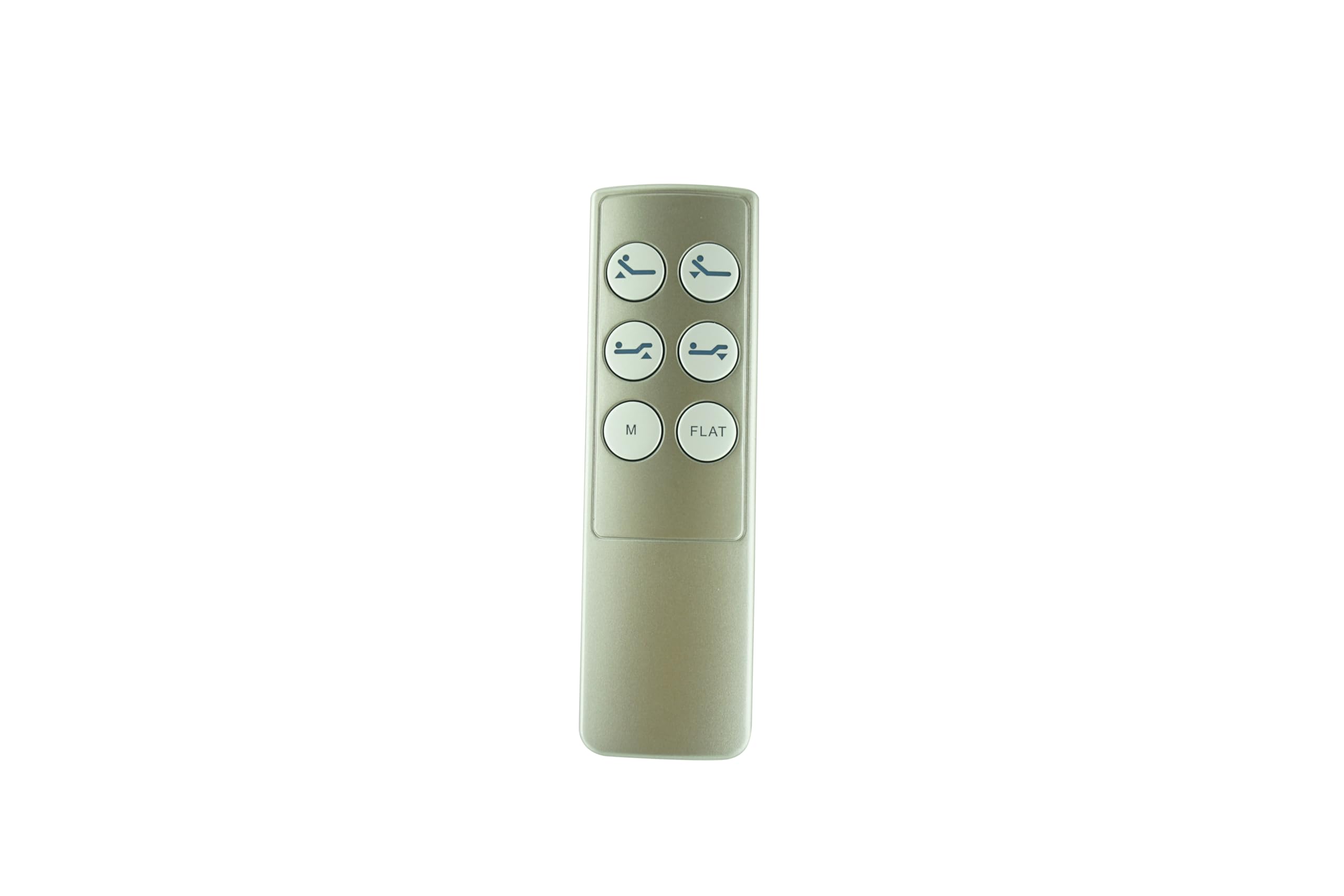
Image: Front view of the HCDZ Replacement Remote Control. This image displays the primary control surface of the remote.
Setup
1. Battery Installation
The remote control requires two AAA batteries (not included). Follow these steps to install them:
- Locate the battery compartment cover on the back of the remote control.
- Slide the cover downwards or press the latch to open it.
- Insert two AAA batteries, ensuring the positive (+) and negative (-) terminals align correctly with the indicators inside the compartment.
- Replace the battery compartment cover, sliding it back into place until it clicks securely.

Image: Back view of the HCDZ Replacement Remote Control, showing the battery compartment cover.

Image: Back view of the HCDZ Replacement Remote Control with the battery compartment open, revealing the battery slots.
2. Pairing Instructions
The remote control does not come pre-paired. You must pair it with your adjustable bed base's control box. If your bed base has specific pairing instructions, please refer to those first. Otherwise, use the following general steps:
- On the remote control, simultaneously press and hold the "head up" button and the "foot up" button for approximately 10 seconds.
- Locate the control box underneath your bed base. Find the button labeled "Learn" or "Reset Coding."
- Press and immediately release this "Learn" or "Reset Coding" button on the control box. Do not hold it down.
- Listen for beeps from the bed base, which indicate that the remote control has successfully synced.
Operating the Remote Control
Once paired and with batteries installed, the remote control is ready for use. No additional programming is required. Point the remote towards the bed base and press the desired function buttons.
- Head Up/Down: Adjusts the head section of the bed.
- Foot Up/Down: Adjusts the foot section of the bed.
- Other buttons (if present): Refer to your bed base's original manual for specific functions like massage, zero gravity, or memory positions.
Maintenance
Cleaning
To clean the remote control, wipe it with a soft, dry cloth. Do not use liquid cleaners, aerosols, or abrasive materials, as these can damage the remote's surface or internal components.
Battery Replacement
Replace the AAA batteries when the remote's performance diminishes or if the bed base does not respond consistently. Refer to the "Battery Installation" section for replacement steps.
Troubleshooting
- Remote not responding:
- Check if the batteries are correctly installed and have sufficient charge. Replace them if necessary.
- Ensure there are no obstructions between the remote and the bed base's receiver.
- Confirm the remote is pointed directly at the bed base's control box.
- Remote not pairing:
- Re-attempt the pairing process as described in the "Pairing Instructions" section.
- Ensure you are pressing and releasing the "Learn" or "Reset Coding" button on the control box quickly, not holding it down.
- Verify that the remote control is compatible with your specific bed base model.
- Intermittent operation:
- Weak batteries can cause inconsistent performance. Replace them.
- Environmental interference from other electronic devices might affect signal transmission.
Specifications
| Brand | HCDZ |
| Model | Revive 3.0 Living Spaces (Compatible with HJC25, ML200B, 127780C250007 control boxes) |
| Compatible Devices | Adjustable Bed Base |
| Max Number of Supported Devices | 1 |
| Batteries Required | 2 x AAA (not included) |
| Special Feature | Ergonomic design |
Warranty Information
Specific warranty details for this HCDZ Replacement Remote Control may vary. Please retain your purchase receipt and contact the seller or manufacturer directly for information regarding warranty coverage and terms.
Support
For further assistance or inquiries, please visit the official HCDZ store or contact their customer support.