
1. Product Overview
The Dasaita Android 13 Car Stereo is designed to upgrade the in-car entertainment system of Toyota Tundra models from 2007 to 2013. This head unit integrates advanced features such as Wireless CarPlay, Android Auto, GPS navigation, and robust connectivity options including Bluetooth 5.0, 5G WiFi, and 4G LTE. It features a 10.2-inch touch screen and is built with a high-performance Qualcomm 665 CPU, 6GB RAM, and 64GB ROM for a smooth user experience. The system is engineered to retain most of the vehicle's original functions, including steering wheel controls, AC information, and compatibility with the JBL amplifier.

2. Setup & Installation
The Dasaita car stereo is designed for a plug-and-play installation in compatible Toyota Tundra models (2007-2013). It retains most original vehicle functions. Professional installation is recommended, but detailed instructions are provided for those with automotive audio knowledge.
2.1. What's in the Box
Before beginning installation, verify all components are present:
- Dasaita Head Unit
- Tool kit
- Audio Output & Camera Input Cables
- AUX Input & Front Camera Input Cables
- USB Cables
- Microphone
- GPS Antenna
- 4G Antenna
- WiFi Antenna
- Power Cables (Power cable 1, Power cable 2)
- USB Adapter
- Canbus Decoder
- User Manual
- Appreciation Card

2.2. Installation Process
Refer to the detailed installation video provided by Dasaita for a step-by-step guide. Ensure the vehicle's engine is turned off and the power is disconnected before starting the installation to prevent damage to the unit or vehicle electronics.
Video: Official Dasaita installation guide for the head unit in a Toyota Tundra 2007-2013. This video demonstrates the process of removing the old unit and installing the new Dasaita stereo, including wiring connections.

Note: Please turn off the car and power off the unit before installation. Otherwise, the Canbus box may be damaged, and the rear view camera might not function correctly.
2.3. Retaining Factory Features
The Dasaita head unit is designed to integrate with your vehicle's existing systems, preserving functionality such as:
- Steering Wheel Controls
- AC Information Display
- JBL Amplifier Compatibility
- USB/AUX Ports

3. Operating Instructions
3.1. User Interface (UI)
The Android 13 operating system provides a customizable and intelligent user interface. You can personalize the layout by long-pressing app icons to move them. The system also supports day and night modes, which can switch intelligently with your vehicle's headlights for optimal visibility and reduced eye strain.
Video: Demonstration of the split-screen function on the Dasaita head unit, showing how two applications can be run simultaneously for enhanced multitasking.
3.2. Wireless CarPlay & Android Auto
Connect your iPhone or Android device wirelessly for seamless integration. Access navigation, make calls, send messages, and play music directly from the head unit's display using voice commands (Siri/Google Assistant) or touch controls.
Video: A demonstration of the wireless Apple CarPlay functionality on the Dasaita Tundra head unit, showcasing app integration and ease of use.

3.3. Internet Connectivity (4G LTE & WiFi)
The head unit supports a 4G SIM card for direct internet access, allowing for software updates, online navigation, and streaming. Alternatively, you can connect to a 5G WiFi hotspot from your smartphone.

3.4. 4G LTE Phone Calls
After inserting a 4G SIM card, you can make hands-free phone calls directly from the head unit. Navigate to Car Setting > Factory Setting > SIM card voice call and select "Yes" to enable this feature. The quality of the call depends on the signal strength in your location.

4. Key Features
4.1. High Performance CPU & Memory
Equipped with an eight-core Qualcomm 665 CPU (64-bit), 6GB RAM, and 64GB ROM, the unit ensures smooth operation and quick response times, preventing lag during use.

4.2. Superior Sound Quality with DTS
The built-in professional-grade TDA7808 amplifier chip (23W RMS/50 peak x 4 channels) and 4V audio output deliver crisp highs and resonating lows. The system allows for customizable sound settings, including speaker delay time, to achieve a balanced and dynamic audio experience.

4.3. Off-Road Inclinometer Functions
A built-in gyro sensor monitors the vehicle's roll and pitch angles in real-time. If preset values are exceeded, an alarm is issued to enhance driving safety, particularly on challenging terrains. This feature provides intelligent vehicle stability control and driving assistance.

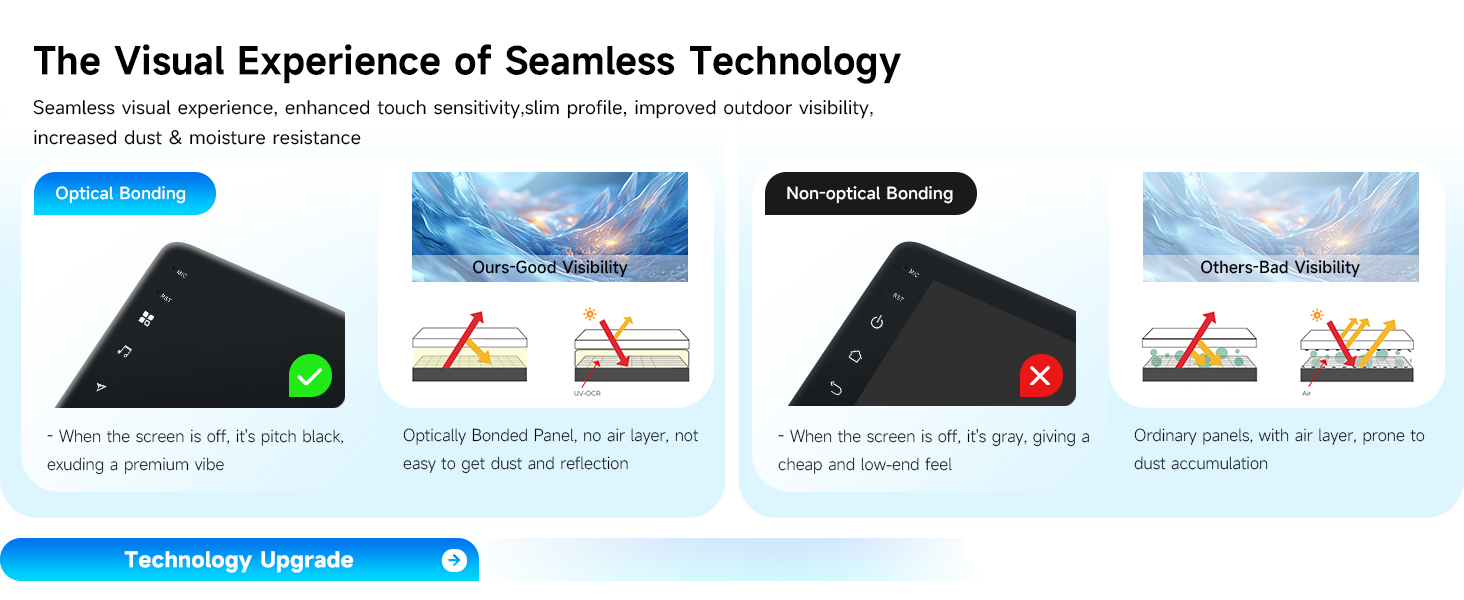
4.4. Fully Laminated HD Touch Screen
The 10.2-inch, 1280 x 720 high-definition fully laminated touch screen offers clear and transparent visuals with enhanced touch sensitivity, slim profile, and improved outdoor visibility. Optical bonding technology reduces reflection and prevents dust accumulation.
4.5. Bluetooth 5.0
Bluetooth 5.0 provides enhanced signal connection for stable music streaming and hands-free phone calls, even on bumpy roads.

5. Maintenance
To ensure the longevity and optimal performance of your Dasaita car stereo, follow these general maintenance guidelines:
- Screen Cleaning: Use a soft, lint-free cloth to gently wipe the touch screen. For stubborn smudges, slightly dampen the cloth with water or a screen-safe cleaner. Avoid harsh chemicals or abrasive materials.
- Software Updates: Periodically check for software updates. Updates can improve performance, add new features, and resolve potential issues. Updates are typically performed via a USB drive or over the internet if a 4G SIM card or WiFi connection is active.
- Environmental Conditions: Avoid exposing the unit to extreme temperatures, direct sunlight for prolonged periods, or excessive moisture.
- Cable Connections: Ensure all cables are securely connected. Loose connections can lead to intermittent functionality or poor audio/video quality.
6. Troubleshooting
If you encounter issues with your Dasaita car stereo, refer to the following common problems and solutions:
6.1. Steering Wheel Controls Not Working
If your steering wheel controls are not responding after installation, verify the Canbus connection and ensure the settings are correctly configured within the head unit's interface. There is a dedicated video guide for this issue.
Video: A troubleshooting guide from Dasaita on how to resolve issues with steering wheel controls not functioning after head unit installation.
6.2. Audio Issues (Inconsistent Sound, No Sound)
If you experience inconsistent sound or no audio output, first check all speaker connections and the amplifier connection (especially if using a JBL amplifier). Ensure the volume is not muted and the audio settings are correctly configured. Sometimes, a software update can resolve audio inconsistencies. If issues persist, a factory reset of the Dasaita unit might be necessary, followed by re-pairing Bluetooth devices.
6.3. Connectivity Problems (CarPlay/Android Auto, WiFi, 4G)
- Wireless CarPlay/Android Auto: If connection issues occur, try turning Bluetooth off and on again on your phone and the head unit. Ensure your phone's operating system is up to date.
- WiFi/4G: Verify the 4G SIM card is correctly inserted and activated. For WiFi, ensure the hotspot is active and the password is correct. Check signal strength in your area.
6.4. Unit Flickers or Reboots
Intermittent flickering or reboots can sometimes be resolved by ensuring the unit's software is up to date. Check power connections to ensure they are stable and providing adequate power. If the problem persists, contact customer support.
7. Specifications
| Feature | Detail |
|---|---|
| Brand | Dasaita |
| Model Number | Android 13 Car Stereo |
| Operating System | Android 13 |
| CPU | Eight-core Qualcomm 665 (64-bit) |
| RAM | 6GB |
| ROM | 64GB |
| Screen Size | 10.2 inches |
| Resolution | 1280 x 720 (Fully Laminated Touch Screen) |
| Connectivity Technology | Bluetooth 5.0, USB, Wi-Fi (5G), 4G LTE |
| Compatible Devices | Smartphone (Wireless CarPlay, Wired/Wireless Android Auto) |
| Audio Output Mode | Stereo, Optical |
| Amplifier Chip | TDA7808 |
| Output Power | 23W RMS/50 peak x 4 channels |
| Special Features | Built-In Bluetooth, Off-Road Inclinometer, Touchscreen, Split-Screen, Day/Night Mode |
| Item Weight | 2.68 Kilograms |

8. Warranty & Support
8.1. Warranty Information
The Dasaita Android 13 Car Stereo comes with a 1-year manufacturer's warranty. Please retain your proof of purchase for warranty claims.
8.2. Customer Support
For any assistance, technical support, or warranty inquiries, please contact Dasaita Official Store directly. You can typically find their contact information on the product packaging or through the retailer's platform where the product was purchased.


