
1. Introduction
This manual provides essential information for the safe operation, assembly, maintenance, and troubleshooting of your EWORK 21V Cordless Leaf Blower, Model EK-01GYG. Please read this manual thoroughly before using the product to ensure proper function and to prevent injury.

Figure 1.1: EWORK 21V Cordless Leaf Blower with two 3.0Ah batteries and fast charger.
2. Safety Instructions
Always observe basic safety precautions to reduce the risk of fire, electric shock, and personal injury.
- Read All Instructions: Familiarize yourself with the controls and proper use of the appliance.
- Wear Eye Protection: Always wear safety glasses or goggles when operating the leaf blower.
- Wear Hearing Protection: Prolonged use may require ear protection.
- Keep Area Clear: Ensure bystanders, especially children, are at a safe distance.
- Inspect Before Use: Check for loose parts, damage, or obstructions before each operation.
- Use in Dry Conditions: Do not operate the blower in wet conditions or rain.
- Remove Battery When Not in Use: Disconnect the battery pack when assembling, adjusting, or cleaning the unit.
- Use Only EWORK Batteries and Chargers: Using incompatible batteries or chargers may cause injury or damage.
- Avoid Overreaching: Maintain proper footing and balance at all times.
- Do Not Point at People or Animals: The powerful airflow can cause injury.
3. Package Contents
Verify that all items are present upon unpacking:
- 1 x EWORK Cordless Leaf Blower Unit
- 1 x Blower Tube
- 2 x 3.0Ah Lithium-Ion Batteries
- 1 x Fast Charger
- 1 x User Manual (this document)

Figure 3.1: Included components of the EWORK 21V Cordless Leaf Blower kit.
4. Setup
4.1 Attaching the Blower Tube
- Align the blower tube with the air outlet on the main blower unit.
- Twist the tube clockwise until it locks securely into place. Ensure it is firmly attached before operation.
4.2 Charging the Batteries
The batteries are not fully charged upon purchase. Charge them before first use.
- Connect the fast charger to a standard electrical outlet. The charger's LED indicator will show its status.
- Slide a 3.0Ah battery pack onto the charger. Ensure it clicks into place.
- The charger's LED will typically turn red to indicate charging.
- When charging is complete, the LED will turn green. A full charge for a 3.0Ah battery typically takes approximately 1.5 hours.
- Remove the battery from the charger once fully charged.

Figure 4.1: Battery charging process with LED indicators.
4.3 Inserting the Battery
- Align the charged battery pack with the battery slot on the blower unit.
- Slide the battery into the slot until it clicks securely into place.
- To remove the battery, press the release latch and slide the battery out.
5. Operating Instructions
5.1 Starting and Stopping the Blower
- To start the blower, press and hold the trigger switch.
- To stop the blower, release the trigger switch.
5.2 Variable Speed and Turbo Mode
The blower features a variable-speed trigger and a dedicated Turbo mode button.
- Variable Speed: The trigger allows for variable airflow control. Press the trigger lightly for lower speed and more firmly for higher speed.
- Turbo Mode: For maximum power (up to 550 CFM and 150 MPH), press the Turbo button located on the top of the handle while operating the blower. Release the button to return to variable speed mode.
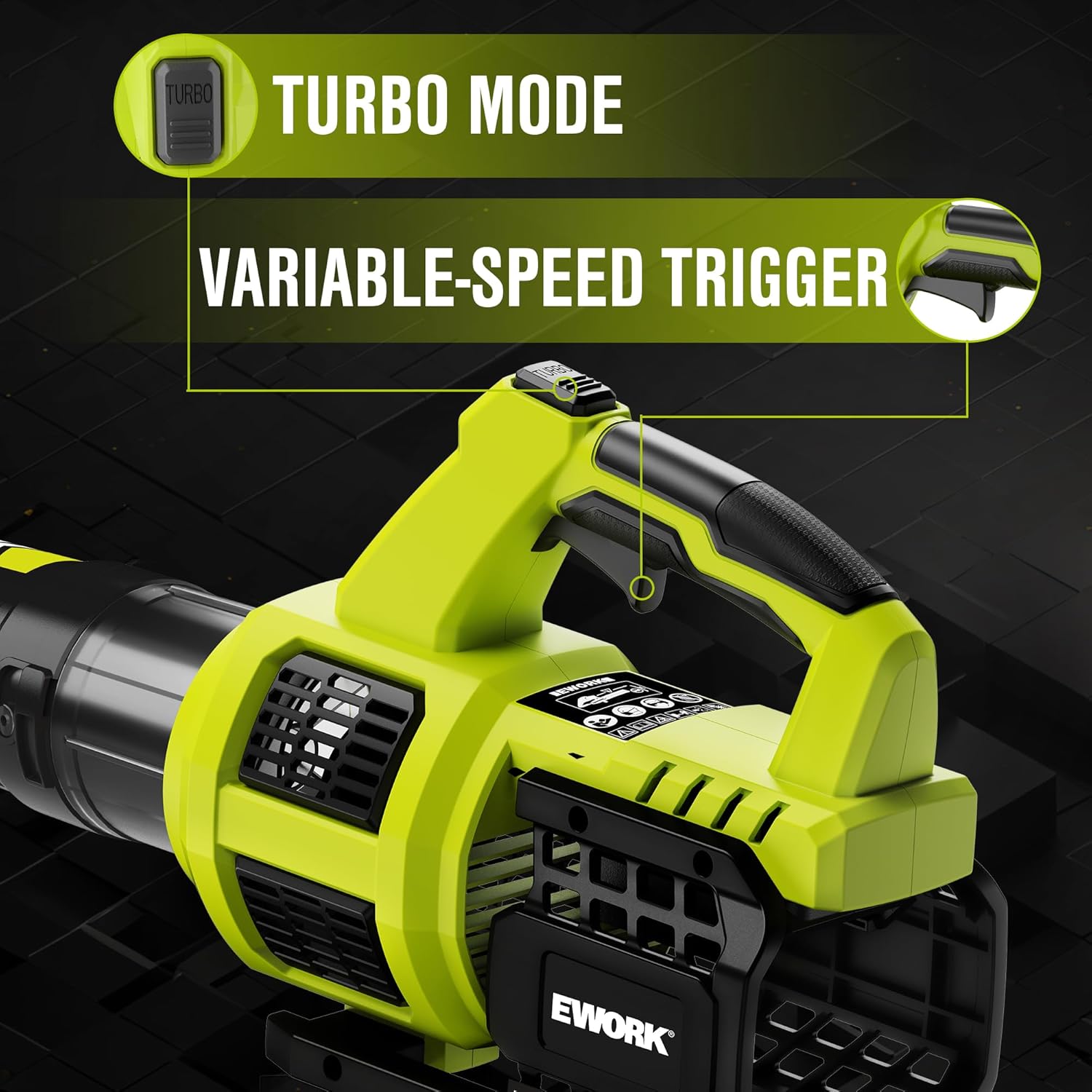
Figure 5.1: Turbo mode button and variable-speed trigger.

Figure 5.2: EWORK leaf blower in operation, demonstrating airflow capabilities.
5.3 Runtime Information
The included 3.0Ah batteries provide the following approximate runtimes:
- Up to 45 minutes on Low Speed.
- Up to 25 minutes in Turbo mode.
Note: Actual runtime may vary based on operating conditions, debris type, and battery charge level.

Figure 5.3: Battery runtime details.
5.4 General Usage Tips
- Use the blower for clearing leaves, grass clippings, dust, and light debris from yards, sidewalks, driveways, and patios.
- Work in a sweeping motion, moving debris away from obstacles.
- For stubborn debris, use Turbo mode for a short burst of increased power.

Figure 5.4: Demonstrating the lightweight design during use.
6. Maintenance
6.1 Cleaning the Blower
- Ensure the battery is removed before cleaning.
- Wipe the exterior of the blower with a damp cloth. Do not use strong detergents or solvents.
- Clear any debris from the air intake and outlet vents to ensure proper airflow.
6.2 Battery Care and Storage
- Store batteries in a cool, dry place away from direct sunlight and extreme temperatures.
- For long-term storage, charge batteries to approximately 50% capacity.
- Avoid fully discharging batteries before recharging to prolong their lifespan.
- The batteries are designed to retain 80% capacity after 800 charge cycles.
6.3 Overload Protection
The EWORK leaf blower is equipped with an intelligent protection system to prevent damage to the motor and battery from overload. If the tool stops unexpectedly, release the trigger, remove the battery, and check for any obstructions before reinserting the battery and resuming operation.

Figure 6.1: Overload protection system diagram.
7. Troubleshooting
If you encounter issues with your EWORK leaf blower, refer to the following table:
| Problem | Possible Cause | Solution |
|---|---|---|
| Blower does not start | Battery not inserted correctly Battery is discharged Overload protection activated | Ensure battery is fully seated Charge the battery Remove battery, check for obstructions, reinsert |
| Reduced airflow/power | Battery low on charge Air intake/outlet blocked Not in Turbo mode (if desired) | Recharge battery Clear any obstructions Activate Turbo mode button |
| Battery not charging | Charger not plugged in Battery not seated correctly on charger Faulty battery or charger | Check power connection Reseat battery on charger Contact customer support |
8. Specifications
| Brand | EWORK |
| Model Number | EK-01GYG |
| Power Source | Battery Powered |
| Voltage | 21 Volts (DC) |
| Form Factor | Handheld |
| Max Air Volume | 550 CFM (Turbo Mode) |
| Max Air Speed | 150 MPH (Turbo Mode) |
| Item Weight (Tool Only) | 3.6 Pounds |
| Product Dimensions | 29.9"L x 4.9"W x 9.8"H |
| Batteries Included | 2 x 3.0Ah Lithium-Ion |
| Charger Included | Fast Charger |
9. Warranty and Support
EWORK is committed to providing quality products and customer satisfaction.
- Warranty: This product is covered by a 365-day warranty from the date of purchase.
- Return Policy: A 30-day return policy is available for eligible purchases.
- Customer Support: EWORK aims to provide a 24-hour quick reply service for all inquiries.
For warranty claims, technical assistance, or any questions regarding your EWORK 21V Cordless Leaf Blower, please contact EWORK customer support through the retailer's platform or visit the official EWORK brand store.

Figure 9.1: EWORK Warranty and Support Information.
No official product videos from the seller were available for embedding based on the provided data.


