
VASTFIRE 1200PCS*3M
VASTFIRE 18W Car Roof Fiber Optic Starry Sky Light
Model: 1200PCS*3M
1. Introduction
Thank you for choosing the VASTFIRE 18W Car Roof Fiber Optic Starry Sky Light. This product is designed to create a captivating and romantic starry sky effect in various environments, including cars, home cinemas, and children's rooms. This manual provides detailed instructions for installation, operation, maintenance, and troubleshooting to ensure optimal performance and longevity of your device.
Package Contents:
- 1 x 1200pcs Fiber Optic Cable
- 1 x Light Engine (Motor)
- 1 x Round Plug
- 1 x EU Plug
- 1 x Wireless Remote Control
2. Safety Information
Please read all safety instructions carefully before installation and operation. Failure to follow these instructions may result in electric shock, fire, or serious injury.
- Ensure the power supply matches the specified voltage (12 Volts).
- Do not expose the light engine to water or excessive moisture.
- Keep the device away from heat sources and direct sunlight.
- Do not attempt to disassemble or modify the light engine. Refer all servicing to qualified personnel.
- Ensure proper ventilation for the light engine to prevent overheating.
- Keep small components and fiber optic cables out of reach of children to prevent choking hazards.
3. Product Components
The VASTFIRE Fiber Optic Starry Sky Light system consists of a light engine, fiber optic cables, and a remote control. Understanding each component is key to proper installation and operation.
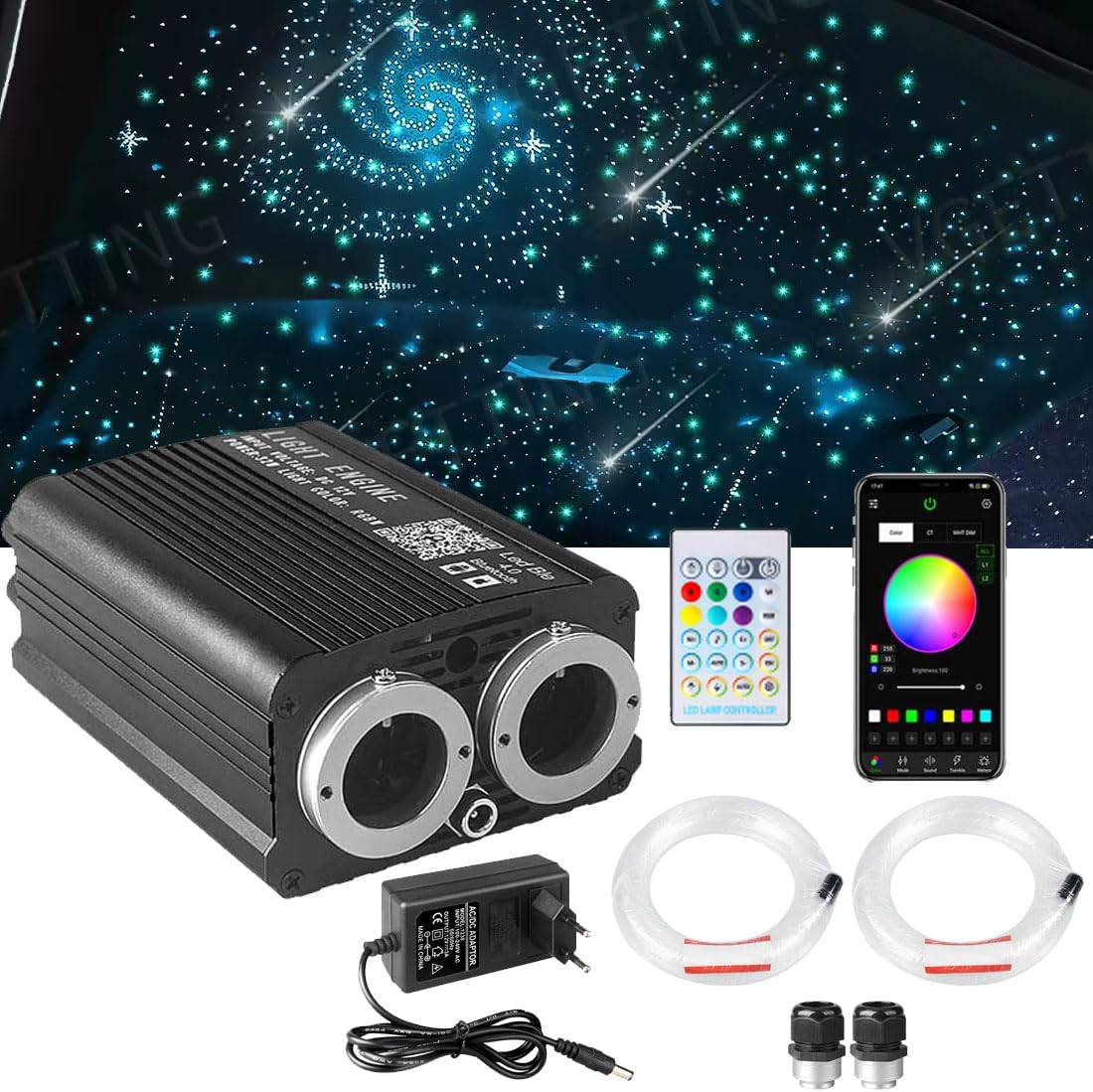
Figure 3.1: Overview of the VASTFIRE Fiber Optic Starry Sky Light kit, showing the light engine, fiber optic bundles, power adapter, and remote control.

Figure 3.2: Detailed view of the light engine, highlighting the Starry Sky Panel (left) and Meteor Panel (right) fiber optic ports, along with the RGB light source, RF antenna, DC12V socket, and ventilation port.

Figure 3.3: Layout of the LED Lamp Controller remote control, indicating buttons for RGBW brightness adjustment, light source switch, color selection, speed/sensitivity adjustment, dynamic switching, and 10LED meteor control.
4. Setup and Installation
The VASTFIRE Fiber Optic Starry Sky Light features a unique, simplified installation design with pre-grouped meteor fiber optic cables for direct plug-in.

Figure 4.1: Step-by-step guide for installation, including making points and drilling holes, inserting and fixing fibers, organizing and bundling, and finally connecting, testing, and trimming the optical fibers.

Figure 4.2: Comparison highlighting the VASTFIRE light engine's effortless installation and storage compared to complicated setups and bulky equipment from other brands.
Installation Steps:
- Step 1: Make Points & Drill Holes
Determine the desired pattern for your starry sky effect. Mark points and drill holes on the surface where you intend to install the fibers (e.g., car roof lining, wooden board, gypsum ceiling board). - Step 2: Insert Fiber & Fix
Insert the fiber optic cables into the drilled holes. Secure the fibers in place using hot glue or glass glue. Ensure the fibers are firmly fixed to prevent movement. - Step 3: Organize & Bundle
Organize and bundle the optical fibers by zone or as desired. The meteor fiber optic cables are pre-grouped for direct connection to the meteor panel, simplifying this step. - Step 4: Connect, Test & Trim
After completing the fiber installation, connect the bundled fibers to the light engine's appropriate ports (Starry Sky Panel and Meteor Panel). Turn on the power to test the lighting effect. Once satisfied, carefully trim any excess fiber optic cable ends for a clean finish.
5. Operating Instructions
Your VASTFIRE Fiber Optic Starry Sky Light can be controlled via the included wireless remote control or a Bluetooth application on your mobile device.
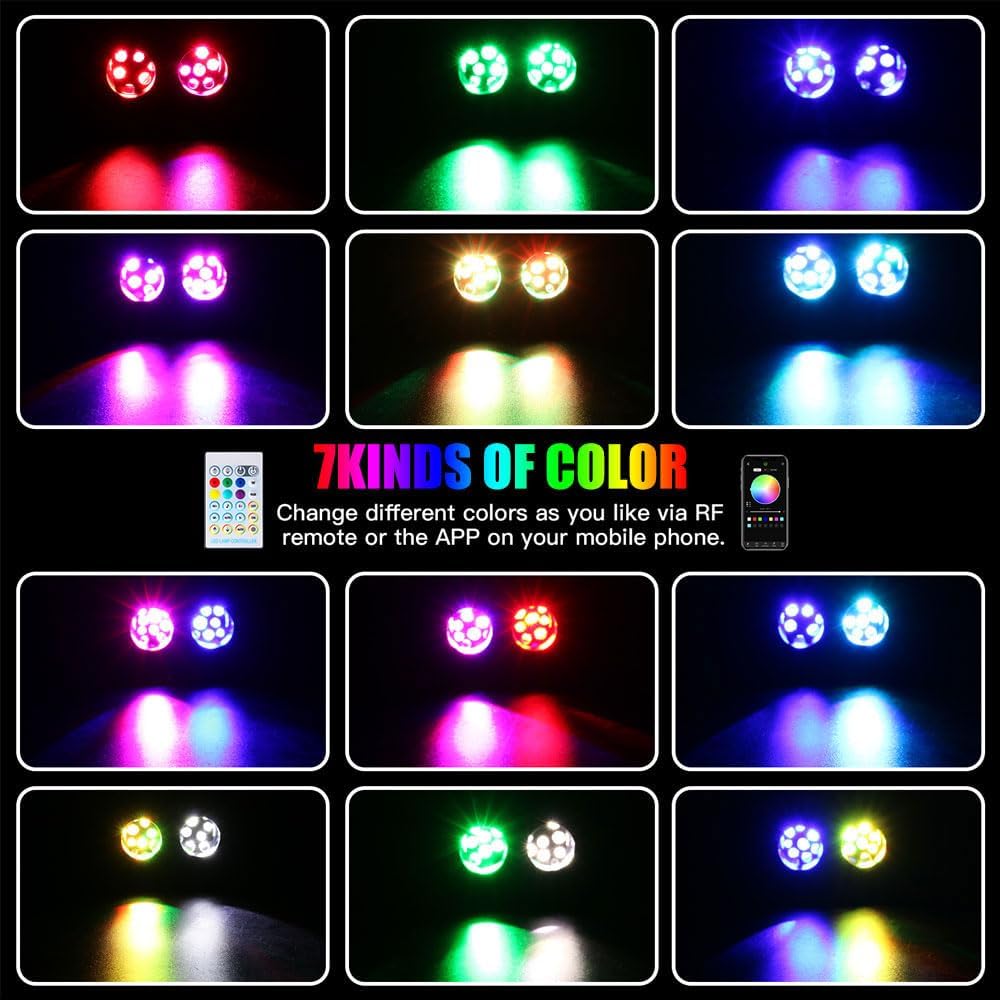
Figure 5.1: Illustration of the seven primary color options available, demonstrating the vibrant lighting effects achievable with the system.

Figure 5.2: Examples of the fiber optic light system in various settings, including wedding venues, parties, bars, KTV rooms, cars, and hotels, showcasing its versatility.
Remote Control Operation:
The wireless remote control allows for comprehensive management of the lighting effects:
- 16 Static Colors: Select from a range of colors including red, green, blue, yellow, mixed white, pure white, cyan, purple, and more.
- 5 Dynamic Modes: Choose from Fade, Jump, Flash, Breath, and Music modes for animated lighting effects.
- Brightness Adjustment: Increase or decrease the intensity of the light.
- Speed Adjustment: Control the speed of dynamic modes.
- Meteor Switch: Activate or deactivate the shooting star effect.
- Sound Control: In music mode, the ceiling light will synchronize with the rhythm of sound.
Bluetooth App Control:
For enhanced control, download the dedicated Bluetooth application to your mobile device. Once connected, the app provides a variety of functions and color conversion options, including advanced sound control where the ceiling light follows the rhythm of your audio.
6. Maintenance
To ensure the longevity and optimal performance of your VASTFIRE Fiber Optic Starry Sky Light, follow these simple maintenance guidelines:
- Cleaning: Gently wipe the light engine and fiber optic ends with a soft, dry cloth to remove dust. Avoid using abrasive cleaners or solvents.
- Ventilation: Ensure the light engine's ventilation ports are clear and unobstructed to prevent overheating.
- Fiber Care: Avoid bending or kinking the fiber optic cables sharply, as this can damage the light transmission.
- Storage: If storing the unit for an extended period, disconnect it from power and store it in a cool, dry place.
7. Troubleshooting
If you encounter any issues with your VASTFIRE Fiber Optic Starry Sky Light, please refer to the following common problems and solutions:
| Problem | Possible Cause | Solution |
|---|---|---|
| Light does not turn on. | No power supply; Loose connection; Faulty light engine. | Check power adapter and wall outlet. Ensure all connections are secure. If problem persists, contact customer support. |
| Remote control not working. | Battery depleted; Remote out of range; Obstruction. | Replace remote control battery (button cell included). Ensure remote is pointed at the light engine and within range. Remove any obstructions. |
| Fibers are dim or unevenly lit. | Fibers not fully inserted; Damaged fibers; Dust on light source. | Ensure all fibers are fully inserted into the light engine ports. Inspect fibers for kinks or damage. Clean the light source area gently. |
| Bluetooth connection issues. | Bluetooth not enabled; App not installed; Interference. | Ensure Bluetooth is enabled on your device. Download and install the correct app. Try restarting the light engine and your device. |
If you are unable to resolve the issue using the troubleshooting guide, please contact VASTFIRE customer support for assistance.
8. Specifications
Detailed technical specifications for the VASTFIRE 18W Car Roof Fiber Optic Starry Sky Light:
- Manufacturer: VASTFIRE
- Brand: VASTFIRE
- Model: Car Starry Sky Fiber Light (1200PCS*3M variant)
- Item Weight: 3.05 Kilograms
- Product Dimensions (L x W x H): 30 x 27 x 20 cm (11.8 x 10.6 x 7.9 inches)
- Bulb Type: LED
- Special Features: Breath Effect, Multicolor, Bluetooth App Control, Sound Control, Meteor Effect
- Voltage: 12 Volts
- Light Source Type: LED
- Form Factor: Panel
- Recommended Uses: Vehicle Interior, Home Cinema, Kids Room, Party Decoration
- Included Components: Double Port Star Car Fiber Optic Lighting Kit (1200pcs fiber optic cable, light engine, plugs, wireless control)
9. Warranty and Support
VASTFIRE is committed to providing high-quality products and excellent customer service.
Warranty: This product comes with a 2-year warranty covering manufacturing defects.
Technical Support: Lifetime technical support is available for all VASTFIRE products.
For any inquiries, technical assistance, or warranty claims, please contact VASTFIRE customer service through the official channels or visit the VASTFIRE brand store on Amazon.
Thank you for choosing VASTFIRE. Enjoy your new starry sky!
Ask a question about this manual
Ask about setup, troubleshooting, compatibility, parts, safety, or missing instructions. Manuals+ will review the question and use this page’s manual context to help answer it.