
CYCPLUS D14PRO
CYCPLUS 20PSI High Pressure Smart SUP Air Pump User Manual
Model: D14PRO | Brand: CYCPLUS
Introduction
Thank you for choosing the CYCPLUS 20PSI High Pressure Smart SUP Air Pump. This rechargeable, battery-powered pump features intelligent dual-stage inflation and deflation, along with an auto-off function, making it ideal for stand-up paddle boards, surfing kites, tents, and mattresses. This manual provides essential information for safe and efficient operation of your air pump.
Package Contents
Please verify that all items are included in your package:
- 1 × CYCPLUS Smart SUP Air Pump
- 1 × 50cm Flexible Air Hose
- 6 × Air Nozzles (various types)
- 1 × Boston Nozzle
- 1 × Type-C Charging Cable
- 1 × User Manual (this document)

Figure 1: All components included in the package.
Product Features
- Compact and Powerful: Weighing only 2.51 lb (1.14 KG) and measuring 7.16 x 6.45 x 3.62 inches (182 x 164 x 92 mm), this pump is highly portable. It can inflate a 10.6 ft SUP board to 12 PSI in approximately 5 minutes.
- Fast Charging and Durable Battery: Supports QC3.0 fast charging, fully recharging in about 90 minutes. A full charge can inflate three 10.6 ft boards to 12 PSI or two boards to 15 PSI, suitable for multiple uses on a single charge.
- Safe Dual-Stage Inflation & Deflation: Features a first stage for maximum speed (400 L/min) and a second stage for maximum pressure (100 L/min). The pump automatically shuts off once the preset pressure is reached, preventing over-inflation. A deflation function is also included for easy packing.
- Real-time Digital Pressure Display: Equipped with a digital differential barometer, the LED display shows real-time air pressure with an error margin of ±0.2 PSI, allowing for accurate monitoring.
- Versatile Nozzle Set: Comes with 7 different gas nozzles, making it compatible with a wide range of inflatables including paddle boards, surfing kites, tents, air mattresses, inflatable boats, and beach balls.

Figure 2: The CYCPLUS Smart SUP Air Pump with its included nozzle attachments.

Figure 3: Examples of items compatible with the pump's various nozzles, including paddle boards, surfing kites, tents, air mattresses, inflatable boats, and beach balls.
Setup
- Charge the Pump: Before first use, fully charge the pump using the provided Type-C charging cable. Connect the cable to the pump's Type-C port and a compatible QC3.0 fast charger (not included). The LED display will indicate charging status. A full charge takes approximately 90 minutes.
- Attach the Hose: Connect one end of the flexible air hose to the inflation port (usually marked "INFLATE" or with an arrow pointing out) on the pump. Ensure it is securely twisted into place.
- Select the Correct Nozzle: Choose the appropriate air nozzle for your inflatable item (e.g., SUP, kite, mattress). Attach the selected nozzle to the other end of the flexible air hose.

Figure 4: The battery-powered design allows for convenient inflation anywhere, without needing a car power source.
Operating Instructions
Inflation:
- Connect to Inflatable: Insert the attached nozzle firmly into the valve of your inflatable item.
- Set Desired Pressure: Turn on the pump. Use the + and - buttons on the digital display to set your desired pressure (in PSI). The maximum pressure is 20 PSI.
- Start Inflation: Press the power button to begin inflation. The pump will operate in two stages: a high-speed stage (400 L/min) followed by a high-pressure stage (100 L/min).
- Automatic Shut-off: The pump will automatically stop once the preset pressure is reached.
- Disconnect: Once inflation is complete, disconnect the nozzle from the inflatable valve and the hose from the pump.

Figure 5: The pump's rapid inflation capabilities for a 10.6 ft SUP board.

Figure 6: The real-time digital display allows for precise pressure setting and monitoring.
Deflation:
- Connect for Deflation: Connect the flexible air hose to the deflation port (usually marked "DEFLATE" or with an arrow pointing in) on the pump. Attach the appropriate nozzle to the other end of the hose and insert it into the inflatable's valve.
- Start Deflation: Press the deflation button (if separate, or follow manual's specific instruction for deflation mode). The pump will begin to extract air from the inflatable.
- Complete Deflation: Allow the pump to run until the inflatable is sufficiently deflated for packing.
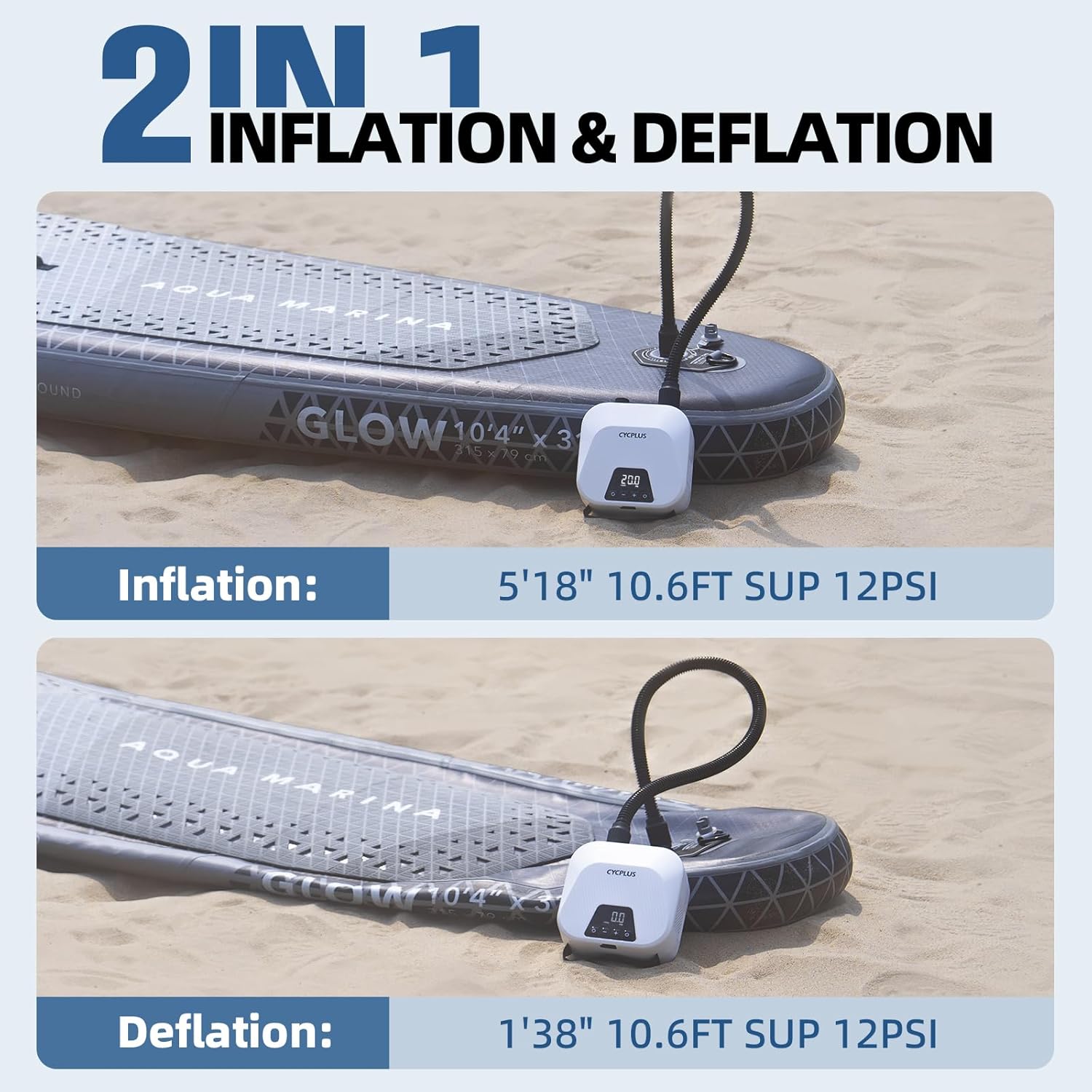
Figure 7: The pump efficiently handles both inflation and deflation, saving time and effort.
Maintenance
- Cleaning: Wipe the pump exterior with a soft, dry cloth. Do not use harsh chemicals or abrasive cleaners.
- Storage: Store the pump in a cool, dry place away from direct sunlight and extreme temperatures. Ensure the hose and nozzles are clean and dry before storage.
- Battery Care: For optimal battery life, charge the pump fully before long-term storage and recharge it every 3-6 months if not in use.
- Nozzle Maintenance: Keep nozzles clean and free of debris. Check rubber gaskets for wear and tear and replace if necessary to ensure a tight seal.
Troubleshooting
| Problem | Possible Cause | Solution |
|---|---|---|
| Pump does not turn on. | Low battery; Power button not pressed correctly; Internal issue. | Charge the pump fully. Press and hold the power button for a few seconds. If problem persists, contact customer service. |
| Pump inflates slowly or not to desired pressure. | Incorrect nozzle/poor seal; Hose kinked or blocked; Low battery; Item too large for pump capacity. | Ensure correct nozzle is used and securely attached. Check hose for obstructions. Recharge pump. Verify pump capacity for your item. |
| "EE4" error message. | Charging cable issue. | Try using a different Type-C charging cable. |
| Pump is excessively loud. | Normal operation during high-pressure stage. | This is normal. The pump will be louder during the second (high-pressure) stage of inflation. |
Specifications
| Feature | Detail |
|---|---|
| Model Name | D14PRO |
| Color | White |
| Material | Plastic, Canvas, Nylon |
| Item Weight | 1.14 Kilograms (2.51 lbs) |
| Item Dimensions (LxWxH) | 7.16 x 6.45 x 3.62 inches (182 x 164 x 92 mm) |
| Power Source | Battery Powered |
| Air Flow Capacity (1st Stage) | 400 LPM |
| Air Flow Capacity (2nd Stage) | 100 LPM |
| Maximum Pressure | 20 PSI |
| Operation Mode | Automatic |
| Hose Length | 80 Centimeters |
| Charging Time | Approx. 90 minutes (with QC3.0 charger) |
| Battery Capacity | 38.48Wh (sufficient for 2-3 SUPs) |
Warranty and Customer Support
All CYCPLUS products come with a two-year warranty. If you encounter any issues with your product during this period, please do not hesitate to contact our customer service team. We are available 24/7 to assist you.
For support, please visit the official CYCPLUS website or refer to the contact information provided in your product packaging.
Official Website: www.cycplus.com
Ask a question about this manual
Ask about setup, troubleshooting, compatibility, parts, safety, or missing instructions. Manuals+ will review the question and use this page’s manual context to help answer it.