
1. Introduction
The FNIRSI-1C15 is a compact, high-performance handheld digital oscilloscope designed for a wide range of applications, from electronic maintenance to R&D and educational purposes. It features a 500MS/s real-time sampling rate and a 110MHz analog bandwidth, making it a versatile tool for waveform analysis. This manual provides comprehensive instructions for the safe and effective operation, maintenance, and troubleshooting of your FNIRSI-1C15 oscilloscope.

Figure 1.1: The FNIRSI-1C15 Mini Oscilloscope, a cost-effective solution for various electronic applications.
2. Safety Information
Please read and understand all safety precautions before operating the device. Improper use can lead to electric shock, injury, or damage to the instrument.
- Electrical Safety: Do not exceed the maximum input voltage ratings. The device is designed for a voltage measurement range of ±40V (x1 probe) and ±400V (x10 probe).
- Probe Usage: Always use the correct probe for the measurement. Ensure probes are properly connected before applying power to the circuit under test.
- Battery Safety: The device contains a built-in 3000mAH lithium-polymer battery. Do not disassemble, puncture, or expose the battery to extreme temperatures or fire. Use only the specified 5V/800mA charging method.
- Environmental Conditions: Operate the oscilloscope in a dry environment. Avoid exposure to moisture, dust, or corrosive gases.
- Maintenance: Refer to the Maintenance section for cleaning and care instructions. Do not attempt to repair the device yourself; contact qualified personnel for service.
3. Package Contents
Verify that all items listed below are present in your package:
- FNIRSI-1C15 Mini Oscilloscope Unit
- High Voltage Probe
- Alligator Clip Probe
- USB Data Cable
- Charger (5V/800mA)
- Electronic User Manual (this document)
4. Product Overview
The FNIRSI-1C15 features a compact design with a 2.4-inch display and intuitive controls. Its robust silicone sleeve provides anti-slip and anti-drop protection.

Figure 4.1: Front view of the FNIRSI-1C15 Oscilloscope with its control panel.
4.1. Physical Layout and Controls
- Display Screen: 2.4-inch (320x240 resolution) for waveform display and menu navigation.
- Joystick: Replaces traditional arrow keys for simpler and more efficient navigation through menus and waveform adjustments.
- Function Buttons: Dedicated buttons for common operations such as OK, AUTO, MENU, STOP, MEAS (Measurement), 50% (return to middle), mV (Vertical Sensitivity), SINGLE (Single Trigger), 1X10X (Probe Attenuation), REF (Reference Waveform), V (Voltage Measurement), SAVE (Save Waveform), ACDC (Coupling), S (Time Base), ns (Time Base), SEL (Select).
- Input Port: BNC connector for probe connection.
- Charging Port: USB-C port for charging and data transfer.
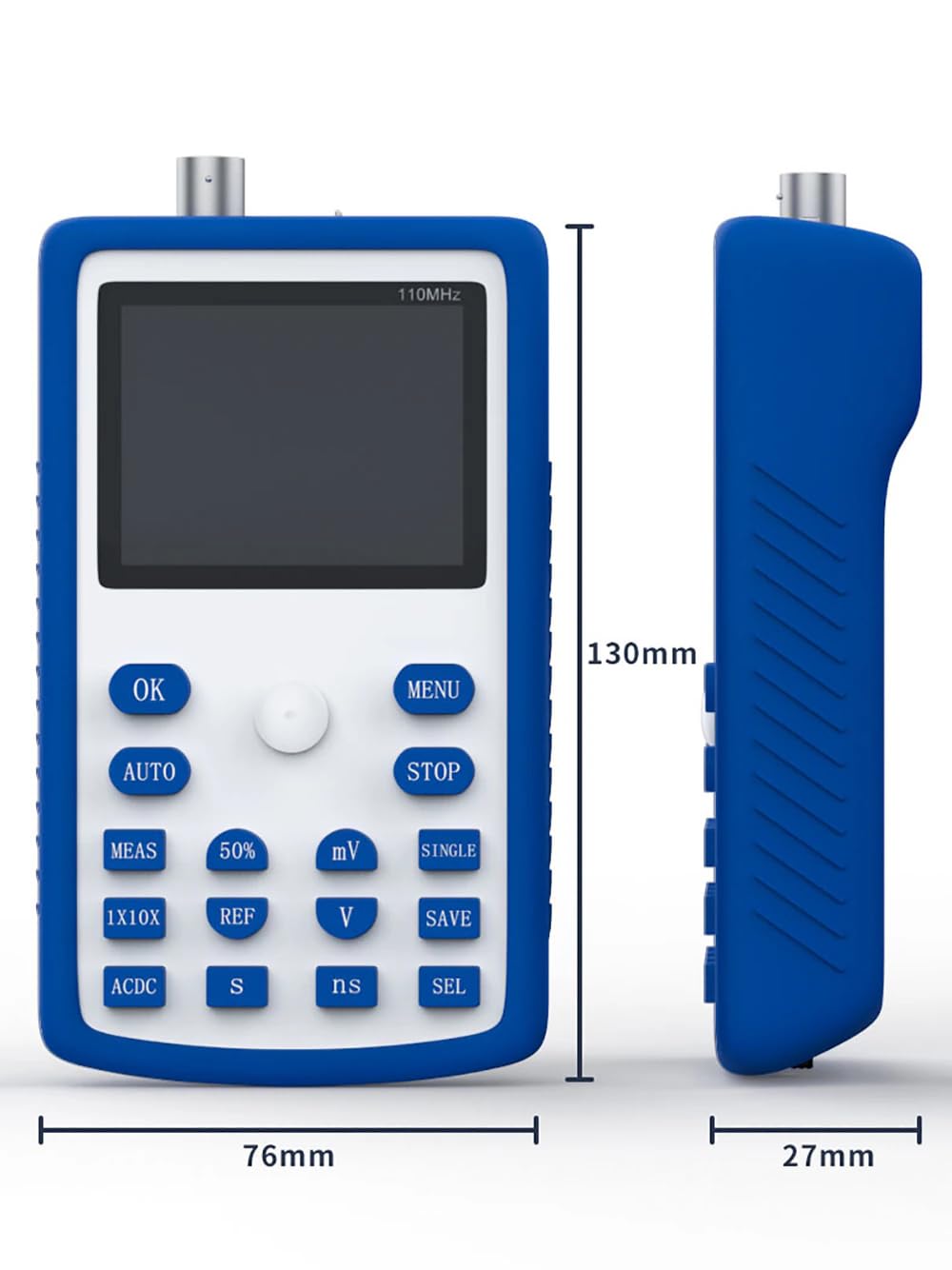
Figure 4.2: Physical dimensions of the FNIRSI-1C15 Oscilloscope.

Figure 4.3: Key features of the FNIRSI-1C15, including its high bandwidth and sampling rate, and safety features.
5. Setup
5.1. Charging the Device
Before first use, fully charge the oscilloscope.
- Connect the provided USB data cable to the oscilloscope's charging port.
- Connect the other end of the USB cable to the supplied 5V/800mA charger or a compatible USB power source.
- The charging indicator on the device will show the charging status. A full charge typically takes several hours and provides over 10 hours of continuous operation.
5.2. Connecting Probes
Proper probe connection is crucial for accurate measurements.
- Ensure the oscilloscope is powered off before connecting or disconnecting probes.
- Align the BNC connector of the probe with the input port on the oscilloscope and twist clockwise to secure it.
- For the high voltage probe, set the attenuation switch (usually on the probe itself) to the desired setting (e.g., x1 or x10) and adjust the oscilloscope's probe attenuation setting accordingly using the "1X10X" button.
- Connect the ground clip of the probe to the ground reference of the circuit under test.
6. Operating Instructions
6.1. Power On/Off
- To power on, press and hold the power button (usually integrated with the joystick or a dedicated button) until the screen illuminates.
- To power off, press and hold the power button until the device shuts down.
6.2. Auto Measurement Function
The one-key quick auto function simplifies waveform acquisition.
- Press the AUTO button. The oscilloscope will automatically adjust the vertical sensitivity, time base, and trigger settings to display a stable waveform.
6.3. Adjusting Waveform Parameters
- Vertical Sensitivity (mV/div): Use the mV button and joystick to adjust the vertical scale, ranging from 20mV/div to 100V/div.
- Time Base (S/div, ns/div): Use the S or ns buttons and joystick to adjust the horizontal scale, ranging from 5ns/div to 10s/div.
- Trigger Mode: Press the MENU button, navigate to Trigger settings. Options include Auto, Normal, and Single.
- Trigger Type: Select between Rising edge or Falling edge trigger using the menu.
- Channel Coupling: Use the ACDC button to switch between AC and DC coupling.
6.4. Waveform Display and Analysis
- Display Mode: Switch between YT (real-time) and Scroll modes using the menu. Scroll mode is useful for observing slow-changing signals.
- Afterglow Time: Configure afterglow settings (None/1s/∞) via the menu to observe signal persistence.
- Waveform Measurement: The device supports 14 types of automatic waveform measurements. Press the MEAS button to cycle through or select measurements.
- Waveform Reference: Use the REF button to save a current waveform as a reference for comparison with live signals.
- Waveform Saving: Press the SAVE button to store the current waveform data. The storage depth is 12 Kpts.
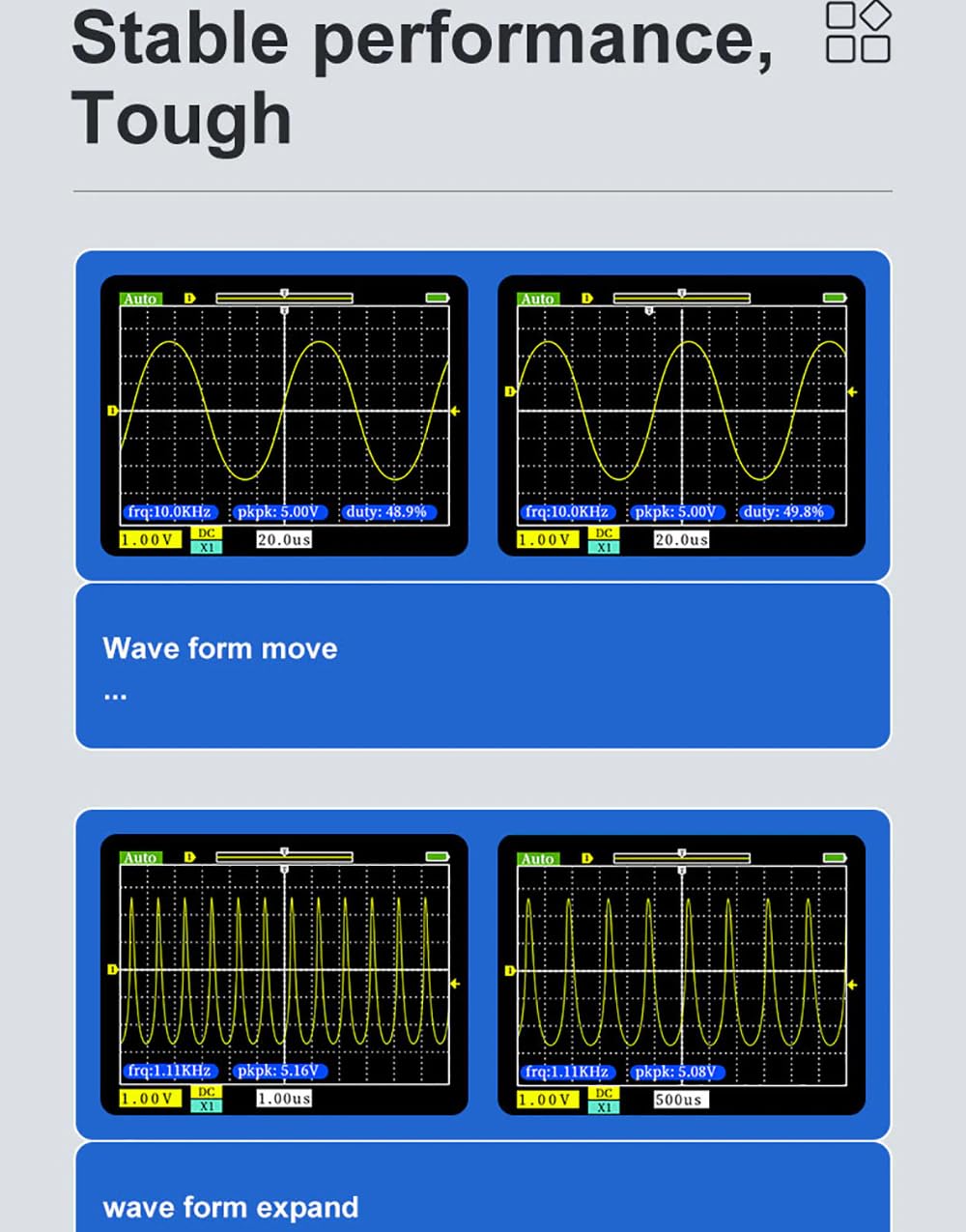
Figure 6.1: Examples of waveform movement and expansion on the display.
6.5. 1KHz Auto-Test Square Wave
The built-in 1KHz square wave generator can be used for probe compensation or self-testing.
- Connect the probe to the dedicated 1KHz test point (if available, or follow manual instructions for accessing this signal).
- Adjust the probe compensation until the square wave appears flat on the top and bottom, without overshoot or undershoot.
7. Maintenance
Proper maintenance ensures the longevity and accuracy of your oscilloscope.
- Cleaning: Use a soft, damp cloth to clean the exterior of the device. Do not use abrasive cleaners or solvents. Ensure no liquid enters the device.
- Battery Care: For long-term storage, charge the battery to approximately 50% to prolong its lifespan. Recharge every 3-6 months if not in use.
- Storage: Store the oscilloscope in a cool, dry place, away from direct sunlight and extreme temperatures.
- Probe Care: Handle probes carefully. Avoid bending or twisting the cables excessively. Clean probe tips as needed.
8. Troubleshooting
| Problem | Possible Cause | Solution |
|---|---|---|
| Device does not power on. | Battery is depleted. | Connect the charger and allow the device to charge for at least 30 minutes before attempting to power on. |
| No waveform displayed. | Probe not connected or faulty; incorrect trigger settings; signal too small or too large. | Ensure probe is securely connected. Press the AUTO button. Adjust vertical sensitivity (mV/div) and time base (S/div, ns/div). Check trigger level. |
| Waveform is unstable or rolling. | Incorrect trigger mode or level. | Adjust the trigger level. Try different trigger modes (Auto, Normal). Ensure trigger type (rising/falling edge) matches the signal. |
| Inaccurate measurements. | Incorrect probe attenuation setting; uncalibrated probe. | Verify the probe attenuation setting (x1/x10) matches the oscilloscope's setting. Perform probe compensation using the 1KHz test signal. |
9. Specifications
Detailed technical specifications for the FNIRSI-1C15 Mini Oscilloscope:

Figure 9.1: Comprehensive technical specifications of the FNIRSI-1C15.
| Parameter | Value |
|---|---|
| Model | FNIRSI-1C15 |
| Number of Channels | 1 |
| Screen Size | 2.4 inches |
| Screen Resolution | 320 x 240 |
| Analog Bandwidth | 110 MHz |
| Sampling Rate | 500 MS/s |
| Rise Time | <3 ns |
| Storage Depth | 12 Kpts |
| Time Base Range | 5 ns/div - 10 s/div |
| Vertical Sensitivity | 20 mV/div - 100 V/div |
| Trigger Mode | Auto/Normal/Single |
| Trigger Type | Rising/Falling Edge |
| Display Mode | YT/Scroll |
| Afterglow Time | None/1s/∞ |
| Charging Method | 5V/800mA |
| Battery Capacity | 3000 mAH (Lithium-polymer) |
| Voltage Measurement Range | ±40V (x1 file); ±400V (x10 file) |
| Channel Coupling | AC-DC |
| Waveform Measurement Types | 14 types |
| Measurement Accuracy | ±2% |
| Frequency Accuracy | ±0.01% |
| Dimensions (L x W x H) | 20 x 10 x 15 cm (Product); 130 x 76 x 27 mm (Device) |
| Weight | 1 kilogram |
10. Warranty and Support
The FNIRSI-1C15 Mini Oscilloscope comes with a commitment to quality and customer satisfaction.
- Spare Parts Availability: Spare parts for this product are available for 1 year from the date of purchase.
- Technical Support: For technical assistance, troubleshooting beyond this manual, or warranty inquiries, please contact your retailer or the manufacturer's official support channels. Refer to the product packaging or the manufacturer's website for contact information.


