
OSCAL PowerMax 3600
OSCAL PowerMax 3600 Portable Power Station User Manual
Model: PowerMax 3600 | Brand: OSCAL
1. Introduction
Thank you for choosing the OSCAL PowerMax 3600 Portable Power Station. This manual provides essential information for the safe and efficient operation of your device. The PowerMax 3600 is a high-capacity, versatile power solution designed for various applications, including home emergencies, outdoor camping, road trips, and professional use. With its robust LiFePO4 battery and advanced features, it ensures reliable power wherever you need it.

Figure 1: OSCAL PowerMax 3600 Portable Power Station
2. Important Safety Instructions
Please read all safety warnings and instructions carefully before using this product to avoid electric shock, fire, and/or serious injury.
- Do not disassemble, repair, or modify the unit.
- Do not place the unit near fire or expose it to heat.
- Do not use or store the unit in a bathroom or in an area exposed to water or rain.
- Use only the original charger and cables provided.
- Keep the unit clean and dry.
- Ensure proper ventilation during use to prevent overheating.
- Keep out of reach of children and pets.
- In case of fire, use a dry powder fire extinguisher.
- The unit is equipped with a UL94V-0-rated fire-retardant casing for enhanced safety.
3. Package Contents
Verify that all items are included in your package:
- OSCAL PowerMax 3600 Portable Power Station
- AC Charging Cable
- Car Charging Cable
- Solar Charging Cable
- User Manual
- Warranty Card
4. Product Overview
The PowerMax 3600 features a robust design with multiple output ports and an intuitive display for easy operation.
Figure 2: Front Panel Layout
4.1. Key Features
- High Capacity: 3600Wh LiFePO4 battery.
- High Output: 3000W (Surge 6000W) AC output.
- Fast Charging: Full charge in 1.2 hours via dual solar and AC input.
- UPS Function: 5-8ms fast switchover for uninterrupted power supply.
- Expandable Capacity: Can be expanded up to 57600Wh with dedicated batteries (sold separately).
- Smart Control: Monitor and control via OSCAL application (Wi-Fi/Bluetooth).
- Durability: IP21-rated dust and splash resistance, 0.8M vertically drop-proof design.

Figure 3: Durability Features (Splash-Proof, Dust-Proof, Drop-Proof)
4.2. Display and Controls
The intuitive LED display provides real-time information on battery status, input/output wattage, and remaining runtime. Larger buttons ensure easy operation for all users.

Figure 4: Smart APP Control Interface
5. Setup
5.1. Initial Charge
Before first use, fully charge your PowerMax 3600. Connect the AC charging cable to a wall outlet and the power station. The display will indicate charging status. A full charge takes approximately 1.2 hours.

Figure 5: Various Charging Methods
5.2. Connecting Solar Panels (Optional)
For solar charging, connect compatible solar panels (e.g., OSCAL PM100/PM200) to the solar input port using the provided solar charging cable. Place panels in direct sunlight for optimal charging efficiency.
Video 1: OSCAL PowerMax 3600 Portable Power Station Overview. This video demonstrates the general features and capabilities of the PowerMax 3600.
Video 2: Outdoor and Solar Panel Usage. This video illustrates how the PowerMax 3600 can be used outdoors with solar panels for charging.
6. Operating Instructions
6.1. Powering Devices
The PowerMax 3600 can power over 99% of common appliances. Simply plug your devices into the appropriate AC, USB-A, or USB-C outlets and turn on the corresponding output section.

Figure 6: Powering Various Essential Devices
6.2. Uninterruptible Power Supply (UPS) Function
When connected to an AC power source, the PowerMax 3600 can act as a UPS. In case of a power outage, it automatically switches to battery power within 5-8 milliseconds, ensuring your connected devices remain operational.

Figure 7: UPS Function for Uninterrupted Power
6.3. Smart App Control
Download the OSCAL application on your smartphone to remotely monitor and control the PowerMax 3600 via Wi-Fi or Bluetooth. The app allows you to check power usage, battery levels, and activate/deactivate outputs.
Video 3: Cooking with PowerMax 3600. This video demonstrates the PowerMax 3600 being used to power cooking appliances, highlighting its versatility for outdoor activities.
7. Maintenance
7.1. Cleaning
Wipe the unit with a dry, soft cloth. Do not use abrasive cleaners or solvents.
7.2. Storage
Store the PowerMax 3600 in a cool, dry place away from direct sunlight and extreme temperatures. For long-term storage, charge the unit to 50-80% every 3-6 months to maintain battery health.
8. Troubleshooting
| Problem | Possible Cause | Solution |
|---|---|---|
| Unit not turning on | Battery depleted; Power button not pressed correctly. | Charge the unit; Press and hold the power button for 3 seconds. |
| AC output not working | AC output not enabled; Overload protection activated. | Press the AC ON/OFF button; Reduce load, then restart AC output. |
| Slow charging | Solar panels not in direct sunlight; Charging cable issue. | Adjust solar panel position; Check cable connections. |
| App connectivity issues | Bluetooth/Wi-Fi off; App not updated. | Ensure Bluetooth/Wi-Fi is on; Update the OSCAL app. |
If the problem persists, please contact customer support.
9. Specifications
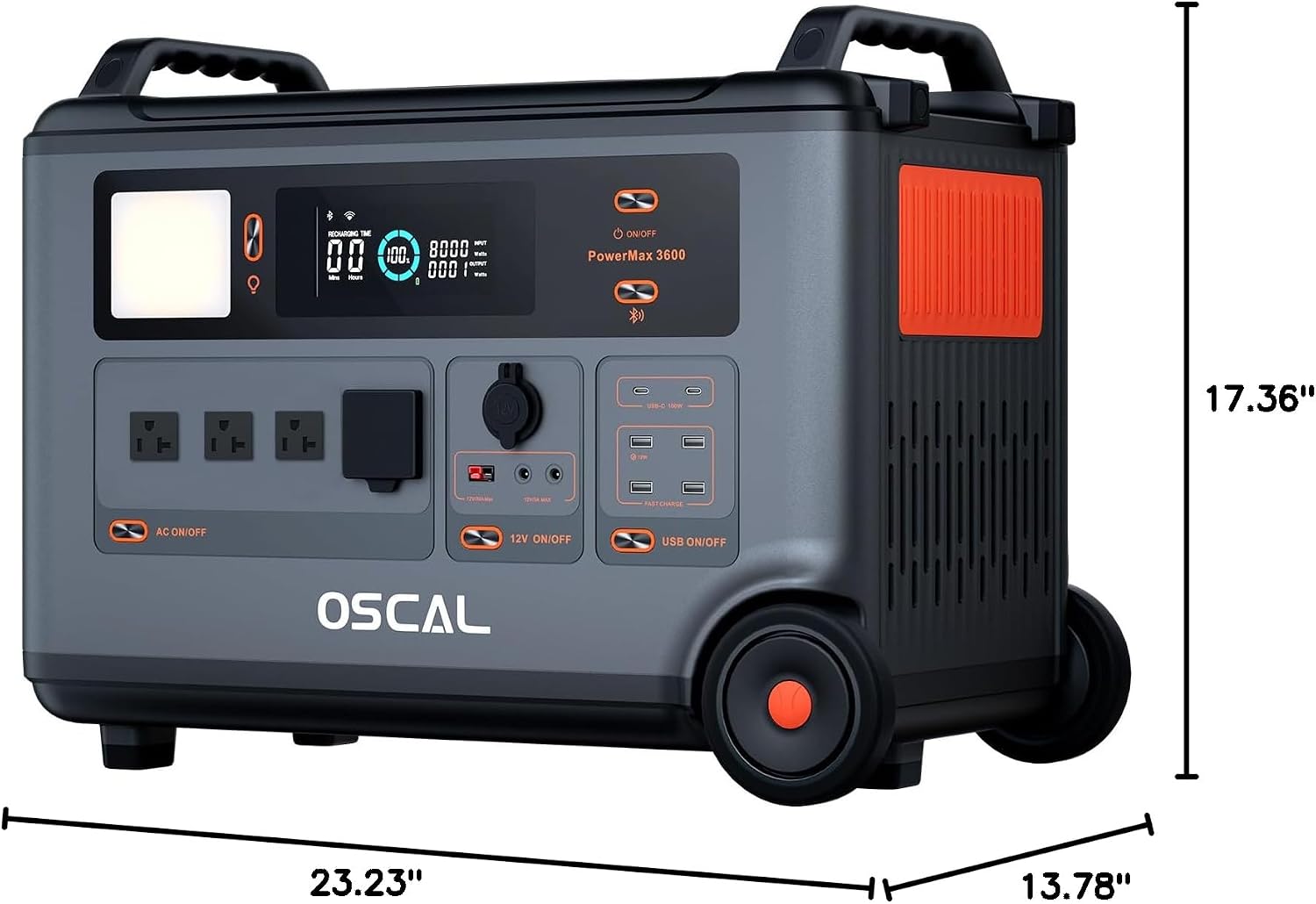
Figure 8: Product Dimensions
| Feature | Detail |
|---|---|
| Model Name | PowerMax 3600 |
| Battery Type | LiFePO4 |
| Capacity | 3600Wh |
| AC Output (Rated) | 3000W |
| AC Output (Surge) | 6000W |
| Voltage | 110 Volts (AC) |
| USB-A Output | 4 ports |
| USB-C Output | 2 x 100W fast charge |
| Full Charge Time (AC) | 1.2 hours (dual charging) |
| UPS Switchover Time | 5-8 ms |
| Dimensions (L x W x H) | 23.23" x 13.78" x 17.36" |
| Material | ABS |
| Special Features | Portable, 0.8M Vertically Drop-Proof, Splash-Proof & Dust-Proof (IP21), Expandable Capacity, APP Smart Control |
10. Warranty & Support
The OSCAL PowerMax 3600 comes with a 5-year technical warranty from the date of purchase. For any technical assistance, troubleshooting not covered in this manual, or warranty claims, please contact OSCAL customer support.
Email: Afterservice@oscal.hk
Please have your purchase details and product model number ready when contacting support.
Related documentsPowerMax 3600


Ask a question about this manual
Ask about setup, troubleshooting, compatibility, parts, safety, or missing instructions. Manuals+ will review the question and use this page’s manual context to help answer it.